


Trivial File Transport Protocol, or TFTP as it is more easily referred to as. TFTP is a client and server protocol that allows for remote file copies for computer systems on a network or over the internet.
When it comes to selecting the best application for your environment it is worth considering a few different factors.
Copying capabilities, transfer speeds, and application costs are just a few of the basics that you should be mindful of when making your choice.
We have put a list of the best TFTP Server Software that are available today so that you can find out which one could be right for you.
The Best TFTP Server Software
1. Windows TFTP Utility

This app is a Source Forge-based project called Windows TFP Utility. It is a Windows based TFPT server that was written in .NET and C#. It has most of the popular features that you would need to use TFPT in your business or home network. The application itself is lightweight and very quick to install.
Why do we recommend it?
Windows TFTP Utility, despite its minimalist approach, proved to be a quick and lightweight TFTP server solution during our testing. Developed as a Source Forge-based project using .NET and C#, it offered essential features for basic TFTP transfers. While lacking some advanced functionalities, its simplicity and ease of installation made it a suitable choice for straightforward file transfers.
Who is it recommended for?
Windows TFTP Utility is recommended for users looking for a free and straightforward TFTP solution for basic file transfers. Its lightweight nature makes it suitable for quick installations and uncomplicated use. However, users requiring advanced features or considering deployment in an enterprise environment may need to explore alternative TFTP server options with more extensive functionalities and active development.
The app has not been updated in a very long time as the project appears to be inactive. However if you would like to try it out then you can download it from the Source Forge link below. Source Forge hosts many different projects that are free and open source for you to download and try out for yourself.
Pricing: This application is a free to use project that is hosted on Source Forge.
Download: https://sourceforge.net/projects/tftputil/
2. TFTPD32

TFTP is another free project that is open source. It also has additional features such as DHCP, DNS and syslog functionality.
Why do we recommend it?
TFTPD32, an open-source project, impressed us with its straightforward TFTP features and additional capabilities such as DHCP, DNS, and syslog functionality. During testing, it supported 4GB file transfers, provided IP address restrictions, and allowed multiple concurrent transfers. Its versatility and ability to function as a Windows service added to its appeal, because we were looking for a free and open-source TFTP solution with supplementary network management features.
The TFTP features are very straight forward as it offers 4GB file transfers on file size, IP address restrictive capabilities, Allow and Deny specific functions such as send and receive, more than one transfer at a time, and windows service capabilities.
Who is it recommended for?
TFTPD32 is recommended for users seeking a free and open-source TFTP server solution with added functionalities like DHCP, DNS, and syslog. Its straightforward TFTP features make it suitable for a variety of users, including small businesses and individuals, looking to manage network devices efficiently.
The application’s compatibility with different Windows versions and service capabilities enhances its utility for diverse user needs.
Pricing: Free and opensource.
Download: https://www.netadmintools.com/tftp-servers/tftpd32/
3. WhatsUp Free TFTP Server

WhatsUp Gold is another company that is very well known as a leader in connectivity monitoring. They are used in many different industries where up time is essential to keeping the wheels of your business turning. WhatsUp Free TFTP is an application that is very easy to setup and run, and its features are very simple to get the hang of.
Why do we recommend it?
WhatsUp Free TFTP Server, from a well-known connectivity monitoring company, stood out during our evaluation for its simplicity and ease of setup. The application offered basic features for TFTP transfers, allowing users to stop transfers at their discretion. Its visual presentation differed from other tools, providing a distinct interface. As a capable and free TFTP tool, it fulfilled all of the essential requirements for file transfers and proved to be user-friendly for those new to TFTP server setups.
You can stop transfers when you want to cancel and has all the basic features that you would expect from a free TFTP tool.
Visually it looks quite different from some of the other examples in our write up which could be a plus for some people. All in all, this is a capable and free TFTP tool that will make your file transfers easier to conduct.
Who is it recommended for?
WhatsUp Free TFTP Server is recommended for users seeking a straightforward and easy-to-use TFTP server solution. Its simplicity and basic features make it suitable for individuals and small businesses requiring uncomplicated file transfers. The application’s intuitive interface and free-to-use nature enhance its accessibility for users with varying levels of technical expertise.
Pricing: Free to download and use.
Download: https://www.ipswitch.com/ftp-server
4. SolarWinds TFTP Server
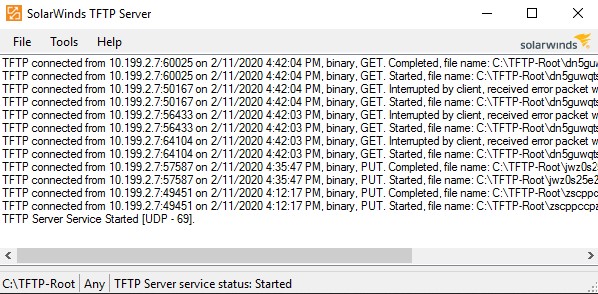
SolarWinds is a premium monitoring and alerting software company that makes some of the best tools for keeping an eye on your infrastructure. They also make a wide range of tools that help people to perform everyday tasks such as FTP, TFTP copies and SCP copies too. The SolarWinds TFTP server application gives you the ability to upload files to and download files from your remote computer systems and servers.
Why do we recommend it?
During our evaluation, SolarWinds TFTP Server proved to be an excellent choice for remote file copies, offering seamless upload and download capabilities for computer systems and servers. As part of SolarWinds, a renowned monitoring and alerting software company, it stood out with features such as support for TFTP, SCP, and concurrent transfers.
The application operated on multiple ports, ensuring flexibility and security through IP range listing. While the specific version we tested had a 4GB file transfer size limitation, it effectively catered to our needs.
It operates on many different ports and has additional capabilities such as TFTP, SCP and supports multiple and concurrent transfers. It has some security features built in, such as IP range while listing, and it can run as a service so that it is less obtrusive and is out of the way.
Who is it recommended for?
SolarWinds TFTP Server is recommended for individuals and small-medium sized businesses seeking a reliable and free TFTP tool with capabilities for remote file transfers. Its user-friendly interface, security features, and support for various transfer protocols make it suitable for users in different sectors. The application’s scalability and ability to run as a service further enhance its utility, providing an efficient solution for those who prioritize effective file management and data transfer. However, please note that the free version limits file transfer sizes to 4GB. This is usually enough for most small-medium sizes businesses.
Pricing: The app is free to download and use.
Download: https://www.solarwinds.com/free-tools/free-tftp-server/registration
5. haneWIN TFTP server

haneWIN TFTP Server is a Windows based application that is available in bot 32-bit and 64-bit versions. It runs on almost all versions of Microsoft Windows Operating Systems. This particular application has some additional features such as access control and IP restrictions.
Why do we recommend it?
haneWIN TFTP Server, a Windows-based application available in 32-bit and 64-bit versions, impressed us with its additional features such as access control and IP restrictions. During testing, we found its command line functionality to be a notable asset, allowing users to automate and schedule file transfers through scripts. This feature, coupled with its support for various Windows operating systems, adds to its versatility and practicality for users with specific access control requirements.
You can specify where the application has access to when performing the TFTP transfers. A great additional feature that we have not seen on this list is the command line can be used as well. This means that you can automate and schedule your file transfers through scripts. Automation is important for backups and scheduled copies as it makes it very simple to setup and forget.
Who is it recommended for?
haneWIN TFTP Server is recommended for users seeking a Windows-based TFTP server solution with advanced features like access control, IP restrictions, and command line automation.
Its compatibility with different Windows versions and the ability to specify access during transfers make it suitable for users with specific security and automation needs. While not open source, its shareware model offers a free-to-use option for users looking for a feature-rich TFTP server.
Pricing:
This app is shareware, meaning that it is free to use but is not open source.
Download: https://www.hanewin.net/tftp-e.htm
6. WinAGents

Updating your network devices is possible thanks to a few remote protocols, and TFTP is one such protocol that does exactly that. It is compatible with All versions of Windows and has support for 64-bit operating systems too. It has compatibility with RFC1350, RFC2347, RFC2348 and RFC2349.
Why do we recommend it?
WinAgents stood out during our testing as an enterprise-level TFTP server solution with comprehensive features. Offering compatibility with all versions of Windows, support for 64-bit operating systems, and features like graphical utilities, high availability, and scalability, WinAgents caters to users with diverse network infrastructure needs. The ability to run as a Windows service and support for scheduled runs every 24 hours enhance its suitability for automated backups and large-scale file transfers.
You can run it as a Windows service so that it is less obtrusive and can be scheduled to run every 24 hours. You can set up access control with IP address and there are graphical utilities, high availability and scalability features too.
But this comes at a cost as this is one of the only apps in our run down that is not free.
Who is it recommended for?
WinAgents is recommended for users requiring an enterprise-level TFTP server solution with advanced features. Its compatibility with various Windows versions, support for high availability, scalability, and automation through scheduled runs make it ideal for businesses with extensive network infrastructure. While not free, its feature set justifies its cost for users seeking a robust and scalable TFTP server solution.
Pricing: Starts at $99
Download: https://www.winagents.com/en/products/tftp-server/
7. Spiceworks TFTP server

SpiceWorks makes many different networking tools, such as their awesome monitoring solutions, helpdesk ticketing and Inventory control with SNMP support. SpiceWorks also has TFTP capabilities which means that your devices can be updated, backup up to and configured all from one location.
Why do we recommend it?
Spiceworks TFTP Server, developed by SpiceWorks, a provider of diverse networking tools, earned our recommendation due to its integration capabilities with other SpiceWorks solutions. The TFTP capabilities allow users to update, back up, and configure devices from a centralized location. The ability to compare file versions side by side before initiating updates or backups adds a practical dimension to the application.
Who is it recommended for?
Spiceworks TFTP Server is a valuable addition to the toolkit for users already utilizing SpiceWorks’ suite of networking solutions.
It’s recommended for users already used to working with SpiceWorks’ networking tools and seeking a TFTP server that integrates seamlessly with their existing solutions. Its features cater to users managing devices from a centralized location, providing an efficient way to handle updates, backups, and configurations. The ability to compare file versions enhances its utility for users involved in version management.
Pricing: SpiceWorks TFTP is free to use.
Download: https://www.spiceworks.com/free-tftp-server-for-network-configuration-management/
8. Pinkie TFTP

Pinkie’s TFTP Server is a part of a larger range of software applications that is easy to read and can allow you to copy over files to your TFTP device very easily.
Why do we recommend it?
Pinkie TFTP Server, part of a larger range of software applications, earned our recommendation for its user-friendly interface and efficient file transfer capabilities. Despite being bundled with various tools, Pinkie TFTP maintains simplicity and ease of use. The multi-threaded performance for larger file transfers and support for security standards like RFC 1783 and RFC 1784 contribute to its effectiveness and speed. Pinkie TFTP’s inclusion of a Timeout Interval enhances its reliability during file transfers.
Who is it recommended for?
Pinkie TFTP is recommended for users seeking a TFTP server with a user-friendly interface and efficient file transfer capabilities. Its simplicity makes it suitable for individuals and small businesses requiring straightforward TFTP functionality. The support for multi-threaded performance enhances its utility for users engaged in larger file transfers. Additionally, adherence to security standards adds a layer of reliability to the application.
Pricing: Free to download and Use
Download: http://www.ipuptime.net/tftp/
Final Words
There are many different applications that you can use to get your TFTP transfers completed. This makes it very easy to test which applications will work best for you in your situation as you have plenty of options. Most of the apps in our list are free and open source which means that they will cost you nothing. We hope that this round up has been helpful and that you can find the best software for your version of Windows.