

How Does Azure Pricing Work?
Azure’s pricing can be highly flexible and variable, making it fairly difficult to keep track of. Most of the time with Azure, you pay as you go, meaning that you are billed for the amount of resources consumed such as CPU, bandwidth, memory, storage, and other services. You also have the option to reserve instances. This means that if you have a predictable workload with a fixed utilization pattern, you can simply reserve a specific number of VMs or other resources for a fixed period, at a discounted rate.
You also have the option to use spot instances which allows you to bid on idle Azure resources such as unused VMs or other services. Once your bid goes through, the resources will be available to you for a limited period, usually at a significant discount. Spot instances can be a very cost-effective way to either use resources for off-peak hours or testing purposes.
Mitigating Costs
Considering the most common type of cost which is the pay-as-you-go method, there are a lot of costs that can catch you off-guard or are simply not fully clear. For example, if you’re a business on a small scale, you will have a much easier time understanding every nook and cranny of your network but extrapolating to a larger scale, there can be lots of hidden or forgotten fees where many things have room for optimization.
Firstly, you can optimize your resources by identifying and shutting down unused resources which are not actively needed. For example, you will have varying requirements for the amount of resources necessary over the course of a week. Identifying downtimes where you’re not utilizing as many resources can be helpful since you can implement automatic shutdown policies for those resources, effectively saving costs.
There are many more factors that play into this that we will get into more detail later, but they all boil down to precise resource management will save you a lot of money, especially on a large scale.
The Best Azure Cost Management Tools
1. ManageEngine CloudSpend – FREE TRIAL
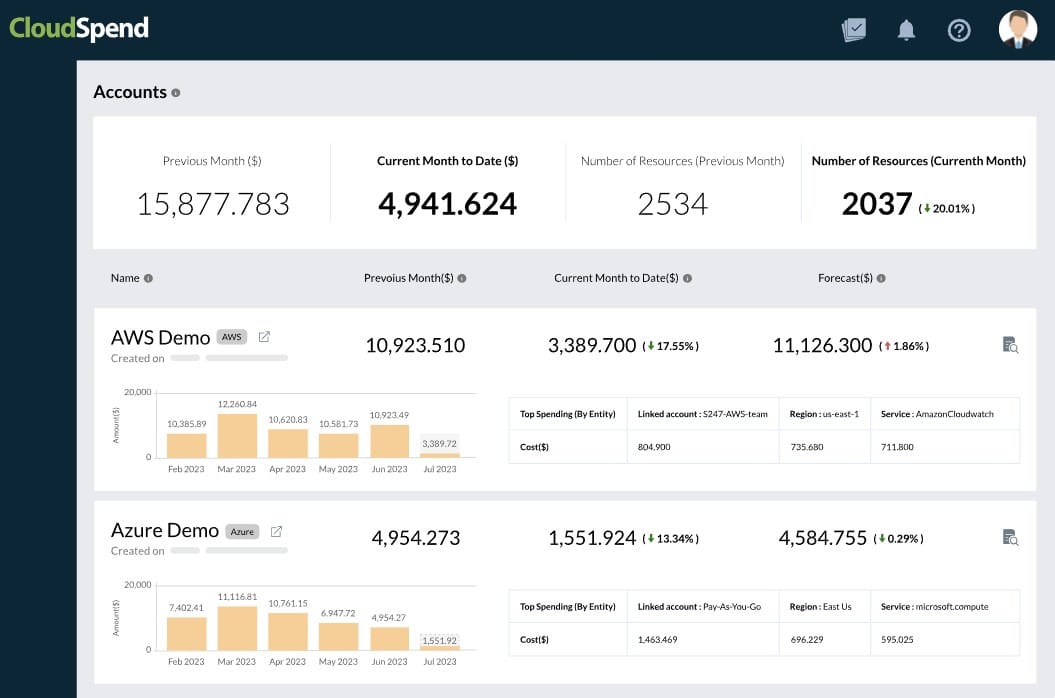
ManageEngine CloudSpend provides intelligent insights that will help optimize cloud costs for your organization. It can identify unused resources and eliminate waste without slowing down operations through automation and full-stack visibility. It also natively integrates with cloud services, making it a good choice for multi-cloud environments as well.
A central aspect of this tool is its cost center management, which provides granular visibility into the spending by each department and usage metrics, like rate of utilization, presence of unused resources, and more. Using this data, you can streamline spending and accountability, ensuring that every dollar adds value to your organization.
CloudSpend natively integrates with cloud services and gathers usage data, which is then analyzed to identify spending and anomalies. It can detect spending spikes, so you can take proactive measures to control overspending.
CloudSpend’s insights also help with forecasting and capacity planning. More importantly, it helps anticipate spending trends to avoid additional costs.
The best part is that all insights are displayed on well-designed dashboards and even generated as reports for easy access. This helps in understanding the spending, and at the same time, supports easy stakeholder communication.
Register for a 30-day free trial.
EDITOR'S CHOICE
ManageEngine CloudSpend gets our Editor’s Choice Award for the best Azure cost management tool because it provides comprehensive insights into how each department spends money on cloud resources. It gathers and analyzes data to pinpoint anomalies, overspending, wasted and unused resources, and other aspects that can better optimize your spending. Its intuitive dashboards and reports, coupled with its actionable recommendations, are other reasons why we love this tool. Its granular visibility and cost center management make it the top tool on our list.
Download: 30-day FREE Trial
Official Site: https://www.manageengine.com/cloudspend/
OS: Cloud-based, SaaS
2. Turbo360 (formerly Serverless360)
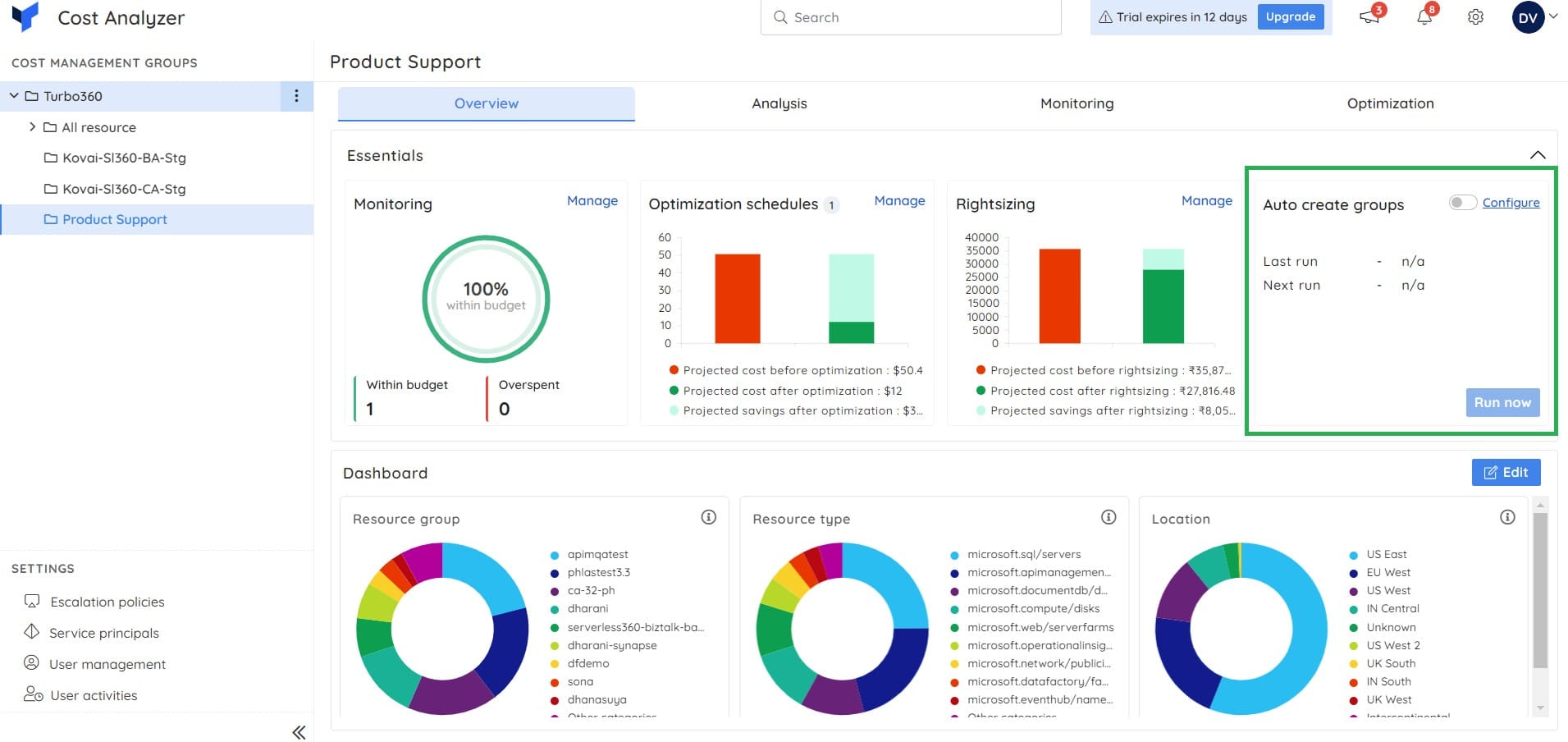
Turbo360 (formerly Serverless360) is a tool that offers multiple ways to enhance your business, not just help manage costs. First of all, it provides you with a crisp unified overview of your spending across multiple subscriptions all in a single pane. It is extremely customizable allowing you to pick and choose the most important details for you. This way you can make sure that all of the key information that is important to you is always presented in a clear and comprehensive way.
While it is customizable, you don’t need much to get it working. Turbo360 is in fact very quick to implement since it comes with a bunch of pre-built templates. These templates were built by developers who are leading the field in the industry, making sure that they’re very viable for almost any business, with you needing to only tweak the settings to cover all of your needs.
Turbo360 offers many automated features to help you analyze and track costs. For example, let us say that your developers have identified that an application is consuming a large amount of resources, leading to high costs, you need to find a way to mitigate this issue. Turbo360 would allow you to analyze these high-cost resources in depth to help you further understand any optimization strategies which you should take, effectively lowering your costs over time.
Turbo360 has a 15-day free trial and a demo which you can request. Pricing is different for the different tools that they offer, but the Cost Analyzer starts at $500 per month.
3. Microsoft Cost Management for Azure
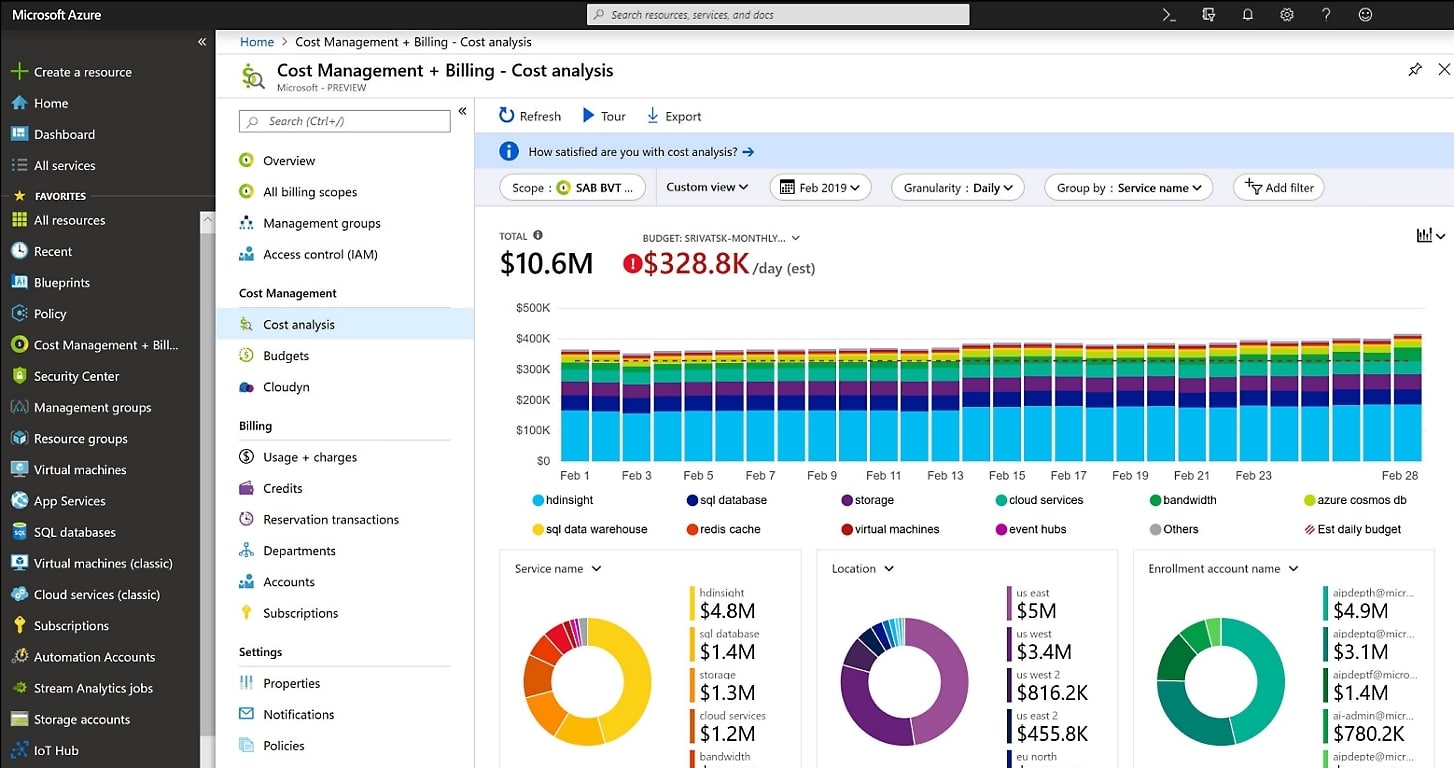
Microsoft Cost Management is a free tool that comes with Azure that helps you optimize your Azure costs and simplifies management for your spending. This is accomplished in numerous ways from monitoring and alerting you about any issues, budget limitations, and recommending cost improvement options. You as a customer can get real-time insights into which resources take up the most of your spending.
You also get a breakdown of the costs by resource type such as storage, VMs, and networking services as well as usage type which are on-demand, reserved, spotted, et cetera. It also allows you to set cost management rules for specific metrics such as total spending, resource type usage, et cetera, and perform automated tasks when certain pre-determined parameters are met.
These parameters are highly customizable to your needs and allow you to pause or deallocate resources as you see fit to mitigate costs further. Microsoft Cost Management also offers you analytics services that will forecast your costs based on historical usage and spending trends. You can then use this information to adequately inform yourself about understanding upcoming costs, planning around them, and optimizing your spending on them.
You can also integrate Microsoft Cost Management with other Azure services such as Azure Resource Monitor, Azure Monitor, and Azure DevOps to create a unified, comprehensive overview for all of your needs to better understand your spending and how to optimize your resource consumption.
4. Apptio Cloudability
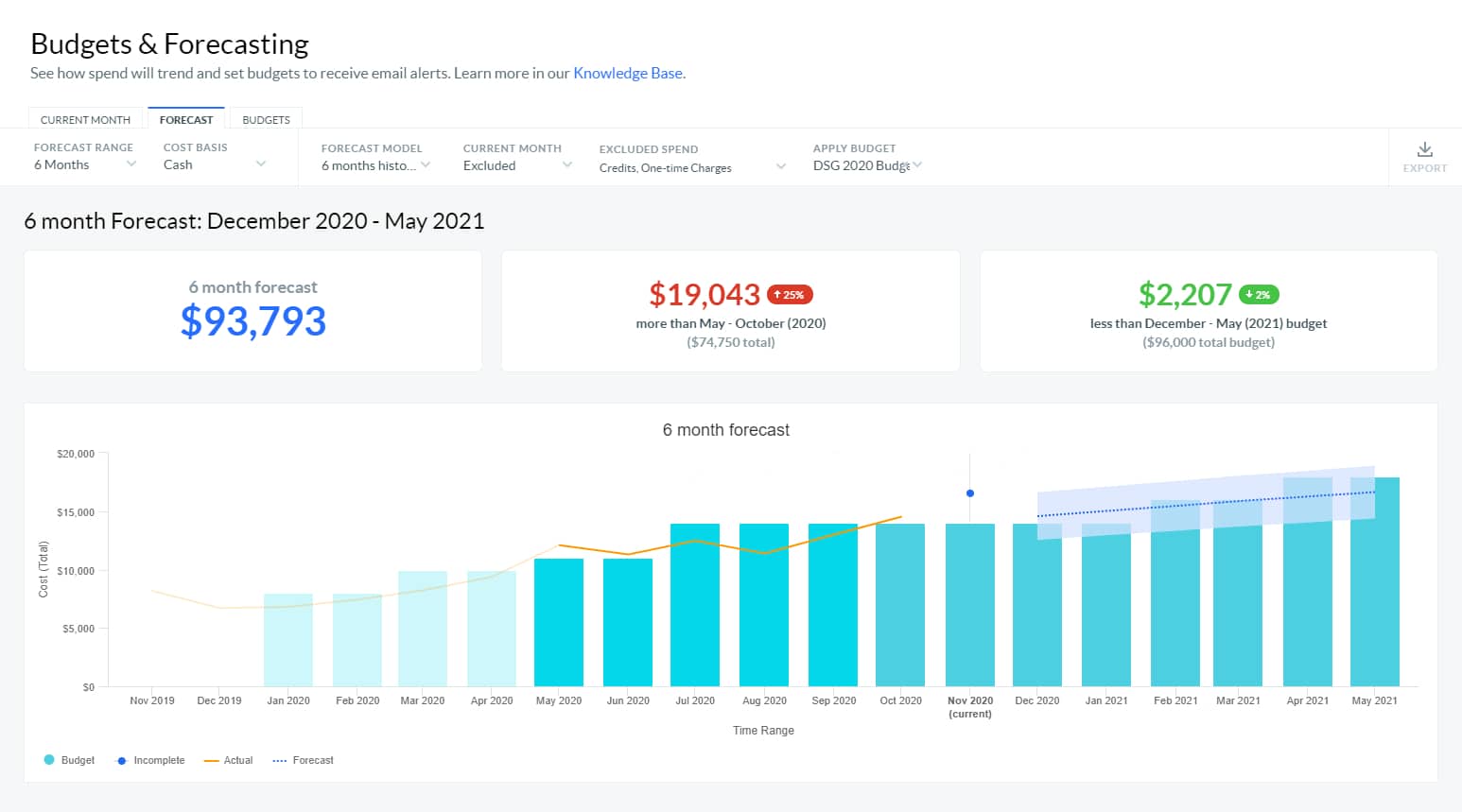
Apptios’ Cloudability is a financial management software platform that assists in optimizing cloud spending, drive cost savings, and automating financial cloud operations. It allows you to manage your cloud costs in real-time and provides you with comprehensive and clear insight to aid you in creating fully informed decisions about resource allocation and cost optimization.
You can also automate cost monitoring and customize alerts to create cost management policies which will help in prioritizing cost optimization efforts. It also has a feature that lets you see the financial impact of different cost optimization scenarios, allowing for far more intuitive and effective cost estimates than before.
This way you can get to informed decisions about your cloud spending and maximize the return on your cloud computing investment. There are also a lot of cost management policies that you can define to shape your resource expenditure perfectly to your business requirements.
You can set automated rules and threshold alerts for many various categories such as VMs, storage, et cetera to identify any cost overruns and take remediation action immediately. Finally, Cloudability offers automatic billing reconciliation where it matches the bills from cloud providers against the invoices, automatically identifying any errors or inconsistencies to help you quickly resolve any disputes, some you might even miss if performing this task manually, and drive down costs.
This way you can ensure you are always only paying for the resources that you are actually using. To get the free trial or to get an accurate price for this solution, you will have to contact Apptio directly.
5. Granulate
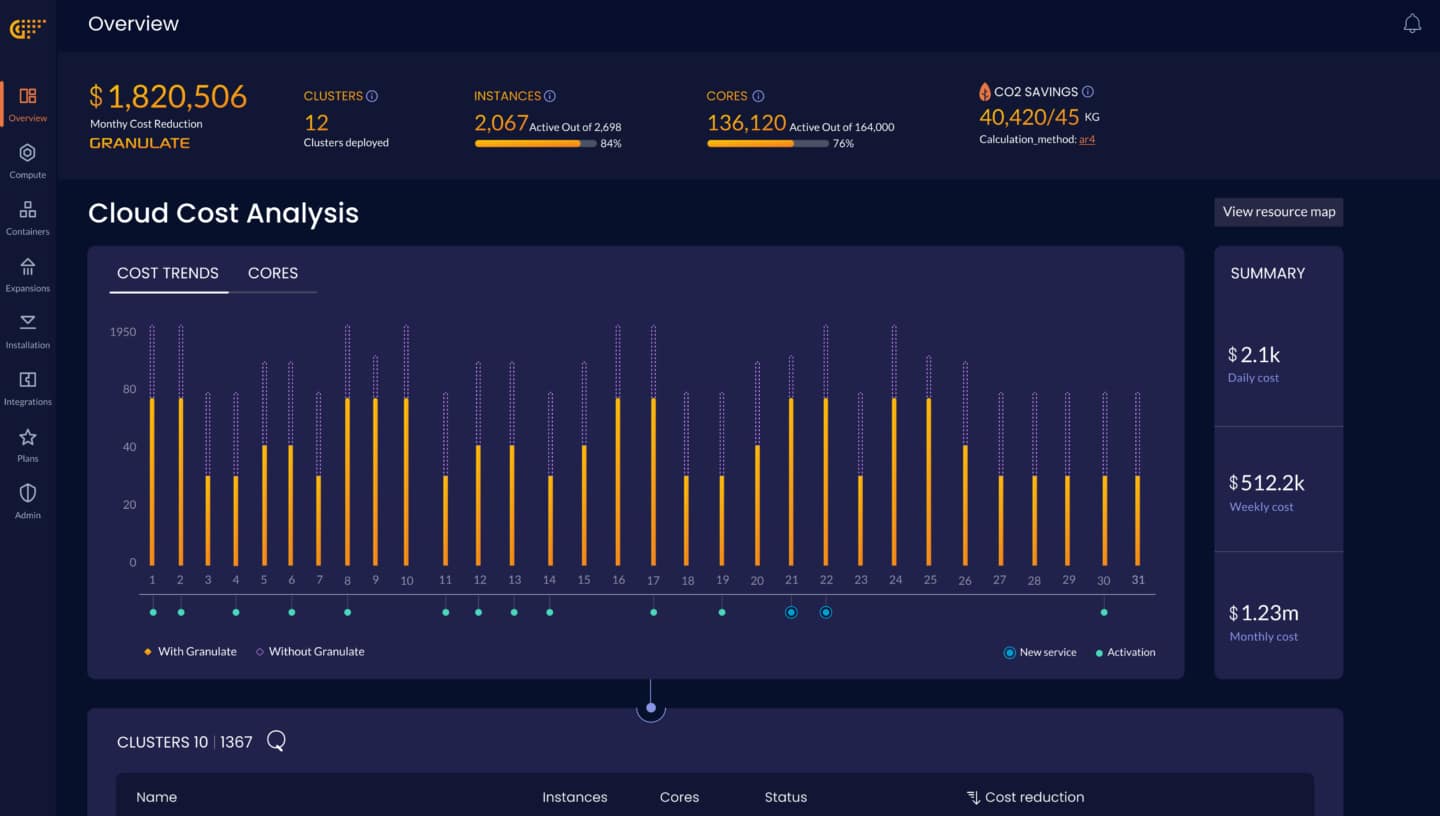
Granulate offers many features, including cost analysis and forecasting. This way you can monitor and forecast your cloud costs in real-time, allowing for precise insights into your business. Besides this, you can scale your resources automatically with Granulate since it has auto-scale features which are based on workload demand. This way you can achieve higher cost-efficiency by reducing idle time and scaling resources up and down in accordance with your demand.
You can also reassign workloads to new instances to optimize resource utilization even further. By doing this you can significantly cut down on costs. There are three different plans for Azure. The free profiler plan will optimize your code and bottlenecks, the Pro plan which costs $0.003 per core per hour, and the Enterprise plan which you need to contact Granulate directly to get a quote.
6. Virtana
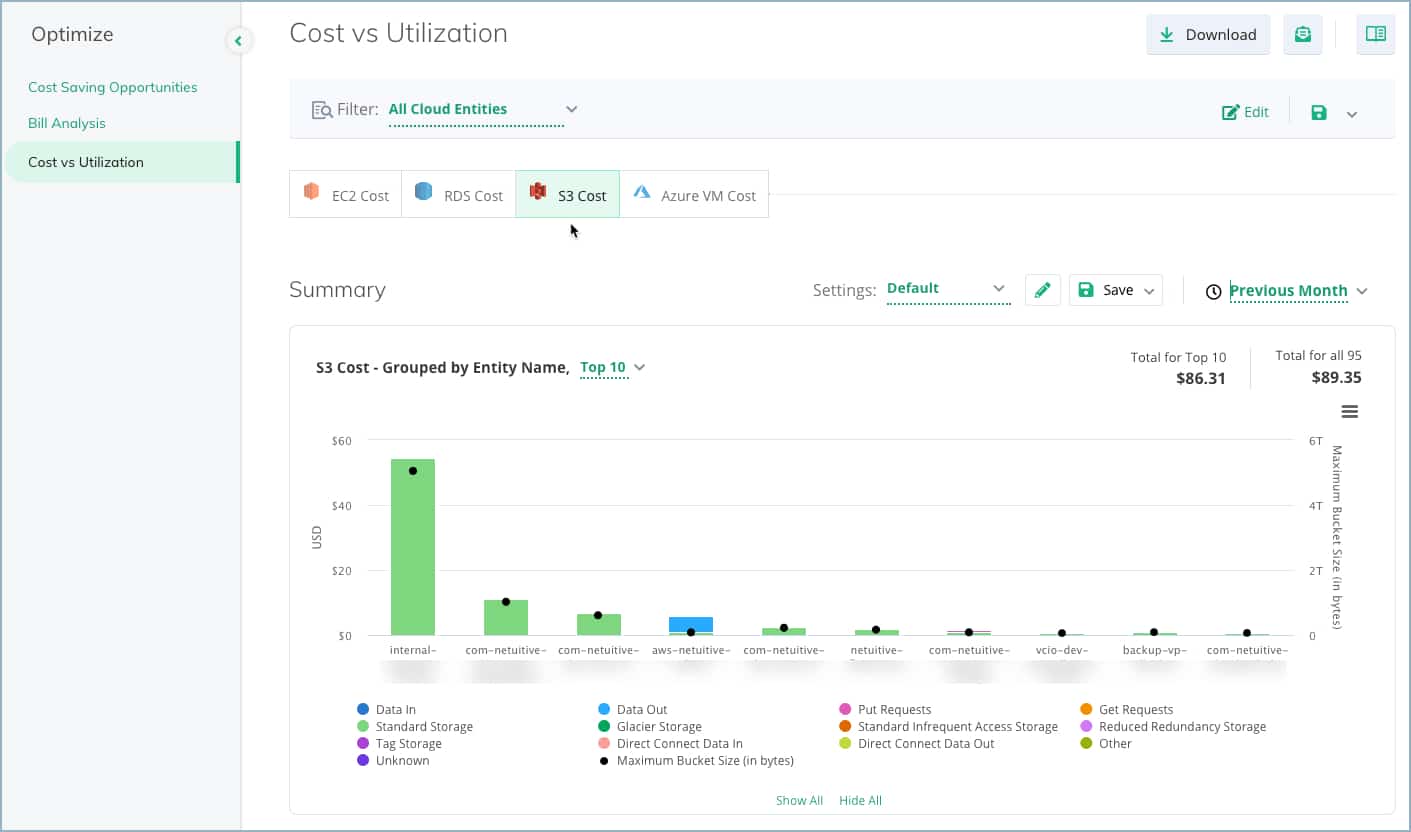
Virtana is a tool that is designed to help optimize hybrid and multi-cloud environments. It allows you to monitor and manage a wide IT enterprise regardless of where it is and how they are deployed, then you can get comprehensive insights to help you drive costs down and improve performance.
Virtana offers Artificial Intelligence and Machine Learning to analyze large amounts of raw data which is then presented to you as insights that you can then use to further optimize your resource usage and drive costs down. This also provides you with predictive analysis which will simulate various usage scenarios.
This way you can project future cloud costs accurately to better comprehend your cloud spending and further optimize your resource utilization.
7. Tanzu CloudHealth (formerly VMware Aria Cost)
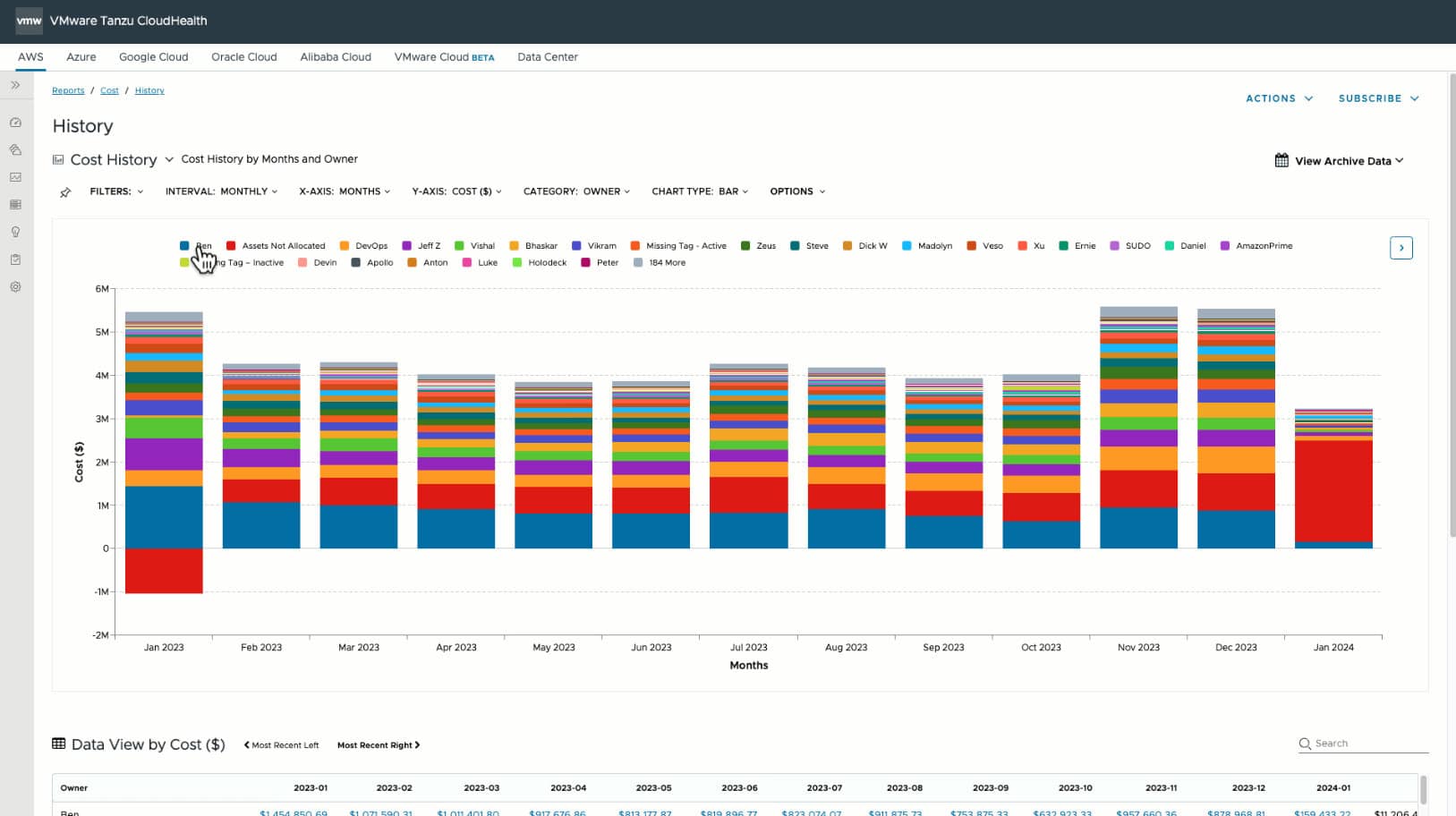
Tanzu CloudHealth (formerly VMware Aria Cost Powered by CloudHealth) helps you simplify cloud finances, streamlines your operations, and many more. It gathers and analyzes data from multiple sources and presents it to you in a comprehensive way. Using open APIs, Tanzu CloudHealth easily collects data from any cloud provider. It can also access data from third-party tools which you may use for any type of management and unifies it as a single data stream.
Furthermore, you can manage budgets and forecast expected spending with ease. You can visualize your expected costs for the year and allocate budgets accordingly. These budgets are highly flexible and variable with many categories which you can implement.
This way you can be adequately alerted when you are forecasted to exceed the budget. You can also terminate unused resources to reduce waste. You can set variable custom thresholds which will analyze resource usage and allow you to identify assets that can be downsized or terminated. Tanzu CloudHealth offers a 14-day free trial. If you wish to purchase the full version, you will have to contact them directly.
8. CloudCheckr
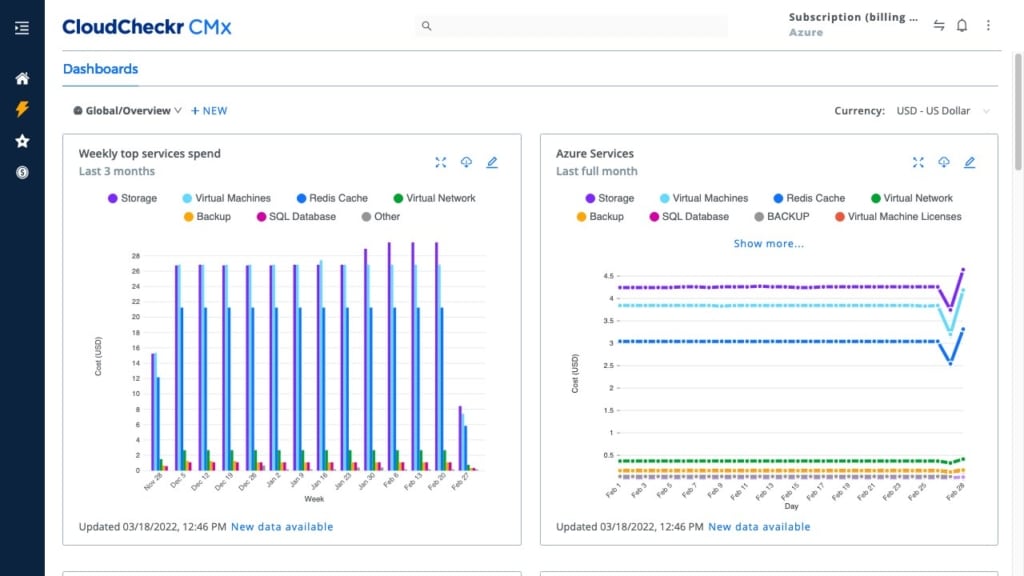
CloudCheckr is a tool that brings you deep insights to achieve the greatest savings possible. It accomplishes this task by providing you with real-time cost visibility allowing you to quickly identify areas that need further optimization. This way you can save countless hours trying to figure out a strategy to optimize costs.
CloudCheckr provides you with personalized recommendations for these matters to further help you drive down costs. It also helps you cut down on any wasted resources that you may have by automatically sizing them based on your needs. CloudCheckr offers a demo. To purchase the full version, you will have to contact them directly.
They will however give you a free analysis to inform you of how they could improve your savings. CloudCheckr offers a demo and if you wish to purchase the full product, you will have to contact their sales team to set up a meeting.
9. nOps
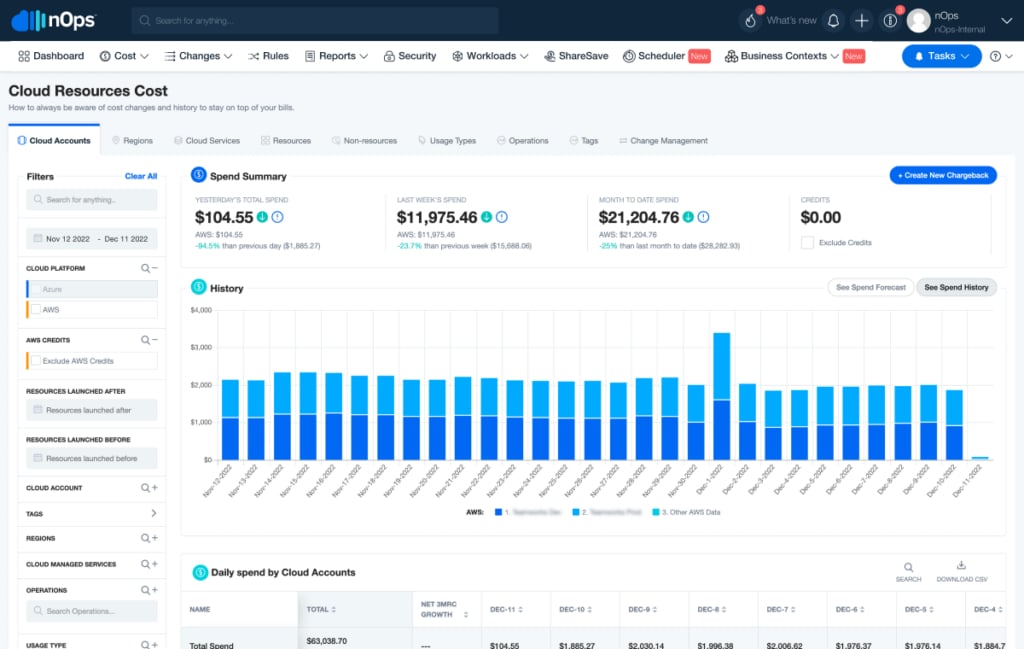
nOps is a cloud cost optimization and automation platform. It allows you to achieve a unified view of your entire cloud spending across multiple public and private cloud environments. The complete view of your Azure costs will help you identify any cost-saving opportunities and optimize your resource usage.
You can manage your costs by many different factors such as resource group, resource type, etc., and identify which resource type is responsible for most of the cost. nOps allows you to easily identify excess or underutilized resources. You can automate this process allowing you to further eliminate waste and further reduce costs.
There is also the cost prediction and forecasting feature which will help you accurately project your future Azure costs and potentially identify any issues before they even happen. This is achieved through machine learning algorithms that analyze your past Azure usage patterns which are then presented to you in an understandable way.
Automatic resource utilization isn’t the only thing you can automate. In fact, you can automate many other things to manage your workflow better. These include custom thresholds for various types such as budget, resource allocation, and more. These are then conditionally checked and predefined automatic steps will be taken when the conditions are met, effectively eliminating the need for manual intervention and reducing the risk of human error.
To purchase nOps you will have to contact them directly for a quote.
10. GorillaStack
GorillaStack is a cloud management platform that can assist you in optimizing cloud costs, cloud security, and reducing overall cloud risk. It allows you to monitor and manage all of your cloud environments and resources across multiple providers. These include Azure, AWS, GCP, and others.
It allows you to automatically discover and identify wasteful spending while also optimizing your current resource utilization. GorillaStack also offers automatic resource distribution meaning that you can balance workloads across instances, regions, and providers much more efficiently, effectively reducing the risks of underutilization or overprovisioning.
Finally, it offers advanced analytics and reporting which further allows you to analyze costs in an insightful and constructive manner. You can effectively oversee resource utilization, performance, and security posture in a very deep and thorough way. GorillaStack offers a free 14-day trial and multiple plans for different services. The Cost Optimization service starts at $500 monthly.
Summary
We have covered how Azure costs work and why managing your resources is so vital when it comes to cutting costs. Since you pay per resource spent it is imperative to make every bit count to its fullest if you wish to cut back on your costs.
This especially becomes difficult as your business grows and it becomes more difficult to keep track of everything. There are many tools here that can help you with this issue, and hopefully, you have found the answer you were looking for.