

Searching for the best PSA software for your MSP? We tested the most popular options to see which ones are truly best to help manage and automate tasks across your MSP. Continue reading to see what we found.
PSA Features To Look For When Shopping
- Ticketing and Incident Management Effective ticketing and incident management features are essential. Look for software that allows easy creation, tracking, and resolution of tickets. The system should enable prioritization and escalation of incidents based on severity. Automation capabilities, such as routing tickets to the right team, can improve response times. Real-time updates and notifications help keep everyone informed.
- Time Tracking and Billing Accurate time tracking and billing are crucial for profitability. The software should allow technicians to log their hours effortlessly. Integration with billing systems ensures accurate invoicing based on recorded time. Features like automated time capture can minimize manual entry errors. Detailed reporting on billable and non-billable hours helps in financial analysis and planning.
- Project Management Robust project management features help keep tasks organized. Look for tools that enable planning, scheduling, and tracking of project milestones. The software should offer Gantt charts, task lists, and resource allocation options. Collaboration features, such as shared documents and communication tools, enhance team coordination. Real-time project updates ensure everyone stays on track.
- Client Management Efficient client management is key to maintaining strong relationships. The PSA software should offer a centralized client database with detailed information. Look for features that track client interactions, contracts, and service histories. Integration with CRM systems can provide a complete view of client activities. Customizable client portals allow clients to access their information and submit requests easily.
- Reporting and Analytics Comprehensive reporting and analytics features help in decision-making. The software should offer customizable reports on various aspects of your operations. Look for real-time dashboards that provide insights into key performance indicators (KPIs). Advanced analytics can identify trends and areas for improvement. Automated report generation saves time and ensures consistent data analysis.
- Automation and Workflows Automation and workflow management features can significantly boost efficiency. Look for software that automates repetitive tasks, such as ticket assignment and follow-ups. Workflow customization allows you to tailor processes to your business needs. Automation reduces human error and speeds up service delivery. Features like automated alerts and reminders help keep tasks on track.
The Best PSA Software
Our methodology for selecting the best PSA software for your MSP
- Integration Capabilities: When choosing PSA software, integration capabilities are crucial. Ensure the software can seamlessly connect with your existing systems, such as CRM, accounting, and RMM tools. This will streamline operations and reduce manual data entry. Look for software with robust APIs for custom integrations. Compatibility with other software you use daily can save time and prevent data silos.
- User Interface and Experience: A user-friendly interface is essential for efficiency. Choose software with a clean, intuitive design that requires minimal training. The layout should be easy to navigate, with clearly labeled features and functions. A good interface can reduce errors and increase productivity. Test the software with your team to gather feedback on usability.
- Customization Options: Every MSP has unique needs, so customization is important. Look for PSA software that allows you to tailor workflows, fields, and reports fitting your business processes. Customization can help you adapt the software to your specific requirements. Check if the software offers flexibility in automating tasks and notifications. The ability to personalize your dashboard can also enhance user experience.
- Scalability: Consider how the software will grow with your business. Choose a PSA solution that can scale up as you add more clients and services. Check if the vendor offers different pricing tiers to accommodate growth. The software should handle increased data volume and user load without performance issues. Scalability ensures long-term viability and investment protection.
- Security Features: Security should be a top priority when selecting PSA software. Ensure the software provides robust security measures like encryption, multi-factor authentication, and regular security updates. Compliance with industry standards, such as GDPR or HIPAA, is also important. Look for features that allow you to control user access and permissions. Regular audits and monitoring tools can help protect sensitive client data.
- Support and Training: Reliable support and training resources are vital for successful implementation. Choose a vendor that offers comprehensive onboarding and continuous training options. Check if they provide various support channels like phone, email, and live chat. Access to a knowledge base and community forums can be beneficial. Good support ensures you can resolve issues quickly and keep your operations running smoothly.
1. Syncro

Syncro is a comprehensive Professional Services Automation (PSA) tool designed specifically for Managed Service Providers (MSPs). It integrates PSA and Remote Monitoring and Management (RMM) capabilities into a single platform, enhancing efficiency and profitability for MSPs.
Key Features:
- Automated Ticketing: Streamlines service desk operations by automatically creating and assigning tickets based on predefined rules.
- Integrated Billing: Dynamically counts and bills for assets, employees, or policies, ensuring accurate and timely invoicing.
- Client Portal: Provides clients with a branded portal to review and pay invoices, access documentation, and submit tickets.
- Customizable SLAs: Allows MSPs to set and manage service level agreements, ensuring compliance and client satisfaction.
- Advanced Analytics: Utilizes PowerBI integration to deliver in-depth business intelligence and data insights.
Syncro’s PSA features help automate and streamline various aspects of an MSP’s operations, including ticketing, billing, client communication, and contract management. This platform is particularly suited for growing MSPs needing advanced tools to manage their expanding client base and service demands.
Syncro is ideal for MSPs of all sizes, particularly those experiencing growth and requiring advanced tools to manage increased service demands. It suits MSPs looking for an all-in-one solution to streamline operations, improve client communication, and enhance billing accuracy.
Pros:
- Streamlined Operations: Automates various workflows, reducing administrative tasks and enhancing operational efficiency.
- Scalable Solution: Offers features that support MSPs of different sizes, from startups to well-established businesses.
- Robust Integration: Seamlessly integrates with multiple third-party tools, enhancing overall functionality and flexibility.
- User-Friendly Interface: Provides an intuitive and easy-to-navigate dashboard, improving user experience and accessibility.
- Reliable Support: Offers personalized support and onboarding, ensuring smooth implementation and ongoing assistance.
Cons:
- Learning Curve: Some users may experience a steep learning curve when first implementing advanced PSA features.
Gain access to the free trial.
2. SuperOps
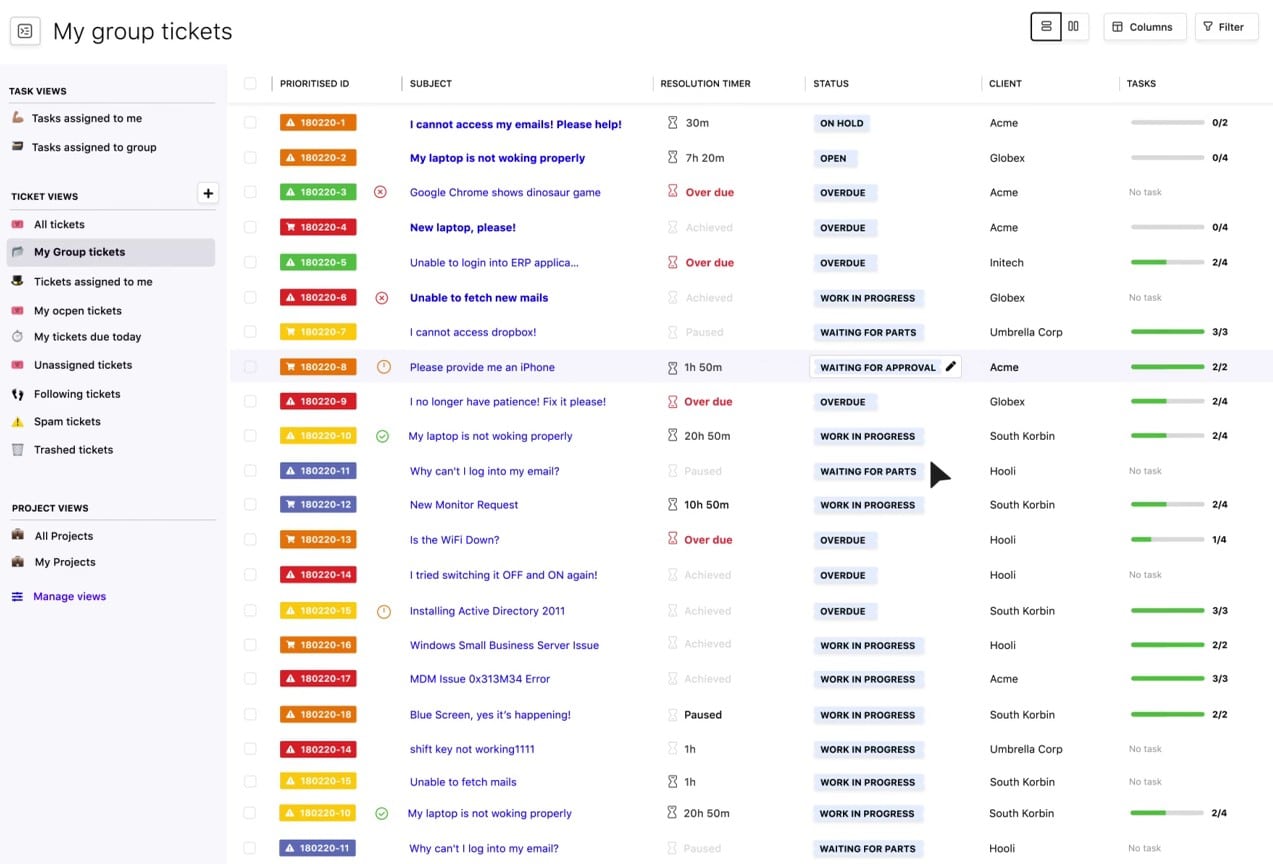
SuperOps is an innovative Professional Services Automation platform designed to streamline operations for Managed Service Providers. It integrates a variety of essential features such as task management, project management, asset management, and automated workflows into a single, cohesive platform. SuperOps aims to enhance service delivery and operational efficiency through AI-driven automation and a user-friendly interface, making it an ideal choice for modern MSPs looking to optimize their business processes.
Key Features:
- Conversational Ticketing: Enables contextual and seamless communication with clients directly through tickets, improving response times and service quality.
- Integrated Billing: Simplifies financial management with built-in quotes, invoicing, and integration with platforms like QuickBooks.
- Project Management: Manages large-scale projects with milestones, task assignments, and deadlines, ensuring timely completion.
- AI-Powered Automation: Automates routine tasks and ticket categorizations using AI, enhancing efficiency and reducing manual workload.
- Advanced Reporting: Generates custom and intuitive reports that provide insights into team performance, project progress, and client satisfaction.
Pros:
- Unified Platform: Combines PSA and RMM functionalities, providing a comprehensive solution for IT management.
- User-Friendly Interface: Offers an intuitive and modern interface that simplifies navigation and improves technician productivity.
- AI Integration: Utilizes AI for smart automation and proactive issue management, reducing response times and increasing efficiency.
- Scalable Solution: Designed to support the growth of MSPs, making it suitable for both small and large operations.
- Robust Security: Includes features like 2FA, IP whitelisting, and strict password policies to ensure data security and compliance.
Cons:
- Integration Limitations: While it integrates well with many tools, integrating with certain legacy systems might pose challenges.
3. Atera
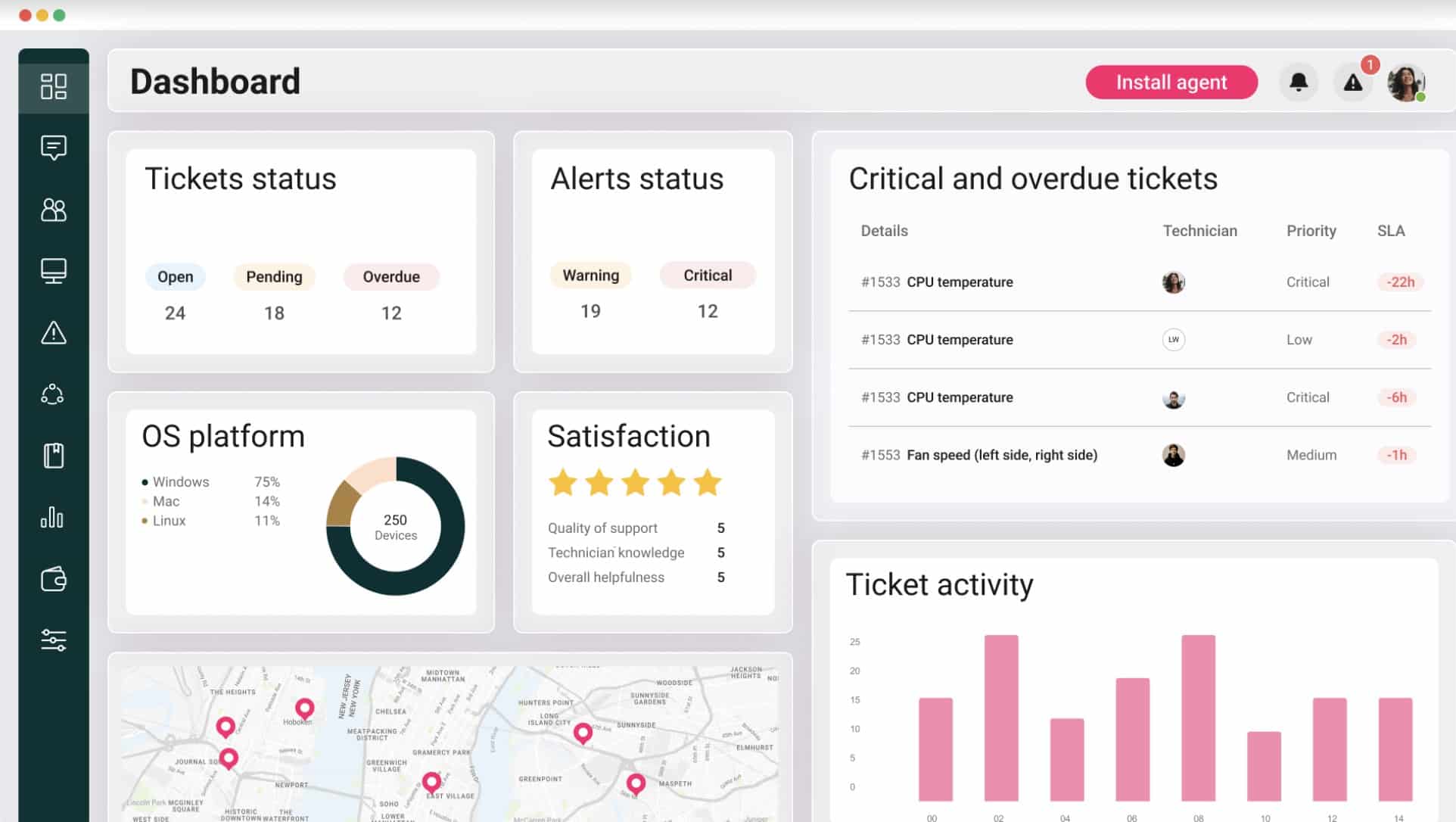
Atera is an all-in-one Professional Services Automation platform designed to streamline operations for Managed Service Providers. It integrates a wide array of features such as remote monitoring, helpdesk, billing, and reporting into a single platform, enhancing efficiency and service delivery. Atera’s PSA capabilities help MSPs automate their workflows, manage client interactions, and maintain high service standards through centralized operations and advanced reporting.
Key Features:
- Helpdesk and Ticketing: Streamline IT service management with automated ticket generation, scheduling, and AI-based categorization.
- Flexible Billing: Supports various contract types and integrates with QuickBooks and Xero for seamless financial management.
- Advanced Reporting: Offers detailed reports on technician performance, customer profitability, and system health to facilitate data-driven decisions.
- Remote Access: Provides secure remote access through integrations with AnyDesk, Splashtop, and TeamViewer, enabling efficient remote support.
- Network Discovery: Automatically identifies and records all assets in the client environment, enhancing visibility and security.
Pros:
- Comprehensive Integration: Combines PSA and RMM functionalities, reducing the need for multiple tools and simplifying IT management.
- User-Friendly Interface: Features an intuitive interface that simplifies onboarding and daily operations.
- AI-Driven Efficiency: Utilizes AI for ticket tagging and automation, improving response times and service quality.
- Real-Time Monitoring: Provides continuous monitoring and real-time alerts for proactive issue resolution.
- Scalable Solution: Adapts to the needs of growing MSPs, supporting unlimited devices with a fixed monthly cost.
Cons:
- Learning Curve: Some users may find the extensive feature set overwhelming initially.
Get started with a 30-day free trial.
4. Workfront
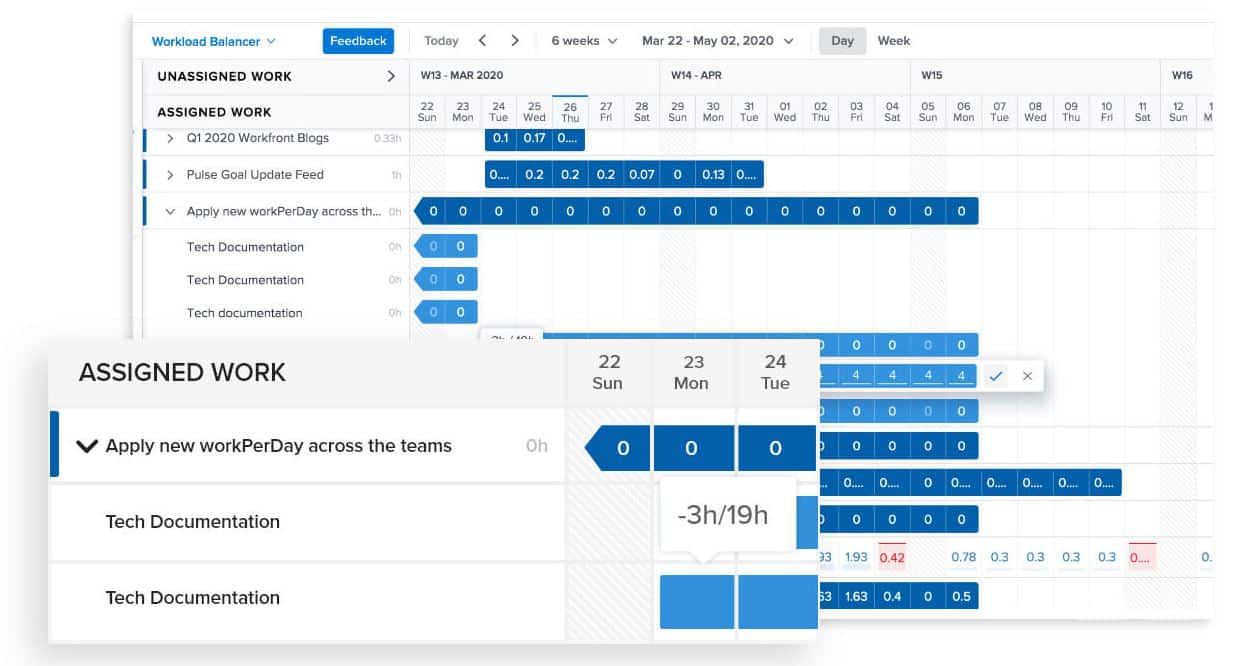
Workfront excels as a Professional Services Automation tool, offering robust project management features for Managed Service Providers. It integrates essential functions such as task management, resource allocation, and workflow automation, enhancing productivity and efficiency.
Key Features:
- Task Management: Easily organize and track tasks with customizable workflows and templates.
- Resource Allocation: Efficiently allocate resources based on availability and project requirements.
- Workflow Automation: Automate repetitive tasks to enhance productivity and focus on high-priority work.
- Real-Time Reporting: Gain insights into project performance and resource utilization with advanced reporting tools.
- Collaboration Tools: Facilitate team communication and collaboration through integrated chat and document sharing.
Workfront’s PSA capabilities streamline project execution, provide real-time reporting, and optimize resource management. It’s particularly beneficial for MSPs aiming to improve service delivery, manage resources effectively, and maintain high client satisfaction through automated and centralized operations.
Pros:
- Comprehensive Integration: Integrates seamlessly with other Adobe products, enhancing workflow continuity and efficiency.
- Scalability: Supports growth with features that adapt to increasing project and team sizes.
- User-Friendly Interface: Offers an intuitive interface that simplifies project and resource management.
- Strong Reporting Capabilities: Provides detailed analytics and reporting to inform strategic decisions.
Cons:
- Cost: Higher price point may be a barrier for smaller MSPs or those with limited budgets.
- Integration Issues: Occasional challenges integrating with non-Adobe products.
5. HaloPSA
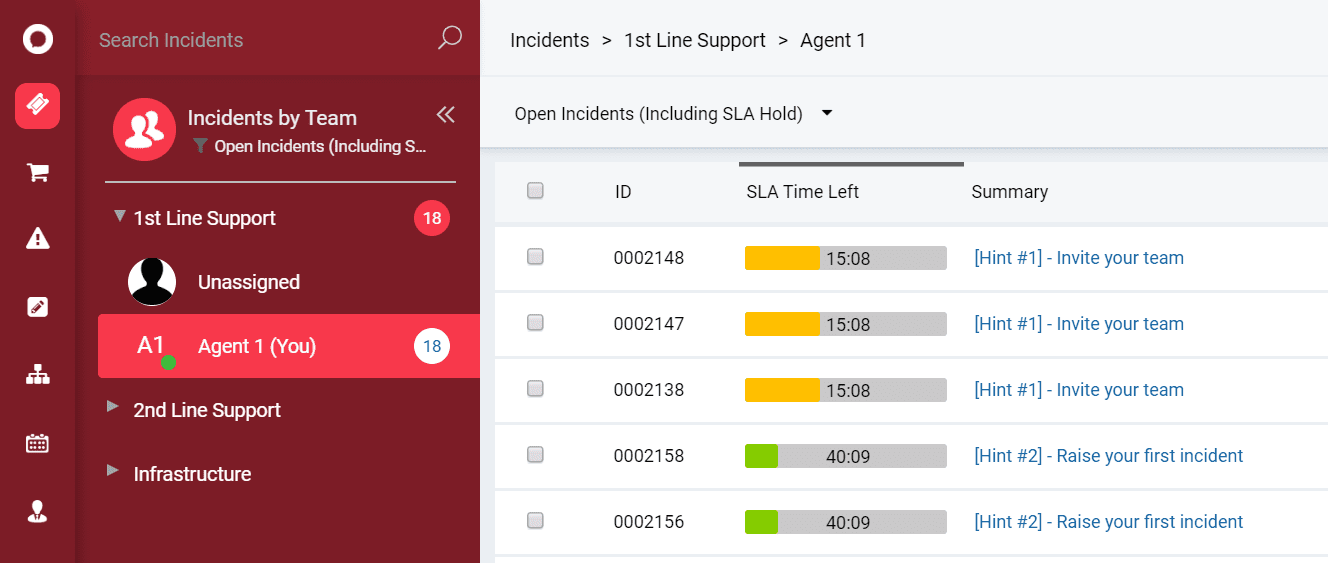
HaloPSA is a versatile and comprehensive Professional Services Automation tool designed to streamline operations for Managed Service Providers. It integrates various features such as task management, asset tracking, time tracking, and billing into a single platform, enhancing efficiency and service delivery. HaloPSA’s capabilities allow MSPs to automate repetitive tasks, manage projects and resources effectively, and maintain high client satisfaction through centralized operations and real-time reporting.
Key Features:
- Task Management: Organize and monitor tasks centrally, integrating apps and calendars to track team progress.
- Asset Management: Track assets and visualize dependencies, logging incidents and preventing major issues.
- Time Tracking & Billing: Automatically capture time spent on customer interactions to ensure accurate billing.
- Contract Management: Maintain and manage customer contracts, tracking key dates and billing details.
- Customer Service: Manage incidents and meet SLAs efficiently with automated workflows and centralized communication.
Pros:
- Comprehensive Integration: Combines PSA and RMM capabilities through integration with tools like NinjaOne, enhancing efficiency and reducing redundant efforts.
- Automated Workflows: Simplifies repetitive tasks and processes, freeing up resources for more critical activities.
- Real-Time Visibility: Provides real-time dashboards and reports for better decision-making and operational oversight.
Cons:
- Complex Implementation: Initial setup can be challenging and may require assistance to fully utilize the system’s capabilities.
- Cost: The extensive feature set may come with a higher price, potentially limiting accessibility for smaller MSPs.
- Learning Curve: Users might find the numerous features overwhelming initially.
6. Planview
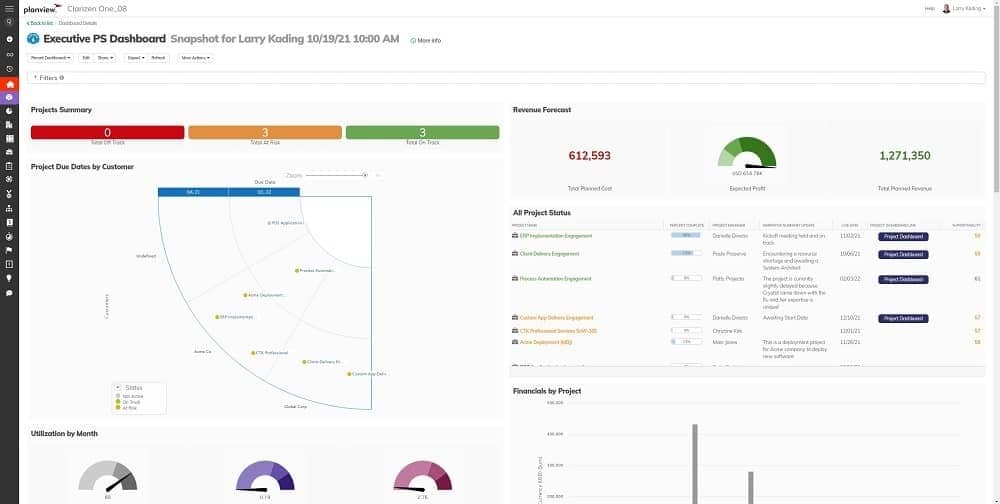
Planview is a comprehensive Professional Services Automation platform tailored to enhance efficiency and profitability for Managed Service Providers. It integrates a wide range of features including project management, resource planning, financial management, and advanced reporting. Planview’s PSA capabilities are designed to streamline workflows, improve governance, and drive customer satisfaction through robust automation and real-time visibility into operations.
Key Features:
- Project Management: Enables efficient management of projects with clear outlines, breakdown structures, and standardized templates for consistent delivery.
- Resource Management: Provides full visibility and management of resources, ensuring optimal assignment and utilization for project efficiency.
- Time and Expense Management: Allows anytime, anywhere tracking and approval of time and expenses, ensuring timely reporting and invoicing.
- Billing and Invoicing: Integrates with ERP systems for seamless billing and invoicing, delivering real-time revenue visibility and recognition.
- Advanced Reporting: Offers custom dashboards and reports for real-time insights into project health, financial performance, and customer satisfaction.
Pros:
- Comprehensive Integration: Connects with ERP and CRM systems, providing a unified platform for seamless data flow and improved operational efficiency.
- Robust Resource Management: Enhances resource utilization through real-time tracking and management, ensuring the right people are assigned to the right projects.
- Scalable Solution: Supports growth with features that adapt to increasing project and client management needs.
- Improved Financial Governance: Provides deep insights into financials, enabling better budgeting, cost management, and revenue recognition.
- Enhanced Customer Satisfaction: Captures and analyzes customer feedback to reduce service gaps and improve delivery processes.
Cons:
- Complex Setup: Initial implementation can be time-consuming and may require expert support.
- Cost Consideration: The advanced capabilities come at a higher price point, which may be a barrier for smaller MSPs.
- Customization Restrictions: Certain advanced customization options may be limited compared to other platforms.
7. ConnectWise
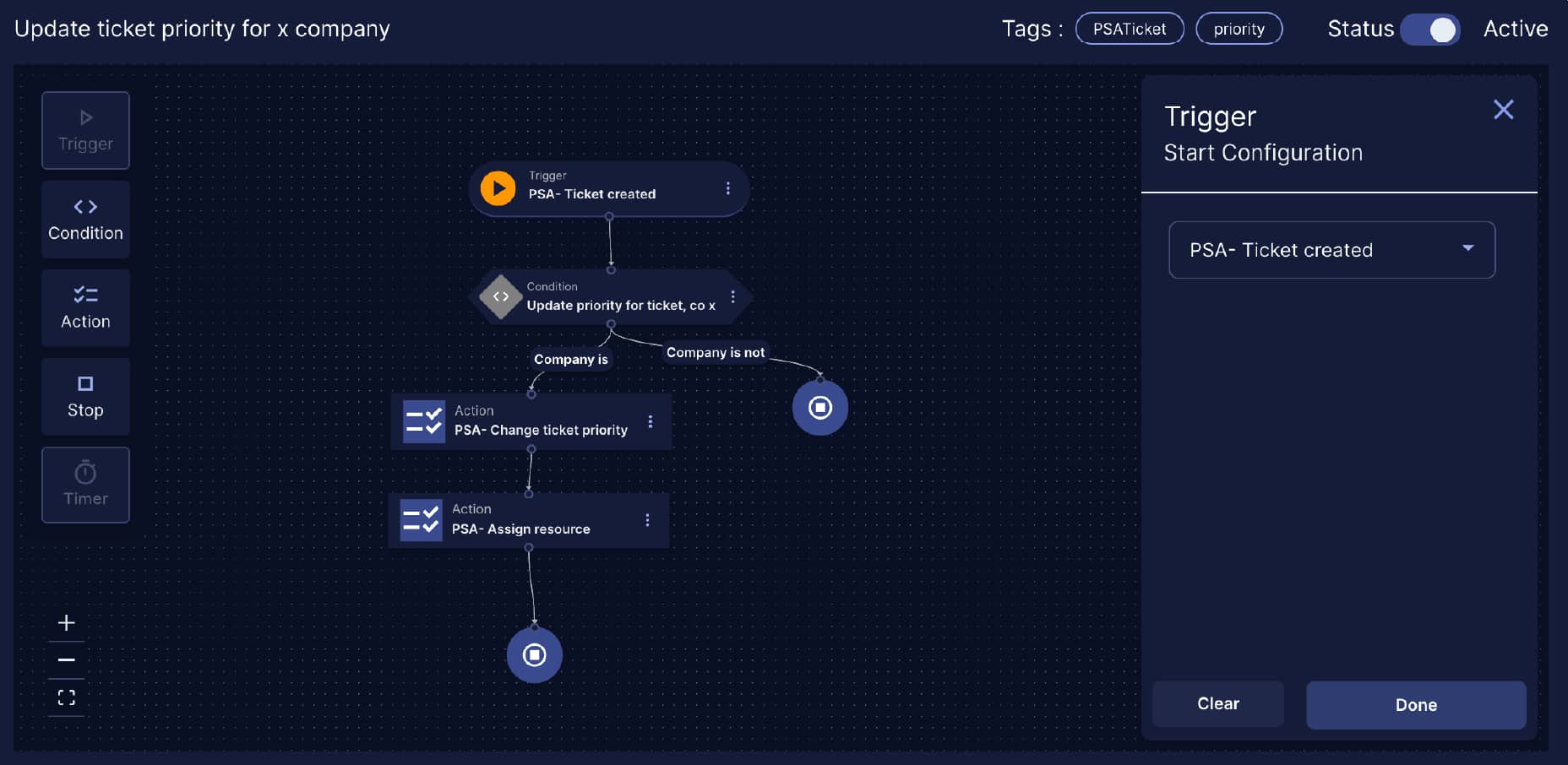
ConnectWise is a comprehensive Professional Services Automation platform designed to optimize the operations of Managed Service Providers. It offers a range of features including project management, billing, helpdesk support, and advanced reporting. ConnectWise’s PSA capabilities aim to streamline business processes, enhance customer satisfaction, and drive profitability through automation and real-time data insights.
Key Features:
- Project Management: Facilitates effective management of projects with Gantt charts, Kanban boards, and standardized templates.
- Billing and Invoicing: Integrates with ERP systems for seamless billing, providing real-time visibility and accurate revenue recognition.
- Help Desk Management: Streamlines support with automated ticketing, intelligent routing, and integrated chat features.
- Advanced Reporting: Delivers customizable reports and dashboards for real-time insights into business operations and performance.
- Resource Management: Ensures optimal resource allocation and utilization through comprehensive tracking and management tools.
Pros:
- Comprehensive Integration: Connects with a wide array of tools and systems, providing a unified platform for efficient operations.
- Automation Capabilities: Automates routine tasks and workflows, significantly reducing manual effort and improving efficiency.
- Scalable Solution: Supports the growth of MSPs with features that adapt to increasing project and client management needs.
- User-Friendly Interface: Offers an intuitive and customizable interface, making navigation and task management straightforward.
- Robust Security: Includes advanced security features like multi-factor authentication and IP whitelisting to protect sensitive data.
Cons:
- Complex Setup: Initial implementation can be complex and may require dedicated support.
- Learning Curve: The extensive feature set may be overwhelming for new users.
- Cost Consideration: The comprehensive capabilities come at a higher price point, which might be a barrier for smaller MSPs.
8. Accelo
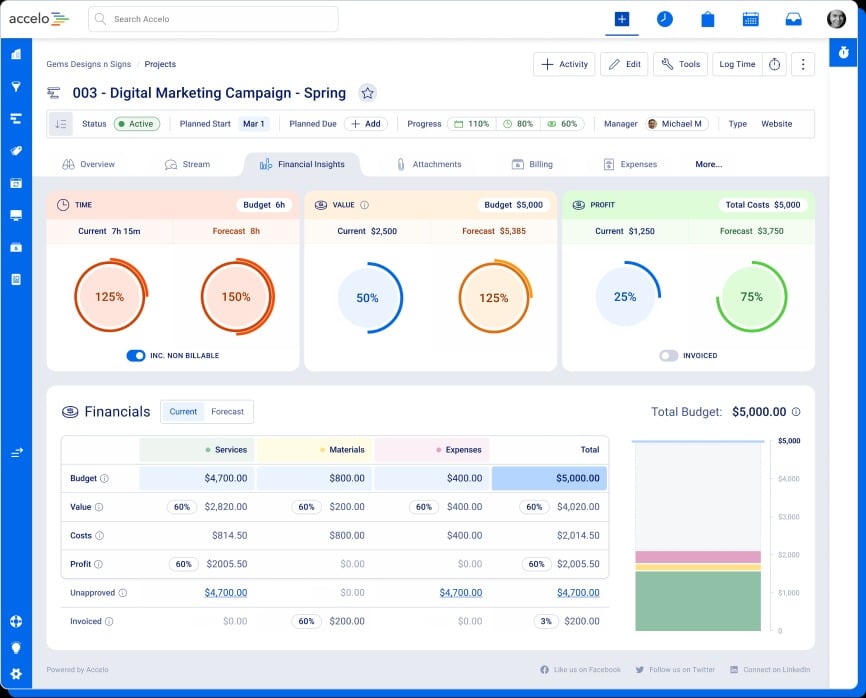
Accelo is a powerful Professional Services Automation platform tailored for Managed Service Providers, offering a wide range of features that enhance operational efficiency and profitability. Designed to manage the entire client lifecycle, Accelo integrates CRM, project management, billing, and service desk functionalities into a single, cohesive platform. This comprehensive solution is ideal for MSPs aiming to streamline their operations and improve client satisfaction through automation and real-time insights.
Key Features:
- CRM and Client Portal: Integrates all client interactions, providing a centralized system for managing relationships and communications.
- Project Management: Facilitates efficient project execution with configurable task boards and customizable views.
- Service Desk: Manages client support with an advanced ticketing system that automates prioritization and assignment.
- Billing and Invoicing: Automates billing processes and integrates with popular accounting software for seamless financial management.
- Advanced Reporting: Delivers real-time insights into project profitability, resource utilization, and key performance indicators.
Pros:
- Integrated Platform: Combines CRM, project management, billing, and service desk into a unified system, reducing tool sprawl and enhancing efficiency.
- User-Friendly Interface: Features an intuitive design that simplifies navigation and improves user experience.
- Robust Automation: Automates routine tasks and workflows, freeing up time for more strategic activities.
- Comprehensive Reporting: Provides detailed, real-time analytics and reports to support informed decision-making.
- Scalable Solution: Supports growth by adapting to increasing project and client management needs.
Cons:
- Implementation Complexity: Initial setup and configuration can be time-consuming and complex, requiring significant effort and support to get started effectively
- Customization Limitations: Although flexible, there may be restrictions in certain advanced customization options, limiting the ability to tailor the platform to specific needs
- Integration Challenges: While Accelo integrates with many tools, connecting with certain legacy systems or less common applications might require additional configuration and support