


The effective Monitoring of Bandwidth and the swift identification of potential bottle-necking and congestion within networks is of unquestionable value among businesses today. We explore some of the Best Bandwidth Monitoring Tools and Software to ensure your network and infrastructure are at Peak throughput!
Here is our list of the best bandwidth monitoring tools:
- Progress WhatsUp Gold – EDITOR’S CHOICE A unified bandwidth monitoring tool that uses NetFlow, jFLow, and sFlow to monitor bandwidth usage and application performance. Get a 30-day free trial.
- AdRem NetCrunch – FREE TRIAL An advanced monitoring platform that supports all popular flow technologies to track and check bandwidth usage in your network. Download a 30-day free trial.
- Site24x7 Network Traffic Monitoring – FREE TRIAL This cloud-based service is able to monitor network traffic with the use of a local collector that communicates with switches through NetFlow, J-Flow, sFlow, IPFIX, NetStream, CFlow, and AppFlow. Start a 30-day free trial.
- ManageEngine NetFlow Analyzer – FREE TRIAL A competent network traffic monitor that has NetFlow, sFlow, J-Flow, IPFIX, NetStream, and AppFLow capabilities. Available for Windows Server and Linux. Download a 30-day free trial.
- Paessler PRTG Network Monitor – FREE TRIAL This on-site traffic monitoring utility is part of a wider bundle of monitoring systems for networks, servers, and applications. Runs on Windows Server. Start a 30-day free trial.
- SoftPerfect NetWorx A lightweight utility for home users or small businesses that offers traffic throughput statistics in live graphs. Runs on Windows, Windows Server, and macOS.
- Progress WhatsUp Gold A network traffic analysis add-on to the main network performance monitoring package. Runs on Windows Server.
- SolarWinds NetFlow Traffic Analyzer This specialized package for tracking traffic patterns uses NetFlow, J-Flow, sFlow, NetStream, and IPFIX to extract data from network devices and it can also monitor the virtual switches of VMWare. Runs on Windows Server.
With the high demand placed on networks in ever-increasing and expanding workplaces, disruptions to workflow due to bandwidth consumption can result in dire consequences.
This is further exacerbated by the emergence of higher consumption, leading to congestion, introduced by rising workplace policies of staff utilizing their own devices. Slow networks decrease productivity within an organization, which invites idleness among employees and disrupts communication with customers.
The resultant loss of sales, particularly in the difficult economic climate businesses currently face, can leave lasting effects.
The tools and software designed to assist businesses with bandwidth monitoring are essential in the prompt detection and immediate rectification of problems arising within networks due to bandwidth hogs.
These tools allow for the measuring of bandwidth available on a local system and display all data collected in real-time to assist in the prevention of network strain. They offer network administrators quick and overall oversight into the network at all times, allowing faster identification of hosts using the most bandwidth, high-traffic processes, and programs.
This uncovers the root causes of issues arising with more efficiently and further supports the proactive management of bandwidth limits within the network. The tracing of outbound IP traffic is also possible, fast-tracking the discovery of any potential botnets, viruses, security breaches, and network intrusions.
The graphical representation of all relevant network data as well as detailed reports, available on demand and on specified schedules, promotes clarity in the identification of problems within the network.
Solutions therefore become attainable faster and easier, with alerts further notifying administrators immediately of issues such as the approaching of full bandwidth availability. These reports increase the ability to plan around capacity requirements, lowering the chance of failure to meet demands when extra services are potentially required.
In further aid of troubleshooting, the tools and software offering bandwidth monitoring collect and store network traffic, allowing for the observation of traffic patterns. This, as well as the options of filtering, sorting and tagging the traffic, is critical in uncovering sources of bandwidth capacity problems.
Overall, in the case of managing bandwidth within a network, the use of software and tools notably improve the monitoring and troubleshooting capabilities of administrators, thereby promoting a more stable network.
Keeping this in mind, the best bandwidth monitoring tools and software to achieve these goals are showcased below, each with their own capabilities and strengths identified. All download links and pricing structures are listed beneath each of the software and tools mentioned.
The Best Bandwidth Monitoring Tools
1. Progress WhatsUp Gold – FREE TRIAL
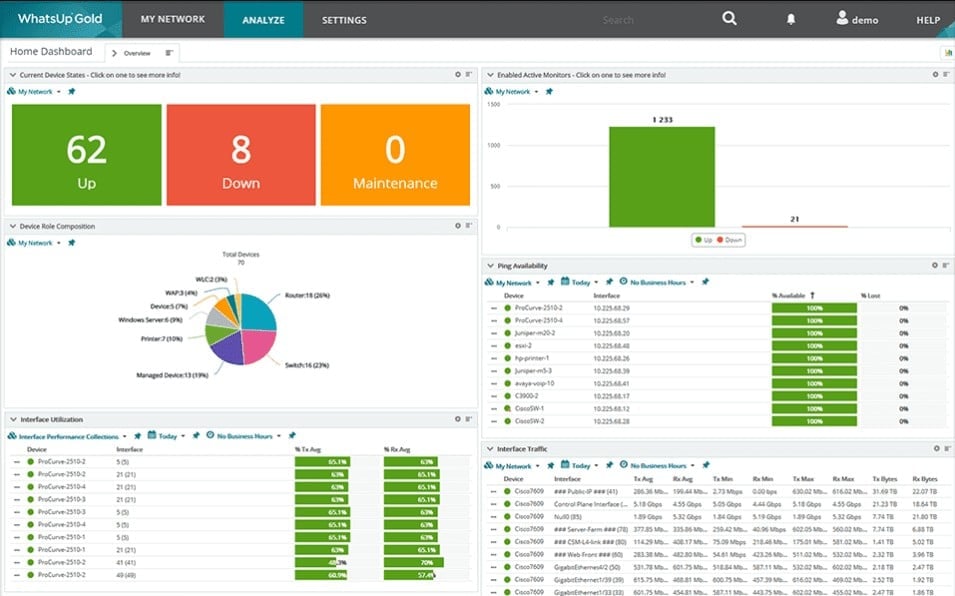
Progress WhatsUp Gold is a network bandwidth monitoring software that collects, analyzes, and monitors traffic patterns by endpoint, port, and application. The results are displayed in an intuitive dashboard, making it easy for IT admins to identify and troubleshoot the root cause of the problem quickly.
Why do we recommend it?
We highly recommend WhatsUp Gold because it is easy to use and, at the same time, provides the required information to keep your network running smoothly. To start with, it automatically discovers routers and switches that use the NetFlow protocol and configures them to gather and send data. Next, it analyzes this data extensively to provide information about traffic patterns, bandwidth usage, and more. Finally, it generates extensive reports on the top users and applications taking up your network bandwidth. This three-step process is comprehensive and provides the insights you need to make the right decisions.
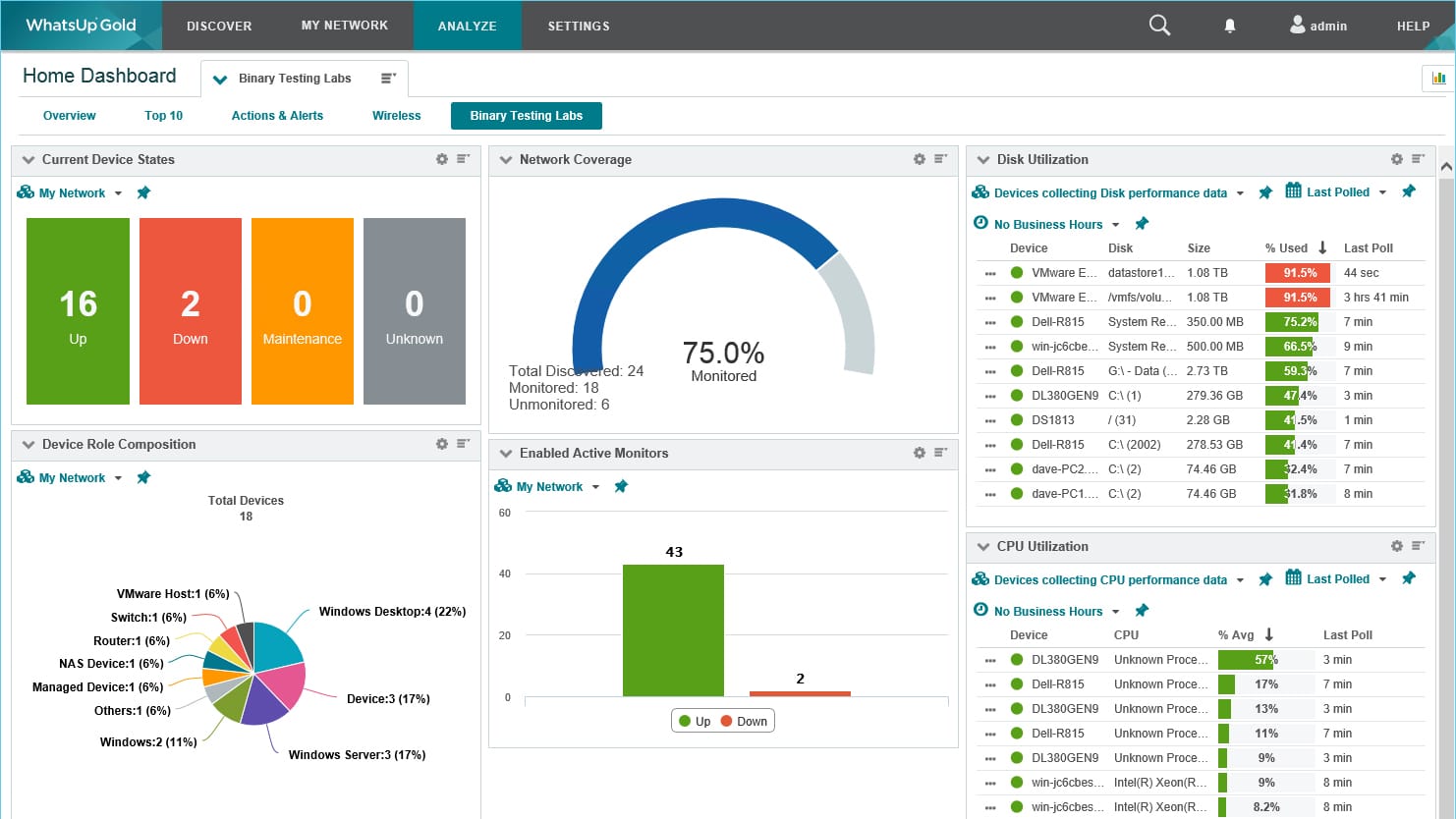
By closely analyzing the information provided by WhatsUp Gold, you can better understand the internal and external sources and destinations taking up your bandwidth. Accordingly, you can create and implement policies that limit bandwidth usage during peak loads to ensure that your business-critical applications perform efficiently.
Additionally, you can use its historical trends to make informed decisions about capacity planning and verify bandwidth billing. It can also come in handy for identifying bandwidth-based cybersecurity incidents like DDoS attacks.
Who is it recommended for?
WhatsUp Gold works well for network administrators and IT teams of mid to large-sized organizations that run many mission-critical applications. It is also well-suited for organizations that require the extensive use of the Internet for collaboration and communication. Start a 30-day free trial.
EDITOR'S CHOICE
WhatsUp Gold network bandwidth monitor takes the top spot on our list of bandwidth monitoring tools because of the extensive information it provides about bandwidth usage, including the endpoints and applications that consume the maximum bandwidth. Using this information, you can decide on capacity planning and implement the required policies to ensure that your most critical applications have the required bandwidth to operate. Its extensive reports and intuitive dashboards also make it quick and easy to troubleshoot the root cause of your network problems.
Download: Get a 30-day FREE Trial
Official Site: https://www.whatsupgold.com/
OS: Windows Server 2012 or later
2. AdRem NetCrunch – FREE TRIAL
AdRem NetCrunch is an IT monitoring platform that simplifies bandwidth monitoring by enabling you to track bandwidth usage. It uses multiple flow technologies, like SNMP, NetFlow, IPFix, sFlow, and jFlow, to gather information about your traffic and analyze them for insights.
Why do we recommend it?
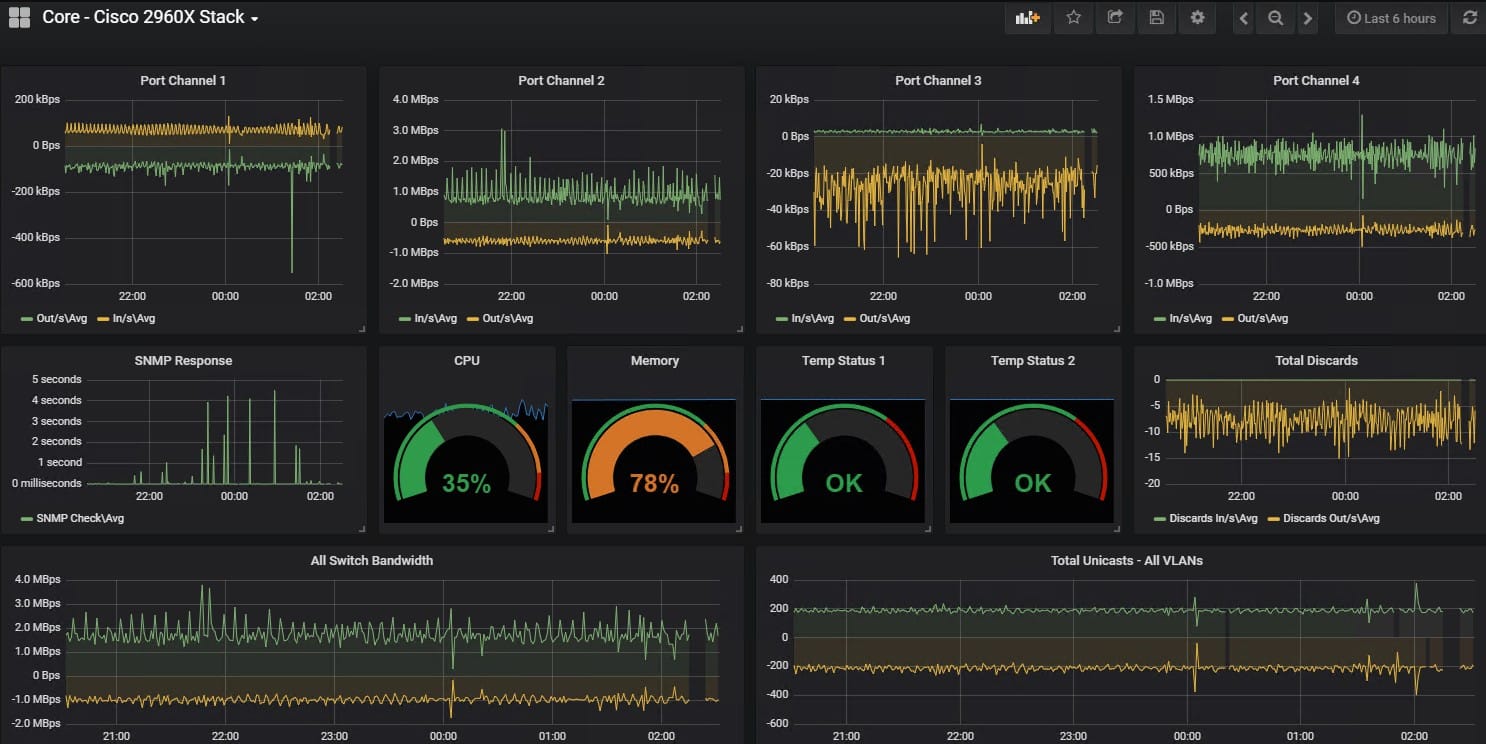
NetCrunch’s bandwidth monitoring answers an important question – “Who is using the bandwidth and why?” To answer this question, it uses multiple flow technologies to gather traffic data from ports and switches and analyzes them to identify patterns. In the process, it also creates a layer 2 map to easily understand the dependencies for troubleshooting.
Another key aspect of NetCrunch is its real-time interface. The dashboards and live maps update in real time to provide insights on the top talkers and their bandwidth consumption. With such detailed information, you can create and implement policies to limit usage and ensure that the bandwidth is available for your critical operations. This data helps with capacity planning as well.
Moreover, NetCrunch integrates well with an extensive MIB library, which has more than 8,700 modules covering almost every device and vendor. The advantage of this integration is that you can add new devices quickly and start monitoring them right away. Also, you can get comprehensive statistics on the Ethernet interfaces that are capable of RMON traffic data provision.
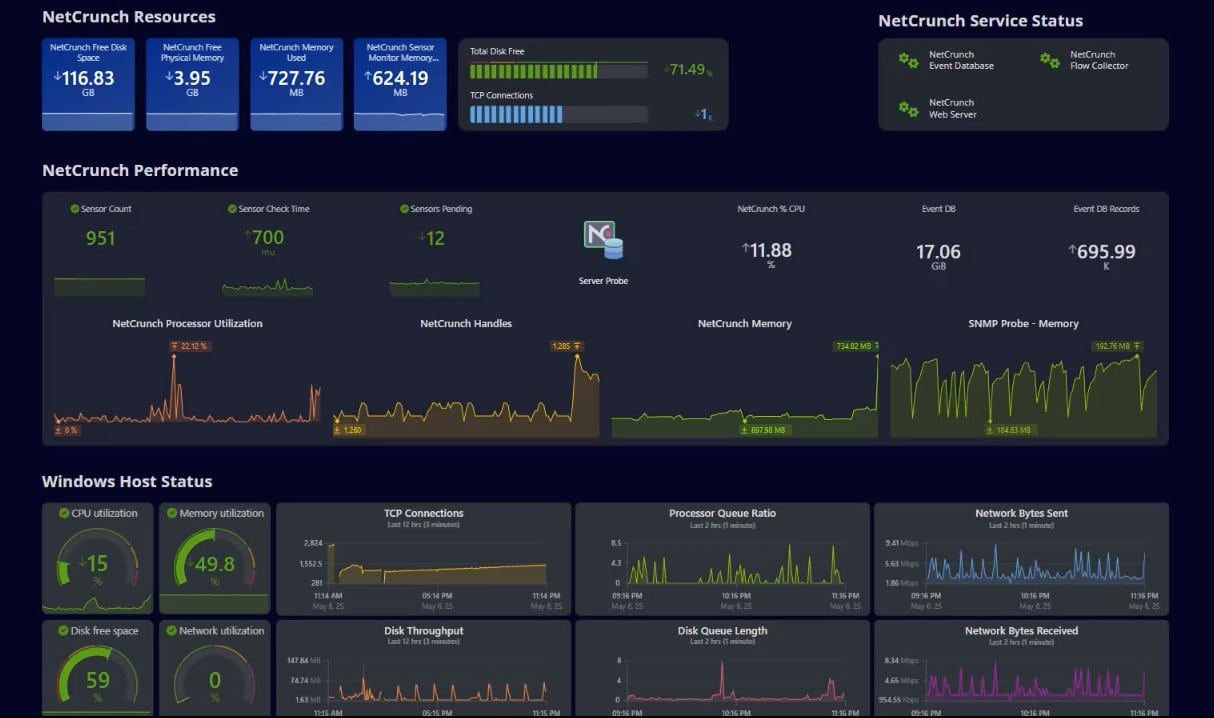
Another notable feature is the live port traffic monitoring, using which you can monitor all switch ports in real time. This monitoring allows you to detect traffic bottlenecks, detect anomalies, and understand traffic patterns to make informed decisions.
All these features are available in both the Professional and Enterprise editions. The former starts at $3,200, while the Enterprise edition is priced at $5,450/year. Download a 30-day free trial.
3. Site24x7 Network Traffic Monitoring – FREE TRIAL
Site24x7 Network Traffic Monitoring is part of a cloud platform of system monitoring and management tools. This module specifically looks at volumes of network packets as they travel around the system. The Site24x7 system downloads a collector program onto the monitored network at the point of enrollment.
Why do we recommend it?
Having extensively utilized Site24x7 Network Traffic Monitoring, we found it effective in monitoring network packets, providing real-time statistics, and raising alerts for potential issues. It is a cloud-based service suitable for businesses looking to monitor network traffic with a user-friendly local collector.
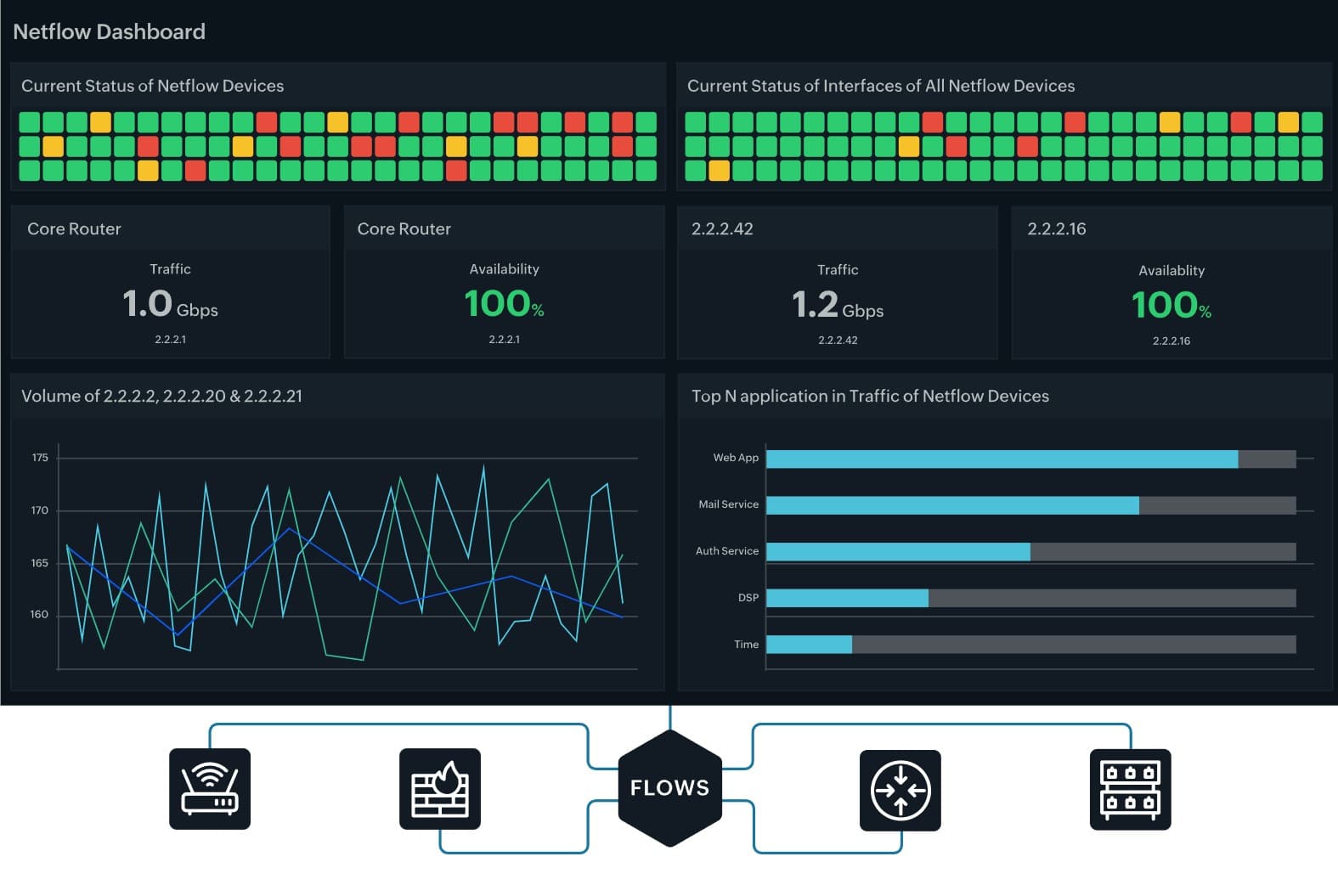
The flows that this system covers include reports for wireless routers and information from gateways and firewalls about the traffic volumes traveling in and out of the network over the interface to the internet.
The traffic monitor communicates with switches, routers, and firewalls using a series of protocols that enable the Site24x7 system to extract statistics or even sample packet headers. These protocols are NetFlow, J-Flow, sFlow, IPFIX, NetStream, CFlow, and AppFlow. As some manufacturers use their own proprietary protocols, such as Cisco’s NetFlow, Huawei’s NetStream, and Juniper Networks’ J-Flow, this multi-protocol capability means that the monitor can communicate with the devices provided by many different manufacturers.
The system queries individual devices and displays their current performance statistics live in the dashboard. This information is also stored to contribute to time-series graphs which show a sliding window of performance over the recent past. You are able to alter these screens and specify the time period that you want those graphs to stretch over.
A summary screen, showing the current statuses of all devices in a table is also available and an overview screen aggregates current statuses for the entire network and highlights devices that might be overloaded.
The monitor records the full capacity of each device and if volumes of traffic approach those levels, the Site24x7 system raises an alert. This tells you which part of which device is in trouble and buys you time to de-escalate the problem. Alerts can be forwarded as notifications by email, SMS, push notification, voice call, or RSS feed.
Alert thresholds are customizable. You can set the level of each threshold and also combine conditions to create your own alert conditions.
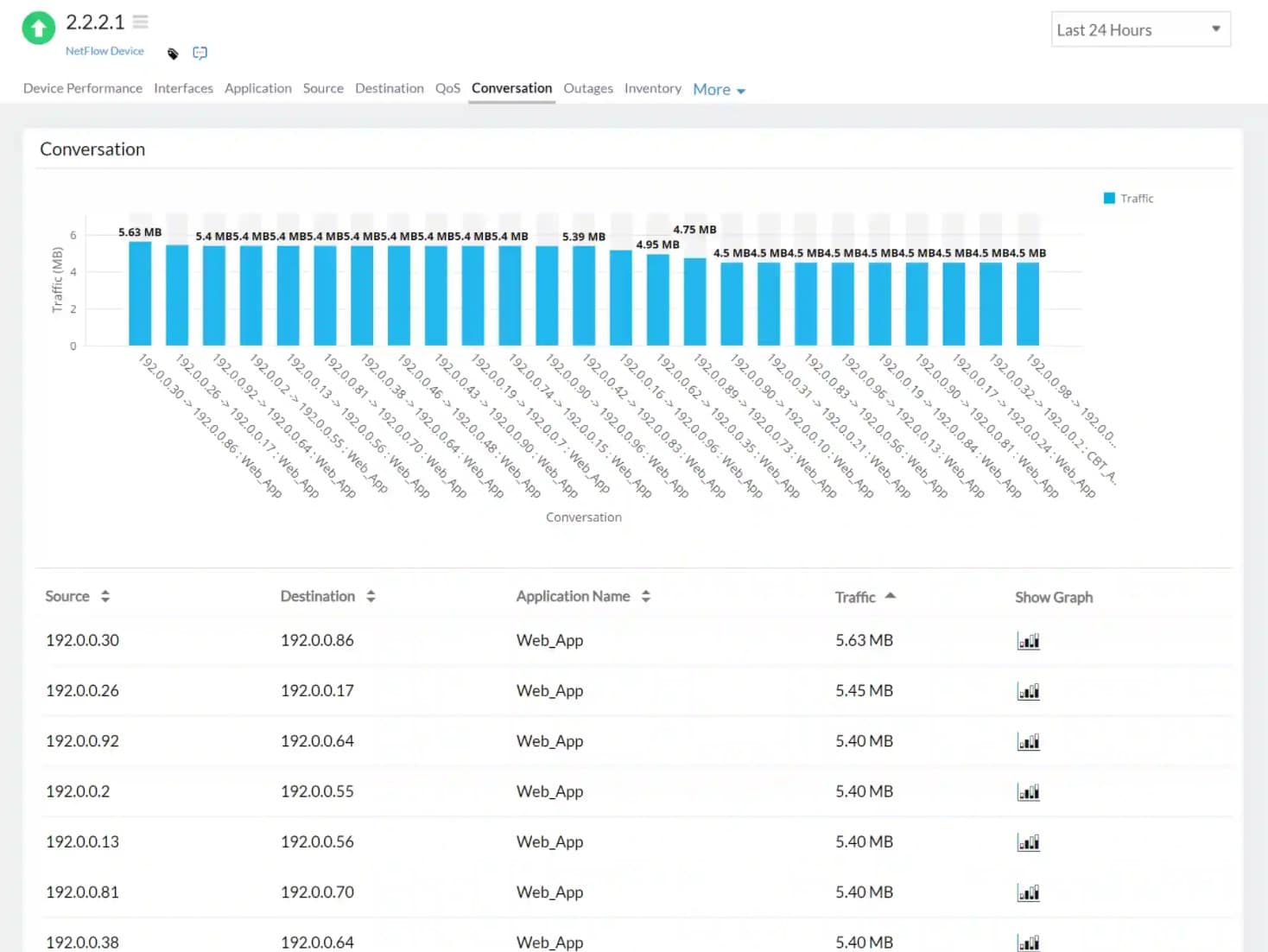
The system is able to segment traffic data so that you can see the top traffic generators. These can be identified by source or destination IP address and might include the traffic sent into the network by external devices. The tool can also display which applications use the network most.
The Site24x7 system offers integrations with project management and Help Desk systems and it is also possible to access the dashboard through iOS and Android mobile devices. The tool is marketed as part of a bundle of services.
With a typical Site24x7 package, you get network performance monitoring, network traffic monitoring, and server monitoring tools all in one deal. The bundles also include real user monitoring and application performance monitoring functions. The standard packages are sized for small businesses with additional charges for more monitoring volumes, which makes this system suitable for larger organizations.
Who is it recommended for?
Site24x7 Network Traffic Monitoring is recommended for businesses of various sizes, offering flexibility in monitoring network traffic. Its multi-protocol capability ensures compatibility with devices from different manufacturers, making it suitable for diverse network environments.
For instance, in the healthcare sector, it assists in maintaining consistent network performance for critical medical applications, while in e-commerce, it helps identify and address traffic patterns to ensure smooth customer transactions.
There are many different bundles available but all of them include network traffic monitoring. You can get any package on a 30-day free trial.
Pricing: Prices start at $9 per month, charged annually.
Download: site24x7.com/network-traffic-monitoring.html
4. ManageEngine Netflow Analyzer – FREE TRIAL
With the understanding that administrators are tasked with making access to applications critical to the running of a business as effortless as possible, ManageEngine Netflow Analyzer has designed its interface to make bandwidth monitoring easy. As a flow-based monitoring tool, administrators are able to visually monitor all activity, and bandwidth usage in the network in real-time.
Why do we recommend it?
Our testing revealed that ManageEngine NetFlow Analyzer excels in providing visibility into bandwidth usage, making it easy to identify top talkers and bandwidth-consuming applications. It efficiently categorized and classified our traffic, aiding administrators in prompt issue resolution.
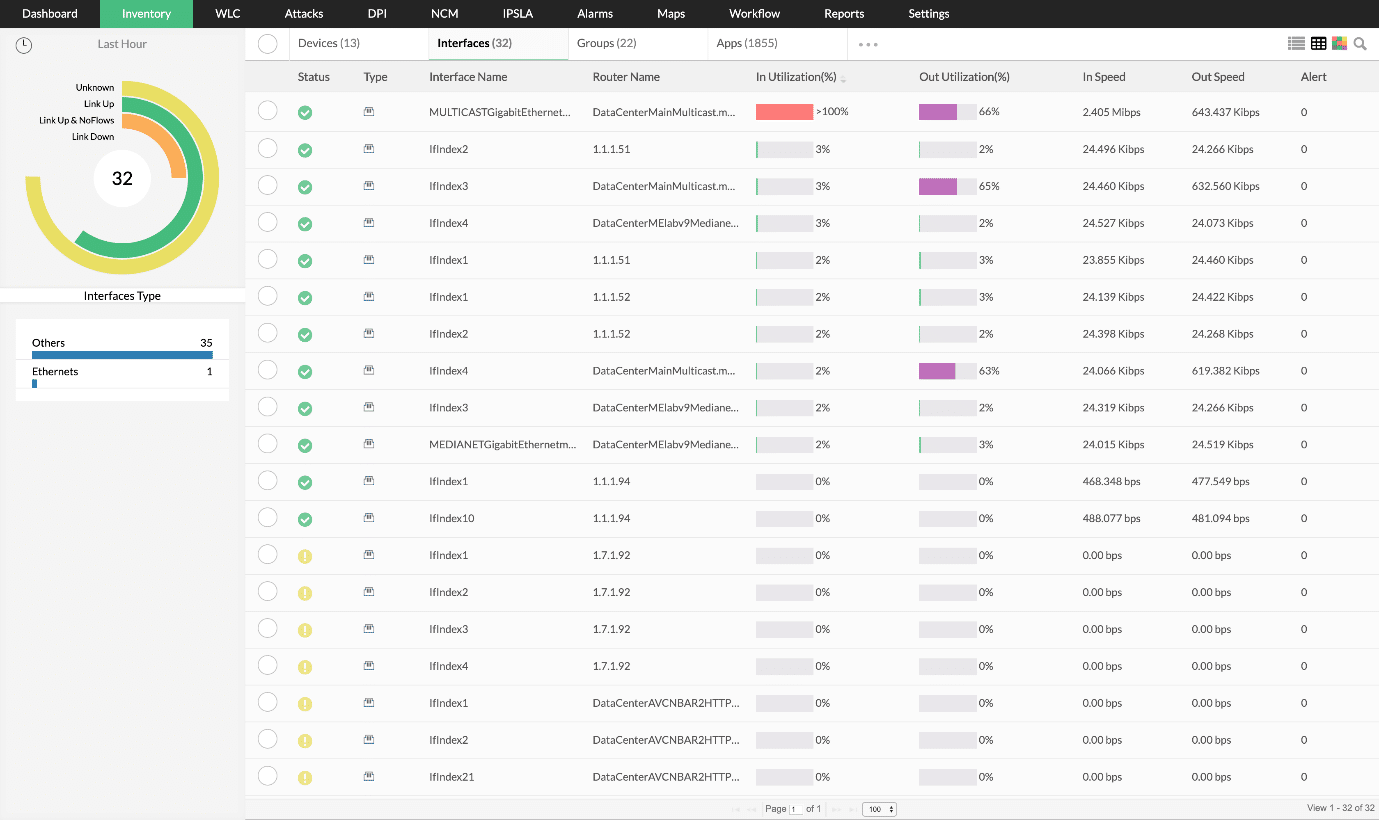
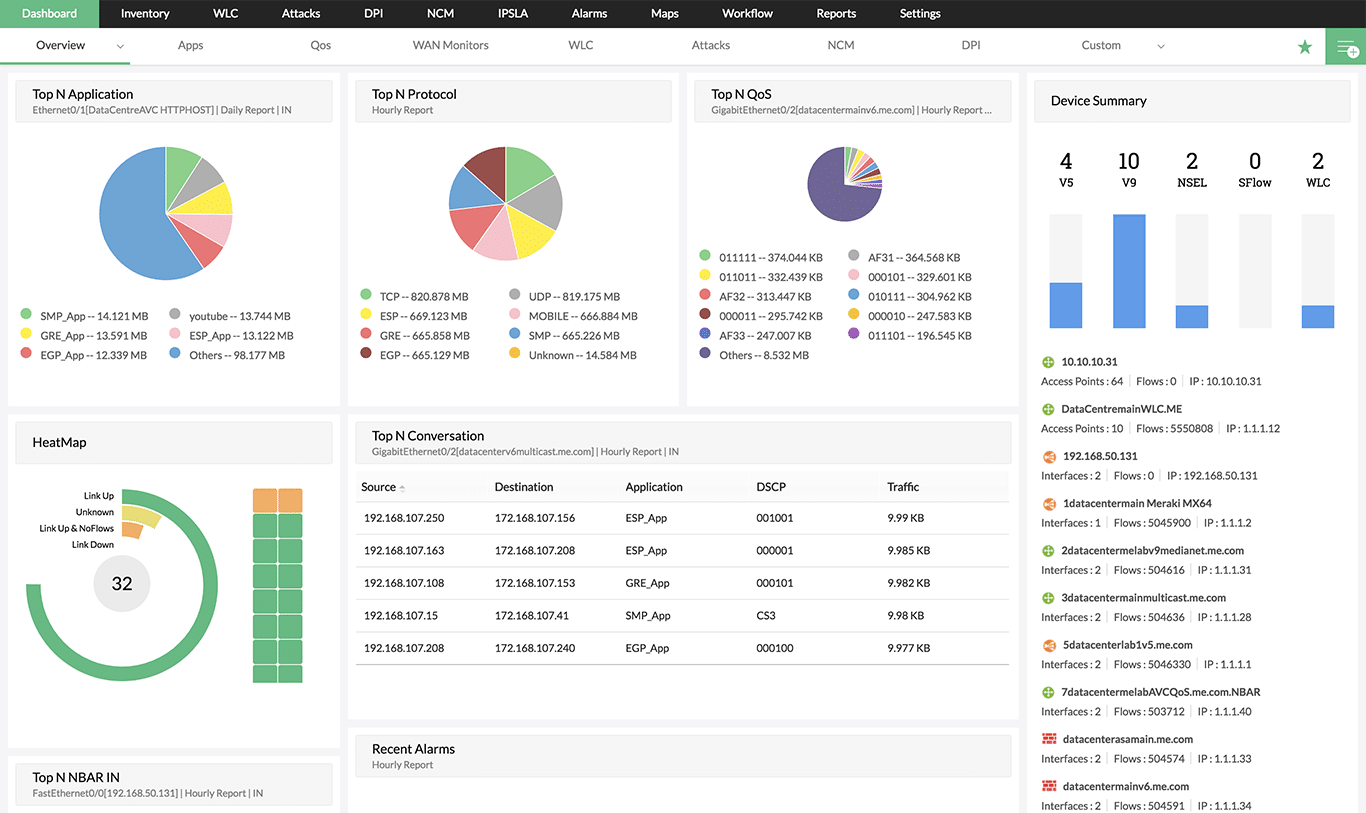
In the aim of resolving issues efficiently, before they affect end-users, ManageEngine Netflow Analyzer highlights which applications consume the most bandwidth as well as the top talkers in a network. In its measurement of bandwidth usage, visibility is immediately generated through its classification and categorization of the traffic monitored.
Usage of applications, interfaces, protocols, and hosts are broken down into graphs, while the bandwidth usage checker further assists administrators to drill down for a more comprehensive analysis. This involves detailed information on the consumption of top sources, conversations, and destinations, providing administrators with the ability to troubleshoot and resolve issues as they arise in less time.
With the avoidance of bandwidth delays in mind, ManageEngine Netflow Analyzer further helps administrators identify and search specific usage details such as applications, IP addresses, protocols, and more through its use of customized reports. The addition of the ability to limit the bandwidth consumption of applications non-critical to the business makes it simpler to manage, monitor, and control bandwidth usage across the network.
The real-time traffic summary on the customizable dashboard of ManageEngine Netflow Analyzer, while detailing the top talkers in the network, also allows for an administrator to access bandwidth statistics across a particular flow-enabled interface. The current, average and the peak bandwidth usage patterns across each of these interfaces are also viewable, providing a useful overview during the identification of problematic bandwidth usage.
ManageEngine Netflow Analyzer also supports the viewing of traffic trends across a day, a week, a month or a year for the understanding of bandwidth usage patterns over specific periods of times. This grants administrators a wider overview of overall bandwidth usage in the network and will alert them when, or if, there is a need for increased available bandwidth, assisting them in capacity planning.
Administrators can also set thresholds for bandwidth utilization, receiving alerts via email or SMS if the thresholds are neared or reached. This reduces the response time to bandwidth hogs, limiting the probability of traffic spikes, and providing the assurance of a smoother, more efficiently run network.
ManageEngine Netflow Analyzer integrates NetFlow, sFlow, JFlow, and more, as well as other collection and analysis engines, while its NetFlow exports are collected, correlated, and analyzed with the aim of monitoring the usage of bandwidth across each WAN link on the network. It eliminates the need for hardware probes in the monitoring of bandwidth usage and the software is designed to suit both Windows and Linux environments.
Who is it recommended for?
ManageEngine NetFlow Analyzer is recommended for administrators focused on efficient bandwidth management. Its user-friendly interface and real-time traffic summaries cater to both beginners and experienced users, making it a valuable tool for network monitoring.
In a financial institution, it aids in identifying and prioritizing bandwidth for essential trading applications, while in manufacturing, it helps monitor and control bandwidth usage for seamless production processes.
Pricing: You can download a 30-day free trial.
Download: https://www.manageengine.com/products/netflow/download.html
5. Paessler PRTG – FREE TRIAL
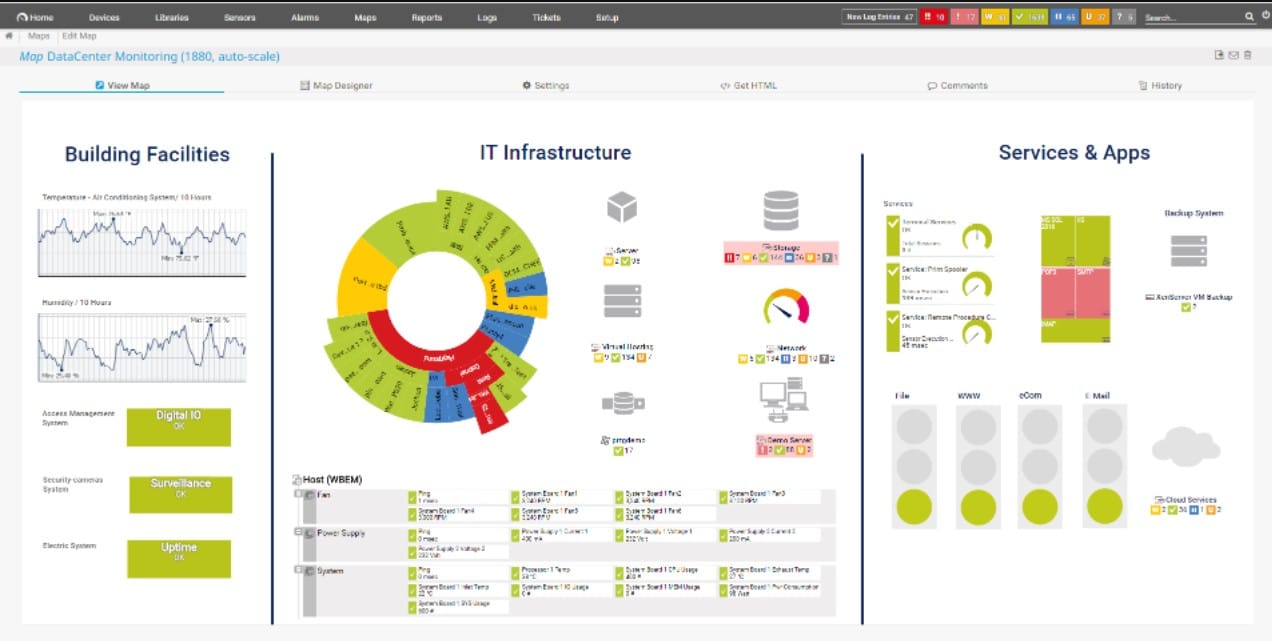
A comprehensive network monitoring tool that covers the entire IT structure of a business, the Paessler PRTG Network Monitor aims to simplify the process of monitoring a network. With its central monitoring capabilities, making it easier to gain an overview of the network, it further saves time through its prompt alerts, auto-discovery features and pre-configured device templates.
Why do we recommend it?
PRTG Network Monitor, after thorough testing, emerged as a comprehensive solution for network monitoring. Its ability to read bandwidth data directly from the router and generate detailed statistics aids in identifying potential bottlenecks and improving overall network performance.
With the knowledge that bandwidth monitoring plays an integral role in the successful management of networks, PRTG Network Monitor makes monitoring easy and straight forward. While many bandwidth monitoring tools and software are limited to monitoring internet traffic on one device, the PRTG Network Monitor instead reads bandwidth data straight from the router.
The PRTG Network Monitor generates detailed statistics about the programs and services using bandwidth in the network, further identifying the potential location of bottlenecks. The collected information is then displayed in three graphs as well as top lists, allowing administrators to quickly identify usage and data transference. This covers all ingoing and outgoing traffic across the whole network, earmarking applications and servers with the highest bandwidth usage. Multiple parameters, i.e. port numbers, IP addresses, protocols and more, are utilized in the monitoring of bandwidth through the use of Packet Sniffing or xFlow sensors.
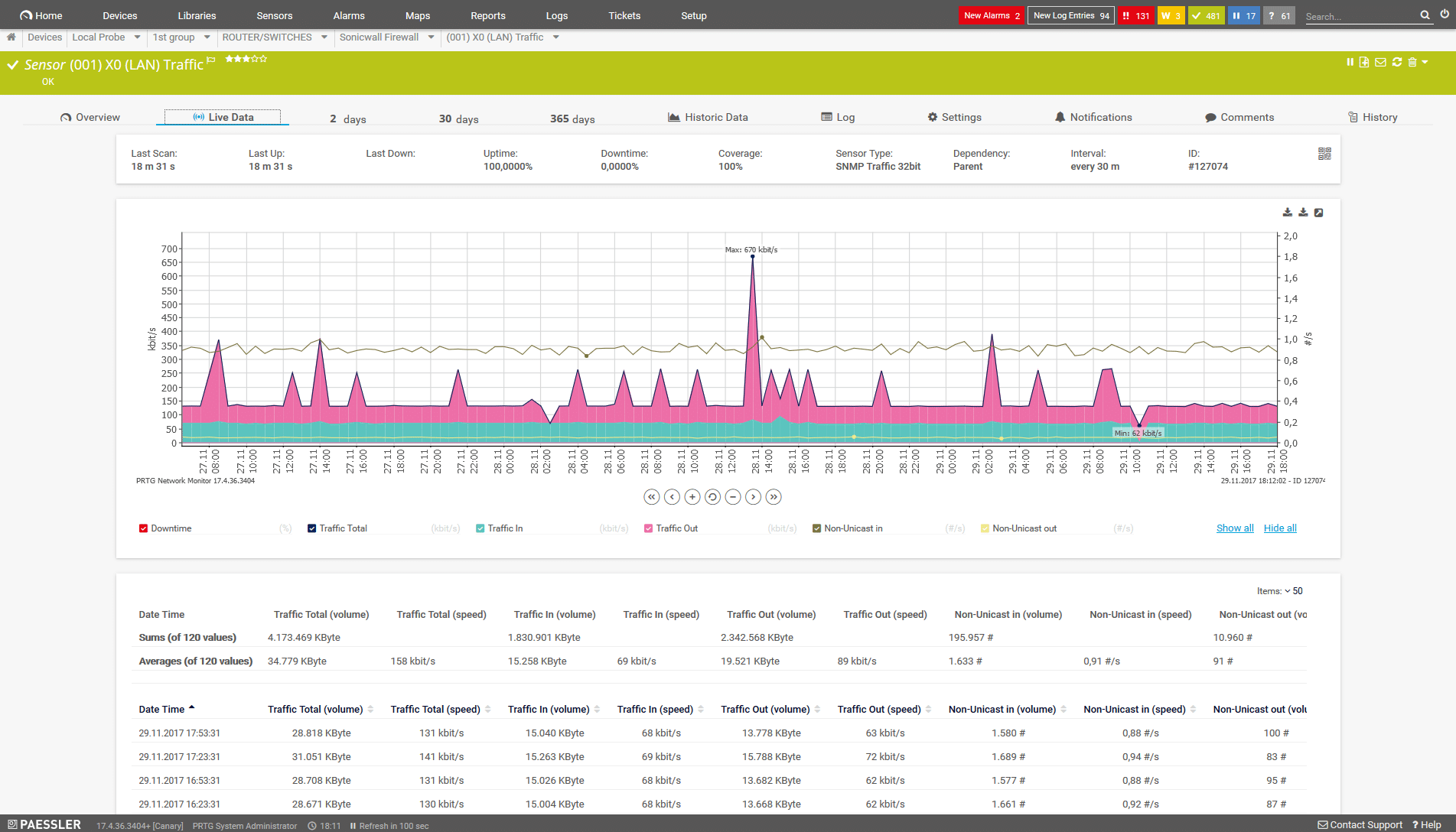
With the choices of SMS, email or push notifications, customized alerts allow administrators to deal with all bandwidth problems immediately and effectively. This assists in the proactive tackling of potential bottle necking and other bandwidth issues, with solutions identified and implemented before the network is affected negatively. As a further step, once the root of the problem has been identified and dealt with, administrators can then put new bandwidth management policies in place to better manage bandwidth in the future.
Who is it recommended for?
PRTG Network Monitor is suitable for businesses of all sizes, offering a centralized monitoring approach. It is recommended for administrators aiming for a simplified yet detailed overview of their network’s bandwidth usage.
For example, in a retail setting, it helps ensure efficient POS system performance by monitoring and optimizing bandwidth usage, while in the hospitality industry, it aids in providing uninterrupted guest services by identifying and addressing potential network congestion issues.
You can download a trial of the unlimited version of the PRTG Network Monitor. The 30-day free trial then reverts to a free version of the software, however, it remains limited to 100 sensors.
Pricing: If you opt to upgrade to a licensed version, licenses for the software start at $1750.00, with the different options.
Download: https://www.paessler.com/download/prtg-download
6. SoftPerfect NetWorx
SoftPerfect NetWorx is a highly customizable monitoring tool designed with the bandwidth monitoring requirements of single users or small offices in mind. While minimalistic, its concise graphic and/or numeric display is simple, easy to use, and offers straightforward functionality. The software can be installed on a router, allowing the monitoring of bandwidth on a few PCs or single Mac or Linux machine.
Why do we recommend it?
SoftPerfect NetWorx, tailored for home users and small businesses, impressed us with its simplicity and effectiveness in monitoring bandwidth usage. Its customizable alerts and straightforward interface make it a valuable tool for identifying and addressing potential bandwidth issues.
Its clean interface allows for the objective evaluation of bandwidth consumption on a network through its collection of bandwidth usage data. Internet speeds can be measures and monitored with this software as well as any other network connections. Bandwidth limits can be enforced to ensure they are not exceeded and SoftPerfect NetWorx further assists in the identification of potential bandwidth issues. The detection and instant alert of suspicious network activity allows for the fast identification of potential issues, ensuring efficient reaction times while also limiting network congestion.
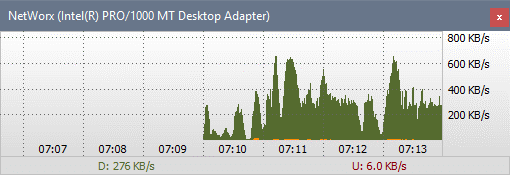
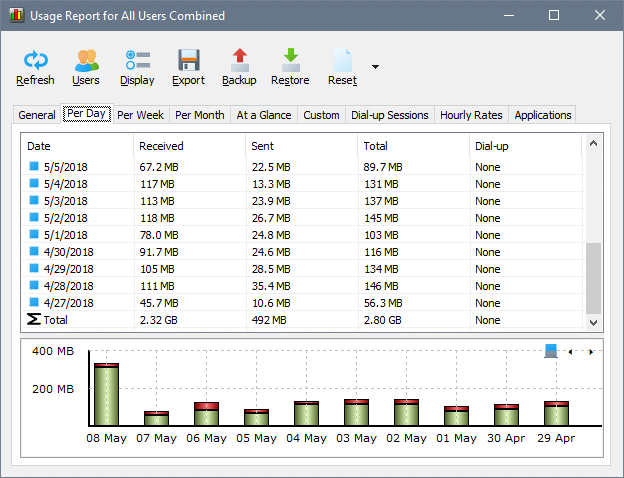
These alerts are also versatile with customizable sound as well as visual warnings to suit your needs and supports the automatic disconnect of all dial-up connections or shutting the entire system down. The reports offered by Softperfect NetWorx are exportable to a variety of formats for further analysis, with all incoming and outgoing traffic represented either on a line chart or logged into a file. This allows the viewing of bandwidth usage and dial-up duration statistics over daily, weekly and monthly periods for an overall overview of the network.
Softperfect NetWorx performs regular connection status checks and offers ping and trace route tests, proving alerts for excessive internet usage detected and supports cable modems, ADSL, WiFi cards and more.
Who is it recommended for?
SoftPerfect NetWorx is recommended for single users, small offices, or home-based businesses. Its minimalistic design and cost-effective pricing cater to those seeking a lightweight yet efficient bandwidth monitoring solution.
In a creative agency, it assists in managing bandwidth for graphic design software, ensuring smooth collaboration, while in legal practice, it helps monitor and control bandwidth usage for secure client communications and document sharing.
You can download SoftPerfect NetWorx here, which will automatically install as a trial version, with the paid licenses listed here.
Pricing: The home edition for SoftPerfect NetWorx starts at $25.00 for up to five devices, while the business edition starts at $49.00 for up to five devices.
7. SolarWinds Netflow Traffic Analyzer
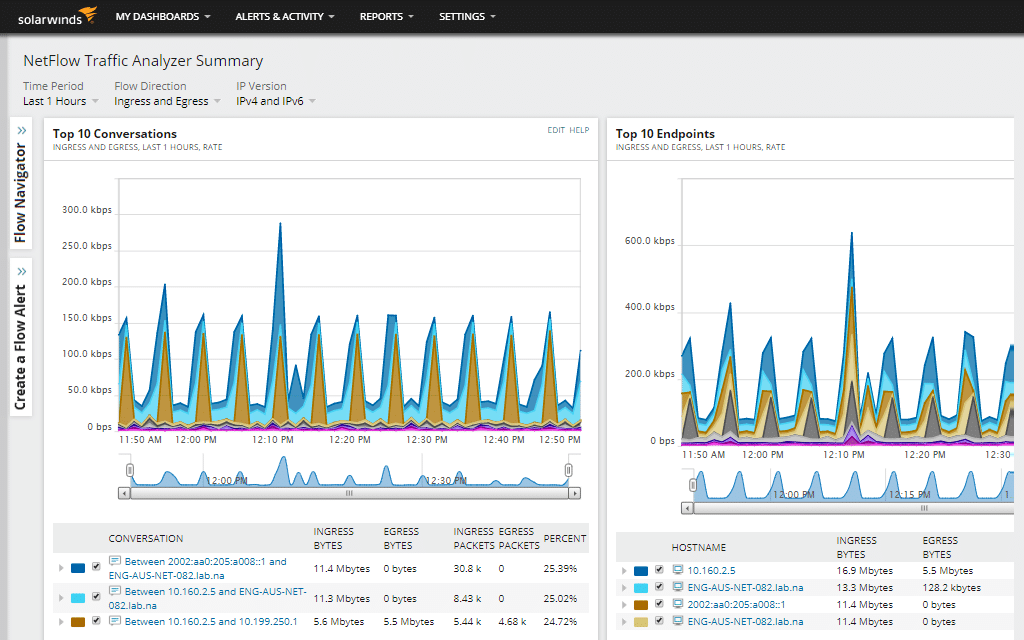
The SolarWinds Netflow Traffic Analyzer in combination with User Device Tracker NetFlow Solutions provides administrators with direct insight into the bandwidth of their network. The monitoring software allows for the efficient troubleshooting of bandwidth issues with its policy of clear visibility, which is further assisted by its easy-to-use interface.
Why do we recommend it?
In our rigorous evaluation, SolarWinds NetFlow Traffic Analyzer proved indispensable in swiftly analyzing bandwidth usage. It provided a clear view of application and client usage, aiding in the identification of potential bottlenecks and ensuring smooth data flow. This tool is recommended for network administrators seeking detailed insights into their network’s bandwidth consumption.
It supports full integration with Orion Platform products and its ability to quickly identify and notify administrators of malicious or malformed traffic flows through the use of its insights provides an overall more secure and stable network.
With high levels of importance placed on the smooth running of a network in business environments, SolarWinds Netflow Traffic Analyzer aims for fast traffic analysis through its dashboard. The software keeps track of the usage of all applications and clients while simultaneously prioritizing selected VolP, e-commerce or cloud-based applications crucial to the business, allowing them to pass smoothly through the network.
With Cisco Meraki wireless environments, SolarWinds Netflow Traffic Analyzer allows for the visualization of traffic flows for better bandwidth monitoring. Network traffic reports are further customizable, with the additional ability to create, schedule, and deliver these as well as detailed bandwidth reports with ease.
The software further allows administrators to measure whether the pre-policy and post-policy traffic levels are effective per class map. This provides oversight into whether policies are working as planned, and combined with the viewing of historical data, peak bandwidth usage is easily identified, allowing for the adjustment of policies for better network management.
Identification of root causes of problems within the network is made faster through the ability to drag and drop traffic data collected into usable formats. Netflow Traffic Analyzer presents the information collected in a web-based interface, providing instant visual correlation of all network data. The software will further immediately alert administrators of any sudden increase and decrease of application traffic or if it disappears completely.
Administrators can then respond promptly, fixing problems arising in bandwidth usage before end-users are affected or business processes are interrupted.
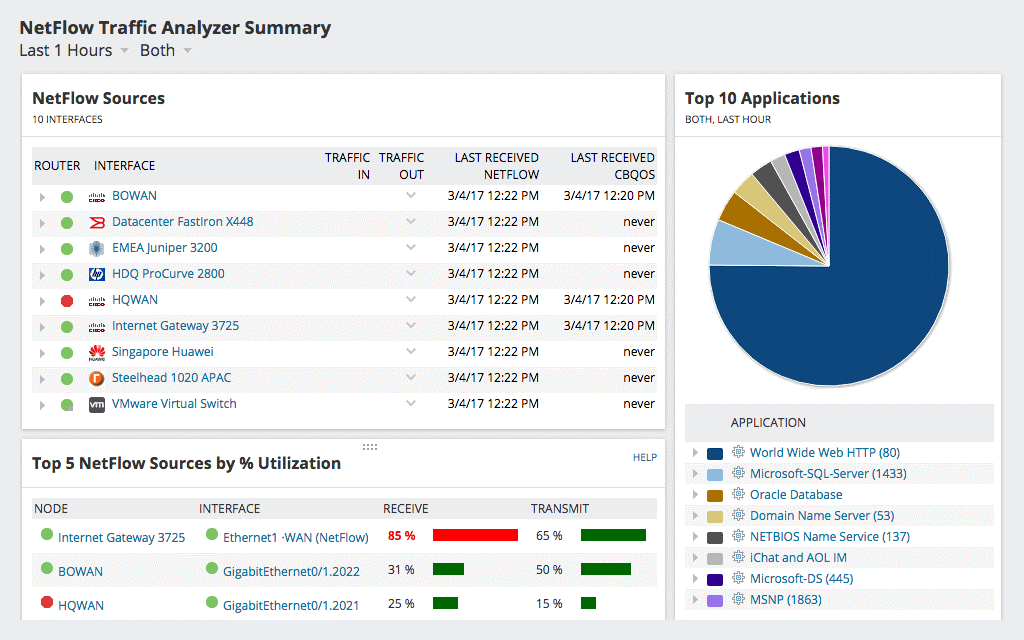
SolarWinds Netflow Traffic Analyzer allows administrators to monitor bandwidth by application, protocol and IP address group, further breaking down traffic conversations by policy when combined with the Network Configuration Manager. Insight into flow data from VMware vSphere switches has been added to the software, allowing administrators to filter out east-west traffic on specific hypervisors. This additional feature assists in the avoidance of service impacts on the network when workloads are being moved.
With the integration of SolarWinds User Device Tracker, administrators can further identify user contact information as well as switch port location, allowing administrators to enforce limits on bandwidth hogs or simply remove them from the network.
Who is it recommended for?
Network administrators, particularly those managing Cisco Meraki wireless environments, can benefit from SolarWinds NetFlow Traffic Analyzer. Its customizable reports and ability to monitor flow data from VMware vSphere switches make it a valuable asset for efficient bandwidth management. For example, in an enterprise setting, it helps IT teams ensure seamless data flow in complex networks, while in educational institutions, it aids administrators in monitoring and optimizing bandwidth usage across various departments.
You can either find the online demo for Netflow Traffic Analyzer here or signup for a free 30-day trial here to see if this software will suit your needs.
Conclusion
There are multiple solutions available for the monitoring of bandwidth in networks. Each are customizable to your specific needs and budget, whether requiring assistance as an individual or as a large organization. These solutions offer either comprehensive or basic bandwidth monitoring capabilities, with the overall aim of providing better management and troubleshooting of bandwidth-related issues.
With the goal of preventing network strain as the daily consumption of bandwidth increases across workplaces, we hope the information supplied here helps with choosing the most ideal bandwidth monitoring software and tools to suit your requirements.