


Finding the Best Agentless Monitoring Tools and Software in one of the most important components in network monitoring and the management of your networks. Not all devices that need to be monitored can accept an agent installed onto them. This is especially true for devices such as routers and network switches, but it also applies to servers and desktop systems.
This is possible because the agentless applications collect data about the target systems through other means that don’t require software to be installed on it.
Here is our list of the best Agentless Monitoring tools:
- ManageEngine OpManager – EDITOR’S CHOICE A network monitor that relies on existing communicated agents to gather network statistics. Available for Windows Server and Linux. Download a 30-day Free Trial.
- Site24x7 – FREE TRIAL A cloud platform of system tools that uses a local data collector at monitored sites while depending on the SNMP agents already present on network devices, which allows it to deliver agentless network monitoring. Get a 30-day free trial.
- Paessler PRTG – FREE TRIAL A collection of network, server, and application monitors that include agentless data collection methods. Runs on Windows Server. Download a 30-day free trial.
- ManageEngine EventLog Analyzer – FREE TRIAL A network monitoring and security tool that monitors and analyzes network events for proactive troubleshooting and incident response. Start a 30-day free trial.
- SolarWinds Network Performance Monitor A monitoring service that uses existing device agents instead of requiring its own agents to operate on the network. Installs on Windows Server.
- WhatsUp Gold A network monitor that uses established procedures of SNMP to request device status data. Runs on Windows Server.
Agent-based collectors are fine, but they do have additional overheads that need to be used in order to run on a computer or server, although these are very small normally. Additional considerations are also things like configuration on a local machine and keeping the software updated.
The only real downside is that agentless monitoring has the potential to gather less details than agent-based monitors. One of the benefits of agentless monitoring tools is the fact that it is far easier to grow your network without needing to install software of each new device. This makes it much easier to setup and monitor while maintaining monitoring within your environment.
We have chosen the most popular agentless monitoring solutions for you to look at today. Each of them has their own special way of approaching the problem of monitoring metrics on your network.
The Best Agentless Monitoring Tools
1. ManageEngine OpManager – FREE TRIAL
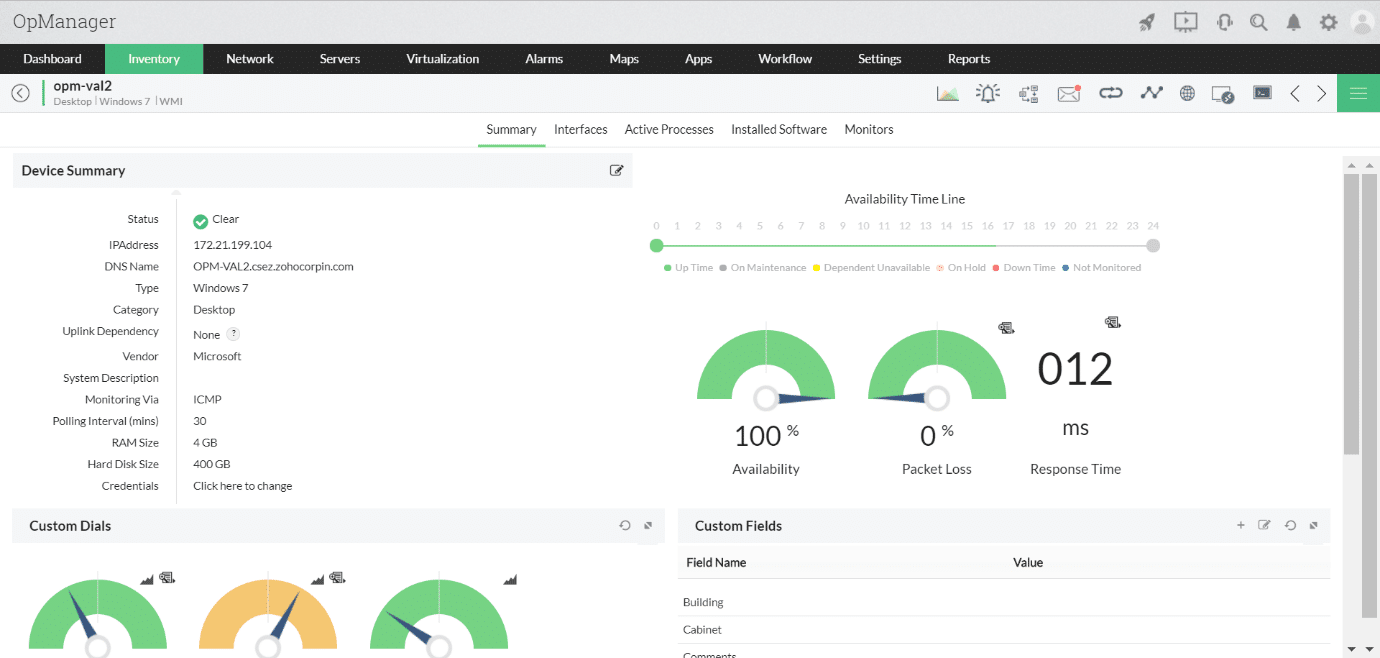
ManageEngine OpManager enters our list with some additional features to make monitoring that much easier, all without needing to use an agent. This tool ships with around 2000 monitoring options so that you can look at the performance of your applications very quickly.
Why do we recommend it
Our exploration of ManageEngine OpManager highlighted its robust features, leveraging around 2000 monitoring options for a comprehensive view of application performance. The agentless monitoring solution excelled in monitoring CPU, memory, and disk usage, along with network metrics, without the need for additional agents. This facilitated efficient monitoring and configuration, especially for systems with non-native installers.
You can also monitor other objects on the network such as CPU, memory and disk usage in the case of servers. Other stats include network metrics such as packet loss, and availability groups such as databases and server groups.
All of the metrics that you want to keep tabs on are available from a single user interface called Performance Monitors. You can add and configure your monitors from this point. Anything relating to operating systems such as logins and sessions as well as the above metrics that we just mentioned earlier. ManageEngine is a well-thought-out monitoring solution and you can feel that when you are configuring and using this application’s many features.
Who is it recommended for
ManageEngine OpManager is recommended for IT professionals seeking a feature-rich monitoring solution for applications, databases, and server groups. Its agentless approach makes it suitable for systems running on both Windows and Linux, offering flexibility in monitoring diverse environments.
You can try out a 30-day free trial here. For full pricing, you can request a quote from here.
EDITOR'S CHOICE
ManageEngine OpManager is our top choice for agentless network monitoring because it gives organizations a capable and accessible way to supervise networks without deploying agents to devices. The platform combines broad monitoring coverage with tools for troubleshooting, performance optimization, and uptime protection. One of its stronger attributes is the ability to watch many types of infrastructure, including routers, switches, firewalls, servers, and wireless access points, without requiring extra software to be installed on them. That agentless model reduces operational complexity, saves time, and helps avoid compatibility problems. The system carries out real-time scans that expose network condition, traffic behavior, and performance measurements. Its dashboards are arranged to surface important information quickly, helping IT teams identify and resolve problems with less delay. Customizable alerts are also included, so teams can be notified as soon as performance thresholds are exceeded. OpManager also provides automatic network discovery and device mapping, giving administrators clearer visibility into topology with little manual effort. Reporting strengthens the package further by supplying historical data for trend analysis and better-informed decision-making. Security is addressed through encrypted protocols such as SNMPv3 and HTTPS, and the platform also integrates with other security tools to broaden network protection.
Download: Download a 30-day FREE Trial
Official Site: https://www.manageengine.com/network-monitoring/download.html
OS: Windows Server, Linux, AWS, and Azure
2. Site24x7 – FREE TRIAL
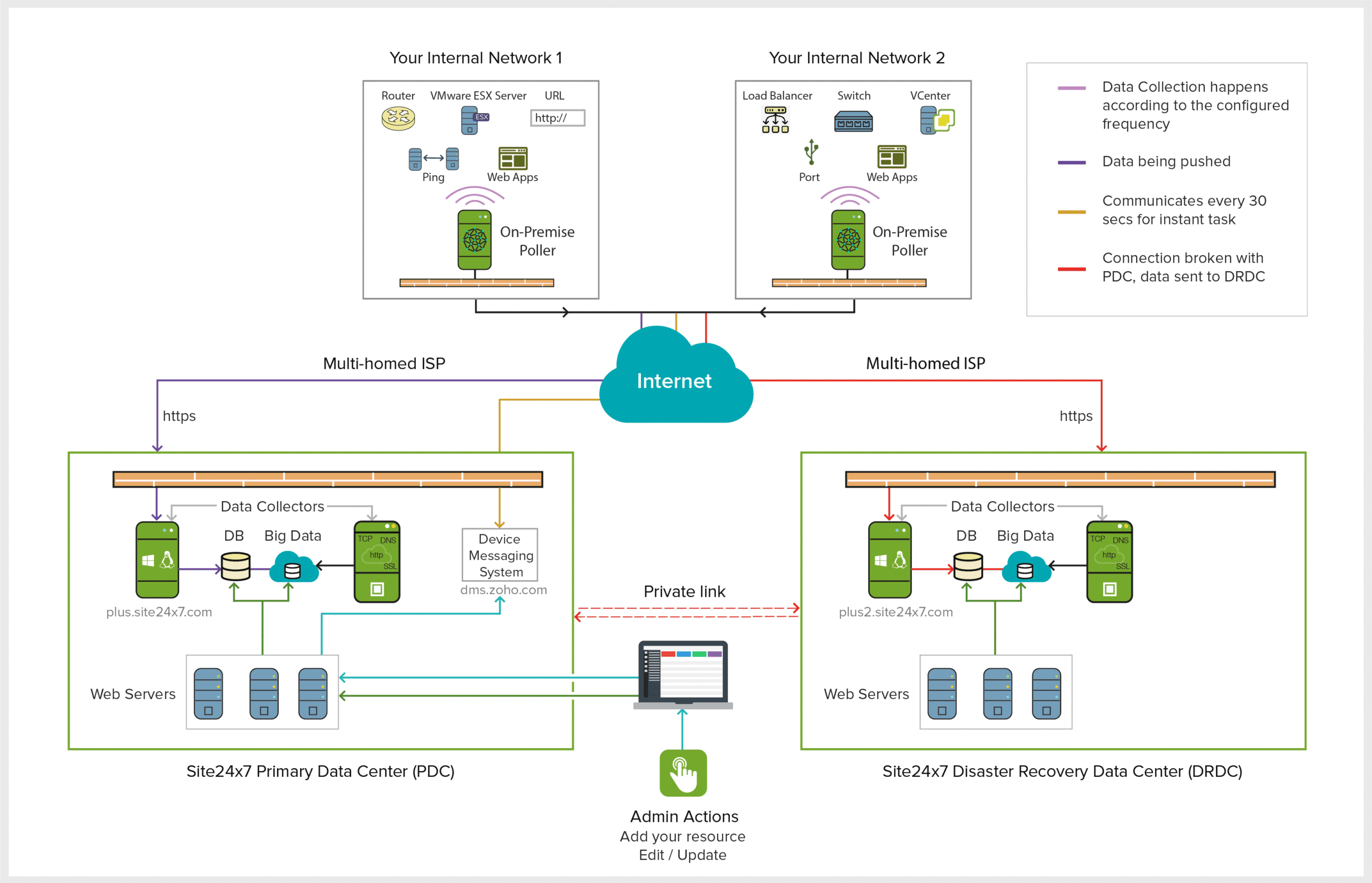
Agentless network monitoring is one of the functions delivered through Site24x7. The service gives teams visibility into both network performance and infrastructure condition without requiring an agent on every device. That approach keeps administration lighter for businesses of different sizes working with more complex environments, while still allowing routers, switches, firewalls, and other network hardware to be monitored.
Why do we recommend it?
Instead of deploying its own software across the entire device estate, the platform works with reporting methods that are already present, including SNMP, WMI, and ICMP. Using those built-in protocols avoids unnecessary software duplication and keeps the monitoring setup comparatively lightweight. On that basis, the service tracks bandwidth usage, packet loss, and latency across network devices, which helps teams catch developing issues before they become more serious incidents.
The console is also structured so administrators can interpret performance information quickly. Views can be customized, alerts can be automated, and thresholds can be defined so teams are notified as soon as conditions move outside acceptable limits and can begin troubleshooting sooner.
Automatic discovery further supports the agentless model. Devices are identified across the network, the existing SNMP capabilities on endpoints and network hardware are used during that process, and the results are turned into a topology map. That gives IT teams a clearer view of network structure and of the relationships between connected devices.
Security is built into the design as well, with encrypted protocols such as SNMPv3 and HTTPS used to protect sensitive network data in transit.
Who is it recommended for?
This service is suited to organizations that want agentless monitoring without losing visibility into performance or infrastructure condition. It also fits growing businesses because the platform can scale as network requirements expand, making it a practical option for teams that want to simplify monitoring without sacrificing performance or security.
Access a 30-day free trial here.
3. Paessler PRTG Network – FREE TRIAL
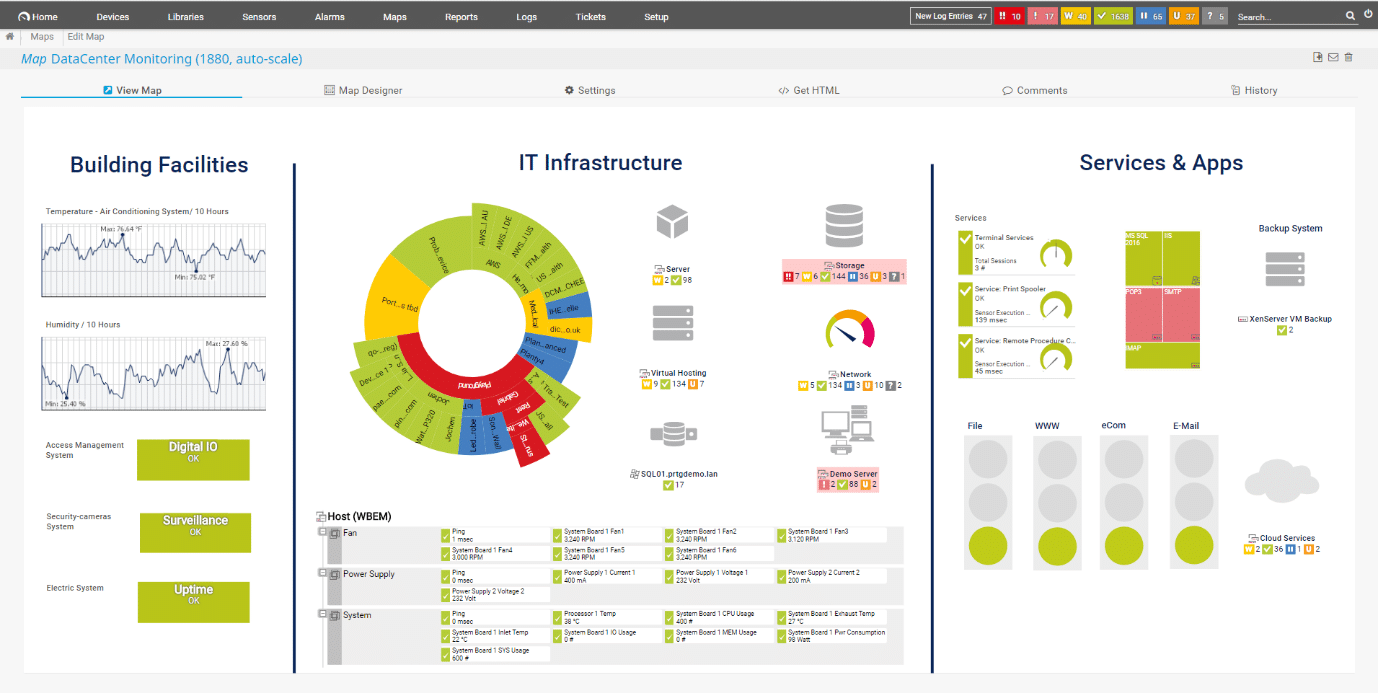
Another great example of agentless monitoring is Paessler PRTG Network Monitor. It is able to leverage SNMP, WMI, jFlow, sFlow and it has data packet analysis capabilities. This allows it to analyze the visible information about the devices on the network and identify what is currently connected on your network. Anything else that needs to be monitored can be quickly added by using the auto discovery tools that ship with this product.
Why do we recommend it
In our evaluation of Paessler PRTG Network Monitor, the tool’s utilization of SNMP, WMI, jFlow, and sFlow, coupled with data packet analysis capabilities, provided in-depth insights into network devices. The auto-discovery tools facilitated quick setup, allowing us to generate connectivity maps showcasing all devices on the network. The intuitive dashboard and interactive maps made monitoring flexible and user-friendly.
After you have finished your initial set up you can ask PRTG to generate a connectivity map that shows all devices on your network as well as how each component interacts with one another.
Where PRTG really starts to shine is in the dashboard department. It has a very intuitive interface that is simple to use and highly functional. From a single location you can look at all of the configured devices and tools that are configured for your network from a single pane of glass.
All of the data streams that you need to keep tabs on can be found from the same location as well. What is even better is the fact that you can change the configuration as you need to, making it more flexible than some older monitoring solutions and their dashboards.
There are interactive maps that you can configure as well. To make things simple you can also choose from a selection of several hundred preconfigured ones. How you choose to monitor your network is up to you, so you can choose the options that suit you.
Who is it recommended for
Paessler PRTG Network Monitor is recommended for IT professionals looking for an agentless monitoring solution with a focus on network visibility. Suitable for small to enterprise-level businesses, it offers versatility in monitoring and configuring devices, making it an ideal choice for those who prioritize a user-friendly interface.
Start by registering for and downloading the 30-day free trial.
4. ManageEngine EventLog Analyzer – FREE TRIAL
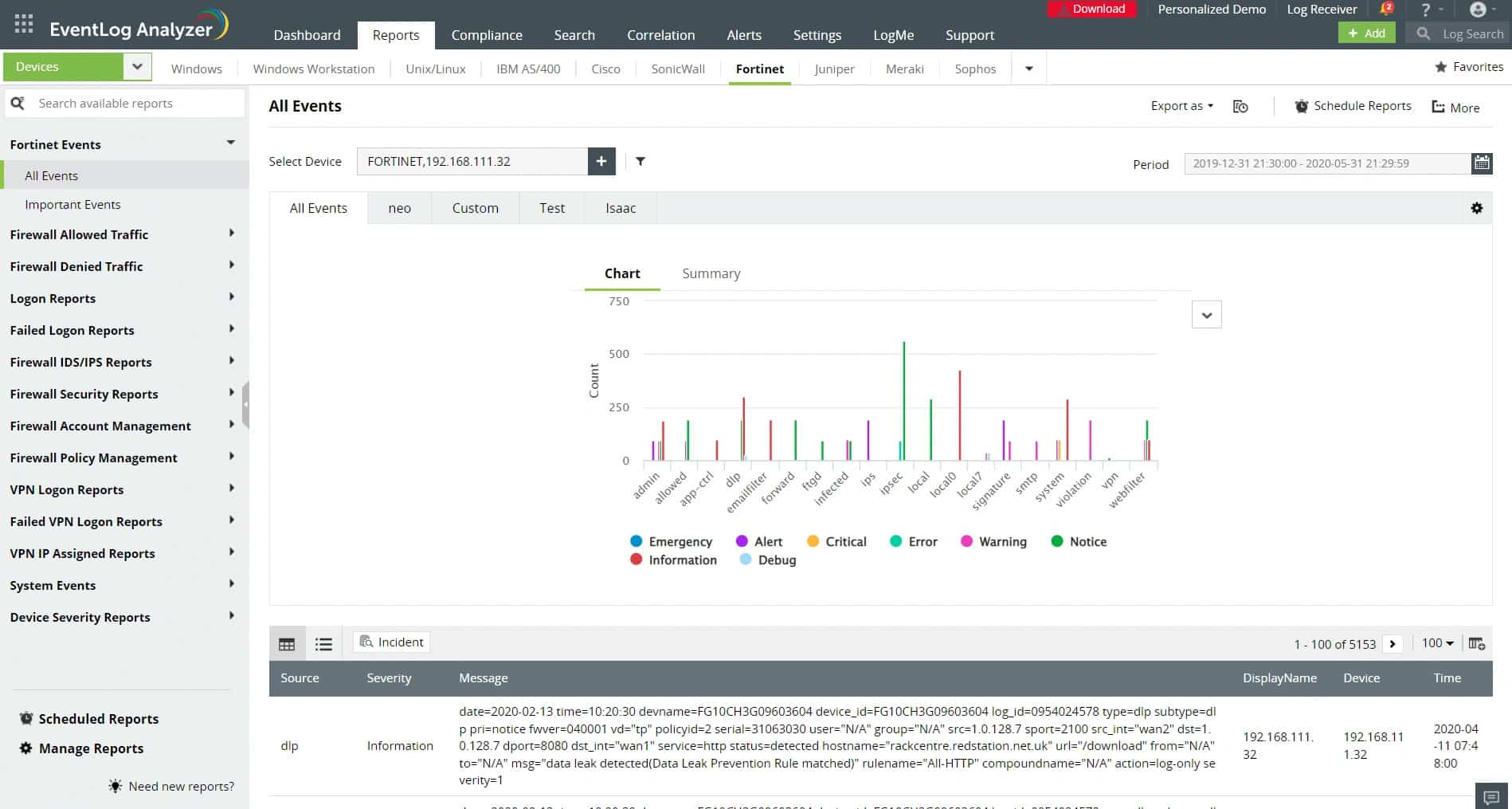
ManageEngine EventLog Analyzer supports agent-based and agentless monitoring, though by default it is agentless. It collects logs from different sources in your network using protocols, like WMI and Syslog. Next, it analyzes this data for insights and displays the results on an intuitive dashboard for easy understanding.
Why do we recommend it?
We recommend this tool for its wide coverage and ability to monitor different tools and applications through a single console. It works by collecting logs from different sources and analyzing them to identify any anomalies or vulnerabilities. Based on the findings, it offers automated response workflows. You can also view the findings on dashboards. It can even generate reports that can be used for further auditing and analysis.
One aspect that stands out for us is its reports. It comes with hundreds of predefined reports that provide information about switch and router connections, configuration changes, VPN logon trends, firewall auditing, traffic errors, and more.
Furthermore, it comes with a feature called a dynamic threat intelligence solution that taps into global threat databases to identify issues while reducing false positives. It also integrates with third-party applications and security solutions for detailed overviews.
Who is it recommended for?
It is recommended for network engineers, security teams, app developers, product managers, and anyone else who needs detailed information about the software and tools in your network. It is also a good choice for organizations that require detailed correlations from these tools, as well as for organizations that have extensive compliance requirements.
Download a 30-day free trial.
5. SolarWinds Network Performance Monitor
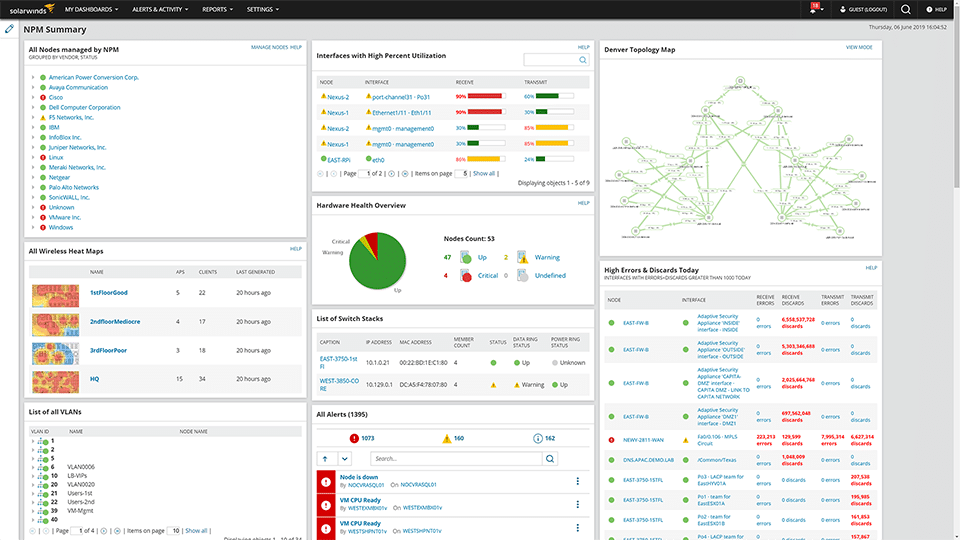
As is the case with most agentless monitors, scaling up is important. In order to guarantee the growth of an IT environment you need to monitor the current health of it. SolarWinds has a lot of networking capabilities that make monitoring that much easier. It can produce network maps and provide you with important statistics about what your traffic and data is doing across the network of your organization.
Why do we recommend it
During our extensive testing of SolarWinds Network Performance Monitor, the tool effortlessly harnessed existing device agents, eliminating the need for additional installations on our network devices. This streamlined approach allowed us to swiftly gather crucial data about our network’s performance. One notable problem it solved was providing detailed statistics on network traffic and data flow, aiding in the identification of potential issues and ensuring the uninterrupted operation of our organization’s network.
SolarWinds NPM gives you all of the important data that you need right at your fingertips, especially on large networks. They have an Enterprise Operations Console that works in tandem with the SolarWinds servers on your network.
All of this information is sent back to the SolarWinds servers by the agentless monitors, giving you an uninterrupted flow of information about your network. If a device goes offline, then you will be notified about it through a series of different alerts and warnings.
In order to configure this correctly you will have to setup a few key things, such as the levels and the metrics of your requirements. The system can also identify and shed light on devices such as servers, configured apps, network hardware like network cards, switches and routers, and much more. This all forms par of the greater software package from SolarWinds, which is for the most part seen by many as an enterprise grade software for monitoring critical infrastructure.
Who is it recommended for
SolarWinds Network Performance Monitor is highly recommended for network administrators and IT professionals dealing with large networks. It excels in producing network maps, offering vital statistics, and promptly alerting users to device offline events. This tool is suitable for enterprises seeking an advanced solution for monitoring critical infrastructure, ensuring optimal performance.
If you would like to try it out for yourself then you can download SolarWinds NPM from here. You will be required to register your email address in order to receive a download link. Starts at $2,995.
6. WhatsUp Gold
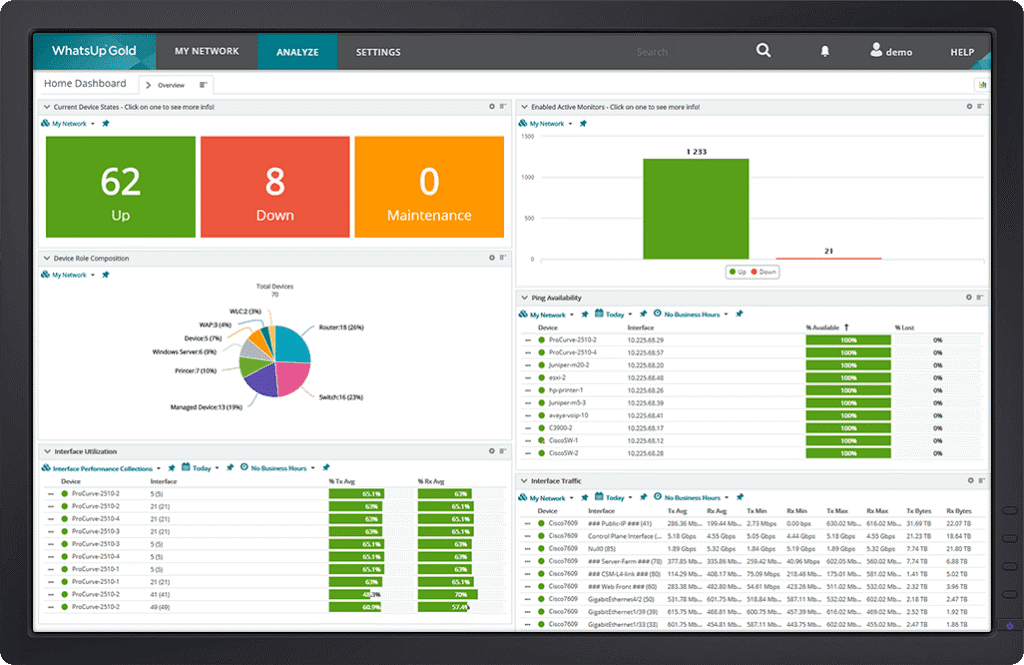
An agentless monitoring tool write up would be incomplete if we didn’t mention WhatsUp Gold.
Why do we recommend it
WhatsUp Gold, a longstanding player in agentless monitoring, impressed us with its intelligent mapping capabilities that didn’t require installations on the target hosts. It excelled in network-related features, including mapping, performance monitoring, and configuration management. Real-time alerts ensured proactive action, preventing minor issues from escalating into widespread network problems.
This application has been around for a very long time and was quite remarkable when it first came out. This was due to the way that it could intelligently map out networking paths without even needing to be installed on the hosts that it was mapping.
Its main features today are still network related, like the network mapping feature, but there are new ones too. Network performance, wireless networks, application performance and configuration management are just a few features that you can expect from Whatsup Gold.
You will be able to discover your network thanks to the way that it runs its discoveries in the layer 2 and 3 tiers of the OSI model.
As a result, you can map and monitor the connectivity between devices on the network without you even needing to install an agent on to the target devices that you want to look at. On top of all of these features you can also get alerts in real-time so that your teams can take action before small issues become big system wide issues.
Who is it recommended for
WhatsUp Gold is recommended for IT professionals and network administrators seeking a comprehensive agentless monitoring tool with a focus on network performance. With features covering network mapping, wireless networks, application performance, and configuration management, it caters to various sectors, making it suitable for enterprises prioritizing network health and efficiency.
If you would like to find out more about pricing then be sure to check out the pricing page here.
Conclusion
We know how important it is to be able to monitor key infrastructure without the need to install an agent onto your computers and servers on the network. There are some key differences between agentless and traditional monitoring agents.
Perhaps the biggest factor is the way that the monitoring systems are able to report back on the status of devices on the network. Agentless monitoring cannot get as much detail as traditional methods, and this is an issue for some devices like servers. On a server most support staff need to know about items such as memory usage and processor utilization.
It is important to understand why you would want to use an agentless monitor in the first place. It is a nimble and resource free way of checking important elements such as connectivity and the status of a device.
This is why you should familiarize yourself with the features of each of the above examples that we have reviews today. We hope that this has been helpful in your search for the Best Agentless Monitoring software and solutions.