


Microsoft Azure, a leading cloud computing platform, offers full observation and visibility into applications, infrastructure and networks with its growing collection of integrated services. Many organizations use Azure in their infrastructure and today we’ll be going over the Best Azure Monitoring Software and Tools for your environment.
Here is our list of the best Azure monitoring software & tools:
- ManageEngine ADAudit Plus – EDITOR’S CHOICE An auditing platform that gives teams close visibility into Entra ID on Azure and Active Directory across other environments. It helps track activity, follow user sign-ins, identify sign-in risks, and manage groups and roles. Available for Windows Server, AWS, and Azure. Get a 30-day free trial.
- Turbo360 Azure Monitoring – FREE TRIAL A system of three tools for monitoring Azure services, letting you define logical applications, distributed tracing on application resources, and tracking Azure resource usage for invoice reconciliation. Available as a SaaS package, or as a privately hosted Azure service. Start a 15-day free trial.
- Progress WhatsUp Gold – FREE TRIAL A cloud-based monitoring platform that analyzes your Azure environment in detail to provide insights about usage, spending, and user experience. Start a 30-day free trial.
- Site24x7 Infrastructure Monitoring – FREE TRIAL A cloud-based application, server, and network monitor that includes many integrations for Azure services.
- ManageEngine Applications Manager – FREE TRIAL An application performance monitor that has capabilities in Cloud service monitoring as well as on-premises resource supervision. This system can monitor Azure services and installs on premises on Windows Server and Linux.
- Paessler PRTG – FREE TRIAL A collection of monitoring systems for networks, servers, and applications that include processes for monitoring Cloud platforms, including Azure. Installs on Windows Server.
- Opsview A system monitor for server and application performance and covers cloud services, such as Azure as well as on-premises resources. Installs on Linux.
- SolarWinds Server & Application Monitor This application monitor is able to supervise Cloud resources as well as on-premises activity. It covers servers as well and so it has special routines for monitoring Azure services.
- Dynatrace A cloud-based infrastructure monitoring service that includes monitoring procedures for Azure services.
- ScienceLogic SL1 An AI-driven infrastructure monitor that includes performance tracking for Azure services. Available as a physical or virtual appliance.
With cloud computing forming an essential role in organizations as technology evolves, the need for fast, easy and above all safe access to stored data from anywhere in the world has become vital. Ensuring uptime, resilience and redundancy in Cloud infrastructures is an network admins top focus and implementing a robust Azure monitoring solution should be a top priority.
Azure’s flexibility to operate within multiple environments, combined with its scalability and ability to monitor everything from one, centralized location, is ideal for organizations utilizing or switching to hybrid and multi-cloud environments. Azure further increases the resilience and availability of all services, allowing for maximum performance and availability of applications.
This is achieved through its extensive collection, analyzation and action on operational telemetry from both cloud and on-premises environments, thereby supporting the fast, proactive identification of issues. This allows for timely reactions to problems arising, ensuring applications and networks run smoothly and uninterrupted.
It further enhances security measures, known for delivering highly rated data protection and security certifications, while also ensuring critical components are consistently supervised to reduce the risk of lost information. While the Azure Platform allows for analysis and visualization of its vast information collected, as well as alerting, third-party tools greatly assist in the monitoring and management of Azure services, virtual machines and databases.
With these Azure monitoring tools, system administrators can detect, diagnose and rectify issues with far more ease. This is possible through the substantial insight provided into an organization’s Azure environment through the level of granularity offered as well as the variety of parameters monitored.
Combined with broader, overall visibility, as well as automation and auto-discovery capabilities, the following Azure monitoring tools make the monitoring of this complex environment far more manageable. The benefits, featured functions, download links and pricing structures are listed beneath each of the Azure monitoring tools mentioned.
The best Azure monitoring software
1. ManageEngine ADAudit Plus – FREE TRIAL
ManageEngine ADAudit Plus is built for server auditing, activity monitoring, file integrity tracking, and security oversight. It gives administrators visibility across on-premises servers and cloud environments, including Azure. By watching server activity continuously, the platform helps teams spot threats early and respond before they spread.
Its auditing functions record user actions such as logins, logoffs, and file changes. That makes it easier to investigate suspicious behavior, confirm accountability, and detect possible breaches. The file integrity monitoring component adds another layer by tracking changes to important system files and warning administrators when unauthorized modifications appear.
The platform also extends those controls into Azure. It monitors Entra ID activity, follows user sign-ins, and identifies sign-in risks, which helps organizations tighten cloud security and support compliance requirements. ADAudit Plus is designed to strengthen security across the full environment. Suspicious activity triggers alerts that notify technicians immediately, and the system can also be configured to launch automated responses.
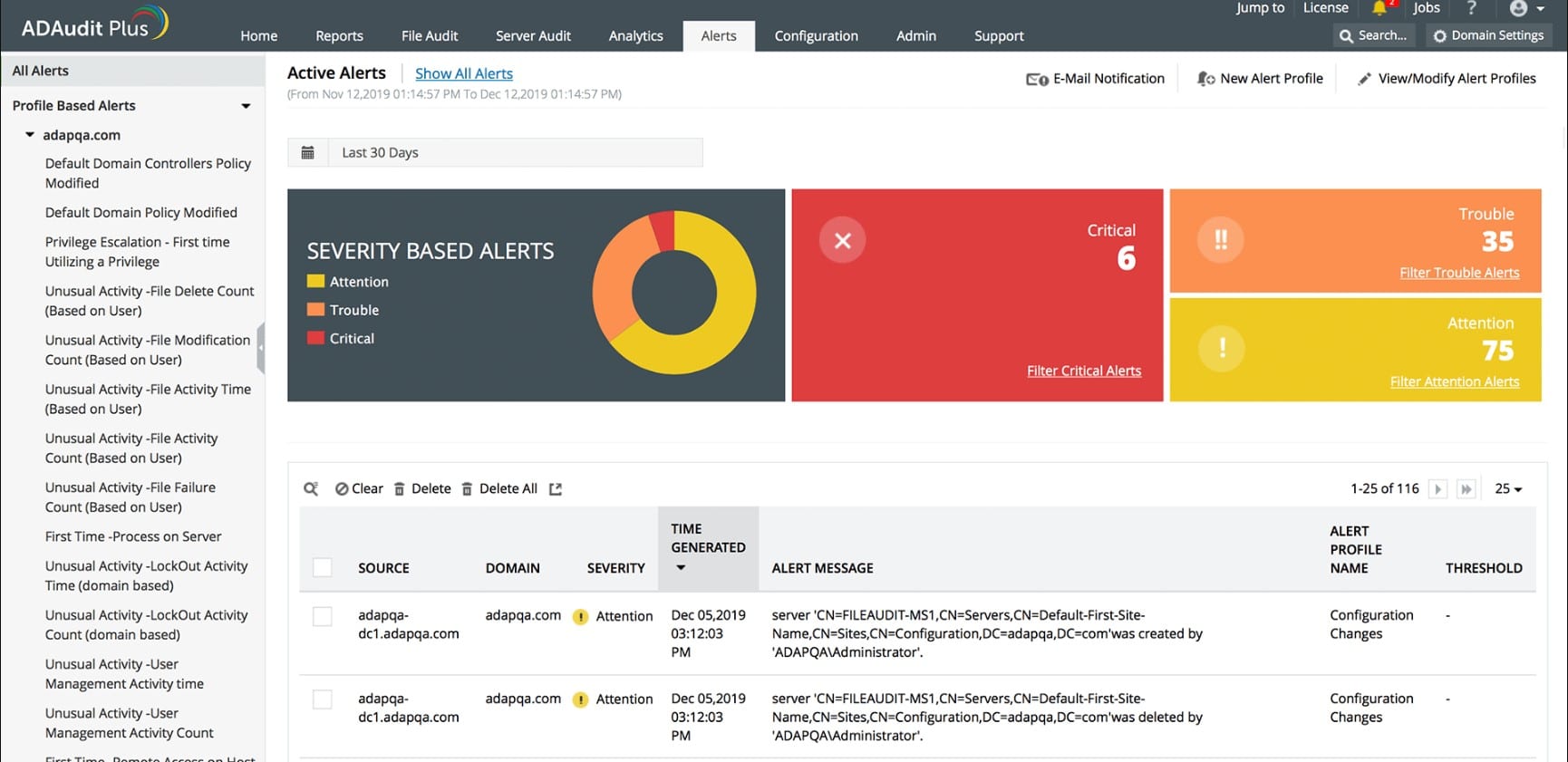
The tool is also effective for tracking changes in both Active Directory and Entra ID. It gives administrators real-time visibility into sign-ins, group membership updates, and modifications to critical AD objects, making it easier to catch unauthorized changes as they happen.
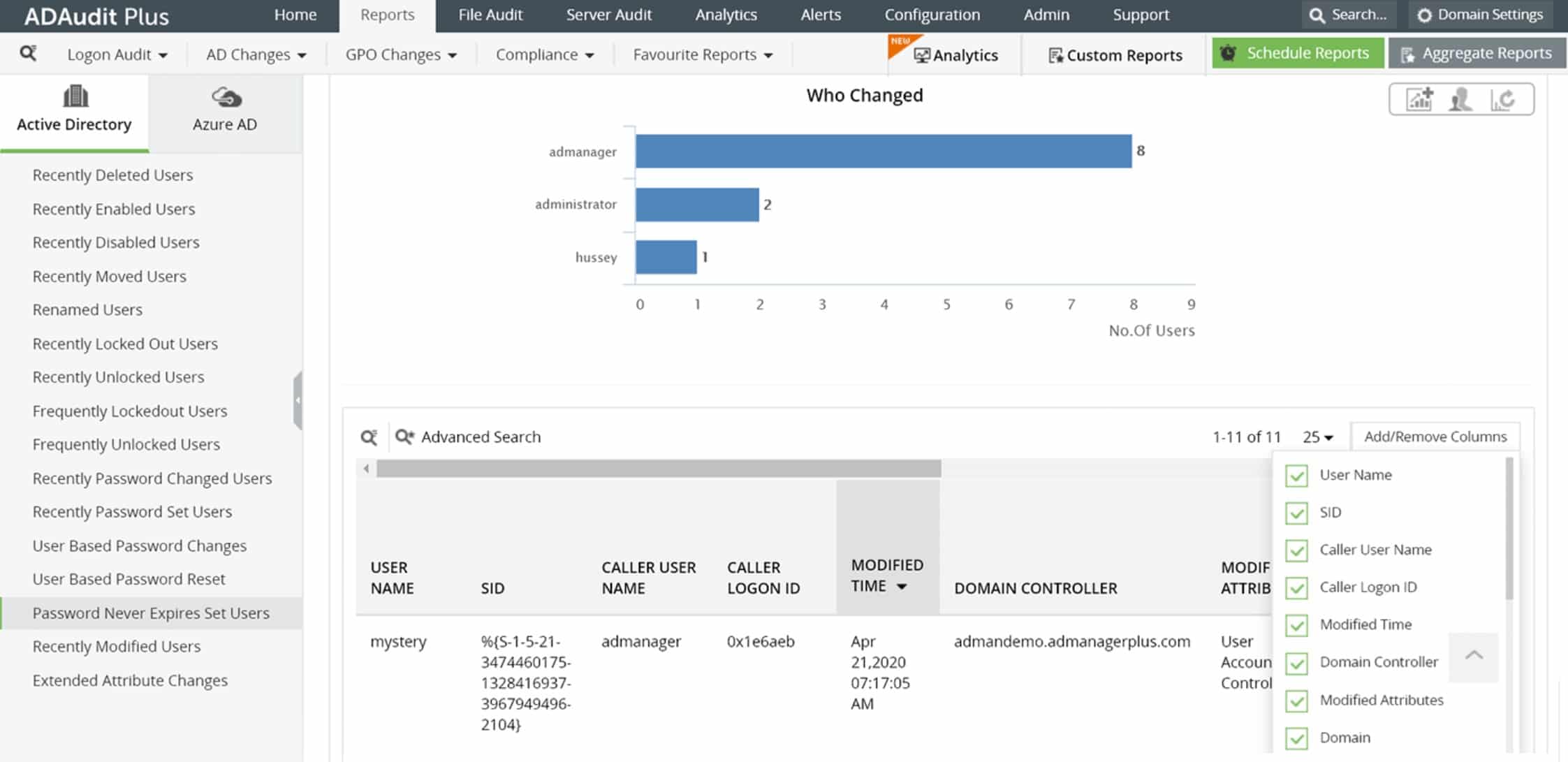
Its Entra ID coverage also includes detailed auditing of cloud authentication activity. It records successful and failed sign-in attempts and produces reports on user behavior and sign-in risk, helping organizations maintain stronger control across hybrid AD estates.
For day-to-day administration, ADAudit Plus allows technician accounts with different permission levels. Administrators can assign roles such as Admin or Operator so staff have the access they need without exposing the whole system.
This package runs as software on Windows Server, but it can also be deployed in Azure or AWS through the Marketplace of either platform.
ADAudit Plus is available in two editions, and both are priced by the number of domains covered. The Standard edition starts at $595 per year, and the Professional edition starts at $945 per year. In both cases, the entry price covers two domains. The package is available for a 30-day free trial.
EDITOR'S CHOICE
ManageEngine ADAudit Plus is our top choice for Azure monitoring because it brings together Azure-focused auditing, server activity tracking, file integrity monitoring, and security alerting in one package. It gives administrators a direct view into Entra ID activity, sign-ins, sign-in risks, user actions, and changes to key objects, which makes it easier to detect suspicious behavior and maintain a reliable audit trail. It also helps with compliance by pairing that visibility with reporting, alerts, and monitoring across hybrid environments. File integrity checks, real-time notifications, and role-based technician access add practical control without making administration harder. That mix of auditing depth, Azure coverage, and security visibility is what puts ADAudit Plus at the top here.
Download: Get a 30-day FREE Trial
Official Site: https://www.manageengine.com/products/active-directory-audit/download.html
OS: Windows Server, AWS, and Azure
2. Turbo360 Azure Monitoring – FREE TRIAL
Turbo360 is a platform that includes three modules: Business Applications, Business Activity Monitoring, and Azure Documenter. These tools are all available individually, but they also work well together as a suite.
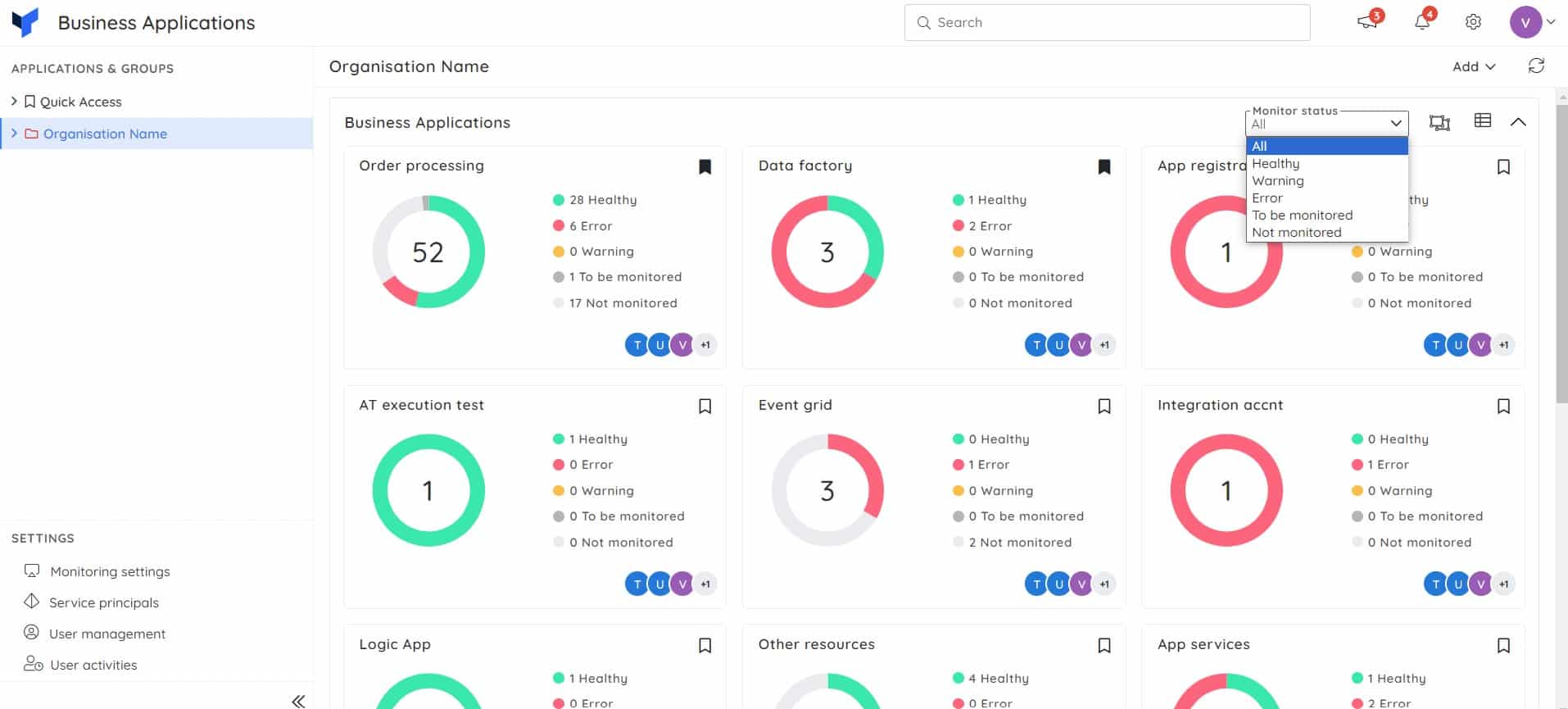
The Business Applications and Business Activity Monitoring tools are particularly good together. The first of these utilities lets you define a group of Azure services as a logical application. This is beneficial for monitoring because, although the Azure platform provides metrics on the performance of its services, these statistics are delivered in separate streams.
The silo approach of the Azure platform in how it delivers its services makes tracking the performance of your Azure-based infrastructure very difficult. When you are looking at microservices, hosted on Azure, performance tracking and root cause analysis becomes even more complicated and almost impossible to perform with the assistance of a monitoring tool. The Business Activity Monitoring unit provides that service.
So, the Business Applications unit virtualizes a bundle of Azure services into a single entity by providing a wrapper. The consolidation of metrics related to those individual services enables the Business Applications dashboard to present live performance data for that logical application. You also need to knit that logical application into its environment. The Business Applications service provides an application dependency map around that virtual application. With this, you can see the services that feed into your virtual application and the applications that depend on the services of your new application.
Business Activity Monitoring is a distributed tracing service, which is suited to monitoring microservices, hosted on serverless platforms.
The monitor tracks the activities of your business processes as the message travels through the application components. This makes querying the transactions on business values, monitoring for exceptions and reprocessing failures to restore business feasible.
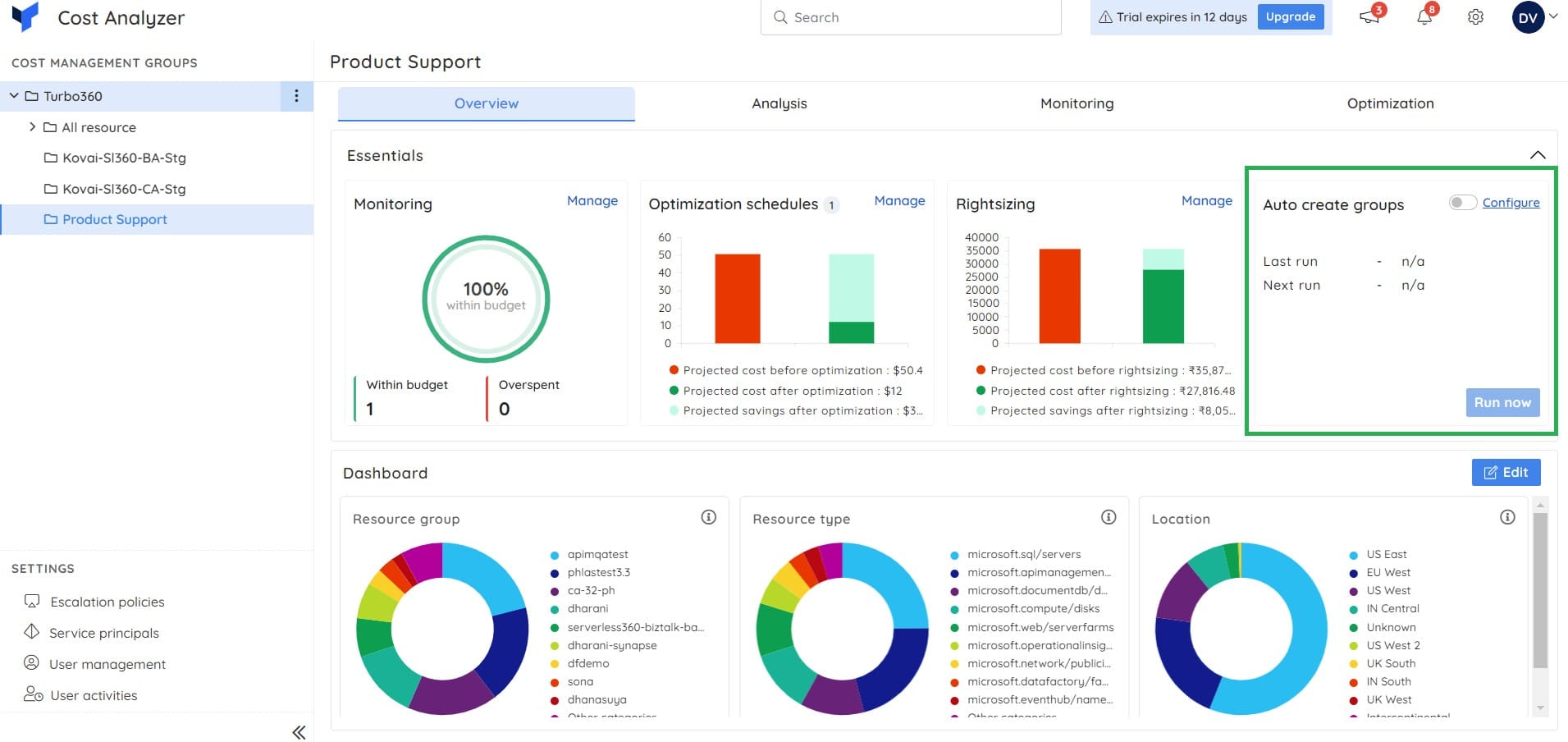
The third service that is available from Turbo360 is a usage tracking system for Azure resources. This provides daily summaries of the consumption of metered services so that you can check the invoice from Azure.
The Turbo360 package is available as a SaaS platform. It also packages its units so that you can run them as services within your own Azure accounts. Whichever deployment option you select, your monitoring service will be able to operate across platforms.
The three modules of Turbo360 are priced individually and billed annually. The Business Activity Monitoring module starts at $300 per month, the Business Application module starts at $150 month, and the Azure Documenter starts at $49 per month.
Demo: You can register for a free demo. You can also get started with a 15-day free trial.
3. Progress WhatsUp Gold – FREE TRIAL
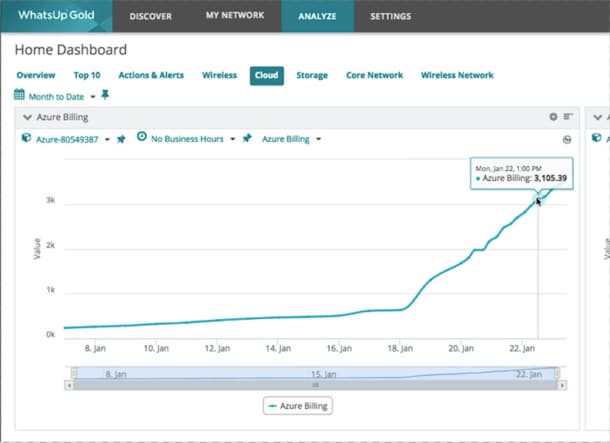
Progress WhatsUp Gold is a cloud-based tool that can comprehensively monitor your Azure environments. It gathers data about your VMs and creates a network map showing their interconnections and dependencies. This map will come in handy for identifying root causes and troubleshooting them quickly.
Why do we recommend it?
WhatsUp Gold allows organizations to proactively monitor their Azure environments to identify their performance and usage rates. In particular, it gathers information about the VMs used in your environment to identify unused and underused resources. Using this information, you can improve the usage of your resources and stop paying for the unused ones, resulting in cost savings. It will improve the efficiency and optimization as well.
Another key feature is its custom alerts. You can establish thresholds, and the system will send alerts when those thresholds are breached. Specifically, you can create alerts when your spending is equal or close to your budget to avoid overspends.
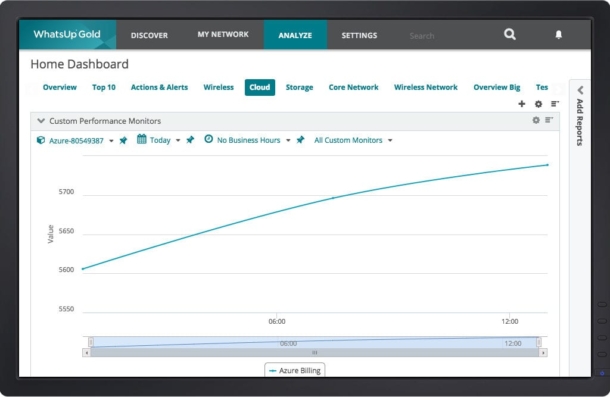
All this information gathered from your Azure VMs is analyzed and presented on intuitive dashboards to make it easy for you to understand the status and performance. Accordingly, you can make the required decisions to improve efficiency and reduce costs.
Who is it recommended for?
It is a good choice for IT teams and network engineers tasked with improving the efficiency of Azure environments. It is also a handy tool for decision-makers who prefer to make data-driven decisions. MSPs can also use this tool to boost the performance of their clients’ Azure environments.
Pricing: WhatsUp Gold offers two plans – Premium and Total Plus. You can also choose between a subscription-based model and perpetual licensing. Start a 30-day free trial.
4. Site24x7 Infrastructure Monitoring – FREE TRIAL
Site24x7 is a cloud-based platform of system monitoring tools. Its Infrastructure module deals with servers, networks, and services, among which are virtualizations. This system can easily monitor Cloud resources as well as on-premises systems and Azure services are among the products that Site24x7 is able to monitor.
Why do we recommend it?
Site24x7, as a cloud-based system monitoring platform, stood out for its versatility in covering servers, networks, and Azure services. The platform’s Azure-related integrations, including Azure Files, Azure PostgreSQL DB, and others, allowed for comprehensive monitoring. Site24x7’s integrations and inter-dependency mapping helped us build a clear picture of the activities supporting our applications. This, in turn, facilitated the identification of root causes for performance issues.
The Site24x7 system includes many specialist modules that can be added on or free. Among these are a number of Azure tailored solutions. These are called “integrations” and they need to be activated in order to add on specialized screens to the dashboard.
The Azure-related integrations available in Site24x7 Infrastructure include:
- Microsoft Azure
- Azure Files
- Azure PostgreSQL DB
- Azure Redis Cache
- Azure Cosmos DB
- Azure Backup
- Azure WebJobs
- Azure Functions
- Azure Gateway
- Azure SQL Database
- Azure Service Bus
- Azure IoT Hub
- Azure Maps
- Azure Search
- Azure ASP
- Azure ML
- Azure Analysis Services
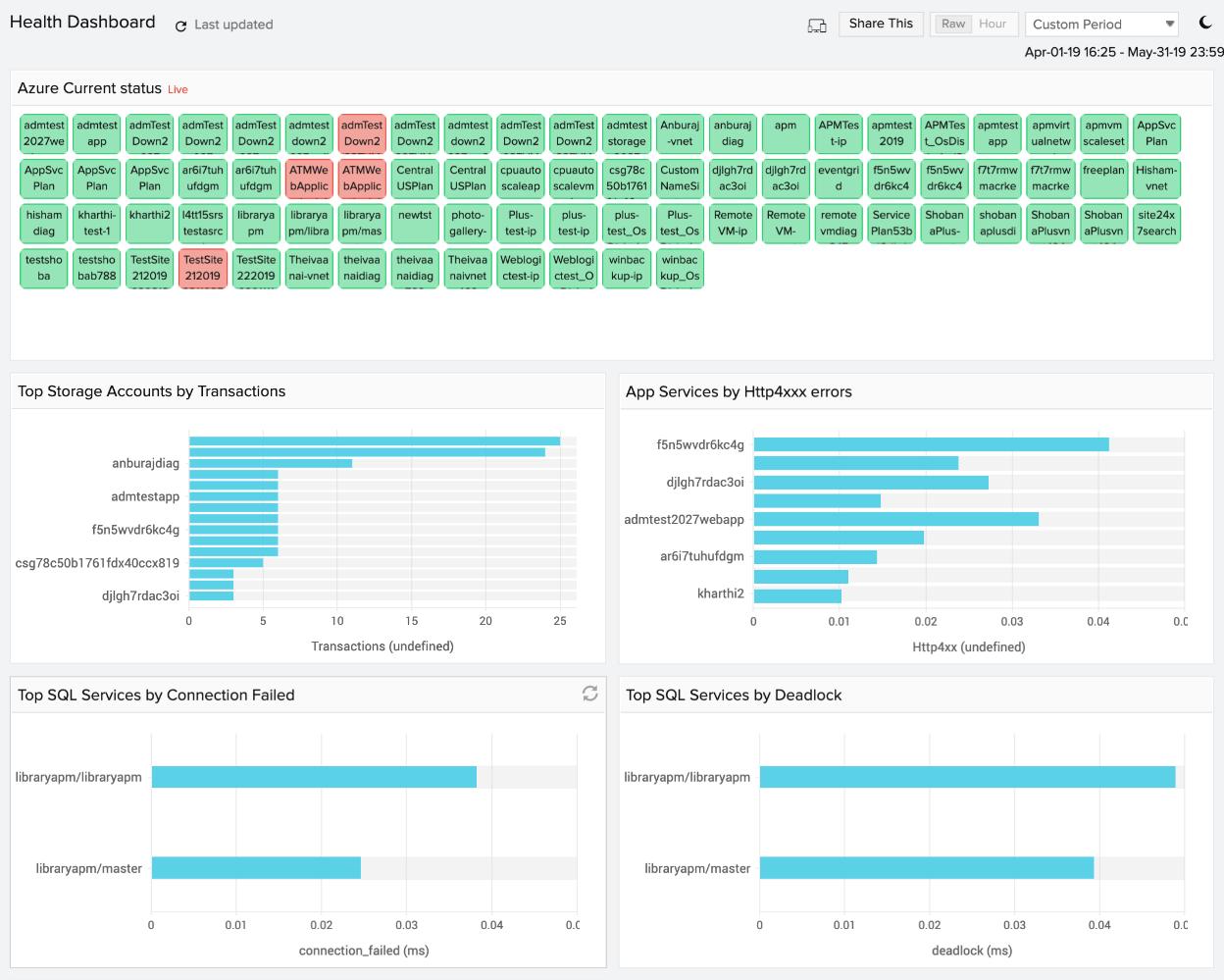
The Site24x7 Infrastructure system is run almost entirely from the Site24x7 servers. One account can manage your on premises servers and services and your Azure systems together. However, the system does require an agent program to be installed on each monitor system.
The dashboard for Site24x7 is resident in the Cloud and is ca be accessed through any standard Web browser. The screens in the dashboard can all be customized through a drag-and-drop utility.
Site24x7 Infrastructure builds a map of inter-dependencies between server resources, services, and applications that support front-end software. The tracking of the included services of Azure builds up a picture of all of the activities that go into providing a website or a software package to users and enables identification of the root cause of performance problems.
Who is it recommended for?
Site24x7 Infrastructure Monitoring is recommended for organizations with a mix of on-premises and Azure resources. Its versatile integrations and mapping capabilities make it suitable for businesses seeking a unified solution for monitoring both traditional and cloud-based infrastructure. It’s well-suited for more advanced users and IT professionals.
Site24x7 is recommended for businesses in the healthcare sector, where monitoring of both on-premises and cloud resources, including Azure services, is crucial. Its integrations for Azure-specific services make it suitable for organizations with diverse IT infrastructure needs, ensuring comprehensive monitoring.
Price: Site24x7 costs $9 per month when paid annually. Site24x7 Infrastructure’s Azure monitoring systems can be experienced on a 30-day free trial.
5. ManageEngine Applications Manager – FREE TRIAL
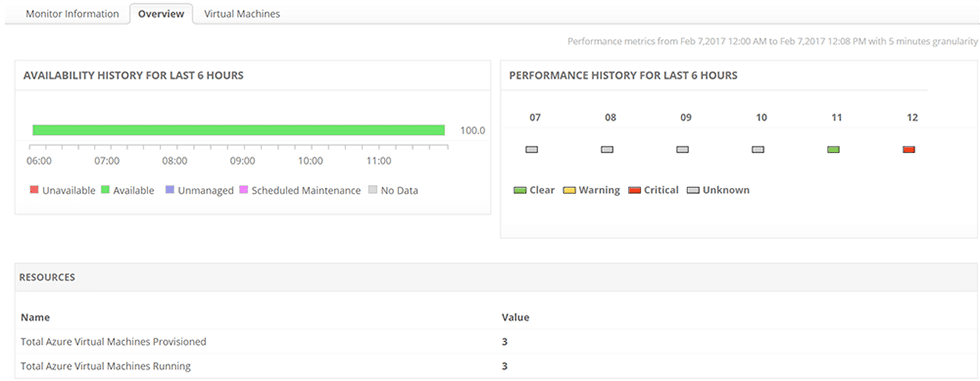
ManageEngine Applications Manager provides an overall, aerial view of an organization’s Azure environment, tracking the health and operational status on all virtual machines deployed within the Azure Environment. While Microsoft Azure supports a wide range of servers and allows users to deploy applications in minutes, making it indispensable to most organizations, without proper monitoring, servers rarely perform at maximum efficiency.
Why do we recommend it?
ManageEngine Applications Manager emerged as a reliable solution for gaining an aerial view of an organization’s Azure environment. Its focus on tracking the health and operational status of virtual machines within Azure was particularly beneficial. The constant monitoring of key metrics and configurable alarms played a crucial role in alerting us to unusual activity, facilitating faster responses.
ManageEngine Applications Manager solves this issue with the constant tracking of key metrics, which are kept readily available. This enables system administrators to ensure that each virtual machine is running correctly, without any glitches, thereby avoiding unnecessary down-times and disruption of service.
Through monitoring memory and processor metrics of virtual machines in the Azure environment, ManageEngine Applications Manager assists system administrators in the effective planning of upcoming tasks and improving overall performance.
All of these metrics and information gathered related to activities of the network are viewable in elaborate graphs, further aiding in the fast identification of potential issues arising.
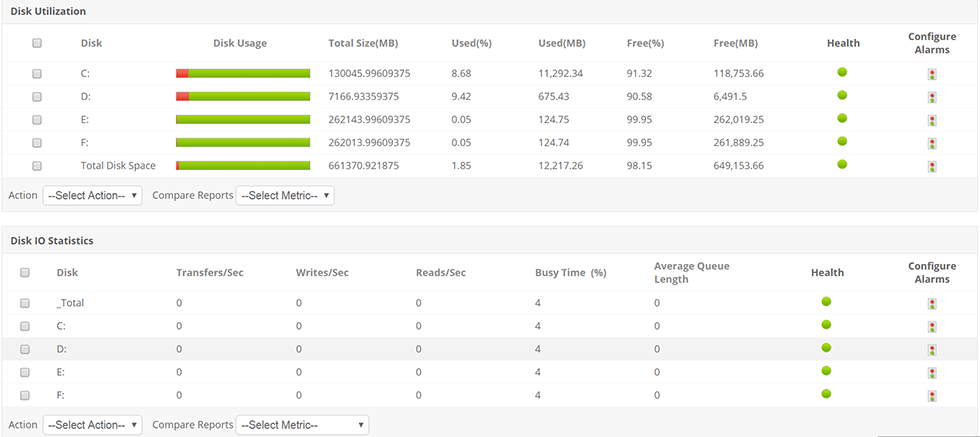
With the aim of increasing the efficiency of addressing issues before they affect end users and making troubleshooting easier, ManageEngine Applications Manager allows system administrators to configure alarms for different attributes of virtual machines.
The software ensures that alerts are sent out instantaneously if it detects unusual activity, while also sending out notifications if threads/ process counts surges. With the ability to react faster, system administrators are better able to manage and monitor the Azure environment, minimizing the chances of performance degradation.
Who is it recommended for?
ManageEngine Applications Manager is recommended for organizations heavily reliant on virtual machines within the Azure environment. Its focus on tracking key metrics and providing configurable alarms make it suitable for businesses seeking proactive monitoring and issue resolution, catering to more advanced users.
ManageEngine Applications Manager is recommended for enterprises in sectors like manufacturing and retail, where a wide range of applications run on Azure. Its ability to track the health of virtual machines ensures uninterrupted operations for organizations with diverse application portfolios.
Pricing: ManageEngine Applications Manager is available in a Professional Edition and Enterprise Edition. For the Professional Edition, pricing for a subscription license starts at $945.00 while a perpetual license starts at $1895.00. The Enterprise Edition starts at $9595.00 for a subscription license and $19195.00 for a perpetual license. You can access a 30-day free trial to assess the software and determine your network needs.
6. Paessler PRTG Network Monitor – FREE TRIAL
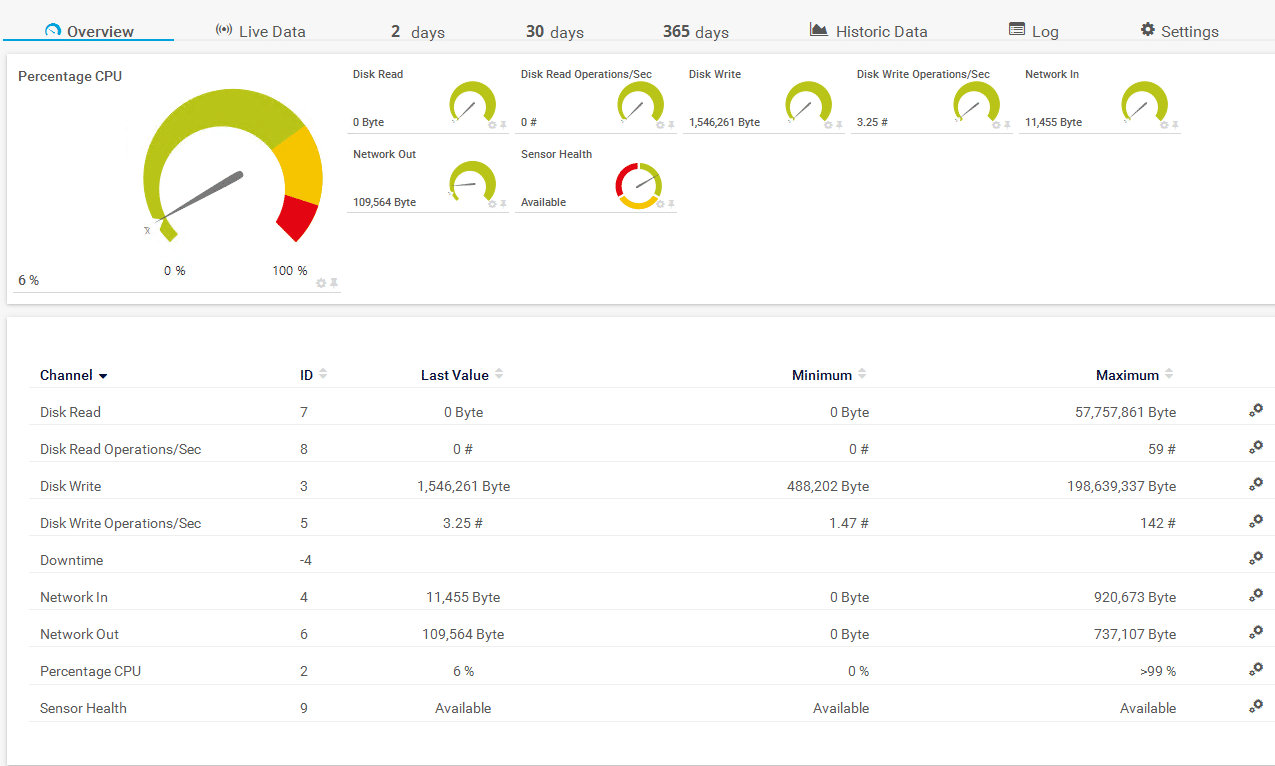
The Paessler PRTG Network Monitor\ provides a comprehensive overview of an organization’s entire Azure infrastructure through a centralized, customizable dashboard. With its full integration with Microsoft Azure and Martello iQ, all Azure resources are tracked with their performance and availability viewable in one overview. This, along with its prompt alerting system and automatic reporting feature, ensures the fast identification and resolving of issues arising while also keeping relevant co-workers and management aware of all situations occurring.
Why do we recommend it?
Paessler PRTG Network Monitor impressed us with its centralized dashboard offering a comprehensive overview of Azure infrastructure. A significant challenge it addressed was the need for real-time visibility into Azure infrastructure, especially when administrators are on the move. Paessler PRTG Network Monitor’s mobile compatibility and instant notifications kept us informed about the status of our Azure environment.
With the aim of ensuring that an organization’s Azure environment is functioning smoothly at all times, the PRTG Network Monitor allows for fast verification of its status even when system administrators are out of the office. This is possible through its compatibility with multiple mobile devices and its instant notifications when defined threshold values are exceeded, with the options of push notifications, email or SMS alerts.
The provision of 18 Microsoft Azure sensors, offered by Paessler’s partner AutomonX, which collects various metric values and information and reports relevant metrics back to the Paessler PRTG Network Monitor assists in this regard. The software further assists system administrators in reducing risks in the cloud, while also ensuring an organization’s local network is correctly adapted to cloud integration.
Who is it recommended for?
Paessler PRTG Network Monitor is recommended for organizations seeking a centralized and mobile-friendly solution for Azure infrastructure monitoring. Its compatibility with Microsoft Azure, inclusion of Azure sensors, and instant notifications make it suitable for businesses prioritizing real-time visibility, catering to both intermediate and more advanced users.
Paessler PRTG Network Monitor is recommended for IT teams in the telecommunications sector, where monitoring of network and server infrastructure, including Azure components, is critical. Its extensive sensor options and customizable dashboards cater to organizations with complex network requirements.
Pricing: An unrestricted trial version of the Paessler PRTG Network Monitor is available for testing and you can use up to 100 sensors for free. This will automatically switch to a free, limited version of the Paessler PRTG Network Monitor after 30 days, unless you chose to upgrade to a paid license. Options start at $1750.00 for 500 sensors and one server. You can download the 30-day free trial.
7. Opsview
Opsview provides a unified insight into an organization’s infrastructure and applications running on Microsoft Azure, monitoring for performance and availability continuously to ensure services run efficiently and smoothly. With the aim of keeping monitoring simple and fast, Opsview allows system administrators to quickly discover and import Azure objects within a given Azure subscription automatically.
Why do we recommend it?
Opsview provides a unified insight into Azure infrastructure, ensuring continuous monitoring for performance and availability. Its auto-discovery features for Azure objects streamline the setup process, and the visual dashboards offer a summarized yet detailed view. Opsview’s support for monitoring not only Azure App Services but also Office 365 applications contributes to effective service delivery.
Dashboards utilized in Opsview display various monitored elements in a summarized, visual fashion, with the additional benefit of allowing the use of auto-refresh intervals to ensure the data displayed is current. Acting as an overall health indicator for the Azure environment, the dashboards can be displayed on large TV’s in an operation center, throughout offices, data centers and more. These two functions, used together, enables the faster identification and resolving of issues detected, with the further ability of easy navigation between multiple dashboards assisting with timeous reactions.
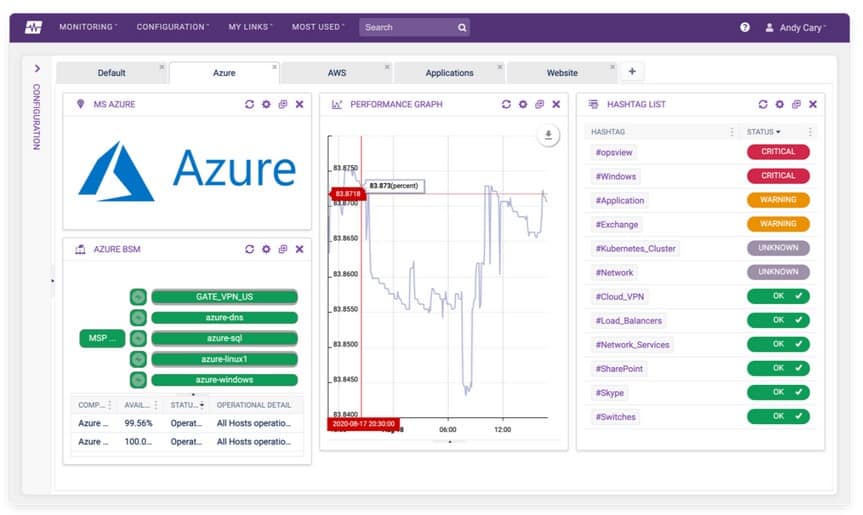
To provide the highest possible experience for customers, in addition to the monitoring of all metrics required to run Azure App Services, Opsview also monitors Office 365 applications and all applications an organization’s website depends on. This ensures effective service delivery which is paramount to an organization, while further avoiding unforeseen costs caused by a lack of insight.
Some of the metrics monitored in Azure App Services include number of requests and data bytes coming in and out, as well as response times. The support of elastic pool monitoring further simplifies data tier management and development, while Opsview’s virtual machine monitoring allows for a large range of computing solutions.
Who is it recommended for?
Opsview is recommended for organizations looking for a streamlined and visually accessible solution for Azure monitoring. Its support for Office 365 applications makes it suitable for businesses aiming to monitor a broad spectrum of services. The visual dashboards and auto-discovery features cater to both intermediate and more advanced users.
Opsview is recommended for IT and DevOps teams in sectors such as finance and e-commerce, where real-time monitoring of Azure environments is critical. Its streamlined visual dashboards make it particularly beneficial for organizations with complex Azure infrastructures.
Pricing: You can test out Opsview Cloud here by signing up for a free trial to see if the product suits your needs. You can further contact the sales team here for pricing of the Opsview Cloud plan, which starts at 150 hosts, and the Enterprise plan, intended for organization’s needing to deploy more than 300 hosts on-premises. The details of these plans, as well as Opsview’s SMB plan, are viewable here, while the scheduling of a demo for Opsview Cloud is available here.
8. SolarWinds Server & Application Monitor
To achieve comprehensive monitoring and management of performance and availability within an organization’s Azure Environment, SolarWinds Server & Application Monitor provides insight and telemetry into cloud workloads through a single, concise dashboard. With a complete overview of the entire Azure Environment, system administrators have the ability to visualize and correlate performance metrics, while gaining valuable information on system, application and infrastructure performance.
Why do we recommend it?
Our exploration of SolarWinds Server & Application Monitor for Azure revealed a comprehensive solution for performance and availability management.SolarWinds’ dashboard allowed us to visualize and correlate performance metrics, facilitating faster detection and resolution of issues. The software’s support for Azure PaaS monitoring, covering critical components like CPU, memory, and response times, significantly improved our overall Azure health monitoring.
Its auto-discovery features further ensure that every single Azure virtual machine and container is consistently monitored. This, when combined with its dynamic baseline capabilities and alerting system, allows for system administrators to get instant notifications when an issue is identified.
With faster reaction times, problems detected are troubleshooted and resolved faster, reducing the potential for interruptions to the organization’s workflow processes.
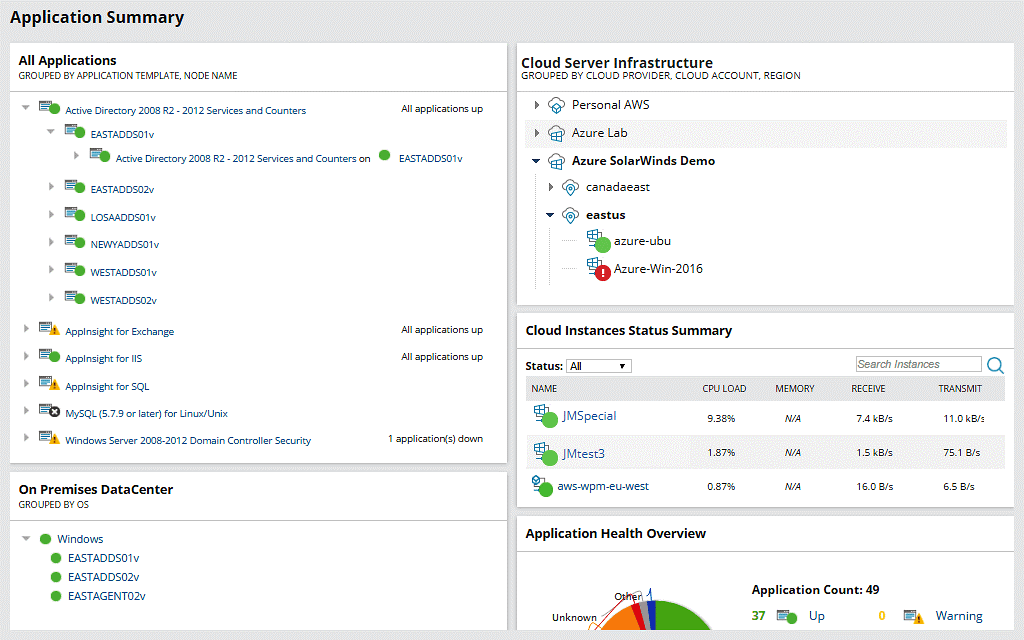
SolarWinds Server & Application Monitor, through the use of its Azure IaaS monitoring, supports the monitoring of Kubernetes and virtual machine performance. With the aim of seamless service delivery, the software also gives system administrators the ability to gain oversight into Azure performance over periods of time.
This, and the option of viewing and correlating infrastructure metrics as it relates to application performance, assists in the determination of the overall health of the Azure environment.
The ability to track network communication between virtual machines as well as visualize dynamic mapping between virtual machines and applications further supports this cause.
The identification and gathering of information such as Azure region, configuration, security details also helps in the event of troubleshooting performance issues arising.
With the monitoring of critical Azure components being crucial to ensuring the consistent performance and availability of applications, SolarWinds Server & Application Monitor makes use of its Azure PaaS monitoring capabilities.
The components tracked include CPU, memory, response times, requests and more, while keys service metrics tracked cover app services, event hubs and SQL databases.
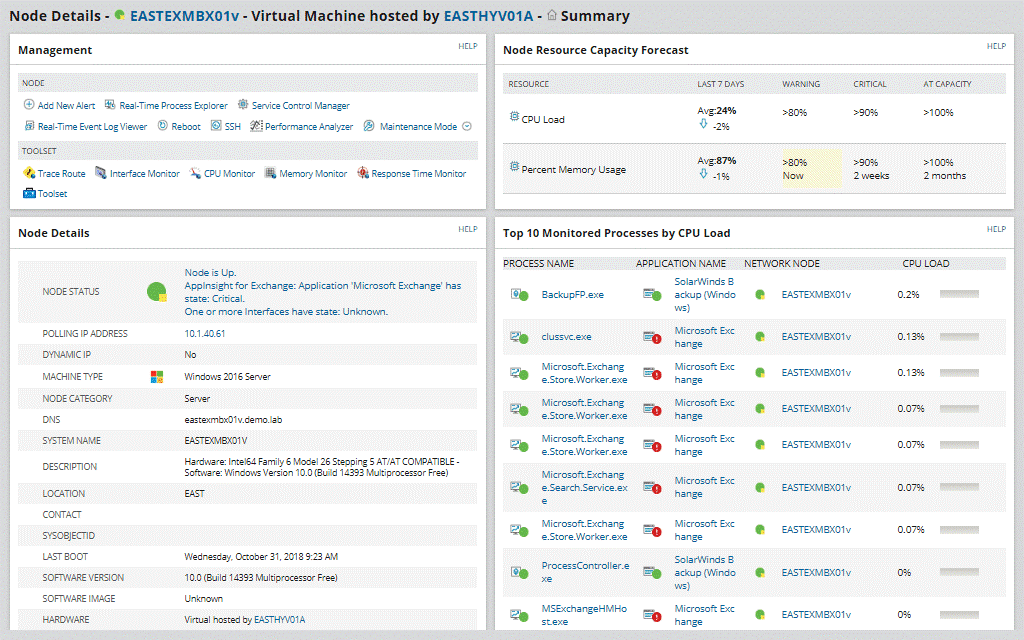
With its inclusion of Microsoft Office 365 monitoring, SolarWinds Server & Application Monitor compiles reports on data monitored, such as active users, mobile devices, mailbox sizes and growth over time.
This allows system administrators to identify trends within the organization’s Office 365 applications, with the additional benefit of being able to track and remove inactive users, assisting with unnecessary billing.
In support of full Microsoft ecosphere monitoring, SolarWinds Server & Application Monitor further allows system administrators to view all Microsoft systems, applications and cloud resources from one, centralized viewpoint.
Who is it recommended for?
SolarWinds Server & Application Monitor is recommended for organizations heavily invested in Azure, especially those relying on Kubernetes and virtual machines. Its capabilities suit system administrators seeking a comprehensive and centralized solution for monitoring Azure workloads, making it suitable for more advanced users.
SolarWinds Server & Application Monitor is recommended for IT teams in sectors like education and government, where comprehensive monitoring of Azure resources is essential. Its ability to cover both cloud and on-premises activities makes it suitable for organizations with diverse infrastructure needs.
Pricing: A perpetual license for SolarWinds Server & Application Monitor starts at $2995.00, while the alternative subscription licensing starts at $1567.00. You can view the different pricing options for both licenses and request a quote, get instantaneous access to an interactive demo or trial the software for free for 30 days.
9. Dynatrace
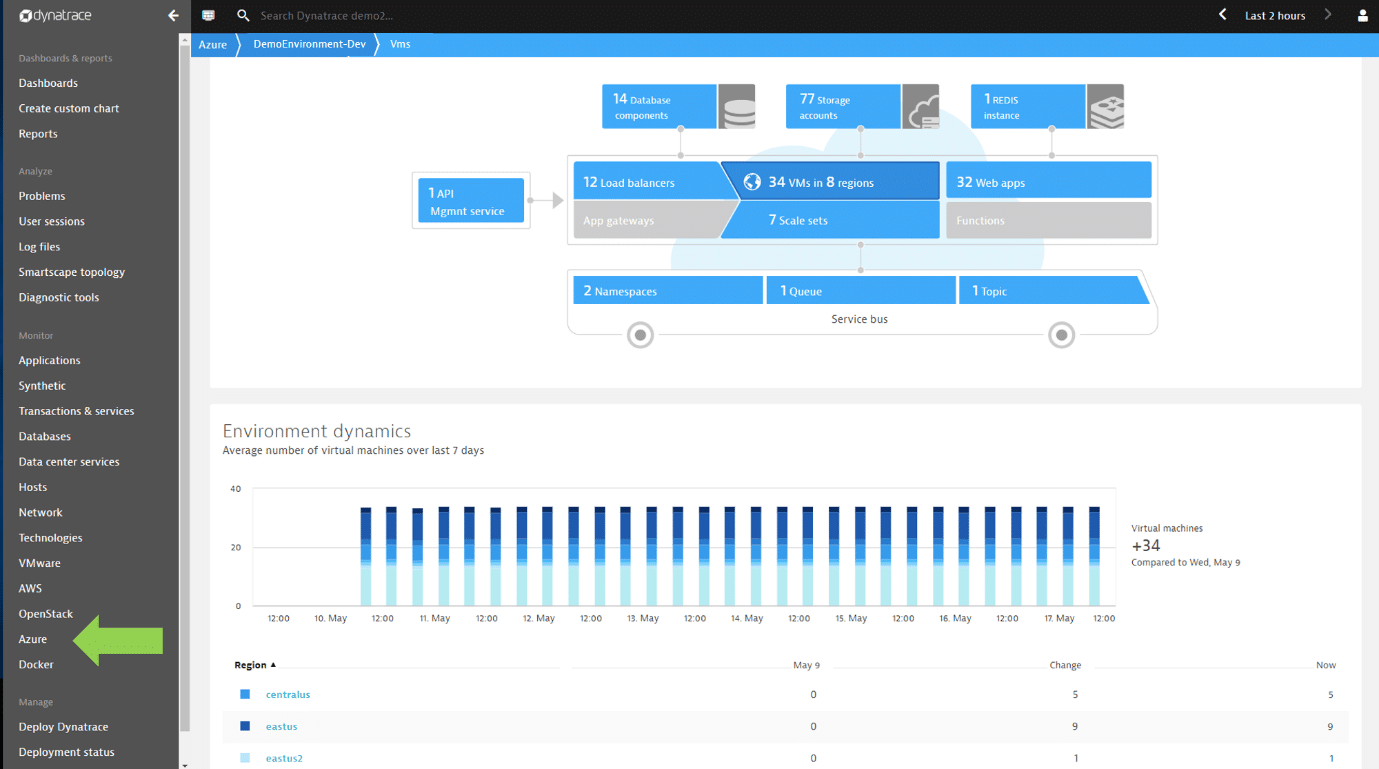
Dynatrace provides advanced, comprehensive observability into an organization’s entire Azure infrastructure in a single overview. This extends to the hybrid, multi-cloud ecosystem while the software further scales across hundreds or thousands of apps and nodes with ease. With deployment, configuration and updates automated, Dynatrace aims to end all manual effort of system administrators.
Why do we recommend it?
Dynatrace stands out with its advanced observability into the entire Azure infrastructure, including hybrid and multi-cloud ecosystems. The AI-powered problem identification and root cause analytics significantly enhance monitoring and troubleshooting. The automation of deployment, configuration, and updates eliminated manual efforts, ensuring a high level of health and performance.
This goal is supported by its AI-powered problem identification and root cause analytics, allowing for fast, accurate and efficient monitoring and troubleshooting of applications, clusters and underlying cloud infrastructure. With the inclusion of container-based applications, this ensures that the health and performance in Azure environments is maintained at a high level. As an additional benefit, Dynatrace allows system administrators to have a working overview of everything while running two versions of the infrastructure simultaneously.
Dynatrace further provides full-stack observability, including metrics, logs and traces, within minutes, while continuous dependency mapping is made possible through its auto-discovery capabilities. With the goal of attaining cross team efficiency across an organization’s Azure environment, Dynatrace offers a single overview source for use in collaboration and innovation. This allows teams to proactively detect problems and work on resolutions wherever they may reside.
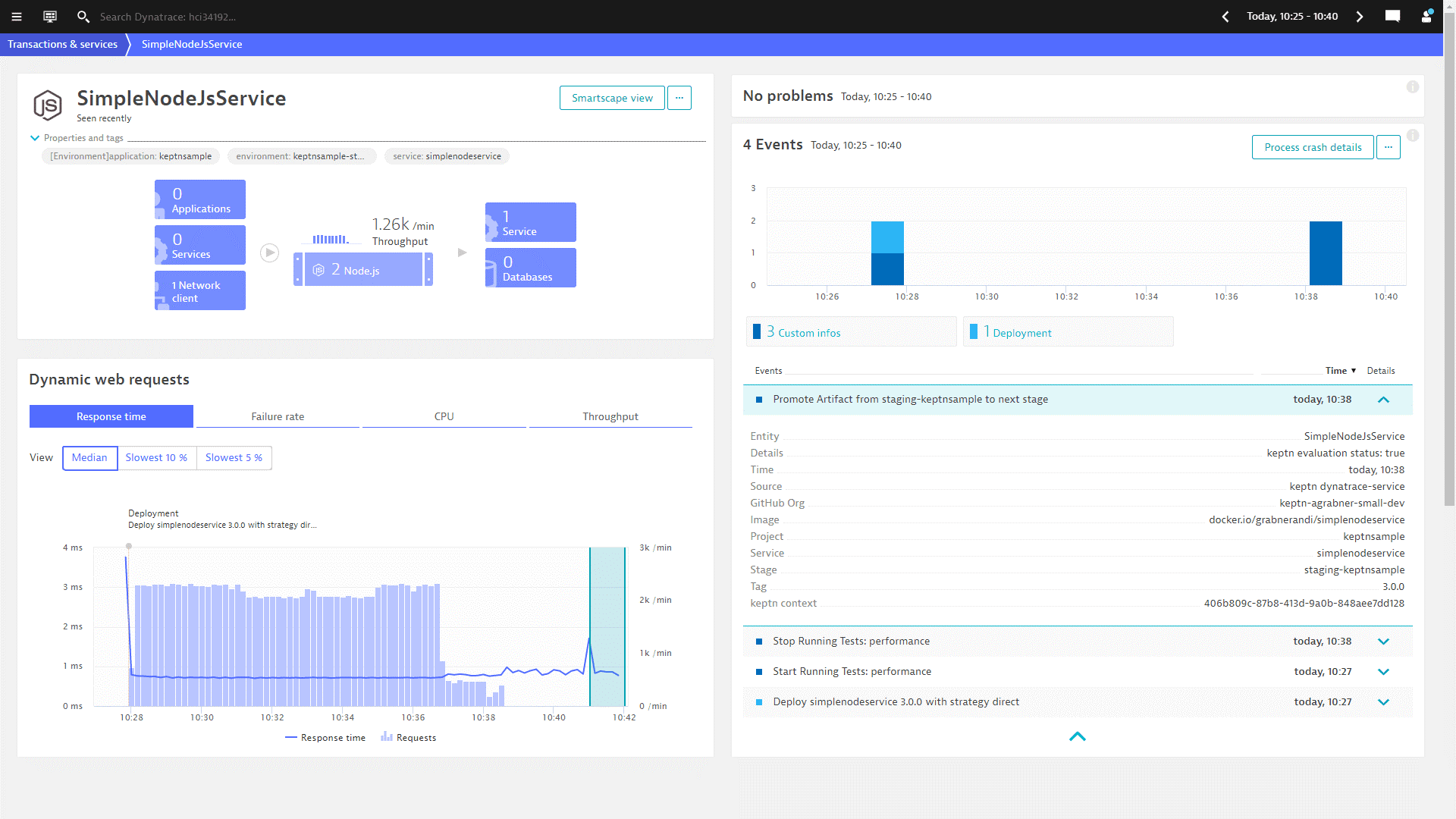
In this regard, Dynatrace’s AI-powered problem identification and root cause analytics significantly speeds up the process of identifying potential issues within the Azure environment. With its ability to scan billions of dependencies in search of root causes of problems, resolutions are achieved faster, decreasing the chance of the organization being negatively impacted.
Who is it recommended for?
Dynatrace is recommended for organizations dealing with complex Azure environments and requiring advanced observability. Its AI-powered analytics and automation features make it suitable for businesses aiming for efficiency in monitoring and troubleshooting. It caters to more advanced users and IT professionals.
Dynatrace is recommended for enterprises in industries like healthcare and finance, where complex, distributed Azure environments require advanced observability. Its AI-powered analytics and automation cater to organizations with high-performance demands and a need for rapid issue resolution.
Pricing: To gain practical insight into Dynatrace before deciding if it suits your organization’s requirements, you can start a 15-day trial here. Dynatrace starts at $69.00 per month for full-stack monitoring, billed annually, and is viewable here, along with Dynatrace’s infrastructure monitoring and digital experience monitoring plans.
10. ScienceLogic
ScienceLogic offers a clear and concise overview into all of an organization’s Azure-based workloads, across multiple regions or comprehensively into single consoles in the Azure environment. With its pre-configured monitoring policies, based on Server Monitoring best practices, ScienceLogic allows for system administrators to begin monitoring immediately. All core services are monitored for health and performance, such as virtual networks, traffic manager, device groups and more, with performance comparisons available over extended time periods.
Why do we recommend it?
ScienceLogic effectively addressed the challenge of monitoring Azure workloads comprehensively. The pre-configured monitoring policies, auto-discovery, and role-specific visibility allowed us to quickly grasp the overall health. The runbook automation facilitated immediate responses to performance issues, minimizing potential disruptions.
This, as well as its auto-discovery and interdependency mapping between Azure regions and services, supports system administrators in understanding relationships between elements. With this knowledge, system administrators are able to identify, troubleshoot and remedy issues faster, as well as monitor impacts on the Azure environment, ensuring it is run efficiently and without interruptions.
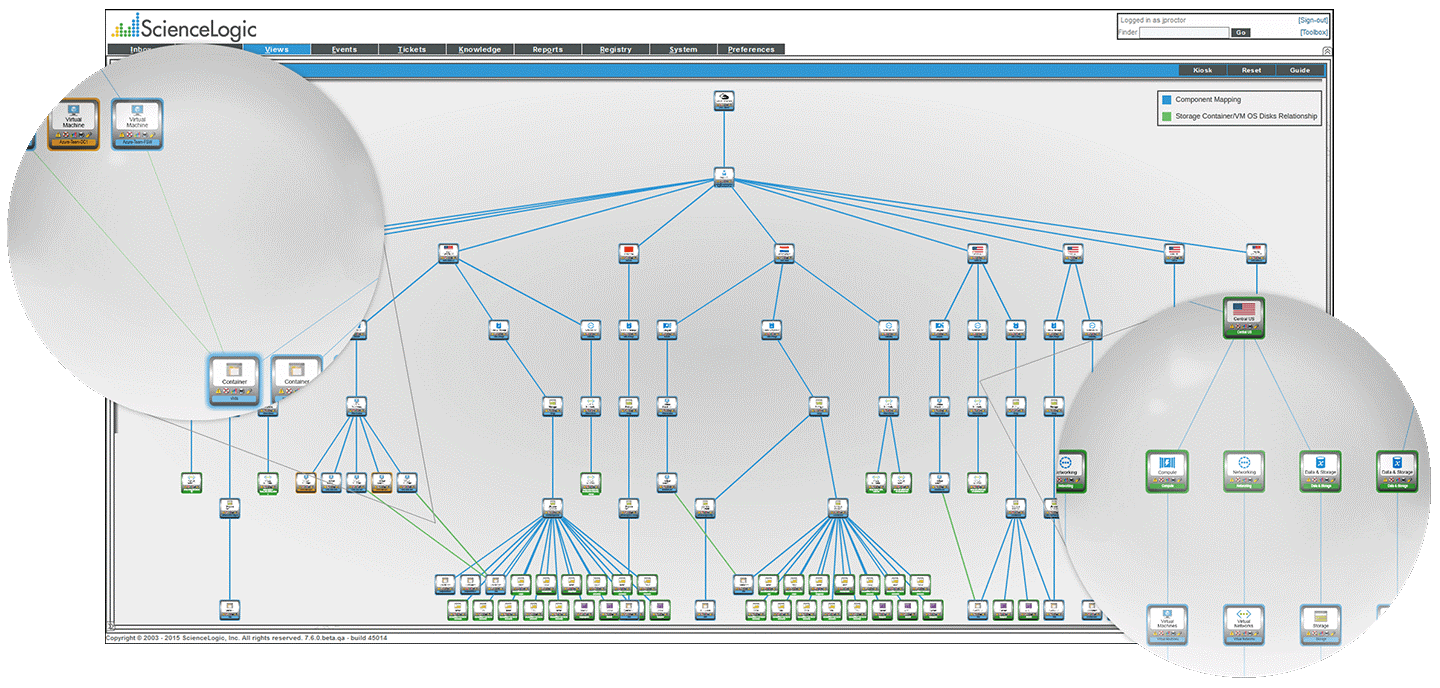
With Azure resources automatically discovered, ScienceLogic further ensures they are automatically kept up to date as they are added and removed. All assets within the Azure environment are organizable through automated functions though functions, groups and more for more precise and efficient management oversight. Its role-specific visibility, including hybrid and multi-cloud visibility, ensures system administrators approach the monitoring and management of the entire Azure environment consistently and effectively.
This granular oversight, allowing visualization into every aspect of an organization’s Azure deployment, as well as easy navigation across clouds, infrastructure on the premises and apps relationships, supports fast troubleshooting and resolutions. When combined with ScienceLogic’s alerting system, system administrators are able to proactively detect and resolve performance issues with speed and accuracy. This is supported further by ScienceLogic’s runbook automation, allowing for immediate response to availability or performance degradation within the Azure environment.
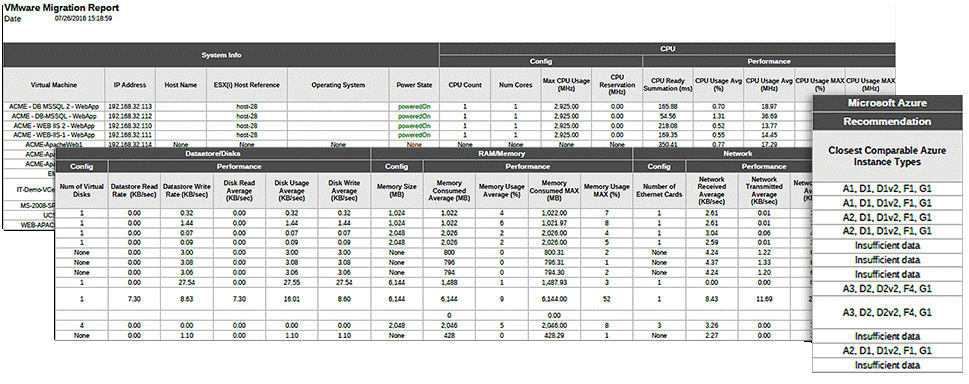
ScienceLogic, with its use of its SL1 platform, aims to make the monitoring and management of an organization’s Azure environment as easy as possible. To achieve this, ScienceLogic offers seamless integration with IT management systems for the full monitoring of an organization’s IT management ecosystem, with dashboards displaying information attained in real-time. System administrators can further rapidly deploy solutions to multiple customers at once. This takes little administrative overhead, while the ability to grow current cloud and hybrid IT services as well as the create new managed services for Azure and more with ease is also supported.
Who is it recommended for?
ScienceLogic is recommended for organizations seeking a comprehensive yet user-friendly solution for Azure monitoring. Its role-specific visibility and runbook automation make it suitable for businesses aiming for efficient management. It caters to both intermediate and more advanced users.
ScienceLogic is recommended for Managed Service Providers (MSPs) operating in diverse sectors. Its role-specific visibility and runbook automation enable MSPs to efficiently manage Azure environments for multiple clients, ensuring service reliability across different industries.
ScienceLogic offers four different packages, namely Base, Standard, Advanced and Premium, details of which are viewable here, with pricing available on request, while a personalized demo for ScienceLogic is available here.
Conclusion
With the complexity of Azure environments, including required visibility into hybrid and multi-clouds, third party tools have become crucial for an organization’s monitoring and management to be effective. As this continues to play a key role as technology develops at an increasing rate, this task only becomes more difficult.
Multiple tools are designed to monitor the Azure environment, each monitoring a variety of parameters with different levels of granular insight available. Whether coming from a smaller or larger organization, the monitoring capabilities of these tools are customizable to meet an organization’s specific needs, keeping in line with the flexibility of the Azure environment.
With the overall aim of ensuring the performance and availability of the Azure environment is always up and running effectively in organizations, we have listed multiple tools that can assist in this regard below.
We hope the information provided here helps with your choice of which of these Azure Monitoring Software and tools best fits with your requirements and budget.