

Monitoring your network adequately can be vital for maintaining its health. Anywhere from monitoring bandwidth and allocating resources, all the way to security and malware protection, making sure that everything is in its place can provide you with a huge boost in overall quality of life.
There is lots of variety when it comes to monitoring your network, some are best suited for small businesses, others for large businesses, and even some that are ideal for things such as law enforcement. Here are some of the best network monitoring tools out there that cover all of those areas.
The Best Microsoft Network Monitor Alternatives
1. ManageEngine OpManager – FREE TRIAL
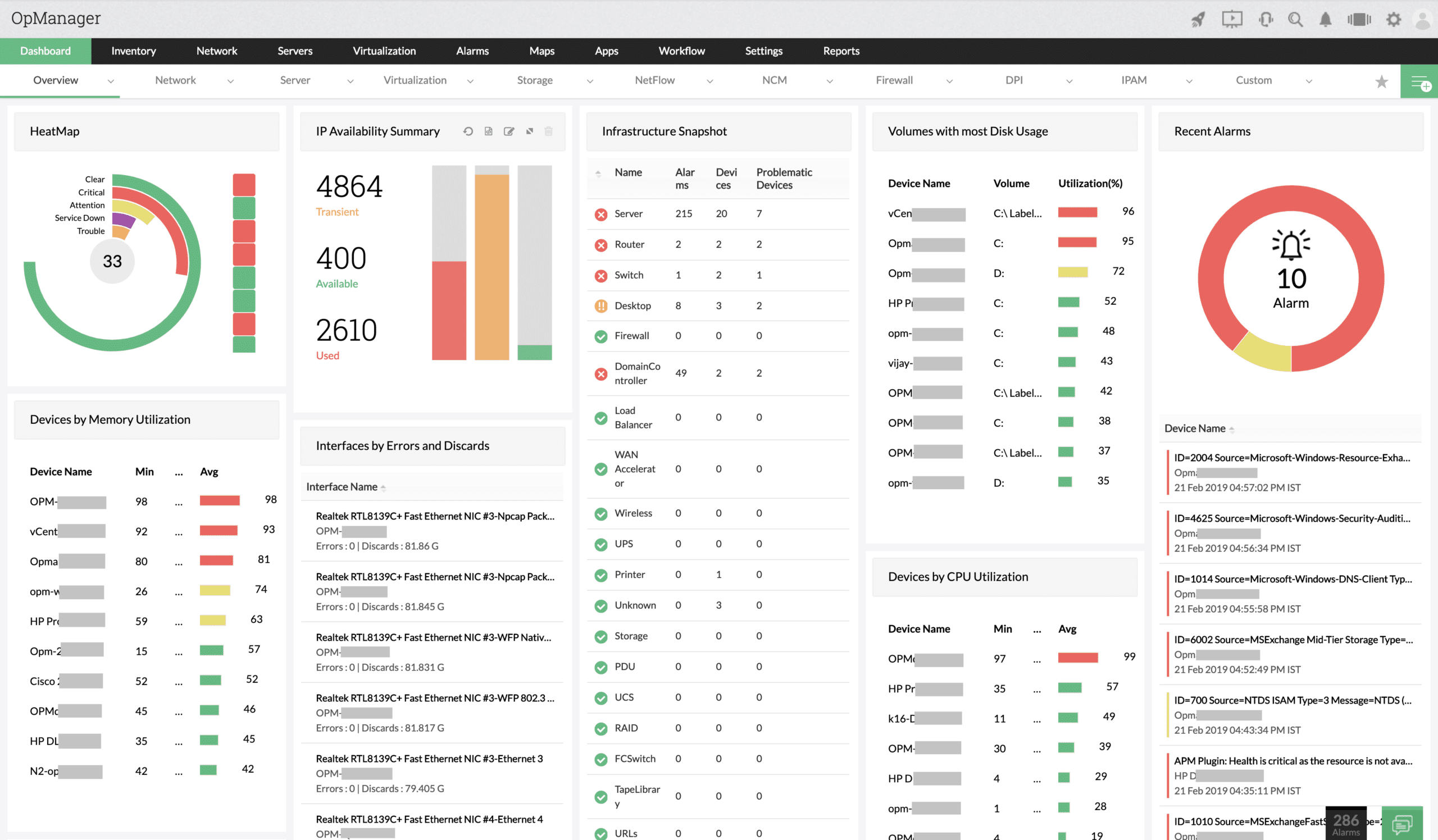
ManageEngine OpManager offers a compelling alternative to Microsoft Network Monitor, providing more advanced network management and monitoring capabilities. While Microsoft Network Monitor focused primarily on packet capturing and analysis, OpManager delivers a more comprehensive approach to network performance management. It helps IT teams monitor the health and performance of the entire network infrastructure, going beyond simple packet analysis to include real-time monitoring, fault detection, and proactive alerting.
One of the key advantages of OpManager over Microsoft Network Monitor is its ability to provide full-fledged network visibility. With OpManager, IT administrators can track critical performance metrics, such as CPU utilization, bandwidth usage, and device health, across all network devices, including routers, switches, firewalls, and servers. This gives organizations deeper insight into network performance and helps quickly identify potential issues that could affect business operations.
OpManager also stands out for its intuitive network visualization tools. Administrators can use dynamic topology maps and custom dashboards to get a clear, real-time view of their network architecture, making it easier to pinpoint network problems and understand how devices are connected. This level of visibility is essential for maintaining optimal network performance and reducing downtime.
Another strength of OpManager is its customizable alert system. IT teams can set specific thresholds for performance metrics and receive notifications when those thresholds are exceeded. This proactive approach ensures that potential issues are flagged before they impact network users. In addition, automated workflows allow for quicker troubleshooting, helping to streamline network management processes.
ManageEngine OpManager is available in three editions. The Free Edition allows users to monitor up to three devices, making it suitable for only the smallest networks. The Professional Edition covers a single network and the Enterprise Edition will track multiple sites in a WAN. This is delivered as a software package for Windows Server and Linux or as a service on AWS and Azure. ManageEngine offers a 30-day free trial of the Professional Edition.
EDITOR'S CHOICE
ManageEngine OpManager is our top pick for a Microsoft Network Monitor alternative because it has more comprehensive network management and performance monitoring capabilities. OpManager includes real-time monitoring of network health, performance metrics, and fault management, making it an ideal solution for businesses with more complex network infrastructures. OpManager provides end-to-end visibility into all network devices, including routers, switches, firewalls, and servers. The tool can also identify endpoints and include them in your system hardware documentation. This comprehensive monitoring allows IT teams to track important metrics like CPU and memory usage, bandwidth consumption, and network traffic, providing detailed insights into network performance and helping to identify potential bottlenecks or issues before they escalate into critical problems. An autodiscovery features assembles a hardware inventory and then goes on to generate a network topology map. Customizable dashboards and alerts offer a clear and intuitive way to monitor the entire network. This visual representation simplifies the process of identifying problem areas and troubleshooting issues, ensuring that network administrators can maintain high levels of service availability.
Download: Get a 30-day FREE trial
Official Site: https://www.manageengine.com/network-monitoring/download.html
OS: Windows Server, Linux, AWS, and Azure
2. Site24x7 – FREE TRIAL
Site24x7 APM provides real-time visibility into application health and performance across a wide range of platforms, including Java, .NET, PHP, Ruby, Node.js, and Python. By tracking response times, error rates, and resource consumption, the service helps teams identify bottlenecks and performance decline before they become user-facing outages.
One of the strongest parts of the package is distributed tracing. Site24x7 can follow request paths across microservices, identify slow code paths, isolate problematic database queries, and surface methods that are dragging performance down. That code-level visibility helps developers fix problems closer to the source instead of working only from symptoms.
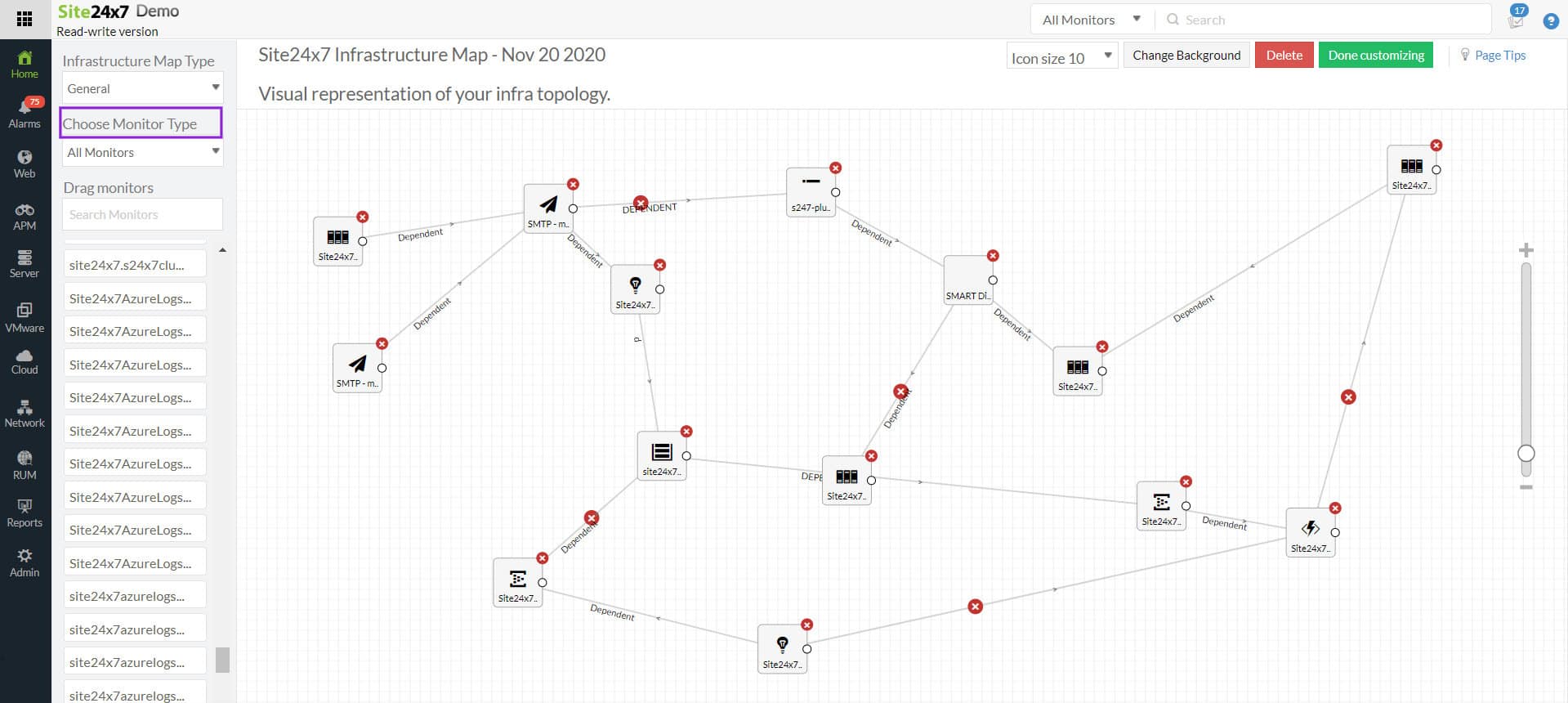
Custom dashboards, reports, and dependency mapping round out the package by showing how applications connect to external components and by making troubleshooting more direct. You can sample the wider Site24x7 platform through a 30-day free trial.
3. Paessler PRTG Network Monitor – FREE TRIAL
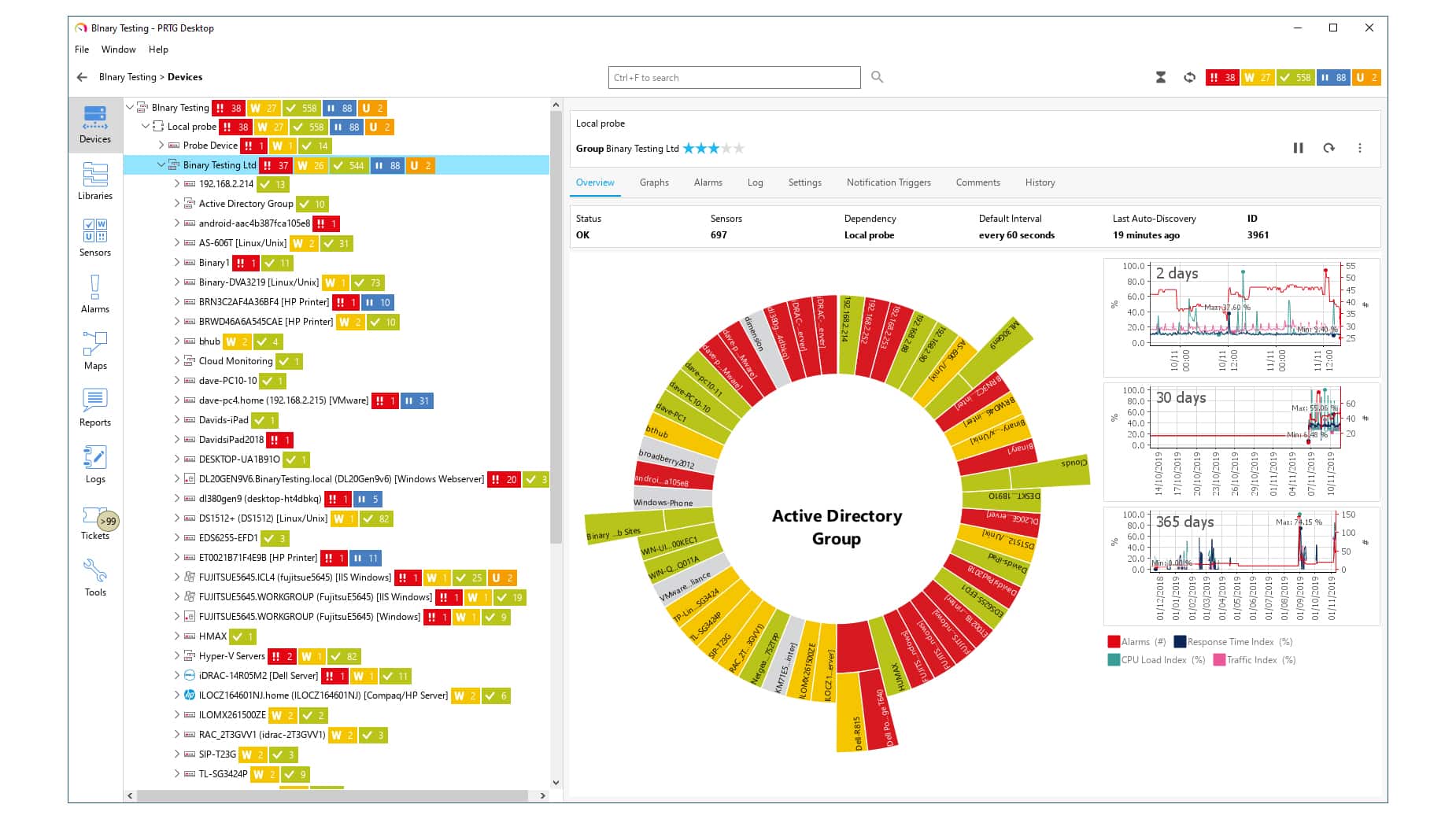
Paessler PRTG Network Monitor offers a rather unique way to monitor your infrastructure. When you purchase a plan, you have PRTG sensors which you then assign to specific aspects that you want to be monitored such as switch ports, CPU loads, et cetera, you can monitor practically every aspect of your network in this way.
All of your systems, traffic, devices, and more are easily covered with this on-premise solution. It features automatic network discovery that allows you to start monitoring immediately while you fine-tune the settings to customize them for your specific needs.
Your entire infrastructure is presented to you via custom maps and dashboards on a centralized unified pane-of-glass overview, making sure you have comprehensive and crystal-clear insights into all of the important metrics. You will get notified of any alerts that may pop up in real-time via the channel of your choice.
Paessler PRTG is also compatible with various user interfaces such as desktops, mobile, and web interfaces, making sure you always have oversight, regardless of where you are.
PRTG has a free trial for 30 days. After the 30 days expire, you will be downgraded to the freeware version. The free version allows for 100 PRTG sensors without any payment, making it ideal if you’re a very small business. There are five different paid versions, the PRTG 500, PRTG 1000, PRTG 2500, PRTG 5000, and PRTG XL which monitors up to 10,000 aspects. If you wish to monitor anything over this amount, you should check out PRTG Enterprise Monitor instead. If you need any help choosing the license that is ideal for you, you can contact their license assistant.
4. Wireshark
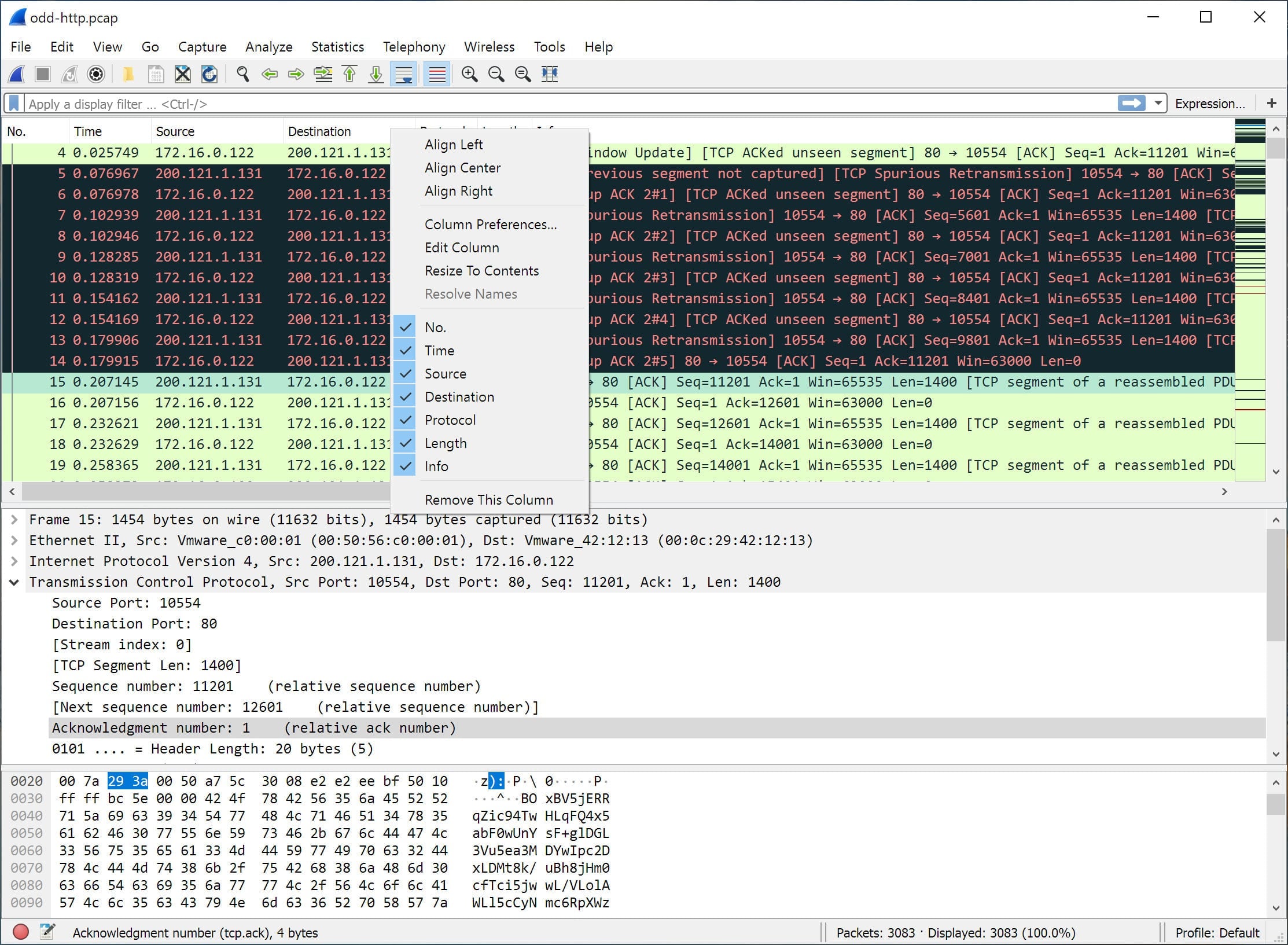
Wireshark is a free open-source network protocol analyzer that is available for Windows, Linux, OS X, FreeBSD, NetBSD, and many more. It is licensed under the GNU General Public License version 2 meaning that you can freely use it commercially or even as part of a commercial product as long as you follow certain conditions.
With hundreds of protocols, you can perform deep inspections into the exact traffic you want to see. You can read live data from Ethernet, IEEE 802.11, Bluetooth, Token Ring, PPP/HDLC, USB, ATM, FDDI, and others. This data can later be analyzed offline and thanks to the most powerful display filters in the industry that Wireshark provides, it makes the process as easy as possible. You also have the option to read and write in many different file capture formats such as tcpdump (libpcap), Cisco Secure IDS iplog, and many, many others.
5. ManageEngine NetFlow Analyzer
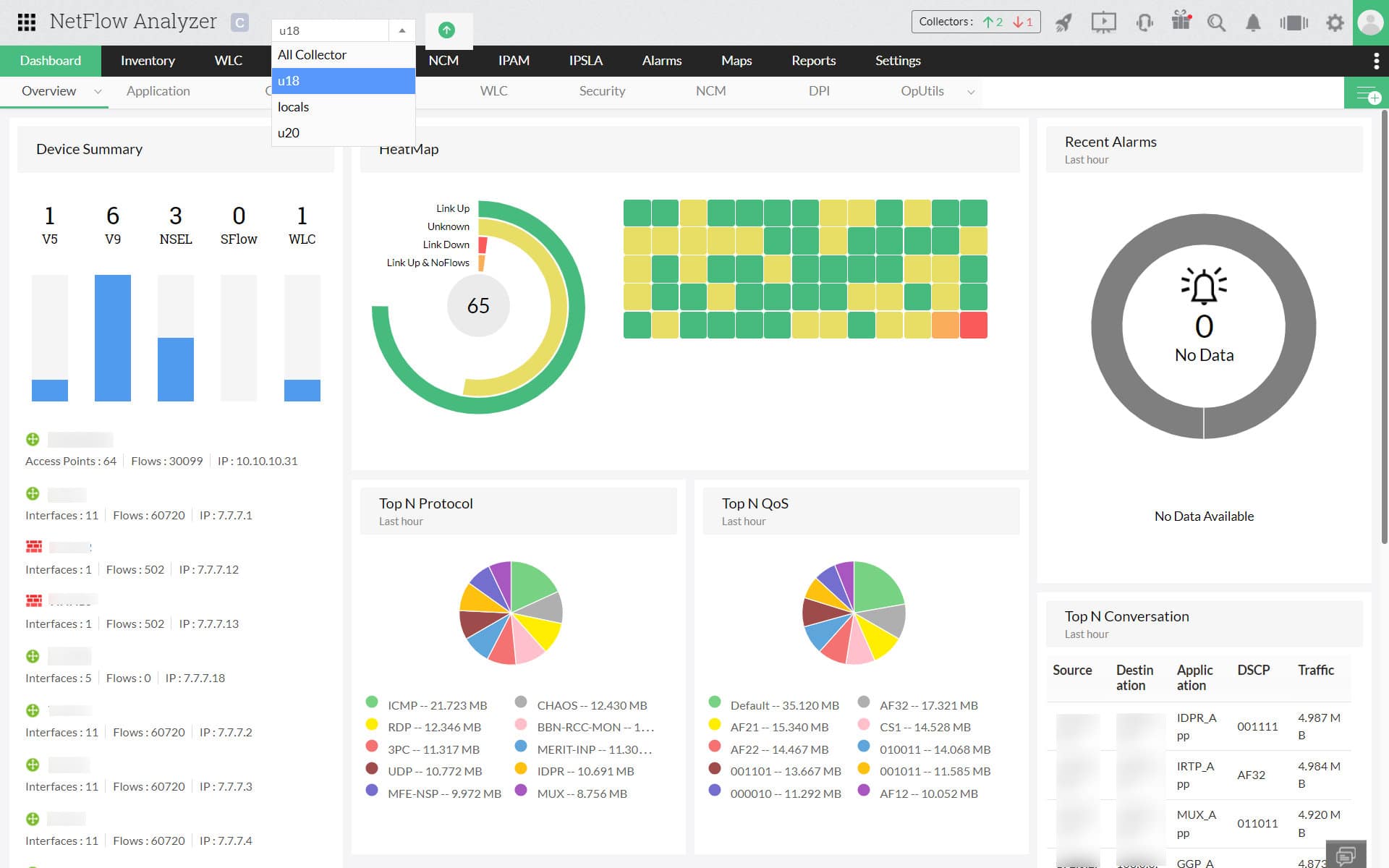
ManageEngine NetFlow Analyzer allows you to gain complete visibility in your traffic as well as provides excellent analytics tools which use flow technologies. It functions by being a unified network traffic monitor that reports and analyzes your network bandwidth.
This includes keeping track of who is using your bandwidth and for which purposes. Now you can easily get to the very core of your traffic and analyze it at an interface-specific level while also getting real-time insight into your network’s bandwidth.
The NetFlow Analyzer also identifies context-sensitive anomalies and tracks network anomalies even beyond your network’s firewall, making sure you’re aware of any threats, even zero-day ones. You can collect and analyze data from all of the major devices such as Cisco, Hewlett-Packard, 3COM, Juniper, Foundry Networks, and more.
ManageEngine offers a 30-day free trial. It also comes in four different editions. The Free, Standard, Professional, and Enterprise editions. The Free Edition lets you monitor up to two interfaces without any license. The Standard Edition starts at $8,595 for 500 interfaces, the Professional starts at $595 for 10 interfaces, and the Enterprise Edition starts at $1,045 for 10 interfaces.
6. Colasoft Capsa Portable Network Analyzer
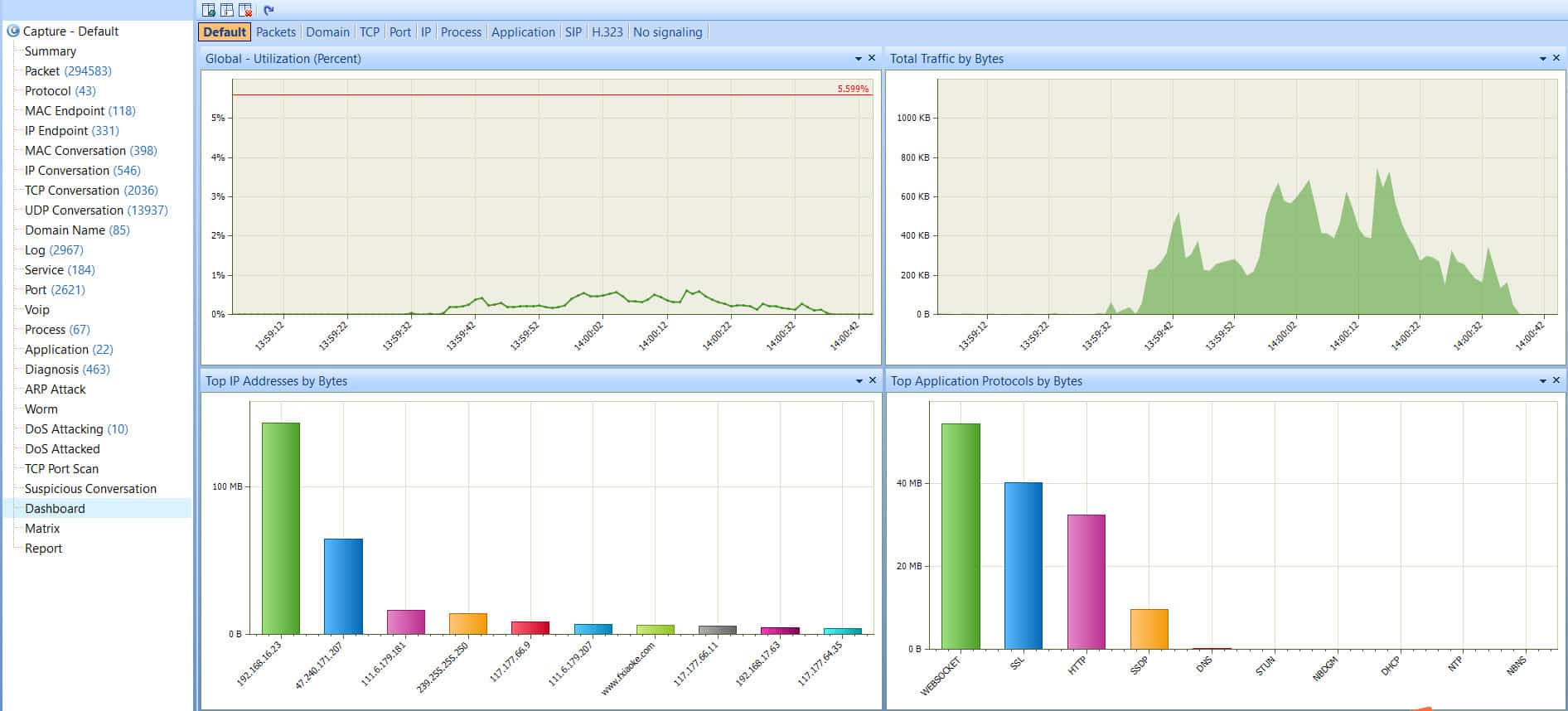
The Colasoft Capsa Portable Network Analyzer allows you to oversee and analyze both your wired and wireless networks including 802.11a/b/g/n. The way that it is designed is perfect for businesses of any size, regardless if you’re a small business or a large enterprise, you will be able to monitor and troubleshoot in a streamlined fashion.
It offers an intuitive, easy-to-use interface that allows you to comprehensively capture packets. You can then analyze these packets with ease regardless of your skill level, Colasoft makes sure that all of the information presented to you is relevant and understandable.
The monitoring is real-time and supports 24/7 monitoring, as well as advanced protocol analysis, and even automatic expert diagnosis. This way you can make sure you always have the keenest insights for your network administrators.
Paired with the user interface, you will be tracking down problems and resolving them quickly and efficiently. It also supports many protocols and sub-protocols including VoIP. Colasoft offers a 30-day free trial on its website. If you wish to purchase the full version, the Capsa Portable Network Analyzer starts at $1,295.
7. SolarWinds NetFlow Traffic Analyzer
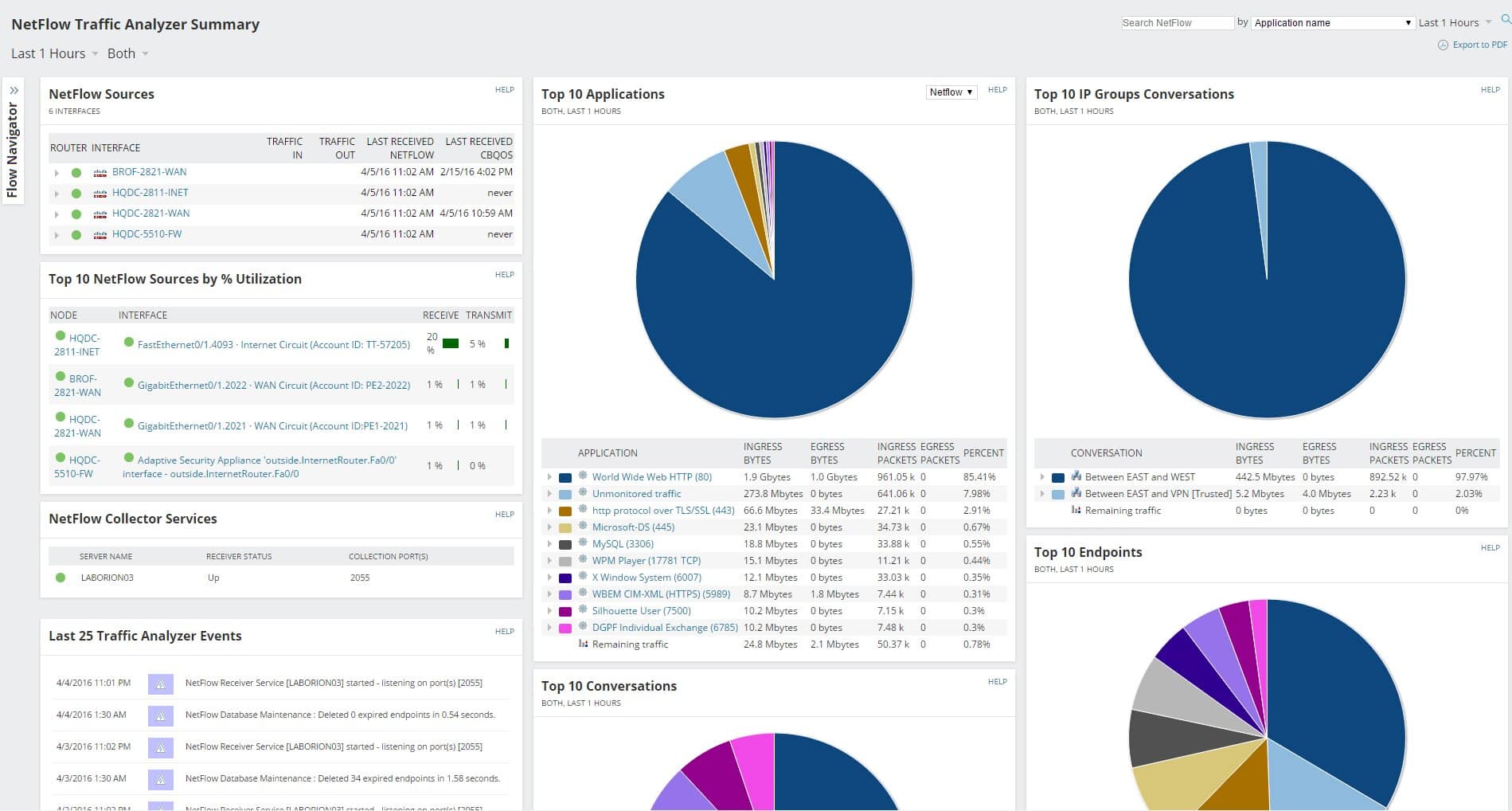
SolarWinds NetFlow Traffic Analyzer allows you to monitor your bandwidth, application traffic, network traffic, and more, all in real-time. The bandwidth monitor allows you to visualize your application, protocol, and IP address groups with ease, as well as allows you to monitor, collect, and analyze the dataflow using tools such as sFlow, IPFIX, Cisco NetFlow, J-Flow, or NetStream.
You also have the option to assign utilization thresholds to make sure specific users don’t overuse the bandwidth. This way you can also analyze if the consumers are using the bandwidth for business purposes or not. If they are in fact actually utilizing that much bandwidth for their business alone, then it would be wise to add more capacity to support them fully.
The Traffic Analyzer also helps you detect issues in real-time and allows you to create customizable reports and alerts to help you deal with any issues as quickly and efficiently as possible. Furthermore, you can also use cross-stack data correlation to improve your network flow.
The data is presented comprehensively and visually with drag-and-drop mechanics, allowing you to get easy oversight over something that would be deemed complicated otherwise. The Network Traffic Analyzer also offers CBQoS (Class-Based Quality of Service) data through SNMP (Simple Network Management Protocol), allowing you to see the effects of any of the changes you make.
SolarWinds offers a fully functional 30-day free trial and an interactive demo. If you wish to purchase the full product, the pricing starts at €954. You can contact the vendor directly to get a quote.
8. NetworkMiner
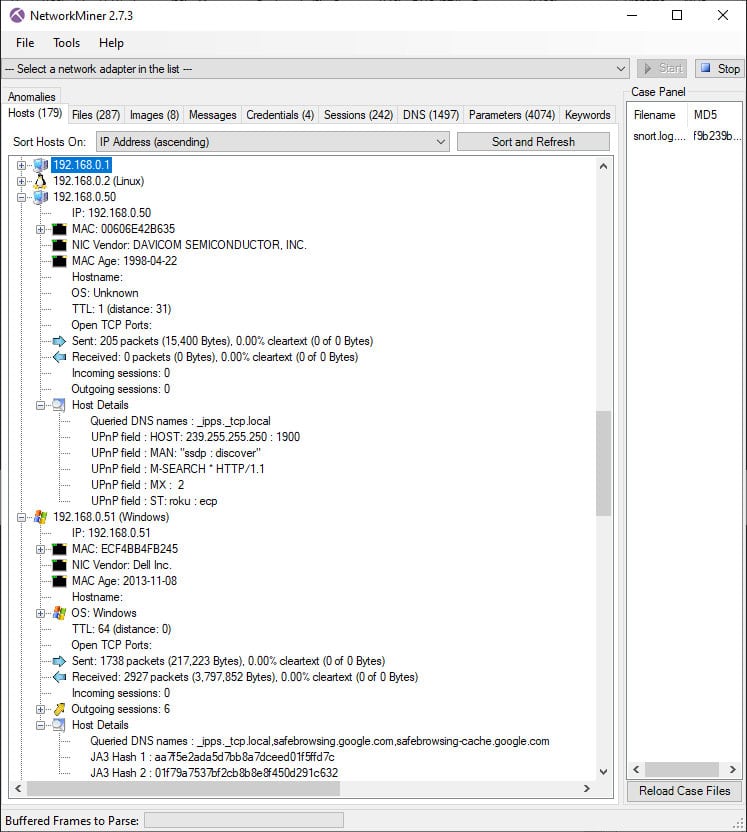
NetworkMiner is a forensics tool that allows you to extract information from the network traffic PCAP files as well as perform live traffic sniffing. It is open-source and can work on Windows and Linux. Since its release in 2007, it has been used by law enforcement, incident response teams, as well as companies and organizations all over the globe.
There are two different versions, the NetworkMiner Free Edition and the NetworkMiner Professional which costs $ 1200 USD. Some of the features of the free edition are PCAP and ETL file parsing, IPv6 support, extracting files from FTP, TFTP, HTTP, SMB, and more types of traffic, extracting X.509 certificates from SSL encrypted traffic, OS Fingerprinting, and more.
The premium edition has some additional perks such as parsing PcapNG files, exporting to CSV, Excel, XML, Advanced OS fingerprinting, Web browser tracing, Geo IP localization, and more.
9. Omnipeek Network Protocol Analyzer
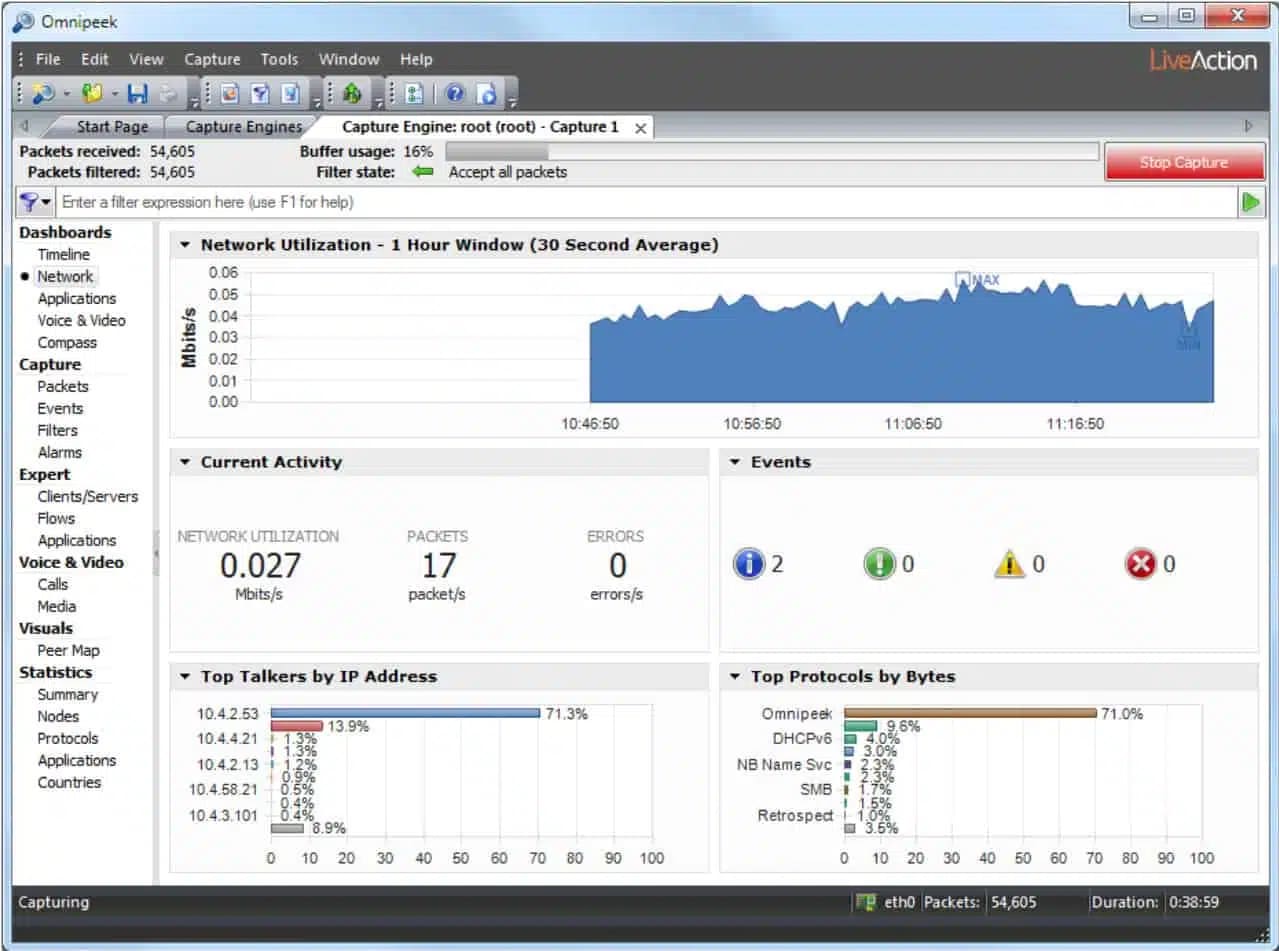
Omnipeek Network Protocol Analyzer is a tool that combines deep packet analysis with a comprehensive visual interface to deliver you the best performance possible. The packet data analysis is automated, meaning that you just need to see it visualized in order to solve a problem.
This effectively increases your MTTR (Mean Time To Resolution) by making sure that your effective process is as streamlined as possible. The entire workflow and all of the visualizations are in fact fully customizable which ensures that it will be able to adapt to even the most challenging of environments.
It also scales incredibly well from small offices to large business enterprises, both wired and wireless networks are easy to analyze and troubleshoot. You can analyze the traffic from any remote network segment possible such as Ethernet, voice and video over IP, 1/10/40/100 Gigabit, 802.11.
Omnipeek offers a free trial and a demo on their website. If you wish to purchase the full product, you will have to request a quote from them directly.
Summary
There are many different network monitors that offer you a wide range of utility when it comes to overseeing your network. Some are more intuitive to use and require a low level of skill, others are much more suited for network administrators that need to delve deep into the core processes. Ultimately, only you know what works best for you and hopefully, you have found it here.