


An organization can suffer serious consequences when failed or unsecured USB drives cause data loss. The threats posed by data leaks can be minimized significantly when portable storage devices are controlled.
Recently, most people have used removable devices to send data from one system to the other. A prominent advantage of removable devices is that they can carry essential files easily to any location without needing an internet connection for transferring files. Even with their multiple benefits, a security risk is associated with them.
Cyberattackers often target these hard drives to infect them with malware while spreading it across the network. Many companies use these lightweight devices to manage backups and store confidential files. For this reason, cybercriminals target these sensitive data as they make their way into the system. Often, unsecured USB drives contribute to data theft and leakage.
Managing data security in USB flash drives has always been a significant challenge for most companies. There have been many instances when USB devices were not used properly, leading to data leakage. For this reason, it has become essential for businesses to embrace the best practices to offer their data the best protection while strengthening their security.
Definition of an Endpoint Protector?
Endpoint Protector is a comprehensive Data Loss Prevention (DLP) software capable of running well on Windows, Linux, and macOS to prevent data loss or leakages. There are many advanced features you will come across on an Endpoint protector. These can manage endpoint devices and flash drives.
Furthermore, we will look into the various features of Endpoint Protector’s device control:
- Grant USB access remotely, even if the computers are offline.
- Remotely monitor all USB devices through a single web-based interface.
- Access a complete list of log reports at any time.
- Create device whitelists and blacklists.
- Search or filter based on the type of device, vendor ID, etc., to know which ones are in use.
- Control the use of each device across your network.
- Provide role-based access to USB drives.
- Define policies for its use across departments/users/devices.
Businesses can make the most of an endpoint protector to control their USB ports and prevent data loss easily. Furthermore, using an endpoint protector ensures that unauthorized devices are blocked while preventing malware from spreading throughout the system.
Networks of any architecture can make use of an endpoint protector. Regardless of the operating system, it can protect the entire network. It is possible to generate reports quickly while also tracking any USB activity on the endpoints. This platform supports advanced security solutions.
By going through these features – as mentioned above – it is clear to see the high level of control that can be enjoyed using an Endpoint Protector.
Why Lock Flash Drives?
One of the reasons why flash drives are locked is data breaches. Whether intentional or accidental, data breaches remain a significant concern for organizations. Take, for instance, a negligent person who loses a USB drive that contains sensitive data. Similarly, a dissatisfied employee could sell the information presented on a drive to competitors for profit. While both scenarios share some differences, the outcome remains the same: data loss.
Even though trust represents one of the foundations upon which an organization can thrive, we are in an era of privacy security. This implies that the loss of sensitive data can seriously affect the organization. Aside from the financial loss associated with it, the organization can be confronted with legal suits, which might make it difficult to rebuild customer trust and reliance.
For this reason, a very straightforward option is to lock the flash drives, which ensures that access is only granted to authorized users. With this, there is always a high level of control over who accessed the data and when. As a result, it can be easily tracked.
Reasons for Choosing Endpoint Protector
Many users choose Endpoint Protector to lock their flash drives for different reasons. This tool is quick to use and easy to install. Besides this, it supports centralized management and many excellent security features, which can always promote the security of the data.
It is possible to quickly restrict access to unauthorized users or devices with the user-based policies allowed by the tool. Besides this, the platform ensures businesses can monitor every USB activity and content movement.
Since vast amounts of data are constantly transferred in the corporate network, managing them can take a lot of work. It is a good idea to consider a tool capable of monitoring all activities automatically while preventing data leakages. Another benefit that Endpoint Protector offers is the ability to trace and keep track of all transfers from plugin USB drives.
Furthermore, with this tool, users can enjoy various alert features that can provide updates for users, which can immediately notify them when suspicious activities are detected. They can also initiate an email that is provided to the administrators, which updates them on sensitive content transfers.
In addition, once the device is plugged into the system, the tool automatically scans the content to identify sensitive data at the endpoint level, preventing data breaches. These and many other benefits make Endpoint Protector an excellent tool for businesses to consider.
How to Lock Flash Drives With Endpoint Protector
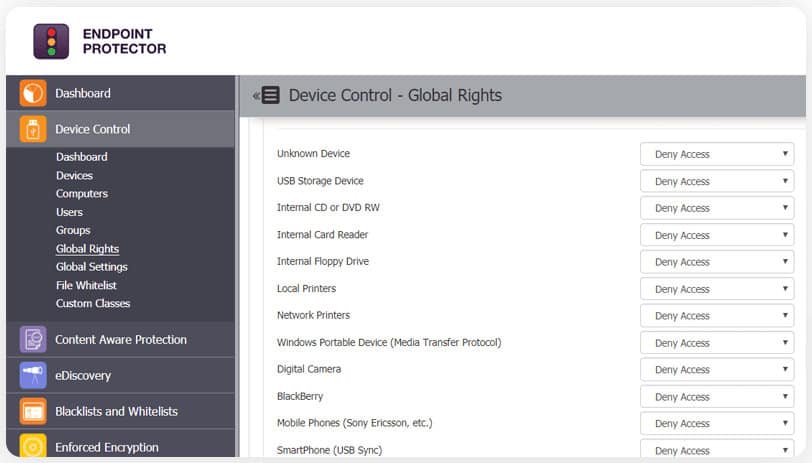
Once the Endpoint Protector is opened, what it does is that it scans your network to detect the various categories of flash and removable devices that are present on the network. This could include Bluetooth devices, Wi-Fi devices, USB drives, and more. Then, you need to press the drop-down box against every one of the devices. You can choose anyone you want. Some options will be contained in the drop-down box, including allowing access/denying access.
Besides this, it is also possible to allow limited access, depending on the trust tier of the devices. Users can also grant access to USB drives depending on departments, users, and roles. It is also possible to even choose the same options for all users or different access levels for different users.
Doing this is quite simple. Find your way to the “Groups” option on your left-hand pane. Then, choose any one of the drop-down options against each group. To grant the same level of access to all the users, find your way to “Global Rights” on the left-hand pane. From there, you can select the level of access for everyone within your organization.
The same process can be followed for “Users,” “Computers,” and “Devices.” All these can be navigated on the left-hand pane. If there are any conflicts, it is worth noting that Global Rights have the lowest priority, while Group rights have a higher one. In addition to this, User or Computer rights have the highest priority and will supersede other rights.
This also supports smooth usability. For instance, if you don’t want the entire department to enjoy access to certain USB drives, the only exception you want is the manager. Then, “deny access” is given to the group, while “allow access” is given to the specific “user.” This allows for a priority hierarchy, which ensures that only the manager can gain access, even though it belongs to the group for which the access has been denied.
There is also a possibility for granular access during the access period. These settings can be allowed for global rights, users, groups, and computers. With this, you can use Endpoint Protector to lock flash drives while gaining granular control over the user with access rights.
Using Endpoint Protector exposes you to an intuitive User Interface. Besides this, the tool provides visibility and control over the users that have access and when they do. The process is effortless.
You can control access to flash drives that contain sensitive information with the use of Endpoint Protector. This control provides an additional layer of security that can shield users against insider threats. In addition, it is also possible to generate reports to have a view of the usage levels whenever it is required. With this information, you can effectively set the right policies that your entire organization can adopt.
Conclusion
With USB devices, users can store and transfer data from one location to another without needing an internet connection. It is easy and quick to use. However, it is imperative always to remember the security risks associated with malware, which can be introduced to your system by cyber attackers through these small devices. These could result in data leaks or theft.
As mentioned above, unsecured or failed USB drives can also cause data leakage.
For this reason, it is crucial to protect your confidential data. Organizations adopt various tools and platforms like Endpoint Protector, a leading Data Loss Prevention (DLP) solution, to achieve this. It is designed with military-grade encryption that tracks, encrypts, and blocks unauthorized flash drives.