

Making sure your network is properly cared for and maintained is essential for a smooth-running business enterprise. Therefore, you need to be able to cover a lot of potential problems, from being able to fix critical issues in minimal time to having better security overall, SolarWinds ipMonitor is the tool for you.
Look at it this way, if you have a large enterprise, that involves a lot of machines and servers that need monitoring. On top of that, you have a dedicated team of IT technicians that are there to maintain and optimize all of your systems that drive your business forward. Every single mistake has the potential of shutting your servers down and causing downtime in which every second will be causing damage to your business.
The technicians themselves vary in skill and capability, and often excel at different areas, uniquely to their knowledge and personality. You need to take all of these factors into consideration when building your enterprise to ensure that you are playing to all of your strengths, and covering for all of your weaknesses. The SolarWinds ipMonitor helps you alleviate all of these issues.
Without a unified tool that encompasses your network, you are looking at multiple third-party options you would need to consider to cover all of your needs. Sure this approach may work on a more modest-sized business, but scaling it up always produces lots of clutter and is poorly optimized. Your technicians would have to change windows, screens, or even machines frequently to check every single tool individually, and in moments where seconds are important, this causes a lot of time delay.
SolarWinds ipMonitor simply has all of that prebuilt and preconfigured for you. You don’t even have to worry about setting it up since it has a Wizard that is capable of intelligently scanning all of your key points and making sure you’re ready to monitor and manage practically out of the box.
It is important to understand that this tool isn’t just something that your technicians can use to make their jobs easier. SolarWinds has lots of experience under its belt where almost any potential needs and issues have already been accounted for and preconfigured within the ipMonitor. This way it ensures that any information presented to you is clear and easy to understand, even for a person less experienced in IT. Once you have this unified view of your entire network, optimizing is easy, especially with the guidance that ipMonitor provides.
Database Availability Monitors
Setting up an effective monitoring tool is fundamentally a challenging task. Your technicians might have to spend countless hours setting your network up and fine-tuning it. This is why while having an effective and detailed tool to assist your every need, it is also important to take user experience and comprehensiveness of said tool into account. This alone determines the difference between having a fully trained dedicated team of network administrators and technicians and having a moderately knowledgeable person being able to look at the information presented and interpret it correctly.
ipMonitor has a quick wizard that allows you to set up all your monitoring needs within minutes. This includes setup, discovering the devices on your network, and configuring your alerts. It also includes wizards for some specific monitors such as the Database Experience ADO-User Experience (SQL query) monitor.
Taking all of this into consideration, if you have a large-scale business enterprise, it is vital to make sure your applications and websites are accessible to everyone. If you’re a small business, it is fairly easy to monitor data such as this, but extrapolate it to a large enterprise, and you can easily imagine how the seams will begin to tear under pressure.
You would need your technicians to dedicate too much of their valuable time to manually check all of these services, while it can easily be automated. This in turn will allow your technicians to use their free time to focus on more critical tasks. To solve this issue, a dedicated tool is necessary to monitor, manage and display all of this information to you, as clearly and concisely as possible, in real-time.
The SolarWinds ipMonitor has several database availability monitors to help you ensure 24/7 database availability. These monitors can analyze the information from your SQL servers and make sure that everything is working smoothly. It accomplishes this by reading the information and retrieving data, analyzing it, and performing queries. If there are any issues during this process, a detailed alert is sent to adequate technicians for them to solve it before the issue becomes too large and impacts your end-users significantly.
SolarWinds ipMonitor also offers other types of monitoring systems to help you build the most optimized network you can. These other monitors include a Bandwidth monitor, an Experience monitor, an Event Log monitor, and a Custom SNMP monitor.
HTTP and HTTPS Monitors
Ensuring your web servers are working as intended is vital for the end-user experience. Manually checking the functionality of your web servers is a very time-consuming task, therefore it would be best to automate it to the best of your capacity.
The SolarWinds ipMonitor comes with two monitors, HTTP and HTTPS with which you can constantly check the endpoints to make sure they’re working constantly, and more. If an issue is detected, an alert is immediately sent to your team so they can start working on it with as little of a time delay as possible. Furthermore, it is important to realize that merely checking if the endpoint is working is one thing, and optimizing it is another. This tool allows you to actively improve your webpage performance to ensure a seamless experience.
IT Monitoring Tool
Overseeing, monitoring, and managing a large-scale network is no easy feat. When you need to monitor hundreds of machines, keeping all that data relevant and clear requires careful forethought and planning. You want the information presented to you to be critical to ensure your enterprise keeps operating smoothly.
SolarWinds ipMonitor allows you to get rid of the clutter by analyzing valuable performance data from your networked devices and infrastructure. This allows for smoother operation while also providing lots of quality-of-life support to your technicians. One of these quality-of-life features is smart alerts for example. They offer you a lot of customization so you can optimize the alerts you get for your network. You can configure the thresholds of criticality to sort out the wheat from the chaff and also set up which alerts go to which technician.
This way you can ensure that the technician most adequate for the task is given the alert, while the others can focus on other issues that also cater to their strengths and capabilities. These alerts can be SMS, email, or event log files. For non-critical alerts, you may simply automate them with ipMonitor’s automatic recovery capabilities.
If there is ever a non-critical failure, ipMonitor can immediately begin predefined remediation actions. These include a wide range going from executing scripts, restarting applications and services, or restarting the server. This feature allows you to minimize downtime and keep your network operating smoothly. This is another way you can eliminate clutter for your technicians and have them focus on important tasks. Non-critical problems such as this appearing would usually require technicians to spend hours going through them monotonously. Now they are simply automated and dealt with easily. The only time your technicians need to spend on issues like these is covering for them in the predetermined configurations as the initial setup, potentially having to write custom scripts, afterward, the issue is resolved permanently.
Taking all of this into consideration, ipMonitor logs all of this information and provides you with very comprehensive and detailed reports on all of the critical information that you need. The summaries and status reports are easy to understand and also allow for a granular view to help you pinpoint the exact root of any issues that may arise. This works by allowing you to check for specific timeframes within the logs or for specific network events that may have happened.
Lightweight and Affordable Network Monitor
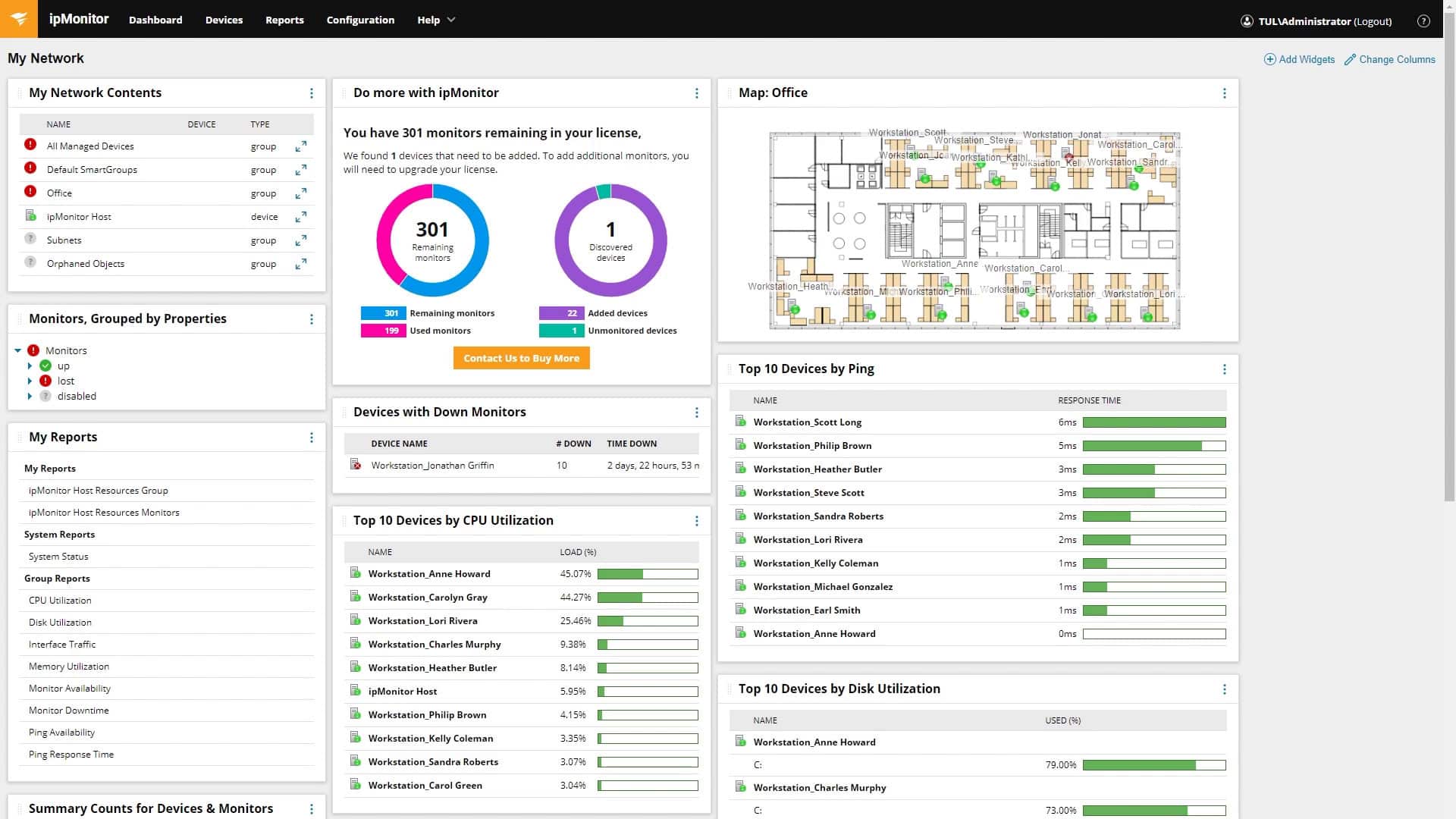
SolarWinds ipMonitor is built to be easy to use, clear, and intuitive. Pair that with a lightweight deployment with a built-in database and web server, you will have all the functionality and data integrity you need without any necessity for third-party options. All of this is accessible from a single, unified screen where you can easily monitor everything. It is highly customizable with drag-and-drop features to custom tailor the view to your needs. You can start monitoring quickly by using the ipMonitor Startup Wizard which only takes a few minutes to get your monitoring tool up and running. The Wizard’s discovery feature includes multiple scanning methods such as DNS zone, host import, IP address range, and network neighborhood.
The wizard lets you quickly scan the network where it discovered nodes and device classifications. It also allows you to look at layer 3 topology information. Taking all of this data into consideration, it is auto-determined which zones are critical to monitor for your network. This decision is made as the culmination of the knowledge and expertise of the developers behind SolarWinds. Years of fine-tuning and customer experience have been taken into account to provide you with the best experience possible.
Windows Application and Service Monitors
Windows services run in the background of any Windows-based server, and their performance directly affects your end-users. Therefore it is important to make sure they keep running smoothly and undisturbed. The SolarWinds ipMonitor has a guided configuration process that lets you configure new monitors with minimal input. You then put these monitors on a centralized screen and implement widgets for each of them. You can organize said widgets into categories and view updated data reports for each service.
You also have full access to the custom alert notifications to make sure that the alerts are always relevant and sent to the right person. Furthermore, you can test all of your monitors with a Downtime Simulator feature that the ipMonitor has built-in. This way you can see how the failure of specific services will impact your network and allow you to anticipate future downtimes far more accurately while also allowing you to fine-tune your configurations.
VM Host Monitors
Since a VM host simulates a physical machine, the monitoring metrics are similar to an actual on-premises server. VM Host Monitors can provide you with a bird-eye-view of your virtual servers and display them accurately and comprehensively on a single screen. It makes sure that you experience as little downtime as possible by monitoring multiple key metrics and alerting you via custom alerts in real-time. These vital metrics that ipMonitor covers are Memory, CPU, and Read and Write.
Running out of memory may cause downtime which is why it’s important to track and identify bottlenecks and manage them properly. SolarWinds ipMonitor has multiple memory monitors. These are total memory capacity monitors, memory usage monitors, and memory consumed monitors. With your CPU, if it becomes bottlenecked or throttled, it will cause your application performance to slow down significantly. By overseeing the CPU usage clearly and comprehensively, you will be able to anticipate when the CPU usage starts reaching critical levels and adjust accordingly to minimize end-user downtime. SolarWinds ipMonitor comes with multiple CPU monitors such as CPU core count monitors, total CPU capacity monitors, and CPU usage monitors.
Alongside this, excessive read and write data on your ESXi disk can lead to end-user downtime. With the right measures, however, you may prevent this issue. Similar to the previous metrics, ipMonitor allows you to detect bottlenecks, identify them, and allow you to begin remediation steps. This is accomplished by having your read-and-write monitors measure the average data that is being read or written on your virtual disk during a customizable timeframe. Having real-time feedback is crucial to deploy any remediation steps necessary to fix the issue as quickly as possible. SolarWinds ipMonitor achieves this by using REST API. When you connect your vSphere API, REST API establishes a private transmission of data between your vSphere and the SolarWinds ipMonitor. This way you can monitor and eliminate bottlenecks in real-time with ease.
Summary
Every tool has its strengths and weaknesses. Knowing what works best for you and your business is something only you can answer for yourself. SolarWinds ipMonitor covers a wide array of monitoring and managing capacities that you can use within your network. It is easy to set up, offers a crystal clear bird’s eye view of the entire network, and is easy to comprehend. On top of that, it is highly customizable which allows you to cover any area that might not be pre-included with the configuration wizard. This way you can safely be assured that your business will never be caught lacking in any way, shape, or form with this tool.