

Port scanners are a crucial tool in the investigation of any remote or local network’s security.
They are used by cybersecurity experts and network admins in order to deduce what port is being used by what app. This helps them figure out which programs are malicious and what might be causing network malfunctions.
They also have a purpose in figuring out how good your security policies are.
With the field of cybersecurity booming in the last few years, there are more and more port scanners swamping the market. In this article, we’ll help you wade through the dirt in order to find the diamonds in the rough.
Here’s Our List of The Top Port Scanners for Windows and Linux:
- ManageEngine Vulnerability Manager Plus – FREE TRIAL A flexible platform that helps both small and large networks identify, categorize, and patch vulnerabilities. Get the 30-day free trial.
- ManageEngine OpUtils – FREE TRIAL This package provides an IP address manager, a switch port mapper, and an endpoint port scanner, giving it the ability to check on all of the addressing issues that your network could have. Available for Windows Server, Linux, and AWS. Start a 30-day free trial.
- SolarWinds Open Port Scanner Cram-packed with useful features all nicely packed up in an intuitive and easy-to-use interface. The tool is easily scalable, so a network of any size can make use of it.
- Nmap One of the more advanced tools on the list. Free and open-source- great for large networks with complex needs.
- Angry IP Scanner The most simple port scanner on this list. If you don’t have a dedicated network professional, or your needs simply aren’t that complex, this is the tool for you.
- Advanced IP Scanner LAN-network exclusive port scanner loved for its ease of use and simplicity.
- NetCat A complex tool supporting a variety of operating systems with optional RFC854 telnet codes.
- LanSweeper IP Scanner A simple and effective tool with an excellent user interface, a paid version with more features is available.
- Slitheris Network Discovery Premium, agentless tool which makes sure to give you as much information as you need at all times.
- MyLanViewer Network/IP Scanner A Windows-exclusive multi-tool, giving you access to a variety of different ways to monitor your network.
Why Do I Need A Port Scanner?
A port scanner is a program that checks the ports in your network for one of three statuses: Closed, filtered, or open.
This is extremely valuable when it comes to diagnosing network issues. Malicious agents have been known to use port scanners on occasion in order to find points of access on your network. Furthermore, they can also find out whether you’ve got a firewall, CPN, or proxy server as well. Because of this, you’ll need to exercise some caution.
The easiest way to prevent your port scanners from being used by attackers is to run scans before there’s any chance of attack. By detecting and patching up and vulnerabilities, you ensure attackers won’t be able to use your port scanner to find out more about your network. Furthermore, you should be regularly auditing your open ports in order to detect if any of them are being used maliciously.
By doing this, you protect yourself from a variety of attacks. Scanning during or after an attack can also bring you valuable information so you can ensure it doesn’t happen again.
The Top Port Scanners
Read on to take a closer look at every one of these tools, and how they set themselves apart from the crowd.
1. ManageEngine Vulnerability Manager Plus – FREE TOOL
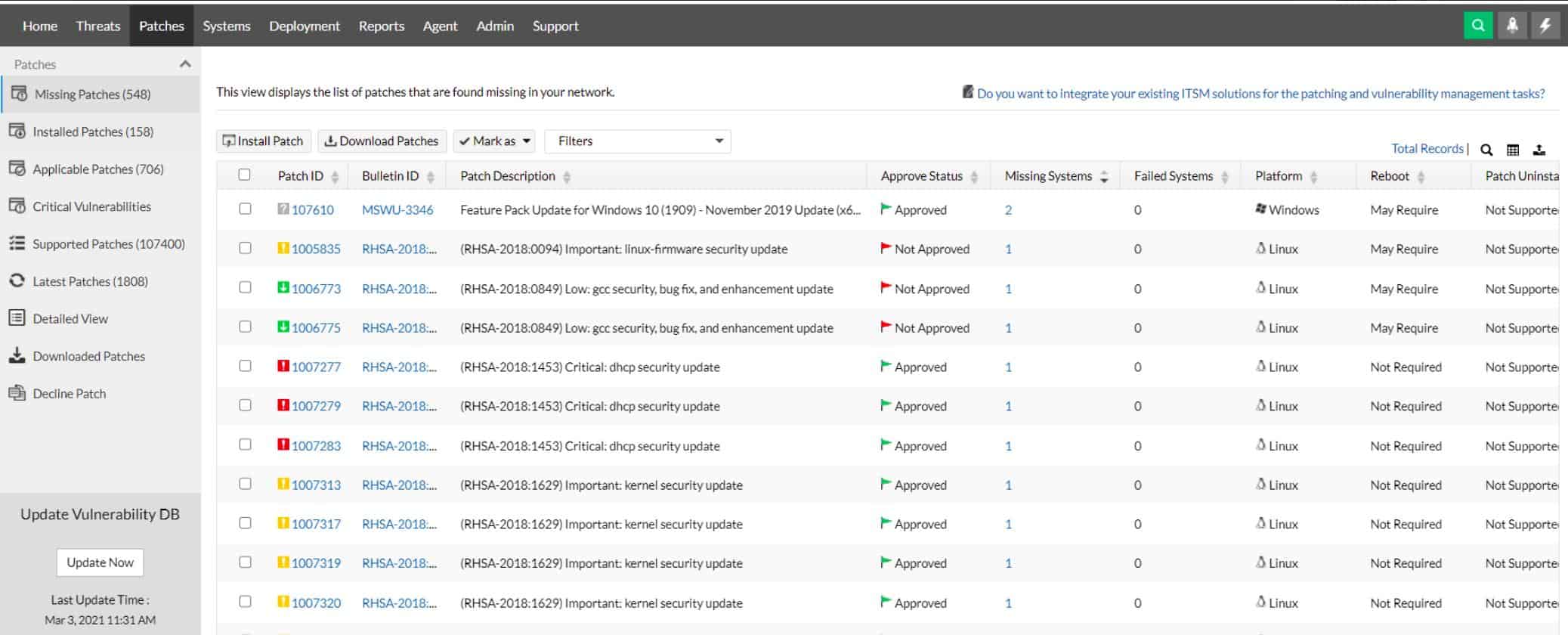
ManageEngine Vulnerability Manager Plus is a software solution that helps organizations identify and fix vulnerabilities in their networks and devices, regardless of the operating system they use. It provides comprehensive coverage, constant visibility, thorough assessment, and integrated remediation of threats and vulnerabilities from a single console.
Key Features
- Holistic vulnerability discovery, management, and remediation
- Offers vulnerability classification and prioritization
- Integrates well into enterprise networks and existing cyber security teams
Why do we recommend it?
Having tried out ManageEngine Vulnerability Manager Plus, we can vouch for its effectiveness in identifying and prioritizing vulnerabilities. Its continuous scanning and robust reporting provided valuable insights, making it easier to enhance our network security. It’s an excellent choice for organizations looking to safeguard their digital assets.
This end-to-end vulnerability management tool is suitable for use on local networks, DMZ networks, remote locations, and on the move, making it a suitable solution for businesses with a distributed workforce.
Vulnerability Manager Plus can help businesses ensure that their employees have safe working conditions by proactively identifying and addressing vulnerabilities in their networks and devices. It includes step-by-step guidance on how to perform vulnerability management in an enterprise setting.
Who is it recommended for?
ManageEngine Vulnerability Manager Plus is highly recommended for organizations of all sizes, especially those with complex network infrastructures. It’s a versatile tool that can help small and large networks identify, categorize, and patch vulnerabilities effectively.
For instance, ManageEngine Vulnerability Manager Plus pointed out and helped us swiftly address a critical security flaw in our web server, preventing a potential breach and ensuring the safety of our sensitive data.
Pros:
- Continuous scanning and patching throughout the device lifecycle
- Robust reporting to show improvements after remediation
- Flexibility to run on Windows, Linux, and Mac
- Backend threat intelligence that is constantly updated with the latest threats and vulnerabilities
- Supports a free version for small businesses
Cons:
- Vulnerability Manager Plus can take time to fully explore and utilize
You can start with a 30-day free trial.
2. ManageEngine OpUtils – FREE TRIAL
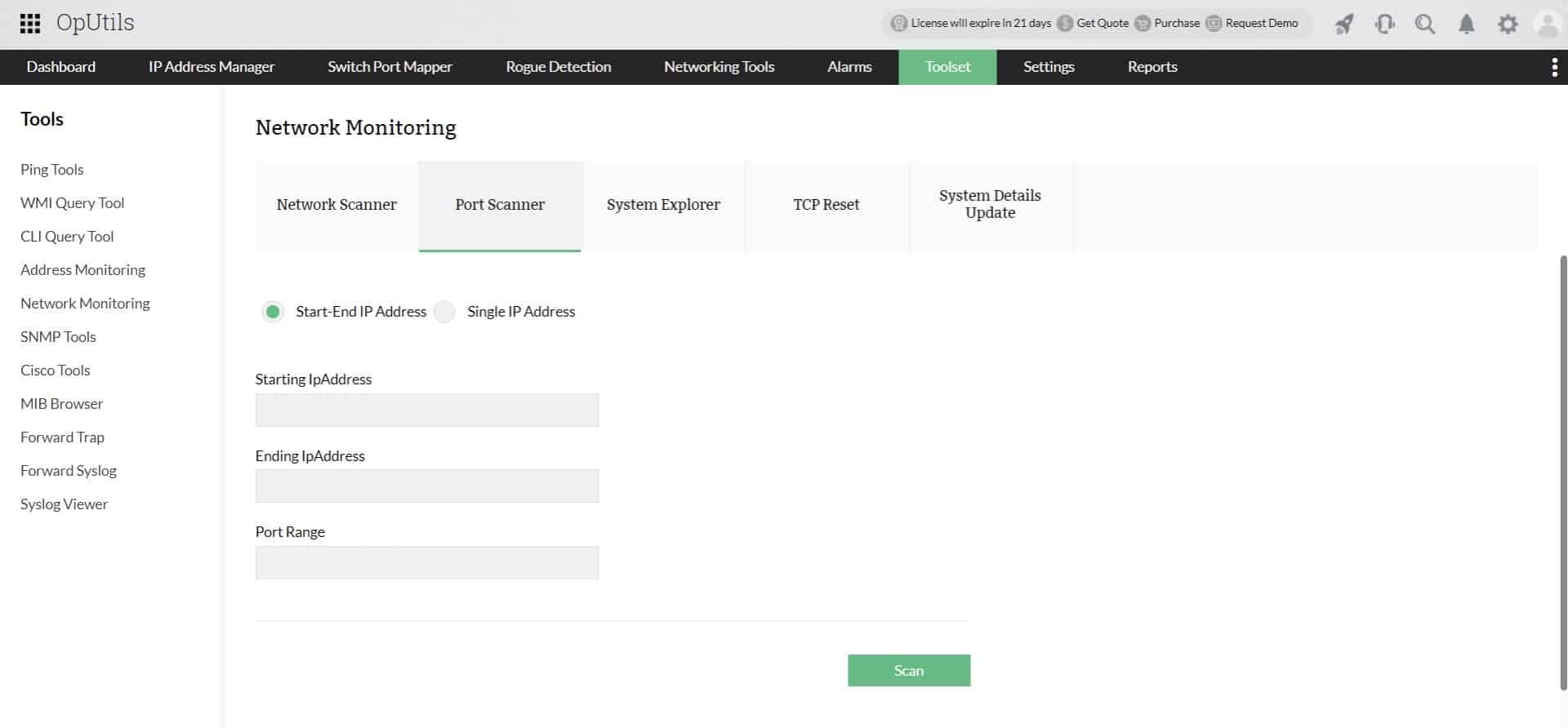
ManageEngine OpUtils is a package of all of the tools a network manager needs in order to sort out addressing issues. This includes an IP Address Manager that can coordinate with your Microsoft DHCP and DNS servers. The package also includes a switch port mapper and an endpoint port scanner.
While the switch port scanner reports on all of the sockets on each switch that have cables plugged into them, the port scanner assesses the login TCP and UDP ports that are active on each of your endpoints. Closing ports that are not in use will enhance security.
Main Features:
- Scans endpoints within a given IP address range
- Can be set to scan ports on just one endpoint
- DHCP manager and DNS resolver
- Simultaneously checks for IP addresses in use and open ports
- Allows for the range of ports in a scan to be limited
- Identifies listening ports
- Tightens network security
Supported operating systems:
The OpUtils software can be installed on:
- Windows
- Windows Server
- Linux
- AWS
Why do we recommend it?
While testing out ManageEngine OpUtils – FREE TRIAL, one of its strongest suits was its effectiveness in resolving network addressing issues. The switch port mapper and endpoint port scanner proved invaluable in enhancing network security by quickly identifying active ports and optimizing resource allocation. The ability to remotely shut down devices and perform other network actions also came in handy when we needed to update settings.
The Port Scanner is just one of the utilities in the OpUtils package. All of the tools in the bundle are accessed through a single console. So, although you can get individual tools elsewhere, such as a port scanner and a visual traceroute, the convenience of this package makes it a winner.
Who is it recommended for?
ManageEngine OpUtils is highly recommended for network administrators and IT professionals responsible for managing IP addresses and network resources. Small to large enterprises can benefit from its capabilities, making it a versatile tool for different network environments too.
It’s especially valuable for those overseeing networks with complex addressing issues, where the IP address manager, switch port mapper, and endpoint port scanner features can streamline network management and security.
You can address the OpUtils package with a 30-day free trial.
Pros:
- A full package of system security weakness checks
- Automated system sweeps
- Continuous monitoring for TCP and UDP ports
- Details on the daemon behind each port
Cons:
- Only available for Windows Server
You can start with a 30-day free trial.
3. SolarWinds Open Port Scanner
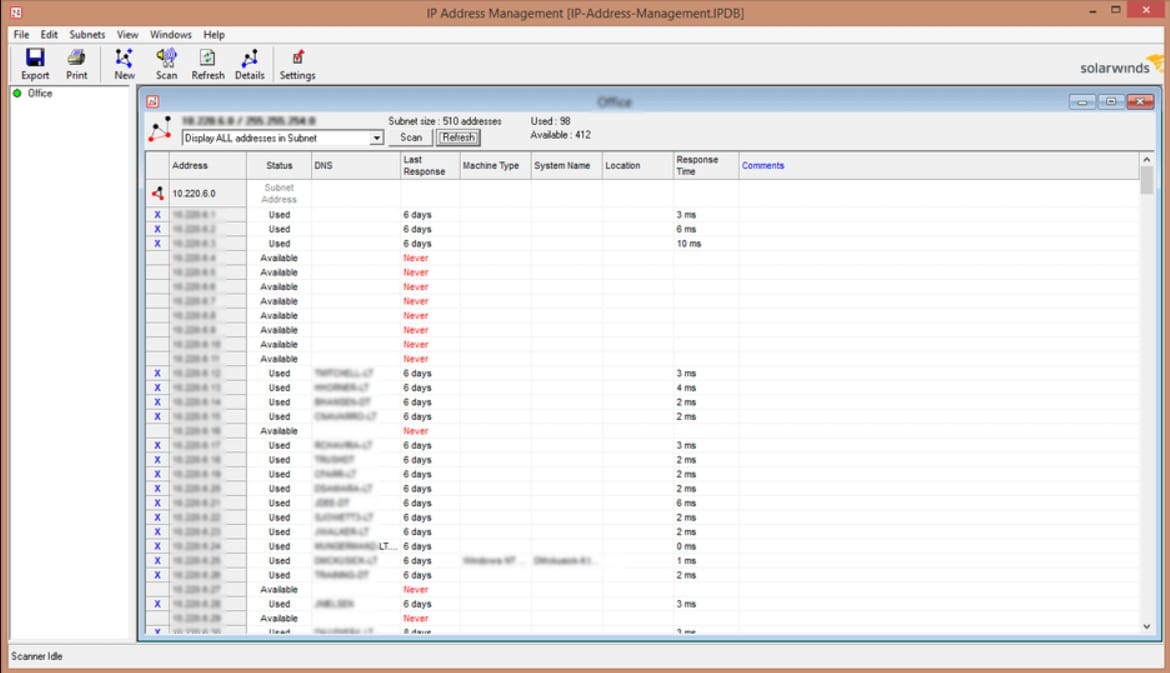
SolarWinds Open Port Scanner comes with the Engineer’s Toolset and has shown itself to be a cut above the rest. With SolarWinds trusted track record manufacturing software monitoring tools, this port scanner is extremely efficient, and will flawlessly come up with a comprehensive list of closed, filtered, and open ports for every IP address in your network.
Main Features:
- You can save any scan configuration to be loaded later. This means you’ll have access to it without needing to change any of the configuration settings.
- You can write up a batch script to be executed at any time.
- The interface is sleek and clever, making using this tool a breeze.
- You can troubleshoot by using a simple, CMD-like interface.
- Scans through this tool can be paused or canceled at any time, meaning if you really need to access a port currently scanned, you can stop the scan immediately.
- Your OS will be determined while scanning, as long as it’s one of the supported installations of Windows.
Operating Systems Supported:
- Windows 8
- Windows 8.1
- Windows 10
- Windows Server 2012 R2
- Windows Server 2016
Why do we recommend it?
Having extensively tested SolarWinds Open Port Scanner, we can confidently say it’s a game-changer. Its intuitive interface, customizable features, and the ability to accurately identify port statuses on our network have made troubleshooting and securing our systems significantly easier. It’s a must-have for anyone serious about network management and security.
Not only is this port scanner completely free, but it also uses advanced adaptive timing behavior in order to expedite its scan time. Furthermore, once it is done scanning you can have the results exported into an XML, CSV, or XLSX format.
The SolarWinds Open Port Scanner is extremely user-friendly to use and to start scanning all you need to do is configure the scan profile. The way you do this is by entering the necessary information like IP range or a hostname. It can also be set up so that it looks for a layer 4 port.
Who is it recommended for?
SolarWinds Open Port Scanner is highly recommended for IT professionals and network administrators who need an efficient and user-friendly tool for monitoring and securing their network. It’s particularly valuable for those managing Windows-based networks due to its compatibility and comprehensive feature set.
We used SolarWinds Open Port Scanner to identify open ports on our organization’s Windows-based network. This allowed us to pinpoint potential vulnerabilities, enhance security, and ensure that only necessary ports were accessible, ultimately safeguarding our network from potential threats.
Pros:
- Scan switch ports
- IP address usage scan
- Check on computer TCP and UDP ports
- Identify open ports
- Also provides SNMP insights
Cons:
- Only available for Windows
4. Nmap

Nmap refers to an open-source scanner that takes a rather peculiar approach to its task. This free tool will scan your network’s device in order to build a “map” of them. This requires it to send out packets to the devices and analyze their responses.
While Nmap isn’t very intuitive and certainly doesn’t keep up with graphic design trends, it’s still one of the most widely renowned port scanners.
Main Features:
- It supports a variety of different techniques to map out devices.
- It’s capable of scanning TCP and UDP ports alike
- It interacts with devices through scrips that use Lua and the Nmap Scripting Engine.
- It’s excellent in enterprise-size networks with thousands of devices
- The tool can help you identify hosts on a network, in addition to listing out their open ports
- It is open-source, meaning you can customize it however you see fit and ensure that it fits your needs
- As one of the most widely used port scanners, it has a huge community working on improving it day in and day out
- It supports pretty much any operating system you can think of
Operating Systems Supported:
- Windows
- Linux
- Free BSD
- OpenBSD
- macOS
- Solaris
- Sun OS
- HP-UX
- Sun OS
- And a variety of others
Why do we recommend it?
After running the tool through its paces, we can confidently say that it’s a network administrator’s dream tool. Its ability to comprehensively map devices, scan various ports, and interact with devices using customizable scripts made it an indispensable asset when we were assessing network security and identifying vulnerabilities.
Its open-source nature allows for flexibility, making it one of the best choices on the market. Its biggest weakness natively is the lack of any progress meter. This means that you won’t have any indicator of when exactly your port scan is going to finish.
Who is it recommended for?
Having tested Nmap extensively, we’ve found it to be a robust and versatile open-source port scanner. It’s ideal for network experts and security professionals who need a powerful tool for mapping devices and identifying open ports, making it an excellent choice for larger networks with complex requirements.
While its command-line interface may not be the most user-friendly, the wide range of scanning techniques and community-driven updates make Nmap a go-to option for network security assessments and penetration testing.
Pros:
- Widely used on network security courses
- A command line tool with many options
- Can be used for penetration testing
Cons:
- Not very easy to use
5. Angry IP Scanner
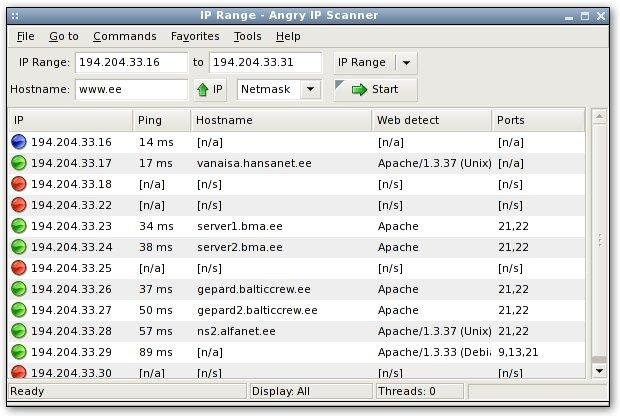
The Angry IP Scanner is a cross-network scanner famous for its efficiency and simplicity. The open-source tool is capable of saving all of your favorite IP ranges and hostnames without requiring an online sign-in. Being able to save all information locally can be a lifesaver if your network connectivity is disrupted.
Main Features:
- Angry IP Scanner is open-source, meaning you can easily customize it to fit your exact needs
- You don’t need to make an external account
- There is little to no installation involved in making it operational
- It boasts a simple and easy-to-use interface
- It makes use of a multithreaded approach to scanning, every scanning thread is made for an individual IP address
Operating Systems Supported:
- macOS
- Windows 8 to 10
- Most Linux distros
Why do we recommend it?
After trying out all of Angry IP Scanner’s features, we found it to be an extremely user-friendly and efficient tool. Its simplicity made it easy to scan IP addresses and check the availability of devices on our network, which makes it a valuable asset for network administrators and users looking for a straightforward scanning solution.
Furthermore, the scanning of your web servers or an external IP can be done within its simple interface. Once you’re done with it, you can quickly export the results into TXT, XML, IP-Port list, or CSV.
Who is it recommended for
Thanks to its comprehensibility and efficiency, Angry IP Scanner is recommended for a broad audience. It’s particularly valuable for individuals who don’t require complex network scanning solutions and those operating without dedicated network professionals. Whether you’re a beginner or just need a straightforward tool for your basic scanning needs, Angry IP Scanner will serve you well.
We particularly recommend Angry IP Scanner for small business owners who want a swift and efficient way to identify and monitor devices on their local network. Its user-friendly interface and effective scanning capabilities streamline the process of overseeing your network’s devices and their current status.
With that being said, some might find that the tool is too simple
Pros:
- Can be used on remote addresses across the internet as well as on a network
- Tests the availability of IP addresses
- Scans a limited number of ports
Cons:
- Won’t provide alerts
6. Advanced IP Scanner
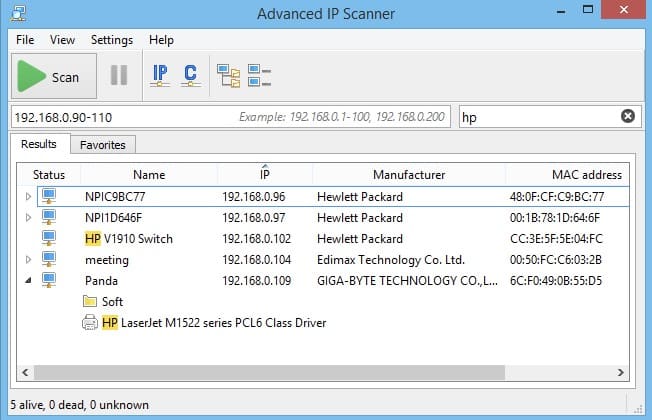
The Advanced IP Scanner is an excellent port scanner usually used to account for LAN networks. As another free port scanner, its main draw is its simplicity and user-friendliness. If you’ve just recently started up a business and are looking for a port scanner to use on your LAN network- the Advanced IP Scanner might just be the one for you.
Main Features:
- You can access and control the tool remotely through Radmin and RDP
- It’s easy to access any shared folders within the network
- The tool allows you to turn devices on and off remotely
- There’s almost no installation involved in setting it up
- It’s an easy tool to use, extremely suitable for beginners
- It is available on Linux, Mac, and Windows
Operating Systems Supported:
- Windows 10
- Most Linux distros
- macOS
Why do we recommend it?
In our hands-on experience with Advanced IP Scanner, we found its capabilities quite impressive. The tool’s remote control features allowed us to power devices on and off remotely, enhancing the overall efficiency of network management tasks. Additionally, when we used its one-click subnet rediscovery feature, it made the process of network monitoring much more straightforward.
Who is it recommended for?
Advanced IP Scanner is recommended for small to medium-sized businesses and individuals who want a user-friendly and efficient tool to scan and manage devices on their local area network (LAN). It’s particularly suitable for those who need to access shared folders, control devices remotely, and perform basic network management tasks with ease.
For instance, a small office can use it to quickly identify and access shared resources like printers and network-attached storage devices, making day-to-day operations smoother and more efficient.
Pros:
- Records IP addresses in use
- Shows MAC address and hostname
- Remote Wake-on-LAN and switch off
Cons:
- A limited number of ports per device
7. NetCat
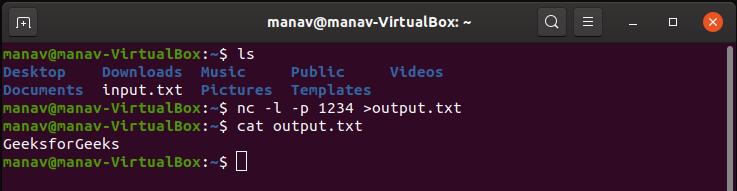
NetCat is a tool capable of reading and writing data throughout different connections by taking advantage of the TCP and IP protocols.
It’s an excellent tool for more experienced networking experts, as it offers a variety of extensive and in-depth applications that will knock most other tools out of the water. With that being said, a smaller company has little use for advanced features like its hexdump capabilities or the buffered send mode.
Main Features:
- A wide tool with built-in port scanning options
- Has a tunneling mode capable of allowing special tunneling like UDP to TCP
- It’ll give you access to both inbound and outbound connections, as well as UDP and TCP ports
- It has an abundance of options for advanced users, such as its buffered send mode or hexdump
- The tool can be configured to use a locally configured network source access, or any local source port you have
- It is capable of reading and executing command line input
- It is packed with optional RFC854 telnet codes
Operating Systems Supported:
- DOS
- Windows
- Windows CE
- Linux
- macOS
- And other UNIX-like operating systems
Why do we recommend it?
We used it as a versatile and powerful tool to read and write data across different connections using TCP and IP protocols. Its wide range of features, including tunneling, inbound and outbound connections, and support for various operating systems, made it a top choice for our network experts involved in daily in-depth networking tasks.
Who is it recommended for?
NetCat is recommended for experienced network professionals, security experts, and IT professionals who need a versatile and powerful tool to perform advanced networking tasks. It’s particularly useful for individuals and teams engaged in penetration testing, network analysis, and network administration.
NetCat has proved itself invaluable for conducting penetration testing and security assessments. For instance, we used it to test network vulnerabilities by probing open ports and performing banner grabbing to identify services running on those ports. This showed us the potential security risks and we were able to safeguard our network.
Pros:
- A free tool for network technicians
- Shows traffic to and from each port
- Can send remote commands
Cons:
- Only available as a command line tool
8. LanSweeper IP Scanner
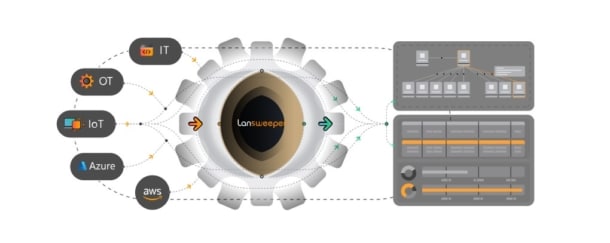
The LanSweeper IP scanner is one of the best network scanners for beginners. It’ll use the information present about currently available active IP addresses to give you a detailed outlook of your network.
Main Features:
- Easily discovers scanned devices using their IP
- It only takes a single click to rediscover a whole subnet
- You can shut down devices remotely, in addition to a whole suite of other remote actions
- The tool can scan through IP ranges on auto mode
- Your network setup can be quickly uploaded through a CSV file
- You can exclude certain devices from the scan
Operating Systems Supported:
- Windows
- macOS
- Linux
Why do we recommend it?
Having explored LanSweeper IP Scanner’s features, we found it incredibly intuitive and effective. It provided detailed insights into active IP addresses, helping us identify potential vulnerabilities, and its remote actions feature allowed us to efficiently control and troubleshoot network devices, ultimately boosting our network’s security and productivity.
Its biggest perk is its user-friendly interface, rivaled only by the SolarWind Port Scanner. It’s also very versatile when it comes to the protocols it uses, with the list containing the likes of HTTP, SSH, FTP, SNMP, and WMI.
Who is it recommended for?
LanSweeper IP Scanner is recommended for network administrators and IT professionals, especially in small to medium-sized businesses, who need a user-friendly tool to efficiently manage and monitor their local area network.
LanSweeper IP Scanner came to our rescue when we needed to streamline our network management. By swiftly identifying active IP addresses, it enabled us to optimize resource allocation, minimize downtime, and bolster network security, all within a few clicks.
While the LanSweeper is a fully serviceable port scanner, its biggest downside is that the free version simply pales in comparison to the SolarWinds. Pretty much anything that it can do, the SolarWind can as well, in addition to them both having a similar interface quality.
The LanSweeper IP Scanner is free for a network with 100 or fewer devices, with 500 devices costing $495 per year, and anything more requiring contact with a support team. Although a network of that size might be better off with an advanced tool like Nmap.
Pros:
- Scans networks to discover IP addresses in use
- Automated or on demand scanning
- Discovered device details
Cons:
- Doesn’t scan ports
9. Slitheris Network Discovery
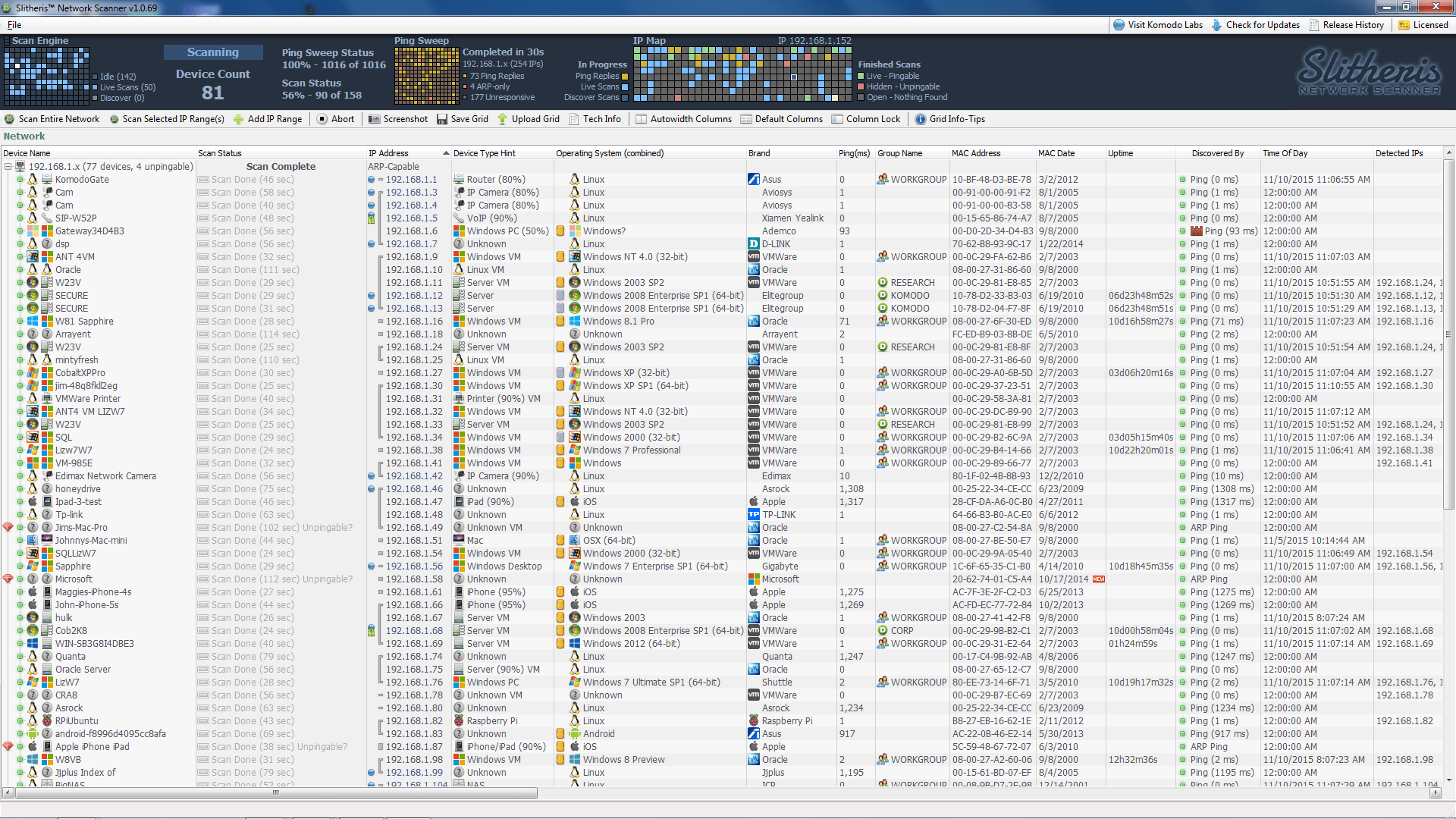
Slitheris Network Discovery is an agentless network scanner. It can be quite an expensive piece of software, as anything past 50 devices will cost you. With that in mind, it does make that money worth your while with its assortment of advanced features.
Main Features:
- It doesn’t require credentials nor agents in order to collect information
- The tool gives a lot of info about every device or app it scans
- It’s able to use an algorithm in order to determine the year of manufacturing for the device
- It can recognize different types of devices through gathering a variety of attributes about each one of them, by comparing them to a device-type definition database
- There is a portable version
- It can determine whether SMBv1 or SMBv2 are enabled, and it allows you to disable SMBv1 at will.
- The tool makes use of an ARP cache in order to find hidden devices
- You can see all of the devices which have a GUI as well as access all of them through a browser interface
- It has a great interface for a tool of its complexity
Operating Systems Supported:
- Windows
Why do we recommend it?
In our practical experience with Slitheris Network Discovery, we found that it excels in delivering comprehensive insights into our network’s devices and vulnerabilities, all without the need for credentials or agents.
What truly stood out was its capacity to identify various device types, detect hidden devices through the ARP cache, and offer a user-friendly browser interface, making it an invaluable tool for network scanning
Who is it recommended for?
Slitheris Network Discovery comes highly recommended for network administrators, IT experts, and businesses looking to gain a deeper understanding of their network infrastructure.
When we put Slitheris Network Discovery through its paces, it efficiently scanned and provided insights into all devices, which quickly revealed some outdated equipment and hidden devices, allowing us to fortify security measures and improve network efficiency.
Now, the biggest downside of the Slitheris is obviously the cost. A network of 1000 devices will set you back over $2000. With that being said, if your company has the cash flow to invest in it, it is one of the best tools available for the job.
Pros:
- Discovers devices on a network
- Provides details of each discovered device
- Free for up to 50 devices
Cons:
- Doesn’t scan ports
10. MyLanViewer Network/IP Scanner
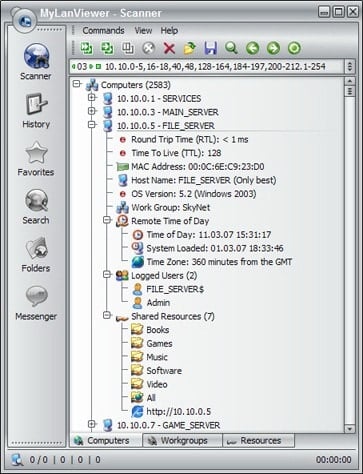
The MyLanViewer Network/IP Scanner is a NetBIOS, LAN, and Network IP scanner made exclusively for Windows. It is quite a versatile tool, boasting a variety of functions that let you have almost complete control over what is on your network.
Main Features:
- It is capable of controlling your network remotely, letting you shut down, reboot, hibernate, sleep, or WOL your devices
- The tool ensures you find every IP and MAC address, as well as shared folders on a network
- It’ll monitor IP addresses on the network and show the states of the devices as they change
- You can terminate user’s sessions, disable access to folders, detect DHCP rogue servers, and a lot more.
Operating System Support:
- Windows 2003 to Windows 10
Why do we recommend it?
We recommend MyLanViewer Network/IP Scanner for its capacity to provide Windows users with a multifaceted network monitoring tool. Our experience with this tool showcased its ability to efficiently control and monitor devices, find IP and MAC addresses, discover shared folders, and manage networks, making it a valuable asset for users seeking to gain a comprehensive view of their network.
Who is it recommended for?
It’s especially valuable for those seeking an all-in-one solution for network management. MyLanViewer Network/IP Scanner is recommended for Windows users who require a versatile network monitoring tool that allows them to control, monitor, and manage devices, IP addresses, and network resources with ease.
IT professionals and business owners can utilize MyLanViewer Network/IP Scanner to maintain a secure and efficient network environment. They can regularly monitor their network for unauthorized access by checking for unfamiliar MAC addresses and promptly terminate any unauthorized user sessions, ensuring that only authorized personnel have access to critical resources.
The main drawbacks of the MyLanViewer are its narrow OS support and lack of specialization. There are many network monitoring tools out there that combine a lot of different areas into one. In the same vein, it boasts too many for it to be a simple and focused solution. It’s not a bad tool by any means, however, its optimal use-cases are quite niche.
Pros:
- Remote Wake-on-LAN, shutdown, and reboot
- Discovers ll devices on a network
- Provides details of each device
Cons:
- Doesn’t scan ports
Conclusion
Port scanners are a crucial tool in any network admin’s toolkit. They’ll help you gain information on the devices that you scan, which will help you better understand their functioning, and therefore, their security.
They’ll help you find any open ports and vulnerable systems that might be allowing intrusions into your network, as well as finding places where your infrastructure might be leaking.
Some of the tools above are free or have a free trial. If you’re on the fence about getting a port scanner, then just downloading one of them and trying it out for a few weeks can show you the benefits that a port scanner brings. You don’t have to take an overly complex, command-line-based tool like Nmap, take one with an intuitive interface!
Did we miss your favorite port scanner? Maybe you’d like to know a bit more about the technology? Let us know in the comments.