


Cloud computing has a growing presence in most modern businesses. Due to the flexibility and efficiency cloud computing brings, a lot of businesses have been investing heavily into it. Microsoft’s Azure is one of the biggest cloud computing services out there and is used by hundreds of businesses across the globe.
Part of Azure’s popularity comes from its flexibility, working seamlessly with a variety of applications across different OSs. Although Azure is easy to use compared to some other cloud computing services, there are still some areas where many businesses are left puzzled.
Azure provides underlying SaaS (Software as a Service), IaaS (Infrastructure as a Service), and PaaS (Platform as a Service) servers. Both IaaS and PaaS are often used to deploy, manage, and create apps on Azure. However, they are not the same, and having a good grasp of what makes them different can elevate your usage of Azure to the next level.
Today, we’ll be looking at what the difference is between IaaS and PaaS services, which one you should use, as well as some tools that will help you manage the performance of your Azure services.
What Is Azure IaaS?
Microsoft Azure IaaS architecture encompasses all of the physical data centers necessary for your applications as well as the servers present on VMs. By doing this, IaaS takes infrastructure from your servers and puts them into Microsoft’s back end.
IaaS lets you manage crucial business tasks and operations by using cloud orchestration features. Using cloud orchestration can be a great help in organizing your operations as it reduces the workload placed on you. Therefore, IaaS reduces time consumption, the chance for human error, and the energy you spend on repetitive tasks. This helps your company’s IT experts focus on larger issues that need their attention.
Although all of your network and computing needs can be outsourced to Microsoft when building IaaS architectures, you still need to buy, set up, operate, and manage all of the elements within your infrastructure. This means that you’ll have to work with and monitor your OSs, databases, and any middleware you have installed on them. Because of this, you should always have trained IT technicians maintaining your IaaS-reliant platforms.
IaaS has a variety of different features, providing different facilities depending on what your business needs. IaaS was created to be able to easily handle essential business operations like creating web apps, hosting sites, building and testing new environments, etc. It’s also easy to store and create backups of crucial data, helping you keep your data safe from accidents and malicious actors. IaaS also scales very well with your business, helping you add or remove elements of your infrastructure without paying the cost of physically scaling it up or down.
Azure IaaS has three different payment options:
- Pay-as-you-go This pricing option lets you pay for IaaS computing capacities by the time you use them. You don’t need to provide any upfront payments or make a long-term commitment. However, if you’re planning to use IaaS extensively, this option can get quite expensive.
- Reserved Machines This option lets you purchase IaaS services within a region for a period between one and three years. This option is usually ideal for businesses looking to heavily rely on IaaS for their operations.
- Spot The Spot payment option lies somewhere in between the former two, and lets you get unused computing capacities at a high discount a few days after purchasing. This option can be great for businesses that are only somewhat reliant on IaaS.
What Is Azure PaaS?
Azure Paas, or Platform as a Service, provides you with a cloud-hosted framework where your developers can create, deploy, and manage your enterprise apps. When you’re dealing with PaaS cloud services, you won’t have to internally store any programming software, security protocols, or service space. This makes it a lot faster, cheaper, and easier to create and scale applications, as well as other products and services.
Azure PaaS services are getting a lot more popular these days. This is mostly because you can now access PaaS services through the cloud, making remote work a breeze. Being able to remotely access PaaS services can not only improve your employee’s experience but even your customers’. Using PaaS can streamline your software’s functionalities, and ensure a positive customer experience.
PaaS is made to provide access to reliable platforms to build and manage applications. PaaS can provide you with pretty much everything you need ranging from tiny web apps to high-level enterprise software through its features like fast-action data transfers and a variety of supported integrations. Being able to build and deploy apps on the cloud can be a massive advantage in today’s fast-moving climate.
When it comes to pricing, Azure IaaS is only available on a pay-as-you-go model.
What Are The Differences Between Azure IaaS and PaaS?
While Azure IaaS and PaaS can seem similar at first glance, in reality, the two are quite different. First of all, IaaS forces you to install, set up, and develop your own physical, on-prem environments. On the other hand, PaaS is built entirely around letting you both build and deploy apps on the cloud. This lets you rid your business of managing its platforms and software, speeding up development.
With PaaS, you’re leaving a lot of your application management to Microsoft, which is oftentimes a good thing, however, some businesses feel less confident knowing this. On the other hand, with IaaS you have to run your core services, which takes more time to do. However, this also lets IaaS be a comprehensive, holistic service.
IaaS has you buy, configure, and manage all of your software and dev tools from the start. PaaS, on the other hand, takes advantage of a pay-per-tool system, letting you only pay for the tools you’re using at the moment. This makes it a bit more flexible in this area.
PaaS is made to support tapping into its many pre-built app components, this helps your staff train and grow their skills more efficiently. IaaS, on the other hand, doesn’t provide any pre-built components.
When you’re deciding on which one of these technologies you want to use, it’s important to keep these differences in mind.
Should You Choose IaaS or PaaS?
If your business is deciding between an IaaS and PaaS Microsoft Azure license, then there are a few things to consider. First of all, think about what precisely your organization needs. Having a list of needs you want a solution to fulfill can make deciding between different options a lot easier.
PaaS has cloud computing support, usually, this leads to more team members being able to make proper use of it. Azure’s IaaS architecture, on the other hand, requires on-site hardware to be installed. IaaS requires your technicians to be proficient in using Azure’s IaaS toolkit since it requires on-site hardware. If you’re looking to prioritize ease of use, then PaaS might be the right choice for your business. On the other hand, IaaS lets you resolve all hardware and backend issues through those that are most familiar with them- your technicians.
On the other hand, if you’re looking to lean hard into cloud computing, PaaS offers more cloud computing features. On pricing, IaaS’s payment structure is a lot more flexible, while PaaS is only offered as a pay-as-you-go model.
Tools To Use For IaaS and PaaS Monitoring
As with any kind of infrastructure, your cloud facilities need to be monitored. Leaving them unchecked can often lead to major security flaws going unfixed, and leaving you vulnerable to hacking efforts by malicious agents.
Monitoring by hand is extremely tedious, and in medium to large organizations, might be physically impossible. Because of this, most companies rely on tools to help them properly monitor IaaS and PaaS infrastructures. These tools will allow you to have a better look at your infrastructure, spot problems quicker, and resolve them efficiently.
1. Site24x7 Azure Monitoring – FREE TRIAL
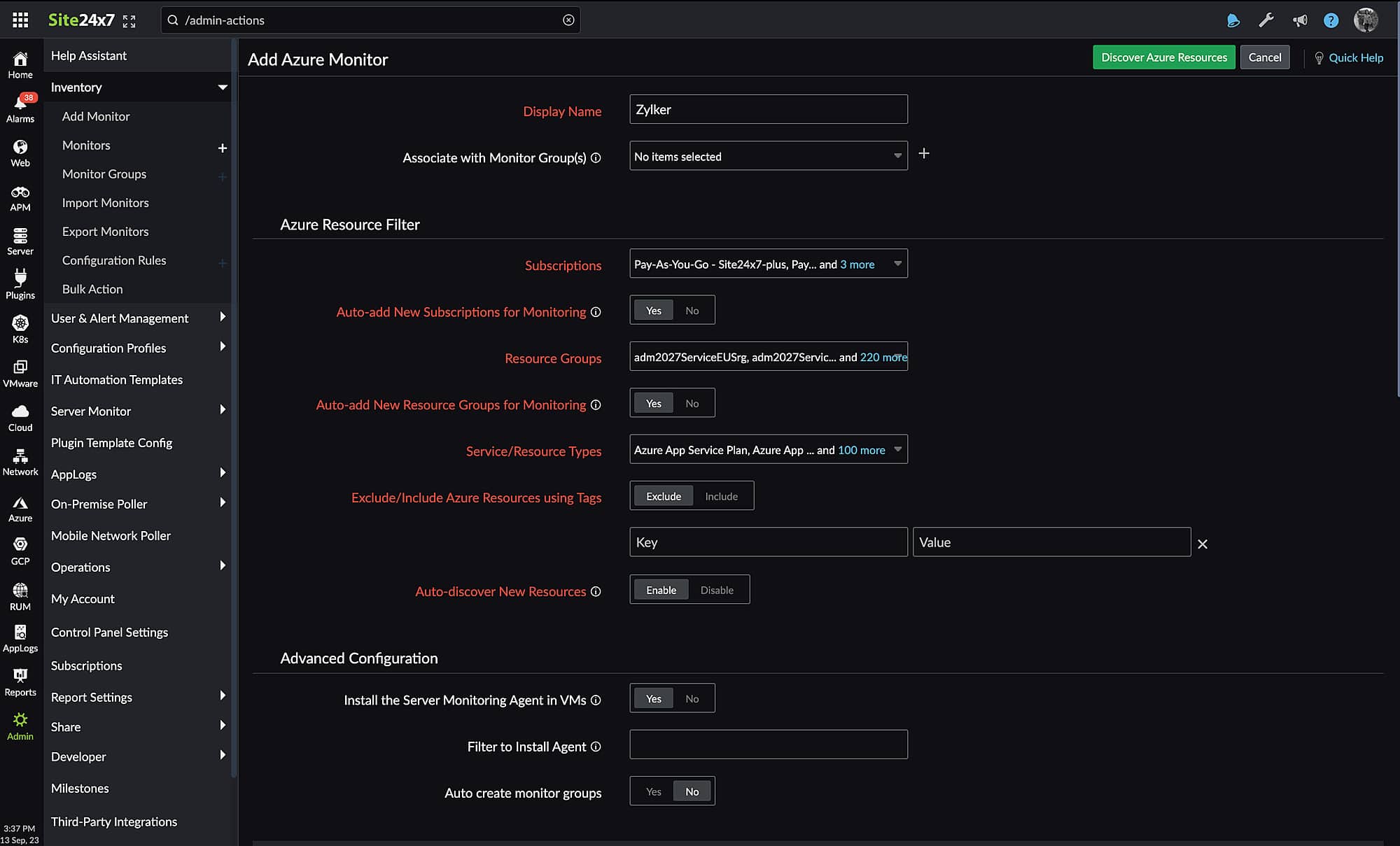
Site24x7 helps businesses watch over the entire Azure environment, including its 100+ resources, IaaS and PaaS services, and applications. Be it on-site resources, cloud resources, or virtual systems, administrators gain access to track down all services and identify potential issues. Additionally, the application offers an extensive catalog of specialized module monitors for every Azure service, so you are not restricted to only one Azure integration.
Key Features
- Tracks down all Azure applications and services
- Supports AI-powered monitoring techniques
- Discovers Azure resources automatically
- Insightful report creation
- Integrates well with ITSM solutions
Why do we recommend it?
Site24x7 Azure Monitoring Tool offers detailed insights and visibility into All Azure resources, services, and applications which helps identify potential issues in real-time. It even supports IT Automation features that increase the agility and efficiency of your IT operations.
Using the IT automation feature, you can remediate incidents faster and run most of the operations automatically. Further, it helps businesses take corrective measures without the need for human intervention. It offers better control over the complete environment with access to quick anomaly detection, insightful reports, integration with various collaboration tools, and more.
Who is it recommended for?
The tool’s design prioritized small enterprises. MSPs and big companies, on the other hand, can also utilize the tool but require paying more for increased capacity.
Pros:
- Provides detailed insights into the operational data and status of 100+ Azure applications in a single window
- Comes with a Guidance Report that highlights best practices to track performance and optimization costs
- Uses machine learning and other techniques to predict trends for Azure performance
- Offers support to a wide range of Azure services and secures resources with single-step authentication
Cons:
- Getting familiar with all features and functionalities could take some time for users
The Site24x7 Azure Monitoring Tool comes with a 30-day free trial.
2. ManageEngine Applications Manager – FREE TRIAL
When it comes to monitoring Microsoft Azure environments, ManageEngine Applications Manager stands out as one of the most reliable tools. It allows businesses to track the health and performance of Azure resources without switching between multiple tools. It provides a unified view in the same console, making it easier for IT teams to detect potential bottlenecks, reduce downtime, and optimize workloads across different environments.
Key Features:
- Offers complete visibility into Azure IaaS and PaaS resources, applications, and servers.
- Monitors availability, utilization, and KPIs from a single dashboard.
- Quickly pinpoint root causes of performance issues to prevent downtime.
- Notifies about anomalies in real-time for faster response.
- Works well with other IT management tools for smooth operations.
Why do we recommend it?
ManageEngine Applications Manager is recommended because it reduces the stress of juggling between multiple Azure monitoring solutions. With this tool, organizations can access performance insights, detect and receive anomaly alerts, and generate insightful health reports. Its AI and ML-powered diagnostics allow IT teams to not only detect problems but also predict potential risks and plan accordingly. Additionally, the platform supports monitoring for over 150 technologies, meaning Azure isn’t siloed but integrated with the broader IT infrastructure.
Who is it recommended for?
Businesses of all sizes, from startups adopting Azure cloud services to large enterprises running hybrid environments, might find it helpful.
Pros:
- Insightful reports with charts and graphs for better analysis
- Centralized monitoring of Azure services and hybrid environments
- Real-time anomaly detection with instant alerts
- Built-in AI/ML for predictive insights and faster issue resolution
- Highly customizable dashboards
Cons:
- The extensive feature set can feel overwhelming for first-time users
Try ManageEngine Applications Manager with its 30-day free trial. For advanced needs, explore the paid editions.
Closing Thoughts
Pitting IaaS against PaaS is not as simple as it seems at first glance. The two are fundamentally very different and are designed for different businesses and applications. While PaaS lets you put all of your data and applications on the cloud, IaaS lets you have a lot more control over the backend. The decision on which one of these two is better fundamentally lays on you. Azure’s IaaS toolkit supports both on-premises elements as well as off-premises, cloud elements. PaaS, on the other hand, works only with cloud-hosted server metrics.
Regardless of which one of these two options you choose, you need to monitor it to ensure it’s running properly and your infrastructure isn’t being taken advantage of by malicious actors.
To get the most out of both IaaS and PaaS systems, you should use an Azure monitoring solution. These tools make monitoring much easier than it would be if you were to do it manually or via freeware. Furthermore, tools like the SolarWinds SAM are quite flexible about pricing, in addition to there being a free trial, so it never hurts to try them out.
Do you prefer IaaS or PaaS?
What is your favorite Azure monitoring tool?
Let us know in the comments below!