

Running a successful business can be very challenging. There are many things to consider when planning its success and properly managing your resources is one of those vital steps. When you start off your business, the network that you have to manage is small. You can have a single dedicated person to keep it in check and work on it to implement new features as your business grows.
Your network will grow more complex, the daily routine checks will become more and more time-consuming so you will likely hire an additional person to split the workload. As your business grows, manual examination of your systems and the concept of oversight start experiencing diminishing returns. Before you know it, your IT technicians will have to switch between dozens of tools daily to accomplish their work and will be swamped by the most menial of issues, disallowing them from actually focusing on upgrading the system.
What will you do once your business grows too large for them? You will have to turn to automation. You might consider having your own technicians create their own tools to automate these issues but that is ill-advised for several reasons. First, you have to consider the issue of creating it, testing it, patching it, et cetera. During this period your services will still likely be under stress, with now even less dedicated people to address them.
The implementation will likely take a while and function only for that given task, out of numerous many others which may pop up. On the other hand, tools for application monitoring are already pre-designed by the leading experts in their respective fields, using cutting-edge industry resources and techniques to do as good of a job at monitoring as possible. They also usually fully implement their features in a timeframe ranging from minutes to an hour at most. That is lightning quick in comparison to developing your own tool for a specific problem. Speaking of which, application monitoring tools do their best to cover your every need. They are highly customizable and flexible, allowing for approaches unique to your specifications with ease.
What Do Application Monitoring Tools Offer?
Different tools offer different capabilities, but the overall experience you can expect is as follows. The tool will autodetect and generate your topology visually. Your entire network will be automatically discovered down to the very last detail, allowing for full oversight of businesses of any scale in real time. The fact that they operate in real-time is a game changer as well.
While manually checking your systems, you are always working against the clock, if a system is currently failing and requires an immediate response, it might take you hours if not longer to actually notice that something is wrong. Automated tools will flag that issue, contextually collect all of the relevant data for the issue and present it to you in a clear and comprehensive way.
There are many different ways that application monitoring can optimize your business and save costs. Take for example the issue of maintenance taking most of the time for your technicians. Taking the issue of the time required to be notified of an alert, responding to it, and fixing it isn’t an easy thing either, especially if you’re overrun by many small alerts which in by themselves might be barely consequential, put together pose a serious risk.
Going through those alerts would take your technician most of their free time, and then they might have to do it all over again tomorrow. With dedicated tools, you don’t have to worry about issues such as these. For every alert that you might receive, you will have the option to create a pre-configured response that will automatically carry itself out upon detection, effectively eliminating the vast majority of the clutter within your alerts. Furthermore, machine learning detection algorithms simply do a far better job at this than humans do. They aren’t prone to exhaustion, or mistakes, and are far more skilled at sifting through raw data.
Application Monitoring as an Investment
Efficiently monitoring your applications and network is an excellent way to cut back on costs, and labor, and provides you with more room to grow as a business. First, take security for example. Data breaches or being forced to pay a ransom for your data can be very expensive. Ransomware is a type of attack in which a malicious actor will encrypt all of your data, making them effectively unreadable.
The only way to break modern encryption would be to actually possess the key since even if you had thousands of years, you would not be able to crack it by force. The cyberattacker then will impose a fee on you in exchange for your data back. How do you protect yourself from this? Firstly, prevention is key, since you monitor all of your vital metrics in real-time you will be notified about an issue like this before it becomes too much of a problem hopefully. Many tools also offer capabilities such as automatic backups and layers of data protection.
You can minimize the risk of the attack ever happening, but if by some miracle it does, you will be able to revert to a previous state with ease and confidence. Data breaches are a similar matter but more dangerous. A breach does not only cost financially but reputationally as well. If you are recognized as unable to keep private information safe, customers may not be willing to spend money at your business or investors may look for different opportunities. A breach can happen for numerous reasons from both external and internal sources.
Inside your enterprise, work can range anywhere from being very incompetent to downright malicious. Luckily you can actively track and monitor every single one of your employees and log their every move, access request, et cetera. This is referred to as “Zero-Trust” security and it allows you to make sure that every person accessing confidential info always has proper clearance and is held accountable for the information. You will no longer have to worry about careless workers who accidentally click on the wrong email attachment which turns out to be malicious that blocks your entire network, nor will you have to worry about corporate espionage where high-clearance employees might keep the information after they leave your company.
Another way you save costs is in opportunity costs. We have touched on the fact that with manual monitoring, your technicians will be required to put lots of time into managing the system and making sure that everything is operational. Once this process is automated, the returns are twofold. Firstly, these tools are so comprehensive that you don’t really need dedicated IT experts to manage your network. All of the heavy lifting is already accounted for, everything is clear and comprehensive meaning that you can hire less experienced people to fulfill this position. This in turn means that your expert IT department now has free time on their hands again to turn towards research and development, making sure that your business is always up-to-date and ready to thrive.
What Should I Consider When Choosing an Application Monitor?
There are many things to consider when picking out the ideal tool for monitoring, while they all try to be as flexible as possible, some may be preferable to others depending on your infrastructure. Things to consider are where is the application that needs monitoring located. Is it local and on-premises or on the cloud, or perhaps a hybrid?
Do you wish to prioritize real-time monitoring, security, or both? Do you want to have the capacity to use machine learning and AI to help you in your monitoring or not? There are a lot of variables to consider that are unique to your business which only you can answer for yourself. Luckily, most of the vendors offer fully functional trials alongside interactive demos to further familiarize yourself with their products. You can get consultations and communicate about it to fully figure out if it is the right choice for you. Here is a curated list of application monitoring tools that should cover businesses of all types and sizes.
The Best Application Monitors
1. ManageEngine Applications Manager – FREE TRIAL
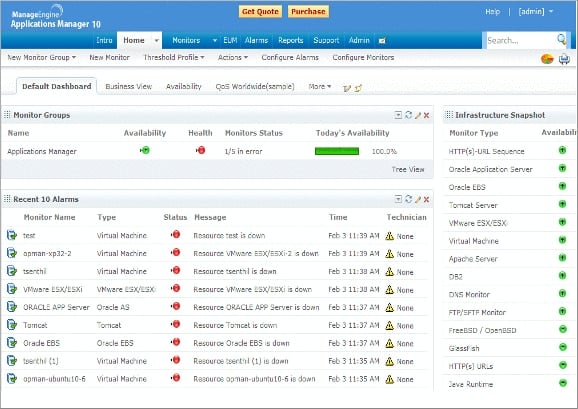
ManageEngine Applications Manager helps you monitor performance and user experience with deep visibility across your entire application stack. The performance monitoring supports Java, PHP, .NET, .NET core, Node.js, and Ruby. Applications manager offers code-level insights allowing for easy root-cause analysis as well as distributed transaction tracing.
If your infrastructure is a multi-cloud environment, ManageEngine has you covered with its multi-cloud monitoring. Regardless if you have private, public, or hybrid cloud resources, you can monitor them all and troubleshoot application performance on cloud and virtualization platforms. Applications Manager supports many VMs such as AWS, Azure, GCP, Oracle Cloud, and OpenStack.
If you have a need for database monitoring, you can easily do it with Applications Manager since it offers agentless monitoring for many databases, including RDBMS, NoSQL, in-memory, and big data stores. There are also many other types of monitoring that you may find useful such as server monitoring, real user monitoring, container monitoring, website monitoring, and many, many more. Using all of these features you can easily reduce MTTR since you will be dealing with issues proactively rather than reactively, optimize application usage, and more. ManageEngine offers a free 30-day trial as well as a demo. If you wish to purchase the full product, however, you will have to contact the vendor directly to get a quote. Start a 30-day free trial.
2. Site24x7 – FREE TRIAL
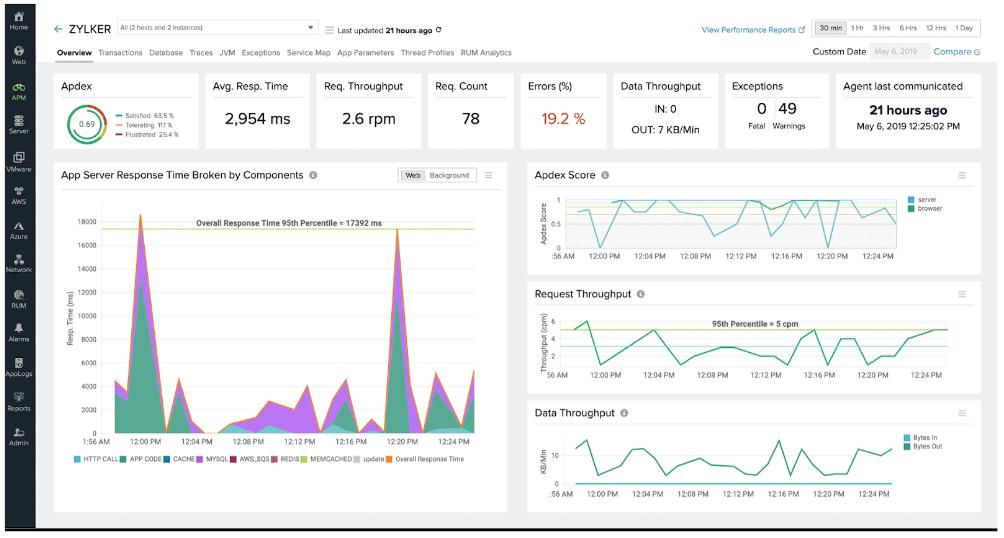
The Site24x7 Application Performance Monitor (APM) is a powerful tool designed to provide real-time insights into application performance and health. It offers comprehensive monitoring capabilities, tracking key metrics such as response times, error rates, and resource usage across various platforms, including Java, .NET, PHP, Ruby, Node.js, and Python. AI-driven anomaly detection and alerting systems help identify and resolve performance bottlenecks, ensuring better application performance.
One of the important features of Site24x7 APM is its end-to-end distributed tracing capability. This feature allows users to trace request flows across microservices and identify slow-performing code segments, database queries, and methods that cause bottlenecks2. By providing deep, code-level insights, Site24x7 APM enables developers to optimize performance at the source, reducing downtime and improving overall application efficiency.
The Site24x7 APM offers customizable dashboards and reports, giving users a clear visual representation of their application’s performance. The tool’s dependency mapping feature helps users understand how their applications connect and communicate with external components. This service makes it easier to isolate and troubleshoot issues. You can sample the whole Site24x7 platform by accessing a 30-day free trial.
3. New Relic APM
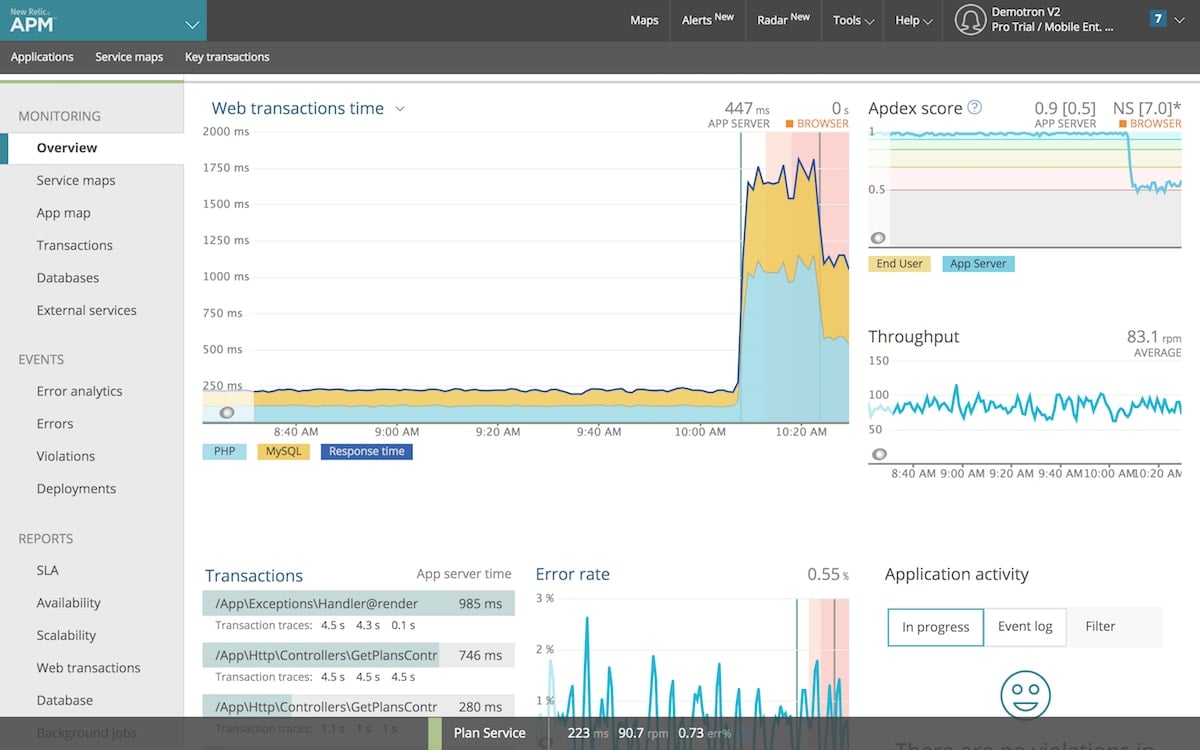
New Relic utilizes many features to provide you with the best service possible. You can get set up and started lightning-fast with over 600 integrations to choose from. Once you have set New Relic up, you can instantly monitor your metrics and dependencies. The alerts are configurable and provide you with context for every incident or anomaly that may appear. It also promotes easy communication on issues between teams for the fastest and most comprehensive response to an issue.
You also have AI leverage when it comes to alerts which will identify and present you with the likely cause and suggestions for remediating the issue. This allows your team to always be on the same board, makes the issue crystal clear, and reduces overall MTTR (Mean Time To Recovery). New Relic can also be used with agents or with full OpenTelemetry support. New Relic offers four different plans, Basic, Standard, Pro, and Enterprise. The Basic plan is fully free for up to 100 GB of monthly data for a single user. The other three plans are calculated specifically by your data ingestion rates and amount of users.
4. Datadog APM
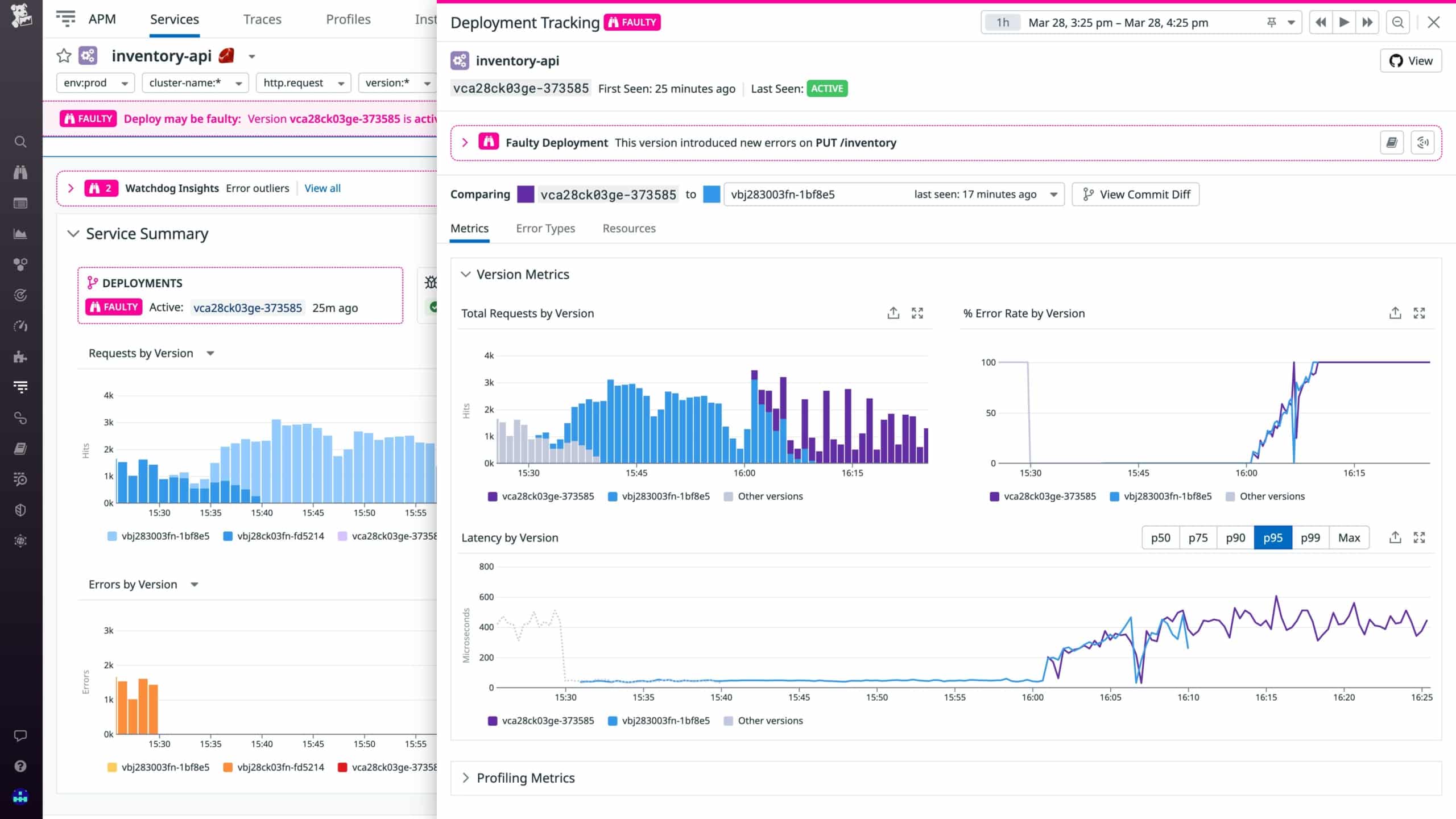
Datadog APM is a well-rounded tool that allows you to dig deep down to the code-level source of the issues with ease leveraging Watchdog AI. It correlates logs, metrics, queries, and many other vital metrics under a single interface. This allows for lightning-fast alerting for any issue that may arise, allowing you to act upon it near-immediately. Watchdog AI also helps with reducing MTTR with automated root cause analysis, allowing you to shift your focus from discovering the issue, to immediately combating it, effectively minimizing the effect that the issue has on your end-users.
You can also ingest both Datadog and OpenTelemetry data to make sure your entire stack is covered, effectively monitoring its performance. Datadog offers a free 14-day trial and allows you to monitor as many servers as you want during that period. For application monitoring, they offer three different plans. The APM, APM Pro, and APM Enterprise plan where the pricing varies per amount of hosts.
Summary
Managing a business successfully can be extremely challenging and even sometimes discouraging. Staying on top of an ever-growing list of problems and concerns can feel overwhelming and stifle your business capacity and creativity. This is where tools that help out automate the hard work and streamline the process come in.
Picking out the ideal one is no easy task, especially since you have to worry about making sure that it is the perfect one for you, however, it can be done, especially since they’re all so adaptable to almost any environment. With the proper tools, you can rest assured knowing that at least some stress will be taken off your shoulders, allowing you and your business to thrive.