

With today’s businesses expanding their digital footprint more and more, digital risks grow in kind. Every new device, cloud service, or remote network connection increases your “attack surface”.
An attack surface is a very broad term, is defined as the sum of all endpoints from which an unauthorized entity can gain access to your system to enter or extract data. Every time you add another endpoint, you’re increasing your attack surface. With this comes the increasing complexity of what you need to do to properly protect it.
Here is our list of the best attack surface monitoring tools:
- Aikido – EDITOR’S CHOICE Provides complete visibility into your attack surface across multiple environments. Its remediation capabilities are also highly effective in protecting your assets from attacks. Get started with a free trial.
- ManageEngine Vulnerability Manager Plus – FREE TRIAL A comprehensive attack surface monitoring tool covering vulnerability discovery, severity, and remediation. Start a 30-day free trial.
- ManageEngine ADAudit Plus – FREE TRIAL An attack surface analyzer that identifies misconfigurations, identity risks, and other threats. Start a 30-day free trial.
- Rapid7 InsightVM Although not a dedicated ASM tool, the Rapid7 InsightVM offers most of the features provided by the top attack surface monitors in addition to its vulnerability management capabilities. It features excellent third-party risk assessment features, is entirely cloud-based, easily scalable, and provides timely alerts. All of these features are wrapped up in a modern, intuitive GUI. The tool offers a month-long free trial.
- FireCompass Attack Surface Management Platform A newer ASM that has been showing a lot of promise with its extremely focused approach targeted towards medium and large businesses.
- Bugcrowd Asset Inventory Created by white hat hackers, this crawler does a great job of supporting any attack surface monitoring strategy.
- Intruder This attack surface scanner offers three plan levels that range from a monthly scan to a continuous service that allows for on-demand scanning as well.
- Digital Shadows SearchLight An extremely innovative tool capable of alerting you of imminent attacks.
- OWASP Zed Attack Proxy The best free and open-source ASM solution available
- CoalFire Attack Surface Management An ASM tool that has its assessments looked over by an actual human analyst.
- CyCognito Attack Surface Management Automation-packed tool that combines ASM and vulnerability management.
- ImmuniWeb Discovery An ASM tool with a lot of potential that comes with vendor risk tracking.
Doing this manually is nigh-impossible in small businesses, and is completely unfeasible for larger ones. Because of this, companies rely on attack surface monitoring tools to make it easier and more efficient. To ensure you’re protected against cyber threats, you need to have a solid grasp of what your attack surface is, as well as which parts of the said surface are at the greatest risk.
Why Use An Attack Surface Monitoring Tool?
Attack surface monitoring tools are necessary for medium to large businesses to attain a solid grasp of their attack surface. These tools provide ASM (attack surface management,) a crucial element of cybersecurity.
Attack surface management is a continuous process. Cybercriminals are always discovering new exploits, because of this, we have to stay vigilant when it comes to our protection. ASM consists of two distinct research phases:
- Assigning each piece of data you know a sensitivity ranking
- Gaining an accurate software inventory
Once this is complete, an attack surface monitoring tool will start looking for typical attack vectors that malicious agents use. DevOps environments should integrate attack surface monitoring into the CI/CD (Continuous Integration/Continuous Delivery) pipeline to ensure compatibility with brand-new functions, apps, and features.
Since attackers are always working on new avenues of attack, ASM has to continuously improve upon itself. Because of this, many tools are continuously updated from a database or via an AI to keep pace with attackers.
Although attack surface monitoring is a relatively new field, it can give you a massive cybersecurity advantage over your competitors. However, this also means that there hasn’t been enough time for tools to reach their peak. With that being said, a vulnerability scanner with software vulnerability coverage can work as a replacement for an ASM tool in a pinch.
Using an IDS (Intrusion Detection System) alongside an ASM is recommended, as IDSs will look at your entire network searching for incidents. Naturally, Data Loss Prevention software also synergizes very well with ASM tools. As always, it’s not enough to have one kind of tool protecting your entire network.
The Best Attack Surface Monitoring Tools
Sometimes, the line between vulnerability management and monitoring tools and attack surface monitoring tools can be quite blurry. Because of this, many vulnerability scanners are advertised as ASM software. In the same vein, many vulnerability scanners offer ASM without specifically stating they do.
In this article, there are a few criteria that we will be following to decide which tools to consider, as well as how to rank them. These are:
- Whether or not the tool looks for software vulnerabilities
- Whether or not the tool is capable of identifying outdated software versions
- Whether or not the tool can log data access by software and other metrics
- If the tool can tell which is which between regular and suspicious user activity
- How good the tool is at reducing the risk of data leaks
- Whether or not there’s a free trial
- How good the tool is at providing a comprehensive look at your entire data surface
- The quality of the tool’s UI, as well as user-friendliness
- How scalable the tool is
1. Aikido – FREE TRIAL
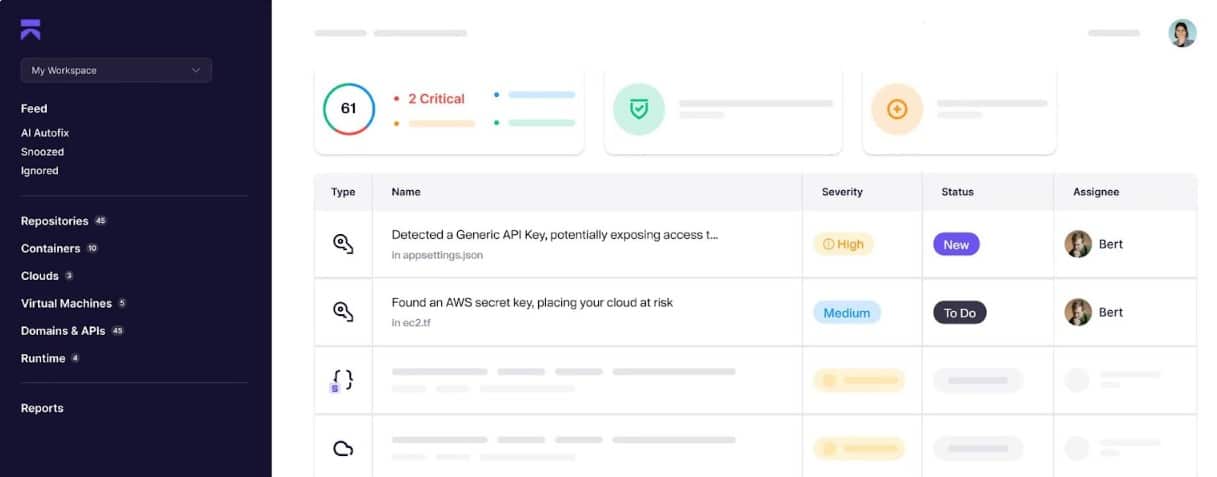
Aikido is an advanced tool that monitors your environment for possible vulnerabilities and security issues. It also remediates identified issues using AI-driven algorithms and provides context for manual troubleshooting as well.
Key Features:
- Asset Discovery: Maps every domain, subdomain, and cloud to create a detailed list of your assets.
- Continuous Monitoring: Keeps an eye on your assets at all times to identify blind spots before hackers use them.
- Actionable Data: Provides insights into each identified vulnerability to improve troubleshooting efficiency.
- Leaked Credentials: Monitors for leaked and stolen credentials and sends alerts based on findings.
- Shadow IT: Discovers unused and forgotten assets that could pose risks.
Why do we recommend it?
We recommend Aikido for its structured and comprehensive approach to attack surface monitoring. It starts with an inventory of assets and scans them for vulnerabilities. It also looks into your code, containers, infrastructure, and other elements in your environment. Based on its scan, it creates a list of CVEs, shadow IT resources, exploits, dangling domains, and more.
Along with identifying these issues, it also creates a detailed context for each, as this can come in handy with troubleshooting. It also leverages AI to automatically fix the common issues. All these features ensure that the vulnerabilities are detected and resolved.
Who is it recommended for?
Aikido is a good choice for all kinds of organizations. In particular, it can be useful for those having diverse hybrid environments.
Pros:
- Compliance: Meets the compliance requirements of leading standards.
- Domain and Subdomain: Protects your domains and subdomains from a potential takeover.
- Credentials: Safeguards your credentials from getting exploited.
- False Positive: Reduces false positives.
Cons:
- Training: Some users may require training to use this tool because of its extensive features.
Aikido offers transparent pricing through its four paid plans. The Basic plan starts at $350, the Pro at $700, and the Advanced at $1,050/month, respectively. The Enterprise plan has custom pricing based on your requirements. There’s also a free plan with limited features. Start a free trial.
EDITOR'S CHOICE
Aikido gets our Editor’s Choice award for the best attack surface monitoring tool. We like both its breadth and depth of coverage, as it can identify vulnerabilities across multiple aspects of your infrastructure. What also stands out for us is its remediation capabilities that auto-fixes common issues and provides insights to speed up troubleshooting. Its support for compliance is notable as well.
Download: Start FREE Trial
Official Site: https://www.aikido.dev/pricing
OS: Cloud-based
2. ManageEngine Vulnerability Manager Plus – FREE TRIAL
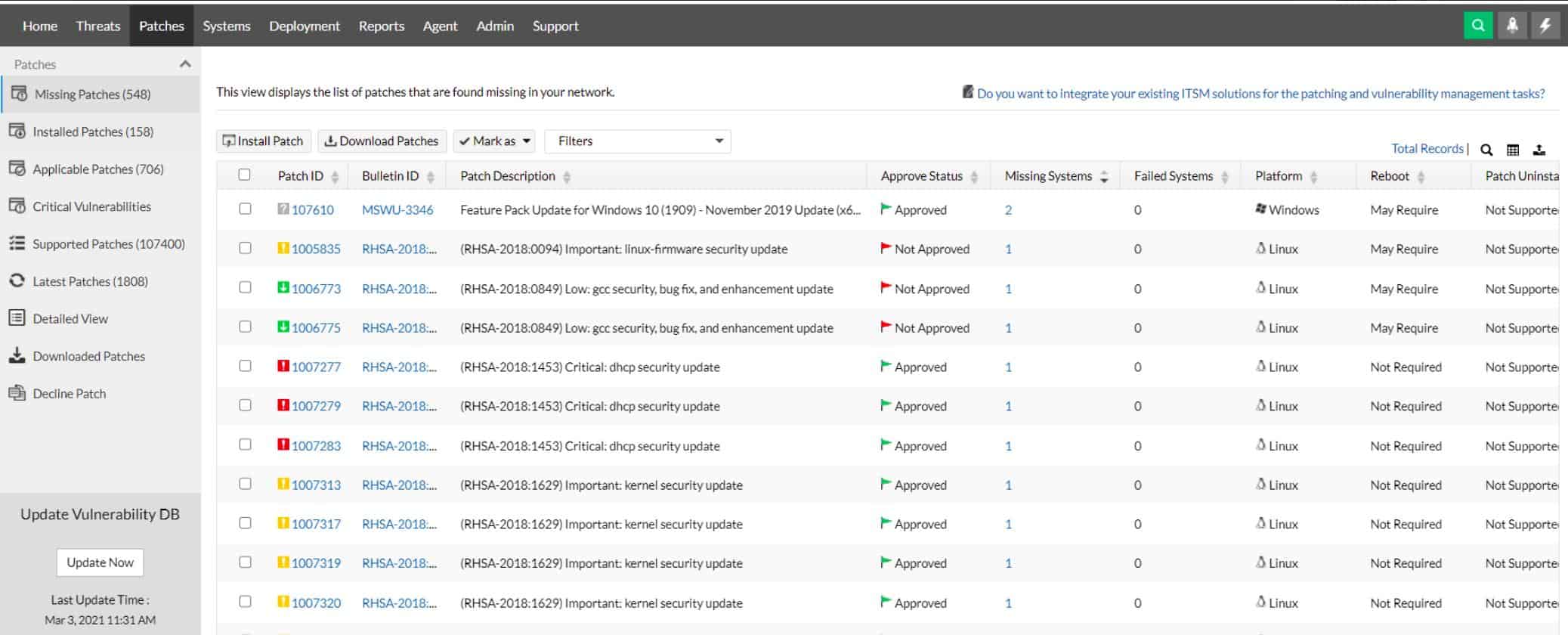
A security application called ManageEngine Vulnerability Manager Plus aids companies in finding and patching weaknesses in their network and systems. It utilizes vulnerability scanning to find potential flaws, such as outdated patches or insecure setups, and it produces thorough reports on the findings.
Key Features
- Delivers thorough reports on the outcomes after scanning the network and devices for potential vulnerabilities, such as missing patches or vulnerable configurations.
- Gives a thorough list of every device connected to the network
- Advises on how to deal with found vulnerabilities, along with detailed instructions for remediation
Why do we recommend it?
We put ManageEngine Vulnerability Manager Plus through its paces, and it worked great for in-depth vulnerability discovery and management. It enabled us to conduct extensive vulnerability scans, identify outdated software versions, and generate comprehensive reports. This battle-proven solution significantly contributed to maintaining our web assets’ security.
To aid businesses in keeping their IT infrastructure secure, Vulnerability Manager Plus also has capabilities like asset management, patch management, and compliance reporting. It offers advice on how to address found vulnerabilities, along with detailed instructions and connections to relevant sources.
One way Vulnerability Manager Plus can be used is for regular vulnerability scanning to identify potential issues in an organization’s network and devices. If any vulnerabilities are detected, the software can provide a report and guidance on how to fix them. By proactively identifying and addressing vulnerabilities, organizations can improve the overall security of their network and devices.
Who is it recommended for?
This tool is ideal for organizations seeking robust vulnerability management and patching capabilities. It’s recommended for medium to large enterprises looking to address software version and patch management challenges. ManageEngine Vulnerability Manager Plus is designed for professionals in the field, offering comprehensive features to enhance web security.
Pros:
- Great for continuous scanning and patching throughout the product lifecycle
- Robust reporting can help show improvements after remediation
- Flexible – can run on Windows, Linux, and Mac
- Backend threat intelligence is constantly updated with the latest threats and vulnerabilities
- Supports a free version, great for smaller environments
Cons:
- Vulnerability Manager Plus is very detailed, and best suited for enterprise environments
ManageEngine Vulnerability Manager Plus comes with a 30-day free trial.
3. ManageEngine ADAudit Plus – FREE TRIAL
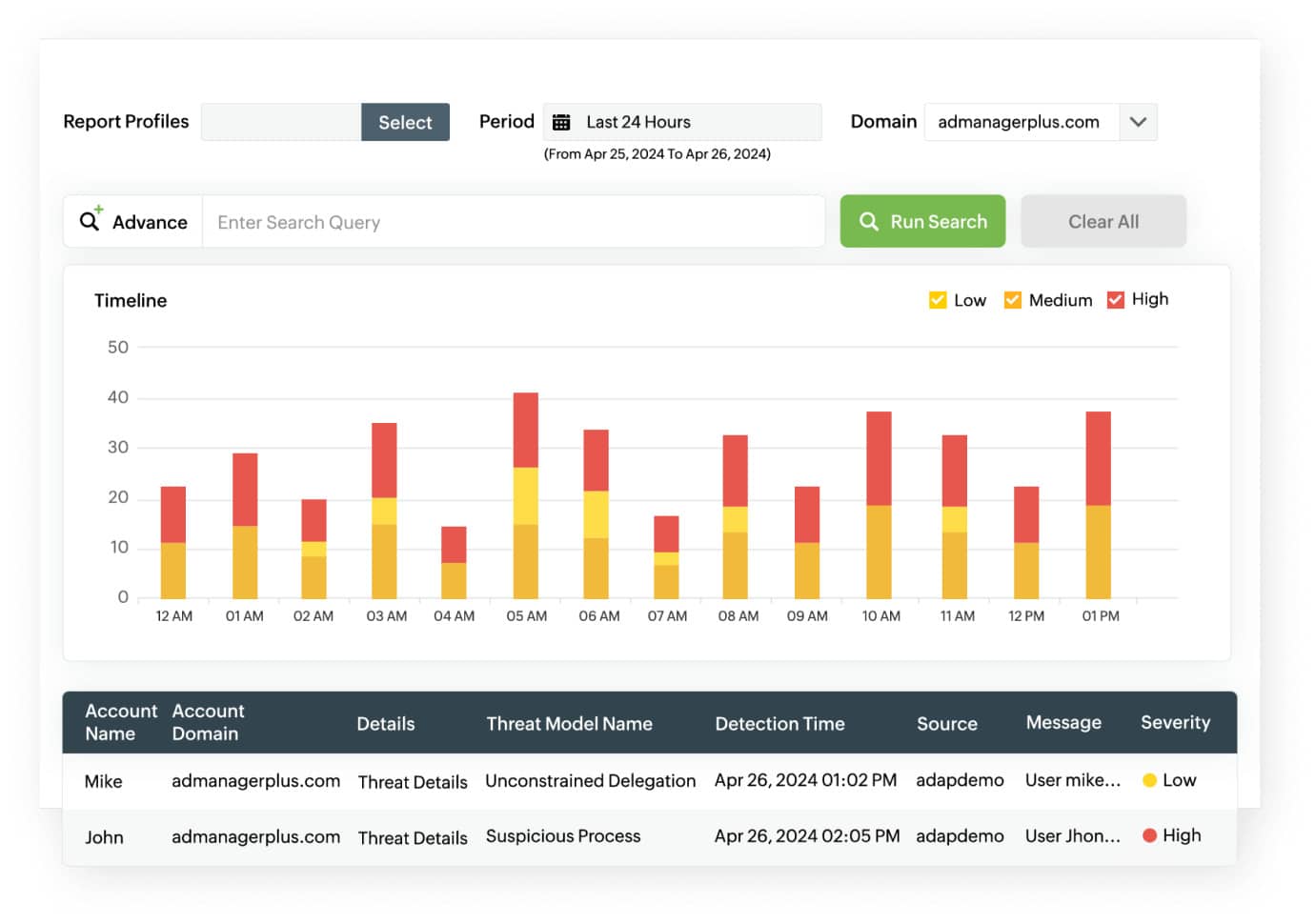
ManageEngine ADAudit Plus is a specialized attack surface analyzer that gathers logs from different endpoints and resources in your network and analyzes them to look for patterns or indicators of vulnerabilities. It can detect a wide range of attacks and provide insights on them, so you can remediate quickly.
Key Features
- Detects 25+ AD attacks, including Kerberoasting, RID hijacking, ransomware, and more.
- Leverages machine learning to identify anomalous logins and credential abuse.
- Comes with automated incident response to support your remediation efforts.
- Offers backup and recovery.
- Generates reports for easy sharing and compliance.
Why do we recommend it?
We recommend this tool because it can identify and mitigate a wide range of attacks that are often easy to miss otherwise. Starting from the network and process level attacks, it covers every part of your organization, and includes even complex attacks like ransomware.
A highlight of this tool is its automated incident response that acts as the first line of defense or troubleshooting to provide additional time for engineers to fix the underlying cause. Similarly, its backup and restoration protect data from ransomware and other attacks that can greatly impact operations.
Who is it recommended for?
It is recommended for network engineers, security teams, compliance teams, MSPs, and MSSPs who are responsible for securing your networks and maintaining their integrity.
Pros:
- Easy to use.
- Highly flexible and configurable to meet your specific needs.
- Helps meet the compliance requirements.
- Comes with predefined reporting templates and alert profiles.
Cons:
- It can take a while to fully understand its capabilities.
ADAudit Plus starts at $595 a year. Download a 30-day free trial.
4. Rapid7 InsightVM
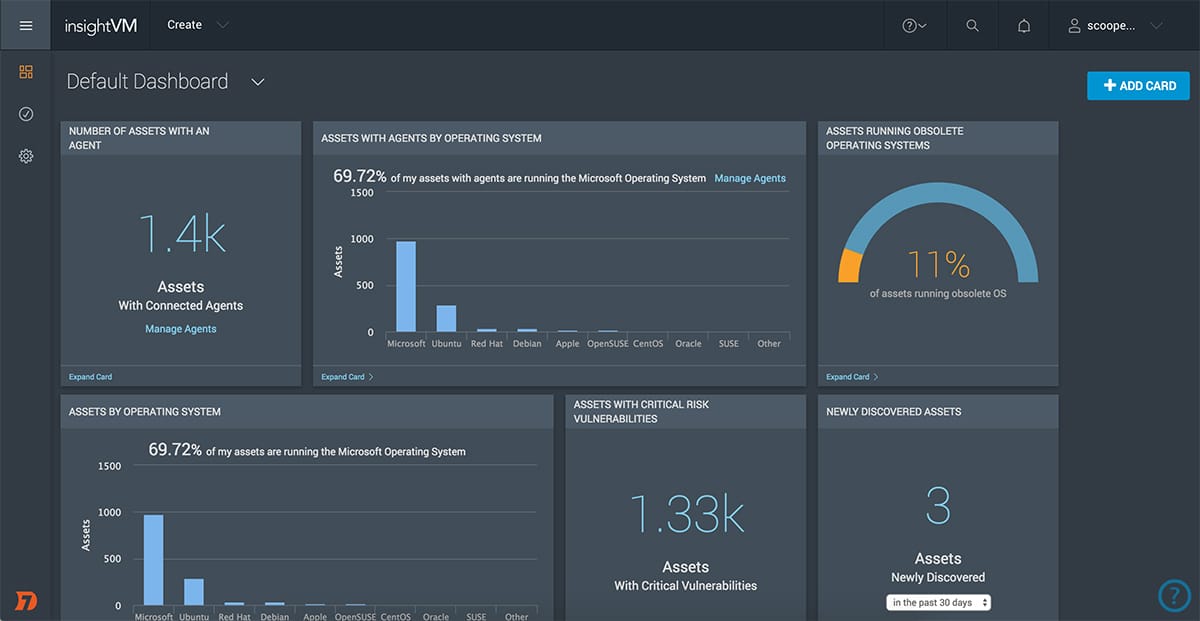
Although Rapid7 InsightVM is technically a vulnerability manager rather than an attack surface monitor, it has a variety of features that make it an excellent stand-in for a dedicated attack surface monitor.
Main Features:
- Third-party risk assessment system
- A vulnerability scanner with a variety of ASM features
- Slick, modern user interface
- Robust alerts system
- Can be easily integrated with a variety of other Rapid7 tools
- Made by a reputable company in the field
- Entirely cloud-based
- Easily scalable
Why do we recommend it?
Rapid7 InsightVM was extensively examined to explore its third-party risk assessment system. It proved invaluable in identifying potential threats originating from third-party sources, a commonly overlooked area. Our thorough evaluation revealed its scalability, cloud-based capabilities, and user-friendly interface.
Rapid7 InsightVM is capable of monitoring both on-premises devices as well as cloud and virtual systems. This means that it can reach every nook and cranny of your network with ease. Furthermore, not only is the Rapid7 a cloud-based tool, but it can check multiple networks at once. It can easily look over endpoints in remote areas or the homes of your remote employees.
The Rapid7 uses its innovative Project Sonar for most of its attack surface assessment, management, and monitoring features. Project sonar collects data loss event notifications and info on other cybersecurity problems from a variety of sources and creates a database of them. It can then form a 3rd-party risk assessment for businesses that run services used by their client. All in all, this provides as many ASM features as most dedicated tools, which is why we feel comfortable including Rapid7 InsightVM in this list.
The InsightVM is only one out of a variety of Rapid7 tools all of which can be easily integrated. The best one to supplant the InsightVM is their SIEM tool that provides a threat intelligence feed. This will help you spot vulnerabilities ahead of time and gain insight into common attack vectors being used on your competition.
Who is it recommended for?
InsightVM is recommended for businesses seeking to gain insight into third-party risks and enhance their website’s security. It’s particularly beneficial for those dealing with complex web ecosystems and third-party dependencies. Small to large enterprises will find InsightVM valuable, as it offers a comprehensive approach to vulnerability management and third-party risk assessment. It is suitable for professionals and beginners alike. The Rapid7 InsightVM comes with a free 30-day trial!
5. FireCompass Attack Surface Management Platform
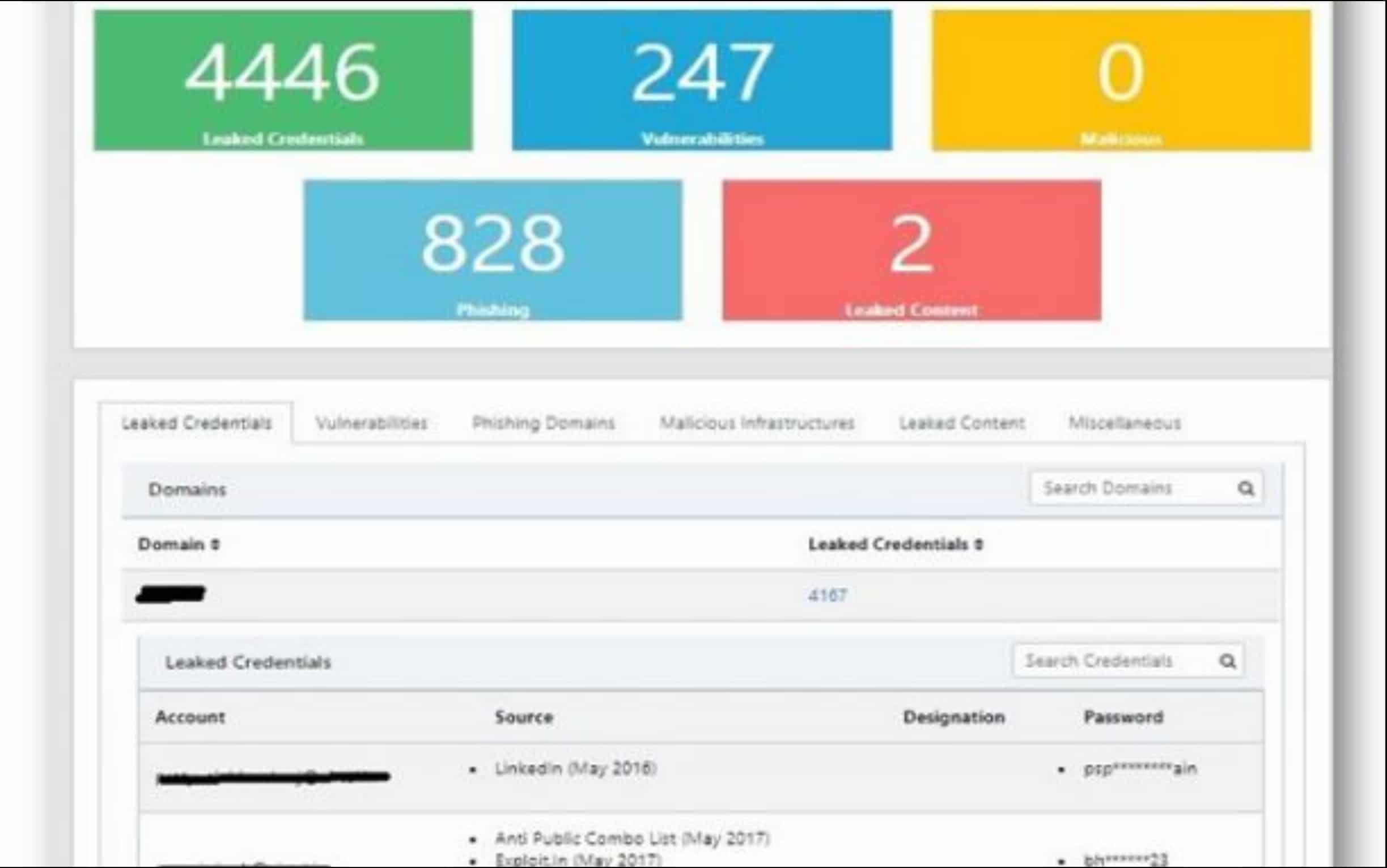
FireCompass Attack Surface Management Platform is a new tool in the ASM area. Despite that, their dedicated ASM solution seems to be offering a lot of features that any business serious about attack surface monitoring needs.
Main Features:
- Creates inventories and discovers exposed parts of your infrastructure
- Reduces effective attack surface
- Real-time alerts system
- Extremely modern, both in UI and intuitiveness
- Quite beginner-friendly given its scope
- Focused on medium and large businesses
- Attack surface mapping features
Why do we recommend it?
While using FireCompass Attack Surface Management Platform’s features, the tool showcased its ability to create inventories and discover exposed parts of our infrastructure. Our testing confirmed its focus on reducing the effective attack surface and its modern, intuitive interface. It efficiently addressed our challenge of streamlining attack surface monitoring.
The biggest reason for it placing below the Rapid7 InsightVM is that it simply hasn’t been out for long enough for us to be certain about recommending it against existing industry giants, however, the tool shows a lot of promise.
The FireCompass focuses on providing visibility into your attack surface for you to better understand your assets as well as the risks associated with each one of them. The tool focuses on catering to medium to large businesses. It provides excellent inventory creation features and is always on the lookout for exposed vulnerabilities, infrastructure, or domains/subdomains.
One of its most useful benefits is its dashboard, as it automatically prioritizes issues and sorts them into one of three categories: “High”, “Medium”, and “Low” importance.
Who is it recommended for?
This platform is recommended for medium and large businesses looking to optimize their attack surface monitoring. Our assessment revealed that it’s ideal for organizations aiming to manage their web assets more efficiently and proactively. FireCompass is designed for businesses seeking better visibility and control over their web assets, and it’s accessible to both professionals and beginners.
6. Bugcrowd Asset Inventory
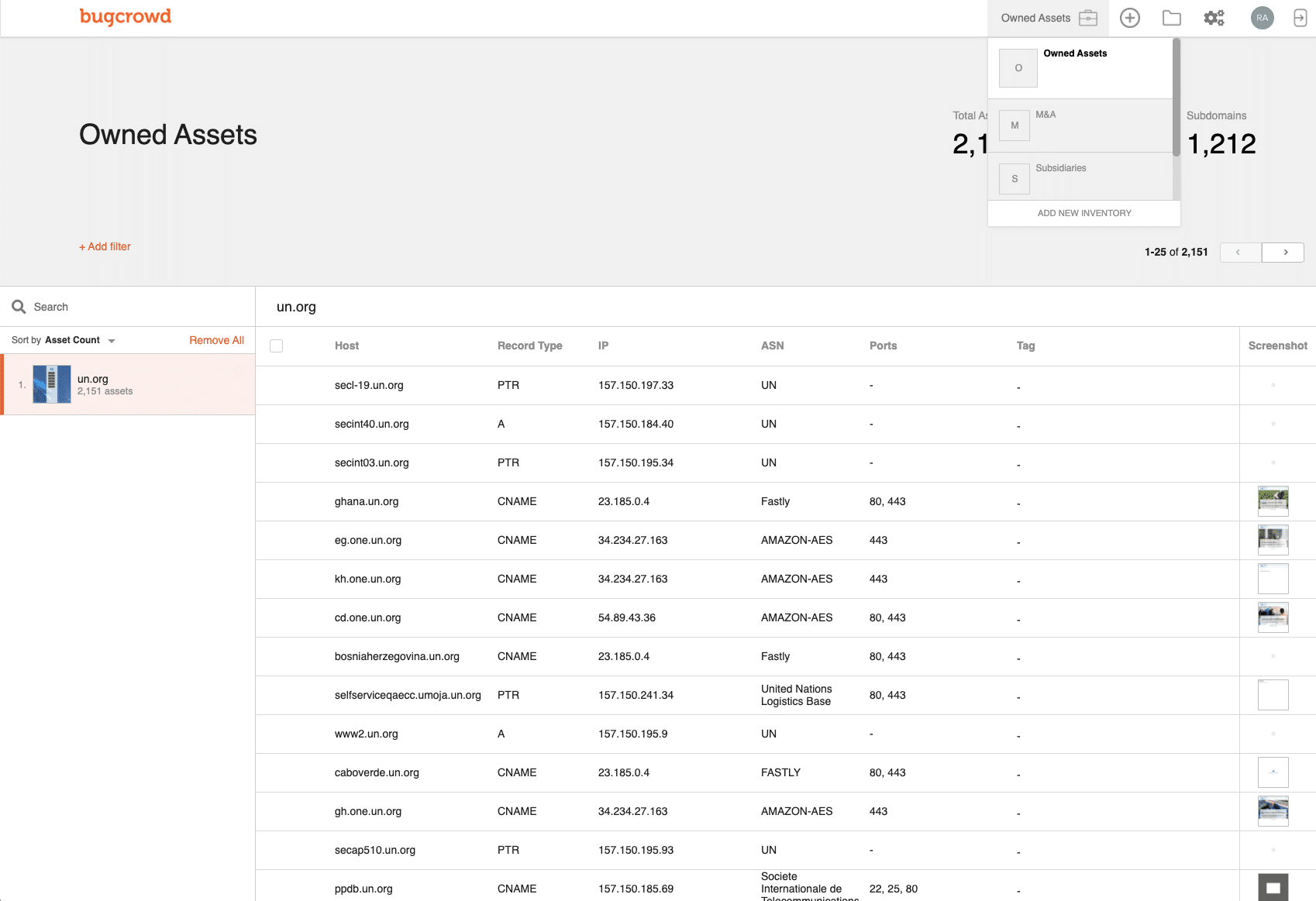
Bugcrowd Asset Inventory is an extremely creative tool created by an organization of white hat hackers. This automated solution is a crawler that looks through linked software packages and can be used for pen testing to find the services and software a system uses. The Bugcrowd then goes through all of the APIs and microservices connected to the surface it’s going through and checks them for vulnerabilities.
Main Features:
- Will detect assets you’re unaware of on your system
- Simple but effective alerts
- Cloud-based
- You can commission human-based searches of your system
- Dedicated ASM tool
- Built by experts in the field
- 24/7 customer support
Why do we recommend it?
Our team put Bugcrowd Asset Inventory through extensive utilization, proving its capability to uncover unknown assets and vulnerabilities within our web ecosystem. This battle-tested tool’s automated crawling and penetration testing capabilities were instrumental in identifying hidden services and potential security risks. Our in-depth exploration confirmed its effectiveness in improving our security.
Bugcrowd has stated on its site that one-third of all successful cyberattacks come through a piece of software or service that the affected firm’s IT department isn’t even aware they’re using. Since it’s impossible to protect systems that you’re not aware of, Bugcrowd is always on the lookout for these unknown assets and will alert you if it finds a security risk associated with any of them.
In case you’re looking to get a personalized experience, you can commission a human-based search of your system. This is a pen-testing exercise where Bugcrowd puts a bounty on your companies’ system and invited some of the world’s best white hat hackers to break into it, giving a reward to the first one to manage this.
Who is it recommended for?
This tool is recommended for businesses looking to proactively discover and mitigate hidden web assets and vulnerabilities. Bugcrowd Asset Inventory is suitable for companies of all sizes, offering a comprehensive view of web assets and ensuring security against hidden vulnerabilities. It’s user-friendly for both professionals and beginners. You can request a demo from the company.
7. Intruder
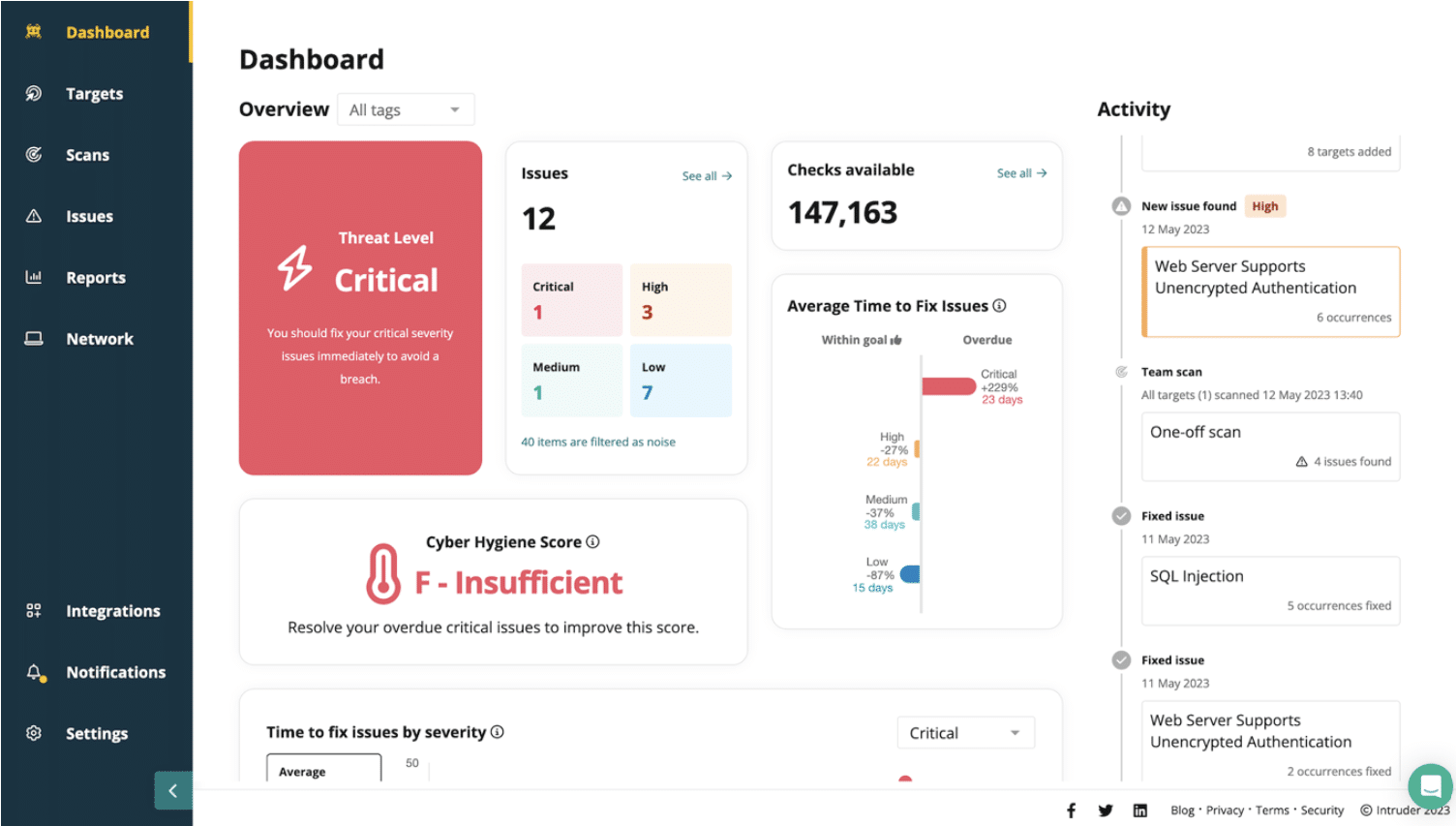
Intruder provides a security framework focused on simplifying vulnerability and attack surface management. It persistently monitors the attack surface, identifying potential vulnerabilities and entryways. By conducting more than 140,000 checks, it integrates smoothly with recognized scanning tools such as OpenVAS and Tenable, enabling users to pinpoint significant vulnerabilities, like an unguarded database.
Key Features
- Provides two vulnerability scanners with the cheaper of the two running once a month and the more expensive scanner for frequent, scheduled scans or on-demand operations.
- Has an option for internal scanning of endpoints and networks with the Tenable vulnerability manager
- Add-on option to get Web application and API security testing
Why do we recommend it?
Intruder underwent a comprehensive examination, conducting over 140,000 checks to assess our web assets comprehensively. This meticulous evaluation revealed potential vulnerabilities, including unguarded databases, allowing us to bolster our cybersecurity defenses effectively. The real-time alert system ensured proactive threat mitigation, making it a crucial tool in our security arsenal.
The external scanner is able to probe your network from across the internet, looking for ways in. It will also check on your cloud services that are hosted on Azure, AWS, or GCP. The Intruder package can also be used for Web application and API security scanning through an add-on that is available to all editions. This can be set up as a continuous tester on a CI/CD pipeline.
The vulnerability scanner will look at the services that support your websites as well as check on the security of your network. For example, it will assess all SSL certificates and let you know if one is about to expire. The services of Intruder also extend to a human penetration testing team that you can hire for an in-depth system security check.
Who is it recommended for?
Intruder is a valuable addition to the toolkit of businesses of all sizes looking to fortify their web assets. This battle-hardened tool excels in addressing vulnerability issues and securing online presence. Whether you’re a small business or a large enterprise, Intruder’s user-friendly interface makes it accessible to both beginners and advanced professionals.
Pros:
- Options for monthly, frequent, or continuous scanning
- The system dashboard is accessed through the Intruder website
- The platform generates a cyber hygiene score after each scan
- Reports can be used to prove to third parties that your business is secure
Cons:
- You need to upgrade to the higher plans to unlock more powerful features
You can assess the attack surface monitoring system with a 14-day free trial.
8. Digital Shadows SearchLight
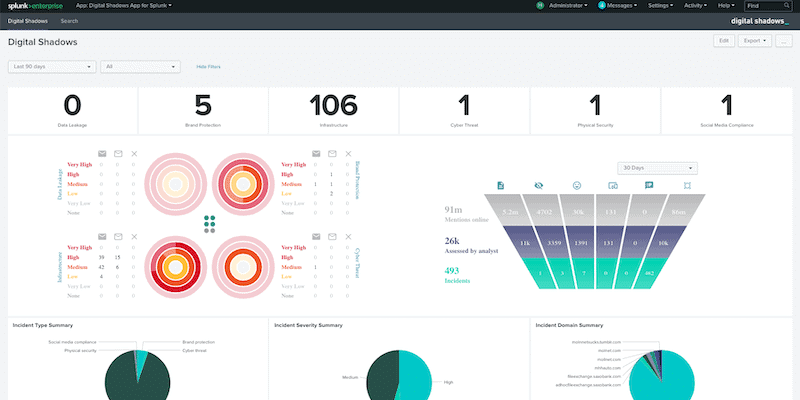
The Digital Shadows SerchLight is an ASM tool that looks at a client’s total software assets and compares it to intelligence shared by known malicious users. This is an excellent tool to use to ensure you’re always staying vigilant against ever-improving threats. While most threat intelligence feeds simply record attack vectors that have worked against other firms, SearchLight also alerts companies when an attack is imminent.
Main Features:
- An extremely innovative approach to cybersecurity
- Alerts you when an attack is imminent, unlike most of its competition
- Excellent dashboard
- Fairly simple to use even for non-technical users
- Very accurate in its assessments
Why do we recommend it?
Digital Shadows SearchLight was rigorously assessed for its innovative approach to cybersecurity. Our exploration demonstrated its effectiveness in alerting us about imminent attacks, a problem that many other tools overlook. This well-examined tool efficiently addressed our challenge of staying informed about potential risks and threats.
All you need to do to get SearchLight working is to register each of your outward-facing network components and include its details like its IP address, domain, etc. Then, it will constantly keep an eye out for any malicious agents mentioning that name. For example, SearchLight would be able to pick up an employee’s details or login credentials being spoken about on the Dark Web.
SearchLight analyzes all of the data it gets using its crawler and data analytics capabilities, finding potential attacks on clients that it’s protecting. The kind of data that it detects can indicate the attack vector a hypothetical malicious agent would use. Once it finds this, SearchLight alerts the client about which system defenses to harden in anticipation.
SearchLight is not a complete ASM solution. However, it’s a great addition to any ASM strategy.
Who is it recommended for?
SearchLight is recommended for businesses seeking a proactive threat intelligence tool. It’s suitable for organizations of various sizes looking to enhance their security posture and gain insights into imminent threats. Digital Shadows SearchLight is particularly valuable for banks and other financial institutions that can use SearchLight to proactively monitor and mitigate cyber threats, protecting sensitive financial data and customer information. It is accessible to both professionals and beginners. The tool comes with a one-week free trial.
9. OWASP Zed Attack Proxy
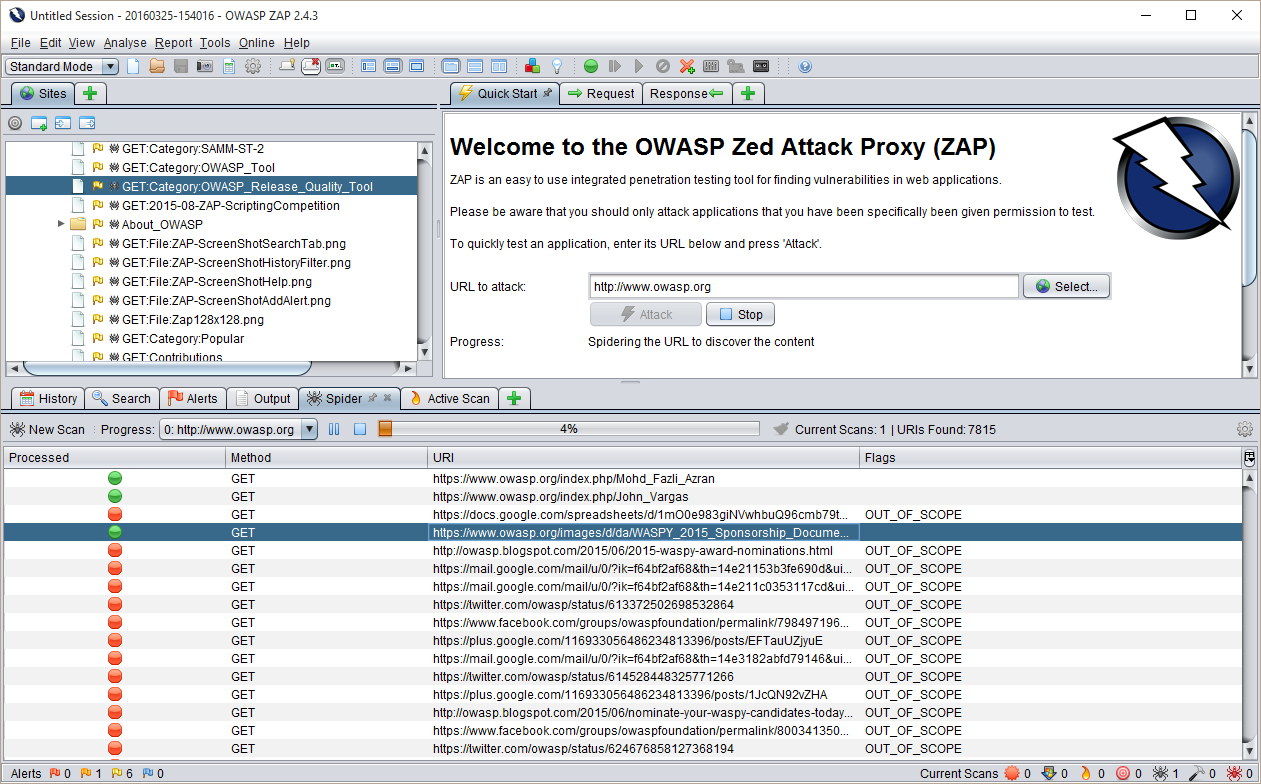
OWASP Zed Attack Proxy is the first free tool on this list. Being open-source, the tool is extremely customizable. It provides a very efficient way to look through your website for the most common threats. Once a website is plugged in, it will immediately search it for the presence of any of OWASP’s Top 10 threats.
Main Features:
- Completely free and open-source
- Available on macOS, Windows, and Linux
- Can store application code, making finding controversial changes easier
- Helpful community
- Excellent for SMBs
Why do we recommend it?
OWASP Zed Attack Proxy, being a free and open-source tool, was meticulously utilized to identify common web application threats. Our exploration demonstrated its efficiency in quickly securing our web applications against prevalent risks. This well-examined tool significantly contributed to enhancing our web security efficiently and cost-effectively.
While this might not seem very significant, a vast majority of cyberattacks come in the form of one of these threats, with the OWASPT Top 10 list being a major cornerstone for most vulnerability scanners.
The second OWASP project that can be easily plugged into the Zed Attack Proxy is the Attack Surface Detector. This is what turns this tool into a true ASM solution. The Attack Surface Detector is capable of tracing through APIs and Web services, which makes it an excellent discovery utility for attack surface analysis.
The detector will locate the host of each discovered application, as well as log its parameters for the call and all of their data types. It can also scan an application and store its code, making recovery much simpler. You can also routinely rescan the application, comparing its code to its stored version, which can make finding changes that can introduce new vulnerabilities a breeze.
Who is it recommended for?
This tool is recommended for small to medium-sized businesses looking for an affordable way to secure their web applications. Our examination confirmed that it’s accessible to a wide range of users and ideal for those with limited security resources. OWASP Zed Attack Proxy is a valuable choice for businesses seeking to secure their web applications without the burden of additional costs.
Nonprofits with limited budgets can utilize OWASP ZAP to secure their web applications and online presence without allocating a significant portion of their resources to cybersecurity.
It is beginner-friendly and suitable for professionals as well.
10. CoalFire Attack Surface Management
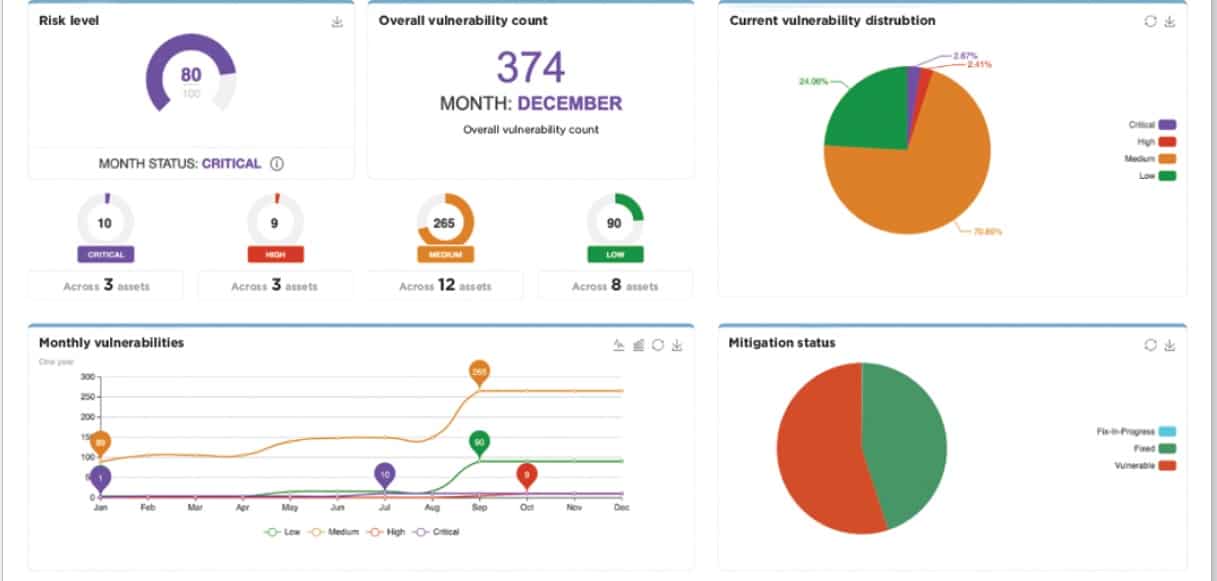
CoalFire Attack Surface Management is one of the few tools out there that accurately assesses the risk that easy to integrate APIs and quick-to-install plugins provide. Pretty much all companies these days take advantage of these, however, few of them think about whether there are vulnerabilities within them.
Main Features:
- All results are looked at by a human analyst
- Considers all of the different circumstances and operating procedures in place within your business.
- Creates an inventory asset of everything that goes into your applications
- Pays attention to APIs and plugins
Why do we recommend it?
CoalFire Attack Surface Management was meticulously evaluated for its ability to assess the risk associated with APIs and plugins. Our examination confirmed its effectiveness in discovering external services integrated with websites. This provided guidance on defense strategies, addressing our challenge of securing web integrations effectively.
Once a website is online, it’s very difficult to rewrite it or make major changes. CoalFire makes finding what external services are integrated with the website a breeze. Its automated processes are capable of discovering all asset chains that contribute to your systems. Finally, it uses a human analyst to ensure that these findings are accurate.
Once it has assembled an asset inventory, you can think about a proper defense strategy, and whether or not all of the integrations are necessary to have.
With that being said, the tool doesn’t have a SIEM or intrusion detection system in place. However, it will guide how you should defend against hypothetical threats. All in all, this is a great supplementary tool for an ASM strategy.
Who is it recommended for?
Accessible to both professionals and beginners., this tool is recommended for businesses relying on APIs and plugins, aiming to comprehensively assess their security risks. Our assessment affirmed its value for organizations focused on enhancing web integration security. CoalFire Attack Surface Management is a valuable choice for businesses of all sizes seeking to secure their web integrations and gain expert insights into potential risks.
Businesses in the media and entertainment industry utilizing web integrations for content delivery, streaming services, and user engagement can employ CoalFire’s tool to assess and mitigate security risks.
11. CyCognito Attack Surface Management
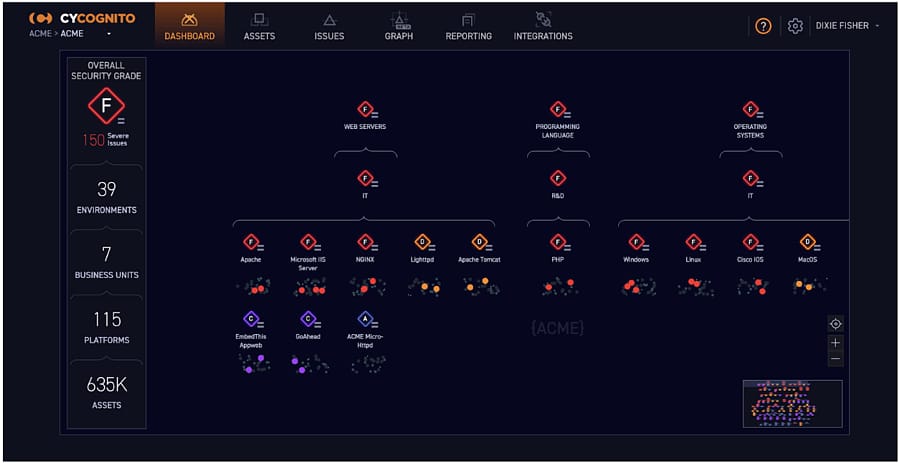
CyCognito is a cloud platform comprised of a variety of tools, including an attack surface manager and vulnerability manager. CyCognito works as an external attack surface monitor.
Main Features:
- Automation features supported by security analytics experts
- Third-party risk assessment
- Both a vulnerability manager and attack surface manager
- Ranks all of the potential risks on your system
- Modern user interface
Why do we recommend it?
CyCognito Attack Surface Management underwent thorough scrutiny to automate the assessment of our external attack surface. Our evaluation highlighted its capability to provide an extensive view of the attack surface, including potential vulnerabilities and risks. This well-vetted tool significantly contributed to our web security enhancement efforts.
The tool will find front-facing data, web services, and principality websites. From that initial assessment, the tool will look through the APIs and services contributing to them. This feature by itself is invaluable, as you’ll know exactly what code is contributing to your sites, as well as the companies behind them.
Another excellent feature is its third-party risk assessment and attack surface monitor. CyCognito automatically attempts hacks on all points within the chain of services contributing to your sites, looking for any weaknesses. This is excellent in case an API you’re using gets an update containing vulnerabilities. Then, the system establishes a ranking of the individual units’ risk and tells you which of these it thinks you should prioritize.
Who is it recommended for?
CyCognito is recommended for organizations looking to proactively assess their external attack surface, gain insights into potential risks, and enhance web security. It’s suitable for businesses of various sizes seeking a comprehensive approach to web security and attack surface management.
Large corporations with extensive digital footprints and complex network architectures can leverage CyCognito to conduct thorough assessments of their external attack surface.
CyCognito is user-friendly, making it accessible to both professionals and beginners. There isn’t a free trial, but you can request a demo from the company.
12. ImmuniWeb Discovery
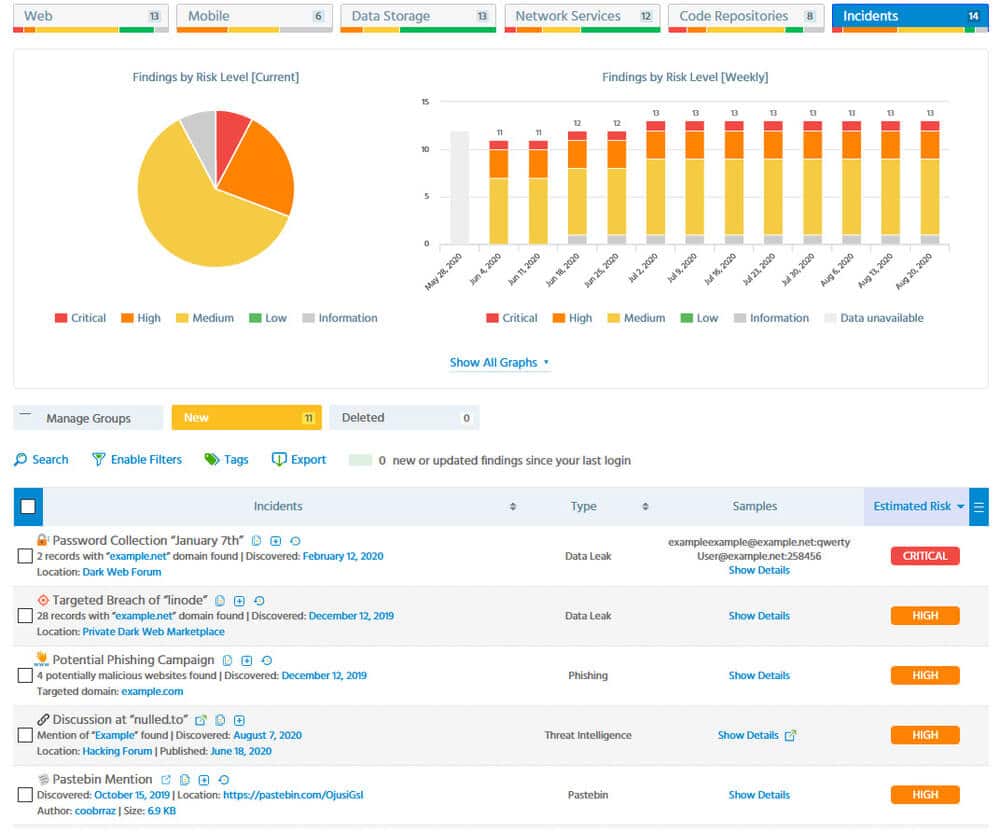
ImmuniWeb Discovery is another combo of a vulnerability scanner and an attack surface monitoring tool. The ImmuniWeb finds all of your on-premises and cloud software assets and then traces through APIs to find the code’s host.
Main Features:
- Scans the Dark Web for mentions of your firm or peripheral software
- Multiple pricing plans(Express Pro, Corporate, Corporate Pro)
- On-demand scans of third-party systems in the full version
- Vendor risk management tracking
Why do we recommend it?
ImmuniWeb Discovery was meticulously applied to assess our on-premises and cloud software assets. Our evaluation revealed its ability to trace through APIs and identify the host of code, essential for a thorough attack surface analysis. This well-examined tool played a pivotal role in enhancing our understanding of web assets and potential risks.
It has a vendor risk management feature, tracking any incidents that any of the vendors you rely on have had in the past. It also looks through the Dark Web searching the most well-known hacker communication channels for any mentions of software or entities connected to your business.
This makes it an excellent tool that covers both your internal and external weaknesses. It will also generate recommendations and alerts based on what it detects.
Who is it recommended for?
This tool is recommended for organizations seeking to gain comprehensive insights into their web assets, including on-premises and cloud software. ImmuniWeb Discovery is user-friendly, making it accessible to both professionals and beginners.
It’s suitable for businesses of various sizes looking to enhance their web security through robust attack surface analysis. ImmuniWeb Discovery caters to businesses using both on-premises and cloud software. This is beneficial for organizations transitioning to cloud-based services or maintaining a hybrid infrastructure.
Closing Words
Attack surface monitoring is growing increasingly more important as businesses continue to rely on APIs and third-party plugins. Today we’ve tried to isolate the best tools to make this process more efficient. Since attack surface monitoring is a relatively new field, we’ve included some non-dedicated tools that fulfill most requirements to be an ASM tool.
As always, the right ASM tool for you will depend on your needs. Depending on the needs of your business, our number nine pick might be your number one. However, we’ve tried to ensure that the first few picks are ones that you can’t go wrong with.
What is your favorite attack surface monitoring tool?
What feature do you wish was more commonplace among them?
Let us know in the comments below!