


USB port locking solutions help you stay safe from malware looking to infect your devices through your USB ports. This might sound like an attack avenue from the past, with remote attacks becoming more and more commonplace. However, that couldn’t be further from the truth.
The expectation that attacks will come from a predictable avenue leads to many companies facing attacks from directions they didn’t anticipate. Attacks through USB ports can be fairly easy to perform in certain situations, and malicious agents won’t shy away from easy opportunities.
Here is our list of the best USB port locking tools:
- ThreatLocker Storage Control – EDITOR’S CHOICE This cloud-based system automatically blocks the USB ports on all of the computers on a network and then enables a system administrator to permit specific USB devices to connect. Get access to a free demo account.
- ManageEngine Device Control – FREE TRIAL An extremely flexible data leakage prevention tool that allows you to ensure your USB ports are completely secure. It’s packed with features and detects over 18 different kinds of devices, in addition to offering an unparalleled alerts system. Additionally, the tool allows you to create in-depth reports to share with your team. Download a 30-day free trial.
- GiliSoft USB Lock A great tool that lets you monitor and lock all port activities in addition to CD burning and reading.
- NewSoftwares USB Block A lightweight tool with an excellent UI that provides a medium amount of features but makes up for it in simplicity.
- EndPoint Protector Device Control A modular, award-winning DLP software with amazing customer support.
- Systools USB Blocker An easy-to-use, lightweight tool mainly designed for SMBs.
- BuduLock The simplest tool on this list, provides the most essential functionalities of a port locker for free.
- USB Disk Manager An extremely lightweight tool that automatically installs itself on your USB drives.
- USB Drive Disabler A tool specialized for enterprises and offering a variety of in-depth features.
Today, we’ll be looking in detail at some of the best solutions to lock your USB ports to prevent yourself from falling victim to one of these attacks. Some of these tools offer password protection for the port blocking settings, while others let you keep USB ports read-only.
The Best USB Port Locking Tools
1. ThreatLocker Storage Control – EDITOR’S CHOICE

ThreatLocker Storage Control applies security measures to USB ports and also other storage devices. The system implements a “deny all” strategy. So, all USB ports are blocked. However, they are still responsive, so the port is aware whenever a device is connected – it isn’t completely crippled.
The main features of ThreatLocker Storage Control are:
- A default block on all USB devices
- An alert when a device is inserted
- Notification to the system administrator
- Options to allow specific devices
- Activity logging
Why do we recommend it?
While putting it through its paces, we were impressed by its “deny all” strategy, effectively blocking all USB devices while maintaining responsiveness. This provided a robust defense against potential threats. One notable issue we faced before implementing ThreatLocker was the potential vulnerability of our endpoints to malicious USB devices. ThreatLocker not only addressed this concern but also enhanced our overall cybersecurity posture.
Some devices can be approved for use. The permission will apply to a specific user, which creates extra security measures. Each USB stick can be identified by its serial number and this ID is used in the access rights management service that is built into the ThreatLocker system.
The permission for a device to attach can be revoked. A USB can also be allocated for use by multiple users and that allocation can be altered. The ThreatLocker system is a cloud platform. System administrators set up security policies in the console, which can be accessed through a Web page. This interface also controls all of the other modules on the ThreatLocker platform.
ThreatLocker also provides protection for files of sensitive data held on servers and it can block all software from running or accessing data stores.
Who is it recommended for?
ThreatLocker Storage Control is recommended for businesses seeking a comprehensive USB port-locking solution. Its effectiveness in blocking all USB devices by default, coupled with the flexibility to selectively permit specific devices, makes it suitable for various sectors.
This tool is especially valuable for enterprises aiming to bolster their endpoint security and protect against potential data breaches originating from unauthorized USB access. The cloud-based nature of ThreatLocker simplifies deployment and management, catering to both small and large organizations with diverse cybersecurity needs. You can examine the full ThreatLocker system by accessing a free demo account.
EDITOR'S CHOICE
ThreatLocker Storage Control is our top pick for a USB port-locking tool because it implements USB port controls on all of the devices in a corporate fleet from a central console. The system immediately instructs all ports on protected computers to block all USB devices from attaching. This prevents infected devices from transferring viruses onto endpoints and implements data theft blocks. Once the ban is in place, the administrator can authorize specific devices by their serial numbers. These devices can be linked to a user account or permitted to attach to one specific computer. USB ports are not turned off, so the administrator keeps the option of updating instructions.
Download: Get FREE Demo Account
Official Site: https://portal.threatlocker.com/signup.aspx
OS: Cloud-based
2. ManageEngine Device Control Plus – FREE TRIAL
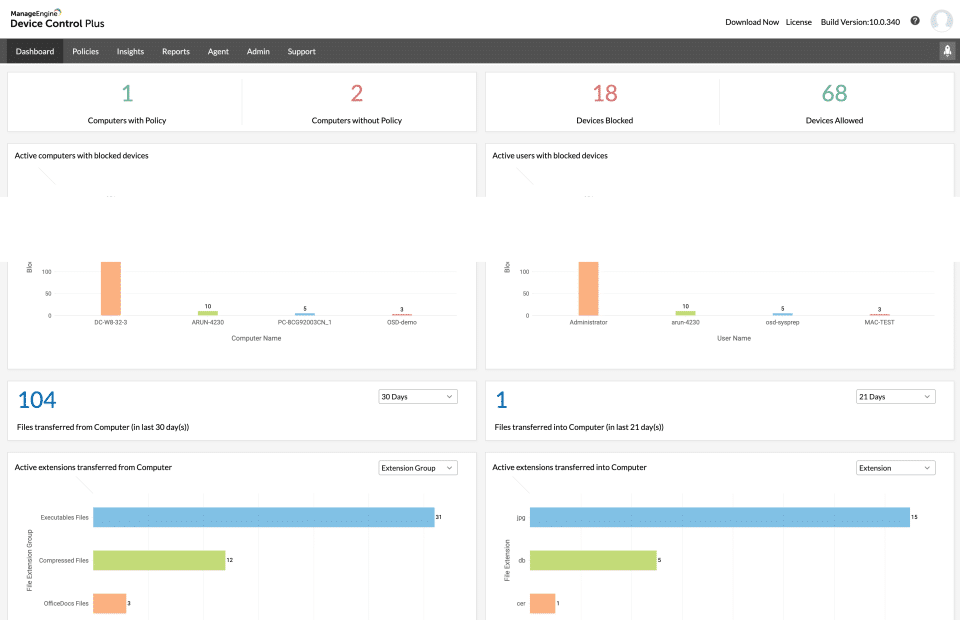
The ManageEngine Device Control Plus is a data leakage prevention software that lets you control and monitor your system’s peripheral devices(including USB. If you don’t mind paying for a solution, this tool is your best bet to ensure the safety of your USB ports.
Main Features
- Intuitive, modern UI
- Detects over 18 different device types
- A robust alerts system ensures you don’t have to spend time staring at its dashboard
- Extensive reporting features make it easy to craft high-quality reports to share with your team
- Remote file action tracking helps you halt data losses, malware, or other forms of malicious activity on your devices
- Excellent customer support
Why do we recommend it?
In our evaluation, ManageEngine Device Control Plus showed extensive reporting features and remote file action tracking, significantly contributing to a proactive approach in preventing data loss and potential malware threats. ManageEngine Device Control Plus effectively addressed our concern about unauthorized peripheral devices accessing our systems, enhancing overall data security.
The tool has various features to ensure that you can customize your experience to the highest degree. Furthermore, it boasts a very user-friendly interface, making it significantly easier to use than most tools of its caliber. It’s a great tool to have regardless of the size of your business, as it’s easily scalable.
It can automatically detect over 18 different device types and allows you to classify any individual device in one of three categories: Blocked, Allowed, and Trusted. It’s pretty easy to generate and modify policies that devices have to adhere to for you to see or transfer files.
The tool can also partially block access to a USB port, in addition to fully locking it. Furthermore, you can ensure that all drives entering your devices are first scanned with its zero-trust approach.
Who is it recommended for?
ManageEngine Device Control Plus is recommended for businesses seeking a feature-rich USB port-locking tool with a focus on data leakage prevention. Its scalability makes it suitable for organizations of varying sizes, offering customizable controls for USB ports.
Its intuitive and modern user interface, coupled with the ability to detect and control over 18 device types, make it accessible for both IT professionals and security administrators.
Whether you operate a small business or a large enterprise, ManageEngine Device Control Plus provides the flexibility to tailor USB access policies to your specific security requirements.
For a price, you’ll have to request a quote from the company; however, there’s a 30-day free trial available to help you decide if the tool is worth the money.
3. GiliSoft USB Lock
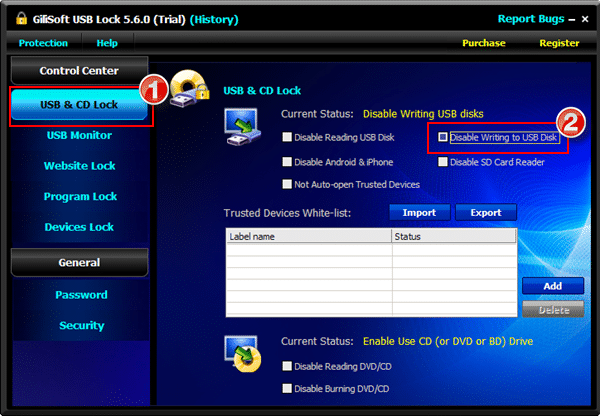
The GiliSoft USB Lock is primarily suited for USB port locking; however, it can detect and block other peripheral devices. So regardless of whether it’s a phone, SD card, or USB, the GiliSoft USB Lock will see its entry and stop it from interacting with your device if it detects a threat.
Main Features
- Blocks a variety of peripheral devices, such as smartphones, USBs, and SD cards
- Prevents reading and burning of discs
- Lets you look at USB activity history
- Invisible mode lets it run in the background
- Lets you remotely monitor activity
Why do we recommend it?
GiliSoft USB Lock proved to be a valuable tool during our testing, due to its versatility in blocking various peripheral devices, and preventing the reading and burning of discs added an extra layer of protection to our systems.
The tool’s USB activity history feature provided valuable insights into potential security threats. We found GiliSoft USB Lock to be particularly effective in mitigating risks associated with unauthorized external devices, addressing our concerns about potential data breaches.
The tool has a variety of peripheral features, including the prevention of reading and burning of optical disks, the ability to block out sites and apps from interacting with your devices, as well as making all USB activity history visible.
The tool has an alert system to email you if anyone tries to access it and inputs the wrong password. It will also allow you to whitelist specific devices so that you don’t have to trouble yourself with entering the password every time you insert a USB.
Its copy protection feature ensures that nobody will be able to copy your files to an unapproved device. Another excellent feature is its invisible mode, which lets the app run in the background undetected.
The tool also features a robust self-protection mode, which will prevent anyone without sufficient privileges and entering the device’s password. For example, if a wrong password is entered five times, alerts are sent out, and that login session is temporarily banned.
Who is it recommended for?
GiliSoft USB Lock is recommended for businesses prioritizing USB port security and seeking a tool with a range of features. Its ability to monitor and block various peripheral devices, coupled with user-friendly features like USB activity history, makes it suitable for organizations across different sectors.
The tool’s invisible mode and remote monitoring capabilities enhance its appeal for businesses looking to maintain a discreet yet robust USB port-locking solution. Whether you are a small business or a larger enterprise, GiliSoft USB Lock offers customizable options to meet your specific security needs.
Pricing: The tool has a month-long free trial and costs $59.99
4. NewSoftwares USB Block
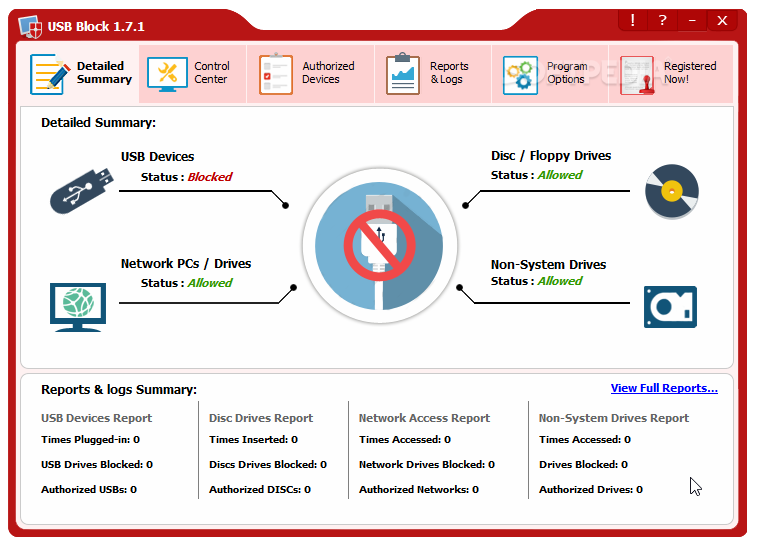
USB Block by NewSoftwares is one of the most lightweight USB port locking tools that will allow you to stop data leaks and block external hardware from interfering with your operations. In addition, the tool can block out all external storage devices from accessing your data and thereby stop interferences.
Main Features
- Stealth mode hides that you’re even running the tool
- You can whitelist authorized devices
- The tool allows you to check if there has been any illegal activity on your system
- Great GUI
- Very lightweight
Why do we recommend it?
NewSoftwares USB Block impressed us with its lightweight design and effective USB port locking capabilities. The tool’s straightforward user interface and focus on essential features, such as preventing data leaks and blocking external hardware, addressed our security concerns without unnecessary complexity. During testing, NewSoftwares USB Block proved to be extremely reliable in safeguarding against unauthorized access to USB ports.
The tool asks for a password whenever an unauthorized USB device, CD, DVD, or similar storage device accesses your computer. After that, USB Block will stop duplicating your files or copyrighted material to another device without your explicit permission.
The tool also allows you to block network access. For example, you can stop Wi-Fi, Ethernet, Map Network Drives, or other avenues that let malicious actors access the Run command on your device.
The tool takes advantage of a multi-layered patent pending protection that functions on the Windows Kernel level and stops all unauthorized devices from accessing your device even if it’s in Safe Mode. Much like the GiliSoft, it features a stealth mode, and it will erase all shortcuts from your device and hide that you’re even using USB Block.
NewSoftwares records three kinds of hacking attempts: Unauthorized Uninstall, Invalid Password, and Program Deletion attempts. All of these display the username, date, and time of the effort. You can also set up an authorized list so that your drives are instantly recognized and trusted.
Who is it recommended for?
NewSoftwares USB Block is recommended for businesses seeking a lightweight yet powerful USB port-locking solution. Its simplicity and ease of use make it suitable for organizations that prioritize straightforward security measures without compromising effectiveness.
The tool’s ability to prevent data copying and tampering adds value for businesses looking to enhance their data security. NewSoftwares USB Block is particularly well-suited for small to medium-sized enterprises seeking a cost-effective and efficient USB port locking tool.
Pricing: $49.95. However, there’s also a limited-functionality version you can use to test it out.
5. EndPoint Protector Device Control
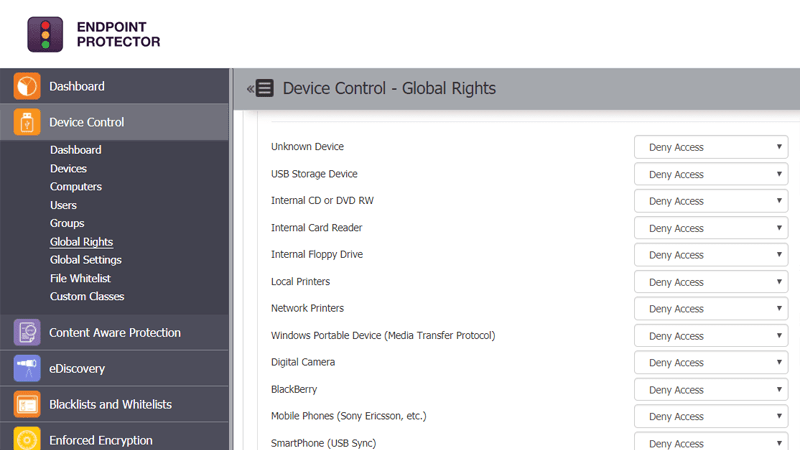
EndPoint Protector Device Control is an award-winning, endpoint-centric DLP(Data Loss Prevention) tool. Although it isn’t just a port locking tool, we felt it deserved a spot on this list. In addition, the tool has cross-platform support, supporting macOS, Linux, Windows devices, and Thin Clients.
Main Features
- Modular software ensures you only get the features you want
- Outstanding customer support, response times are around 24 hours
- Central, web-based dashboard
- Can lock ports on multiple devices at once
Why do we recommend it?
End Point Protector Device Control earned our recommendation through its comprehensive approach to data loss prevention, including robust USB port locking capabilities. While we were putting it through its paces, the tool’s cross-platform support and content filtering features stood out, providing a simple solution to protect sensitive data. EndPoint Protector Device Control effectively addressed our concerns about potential data breaches and unauthorized access, making it a valuable asset in maintaining data security.
The tool is designed to provide a one-stop shop for data loss prevention. The firm’s mission is to allow businesses worldwide to take full advantage of the mobility and portability we’ve been presented within the last few years without sacrificing security.
EndPoint Protector is modular software, which means that you can purchase multiple different modules and have them all work together as one. For example, the EndPoint Protector’s port locking utility is the Device Control module, and it provides peripheral and USB port control. It also has modules like the Content-Aware Protection module to secure data while it’s in motion.
The tool provides content filtering for data both at rest and in motion, in addition to ensuring that you adhere to data protection regulations like HIPAA, CCPA, GDPR, and many others.
The tool ensures that your ports remain protected against malicious entry. It’ll disallow data copying by unauthorized USBs; in addition to this, it’ll let you whitelist specific devices, so you aren’t constantly hassled with entering passwords.
Its central dashboard is web-based and provides you a great overall look at the state of your ports as well as historical data to help you gather in-depth knowledge on your security.
Who is it recommended for?
EndPoint Protector Device Control is recommended for businesses prioritizing comprehensive data loss prevention, with a specific focus on USB port security. Its modular software design makes it adaptable to various business environments, supporting macOS, Linux, Windows devices, and Thin Clients.
The modular design of the software allows businesses to tailor their security measures, ensuring effective control over peripheral devices. The tool’s content filtering capabilities align it with regulatory compliance requirements, making it suitable for industries where data protection regulations are stringent.
Whether you operate in healthcare, finance, or other sectors, EndPoint Protector Device Control offers a versatile solution for organizations of different sizes.
6. Systools USB Blocker
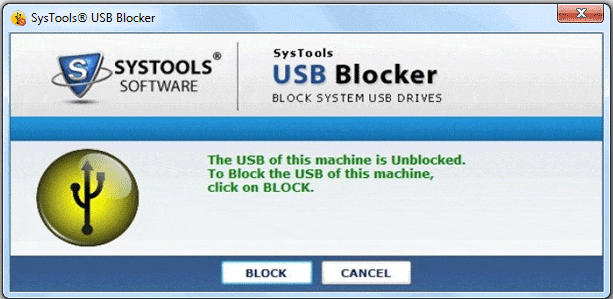
The SysTools USB Blocker allows you to block and unblock USB ports on your devices easily. The UI is relatively simple and easy to learn, even if you aren’t technically inclined. This is an excellent tool if you’re looking for a tool that combines an easy-to-learn experience with very few more advanced features to confuse you.
Main Features
- Supports all Windows installations
- Extremely easy to use and user-friendly
- Prevents file copying and tampering
- Blocks most external devices
- You can lock ports of multiple devices at once
Why do we recommend it?
Systools USB Blocker emerged as an easy-to-use USB port-locking tool designed for simplicity and effectiveness. The tool’s ability to prevent file copying and tampering, coupled with the option to lock ports on multiple devices simultaneously, addressed our security concerns without unnecessary complexity.
It will block various external devices, including Flash drives, pen drives, external HDDs, etc. It also allows you to set up a schedule for when you want your ports locked/unlocked. To lock or unlock USB ports, you’ll need the tool’s password in addition to the user’s.
Who is Systools USB Blocker recommended for?
Systools USB Blocker is recommended for businesses seeking a straightforward and user-friendly USB port-locking solution. Its ease of use and compatibility with all Windows installations make it suitable for organizations of different sizes and technical capabilities.
The tool’s focus on preventing unauthorized file copying adds value for businesses looking to enhance their data security measures. Whether you are a small business or a larger enterprise, Systools USB Blocker provides a cost-effective and efficient solution to safeguard against potential security threats.
Pricing: The tool has three licenses, with the Personal costing $29 and the Business costing $199.
7. BuduLock
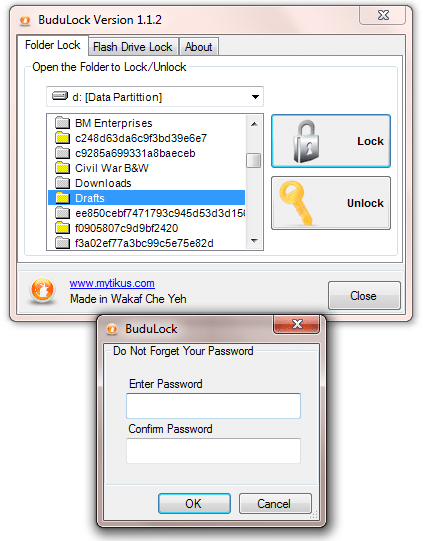
BuduLock, made by Mouse Click Enterprises, is a free tool that provides password protection to any folder on your system. Although this is its primary purpose, it’s also capable of USB port locking, forcing password entry if a USB attempts to interact with your system. It doesn’t disable the USBs, meaning your USBs will generally work on systems without it.
Main Features
- The most straightforward tool on this list
- Entirely free of charge
- Can lock and unlock folders in addition to USB drives
Why do we recommend it?
BuduLock secured our recommendation as a straightforward and free USB port-locking tool that excels in simplicity and essential functionalities. During our testing, the tool’s uncomplicated interface and the ability to provide password protection to folders and USB drives proved effective for basic security needs.
While lacking some advanced features, BuduLock’s ease of use and cost-free nature make it an accessible choice for personal use, offering a no-frills approach to USB port protection.
The tool has two primary tabs: Folder Lock and Flash Drive Lock. This gives it an extreme level of simplicity that’s difficult to match. In the Folder Lock tab, you can see a list of the drives on your system, as well as a simple tree view for picking folders. There are also two big buttons- Unlock and Lock.
This is probably the most straightforward tool on this list, preceding complex features or even a beautiful user interface for sheer simplicity. The Flash Drive Lock tab is similar in structure and highly intuitive. Not only is the tool simple enough for those of us that aren’t technically inclined, you most likely won’t even need to read a tutorial.
Who is it recommended for?
BuduLock is recommended for individuals and users seeking a simple and free solution for USB port locking. Its minimalistic design and uncomplicated features make it suitable for those who prioritize ease of use over advanced functionalities.
While not designed for enterprise-level use, BuduLock can serve well for personal devices, providing password protection to folders and USB drives without the need for extensive technical knowledge.
8. USB Disk Manager
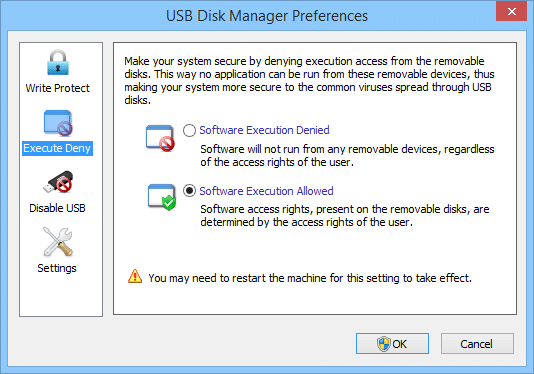
The USB Disk Manager is yet another lightweight USB port protection software that ensures all of your USB ports are protected from malware and the actions of malicious actors. This tool has some innovative features to set it apart from the rest.
Main Features
- Completely free of charge
- Extremely lightweight
- Easy to use
- Automatically installs itself on your USB drives
- With that being said, the UI could use some cleaning up, and the tool lacks more advanced features for when you’re comfortable with it.
Why do we recommend it?
USB Disk Manager earned our recommendation as a lightweight and free USB port protection software with innovative features. During our evaluation, the tool’s automatic installation on USB drives and the ability to block unauthorized access to devices showcased its efficiency in preventing malware and unauthorized actions.
It has AutoCopy features that automatically install USB Disk Manager on your USBs as a portable application, which ensures you’ll never be without it. It also has an Autorun feature, so it’ll automatically start with the rest of your system.
The tool will block all users attempting to copy files to and from untrusted USB devices. It can also hide devices from your device entirely, in addition to stopping them from running any applications while plugged in.
Without proper authorization, it will also block existing applications or malware from accessing your USB devices. This tool provides everything you need in a simple USB port locking solution despite being free.
Who is it recommended for?
USB Disk Manager is recommended for users who prioritize a lightweight and free USB port-locking solution. Its automatic installation feature on USB drives enhances convenience, making it suitable for personal use and small businesses.
USB Disk Manager’s user-friendly approach, coupled with its cost-free nature, positions it as a practical choice for users looking for a straightforward and reliable USB port-locking solution. While lacking some advanced features, the tool’s straightforward design and effective protection against unauthorized access make it an excellent choice for individuals seeking an uncomplicated solution to enhance USB port security.
9. USB Drive Disabler
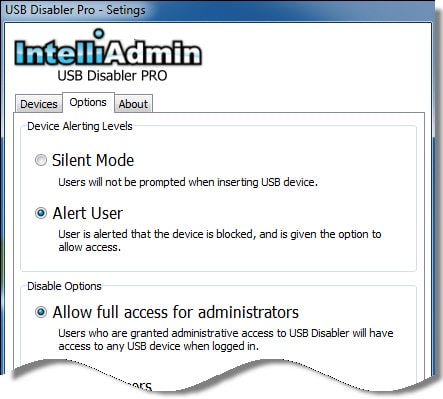
USB Drive Disabler is a small, portable software mainly aimed at enterprises. The focus on enterprises helps it cater its UI and features to an enterprise-level environment without worrying about performance for home users or SMBs.
Main Features
- Specialized for enterprises
- Has a silent mode which will not let users know that their device was blocked by the tool
- Alert Mode allows you to be alerted whenever someone tries to access a blocked port
- Lock ports on multiple devices at once
- You can even block administrators from accessing the ports
Why do we recommend it?
USB Drive Disabler stands out as a specialized tool tailored for enterprise-level environments, earning our recommendation for its advanced features and flexible alert system. Through our testing, the tool’s silent mode, alert options, and the ability to block administrators from accessing ports showcased its capability to provide robust security.
The tool has a flexible alerts system. Unlike tools that will alert you after X failed attempts, this tool lets you set up when you want to be alerted. Its Alert Mode will also alert you whenever a failed attempt or a drive is inserted into a blocked port.
Administrative privileges will also allow you to lock ports to multiple devices at once. This can be extremely useful for defending from a well-organized attack. If administrator access is compromised, you can even block all users so that not even administrators have access to the ports.
Who is USB Drive Disabler recommended for?
USB Drive Disabler is recommended for enterprises seeking specialized USB port control with advanced features. Its silent mode, flexible alert system, and the ability to block administrators from accessing ports make it suitable for organizations prioritizing stringent security measures.
While the tool’s aesthetics may appear dated, its functionality and focus on enterprise-level security needs make it a valuable choice for businesses looking to safeguard their systems from unauthorized USB access.
Closing Words
As always, deciding on the ideal tool for you depends on your needs. Before you commit to any of these tools, you should look at what exactly you and your business need to get from it. If all you’re looking for is a straightforward tool to let you lock ports, then BuduLock might be the tool for you. If you’re looking for a modular approach to endpoint DLP, the Endpoint Protector Device Control might be just the fit.
Because of this, we’ve tried to keep our top few picks flexible. We opted for tools that would work well for you regardless of your business environment and what features specifically you need. However, it’s always worth it to inspect the features of any new software you intend to use in your business.