

The number of digital services, devices, and apps making their way into business operations has grown tremendously over the last few years. This has led to the underlying IT infrastructures supporting all of this growth growing more and more complex. With this, the number of tickets, alerts, and service requests companies get from their users has become far too great to deal with manually.
Here is our list of the best service request management software:
- NinjaOne – EDITOR’S CHOICE A comprehensive IT service desk ticketing platform that supports faster response and efficient troubleshooting. Start a 14-day free trial.
- Zendesk ITSM – FREE TRIAL An enterprise-focused solution extremely good for building online communities and easing the burden on your employees with its excellent organizational features. Start a 14-day free trial.
- HaloITSM A holistic, all-inclusive request management tool with a generous free trial and flexible pricing.
- Jira Service Desk An excellent tool for SMBs, extremely simple to set up and use, without much feature bloat to get you confused. However, it still has enough meat on its bones to make it worth the price.
- SolarWinds Web Help Desk An extremely versatile request management tool for SMBs and enterprises alike. It provides sublime automation features and runs without a hitch. The UI is modern and extremely customizable. It has real-time tracking capabilities as well as rule-based approval and voting features.
- SuperOps PSA – FREE TRIAL This cloud platform offers a SaaS remote monitoring and management (RMM) package that includes a patch manager for Windows and mac.
- Wrike The most customizable tool on this list, if you’re looking for a customizable tool with a lot of available integrations(over 400) Wrike is the tool for you.
- HubSpot While not a dedicated request management software, the HubSpot suite provides automation features and a completely free CRM.
- Freshservice A relatively new tool with an extremely easy setup, an intuitive UI, and a robust alerts system.
Being able to properly prioritize work in this kind of environment has become a necessity. To solve this issue, companies have turned to service request management software to help them push forward. Today, we’ll be looking over what these tools are, why you need them, and what the best ones are.
What Should You Be Looking For In A Service Request Management Software
Service request management software is software that helps your company handle a variety of different customer and user requests. This can range from requests to access certain applications, install new hardware, reset passwords, or deal with issues.
Service request management software is optimized to help your service desk team push through your requests’ lifecycles. The software should also be capable of helping users quickly create a request and look at its status, as well as get an estimate for when they can expect it to be resolved. Ideally, a tool like this should be able to tell you how efficiently the entire service request management process is flowing. This helps the decision-makers at your company have a good view of how your service desk teams are performing. Furthermore, using a tool like this should help you decide which departments and regions need more resources.
Now, service request management is only a part of what most tools on this list do. This is because there are many areas, such as change, problem, and incident management, that are closely linked together.
The Best Service Request Management Software
1. NinjaOne – FREE TRIAL
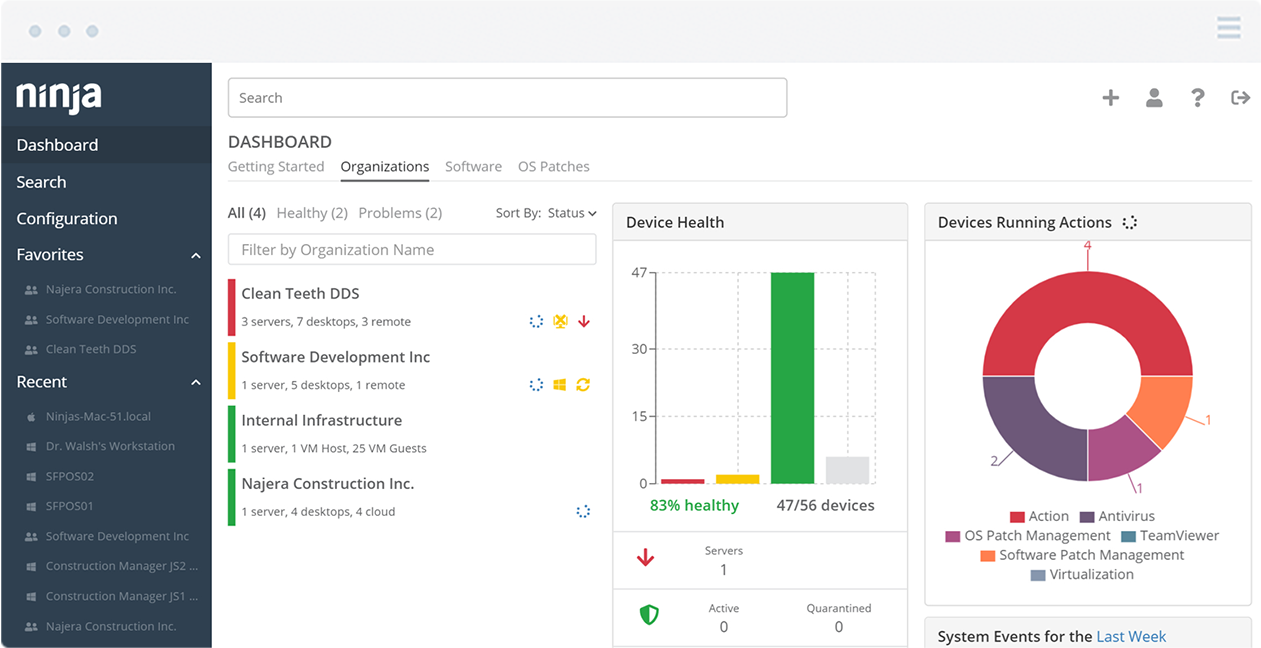
NinjaOne IT Service Desk Ticketing offers automated capabilities to create tickets and route them to the right personnel for maximum efficiency. It also comes with escalation features to improve response speeds and in-depth visibility into the overall performance of your service requests.
Main Features:
- Customizable ticketing workflows that improve efficiency and response times.
- Robust automation rules that can be adapted to specific needs.
- Integrated remote management for critical remediation.
- A customizable client-service portal through which end users can track their tickets.
- Maintains a complete inventory of IT assets for real-time reference.
Why do we recommend it?
We recommend NinjaOne for its focus on improving resolution time and efficiency. It leverages the latest automation technologies to create and route tickets to the right individuals. It also offers escalation workflows to ensure that the tickets are resolved on time.
A highlight of this tool is ticket monitoring, as you can see the status of all tickets on a single pane. This approach provides complete controla nd visibility into the entire ticketing process.
Additionally, actionable and context-rich data is present along with the alerts to help the concerned employees to quickly fix issues.
Who is it recommended for?
It is highly recommended for organizations of all sizes, especially those that have many customer-facing applications. It is also a good choice for service providers who want a streamlined way of handling tickets.
Pricing:
The cost depends on the number of endpoints used in your organization. Contact the customer team for a detailed quote. Get started with a 14-day free trial.
EDITOR'S CHOICE
NinjaOne is our first choice for the best service request management software due to its automation workflows that streamline the ticketing process and reduce the time to close tickets. In particular, we love the self-service portal, as it enables users to track the status of their tickets and escalate them if required. These automation rules can also be customized to meet specific requirements, thereby providing complete control and visibility to administrators. Its collaborative workspace, integrated remote management, context-rich information, and IT asset management are other reasons why love this tool.
Download: 14-day FREE Trial
Official Site: https://www.ninjaone.com/freetrialform/
OS: Cloud-based
2. Zendesk ITSM – FREE TRIAL
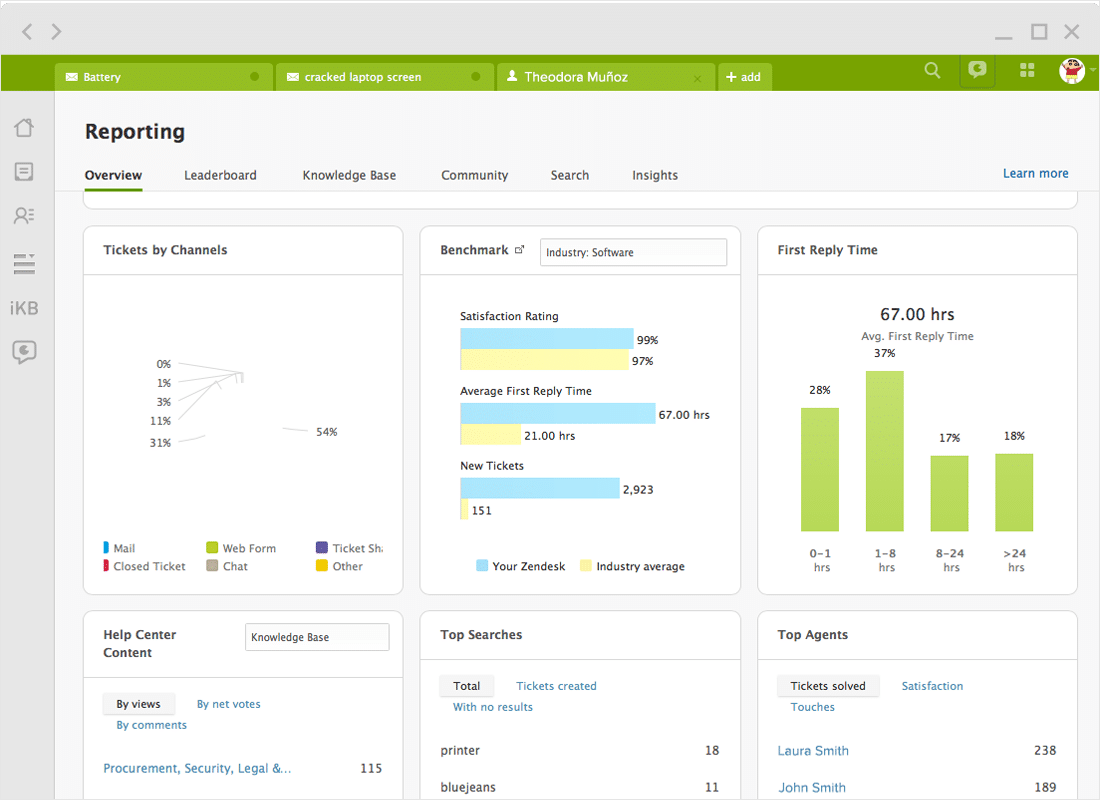
The Zendesk ITSM is a customer service and support ticketing tool with live chat and messaging functionalities. It is optimized for larger businesses and enterprises, featuring knowledge-base building capabilities.
Main Features:
- Knowledgebase-building features
- Helpful for building online communities
- Excellent reporting features
- Clever user interface
- Extensive communication features
Why do we recommend it?
Zendesk ITSM is recommended for its robust features, especially for larger businesses and enterprises. It offers knowledge base-building capabilities, excellent reporting features, and a user-friendly interface. It’s an ideal choice if you want to enhance request handling efficiency, build online communities, and streamline your service desk operations.
The tool can be easily used for internal self-service, which lets you use the same tool both internally and externally with ease. Zendesk is unparalleled when it comes to the breadth of communication it enables. Its chat, messaging, and reporting features make communicating within and between teams a breeze.
The tool will help you prioritize and track your customers’ tickets and requests. As a cloud-based solution with on-premises agents, it’s a great tool for worldwide enterprises or companies that rely quite a bit on cloud services.
Although Zendesk is best known for its CRM solutions, the ITSM comes as part of its Support Suite, and easily integrates with the rest of the Zendesk ecosystem.
Who is it recommended for?
Zendesk ITSM is recommended for larger businesses and enterprises that require advanced request management capabilities and a comprehensive IT service management solution. It’s suitable for organizations looking to efficiently handle service requests, build online communities, and gain deeper insights into their request management processes.
Zendesk ITSM Pricing: A free trial is available. It has three pricing plans: Support, Suite, and a plan to build your solution. The price starts at $5 per agent. Start by registering for a free demo and a 14 day free trial.
3. HaloITSM
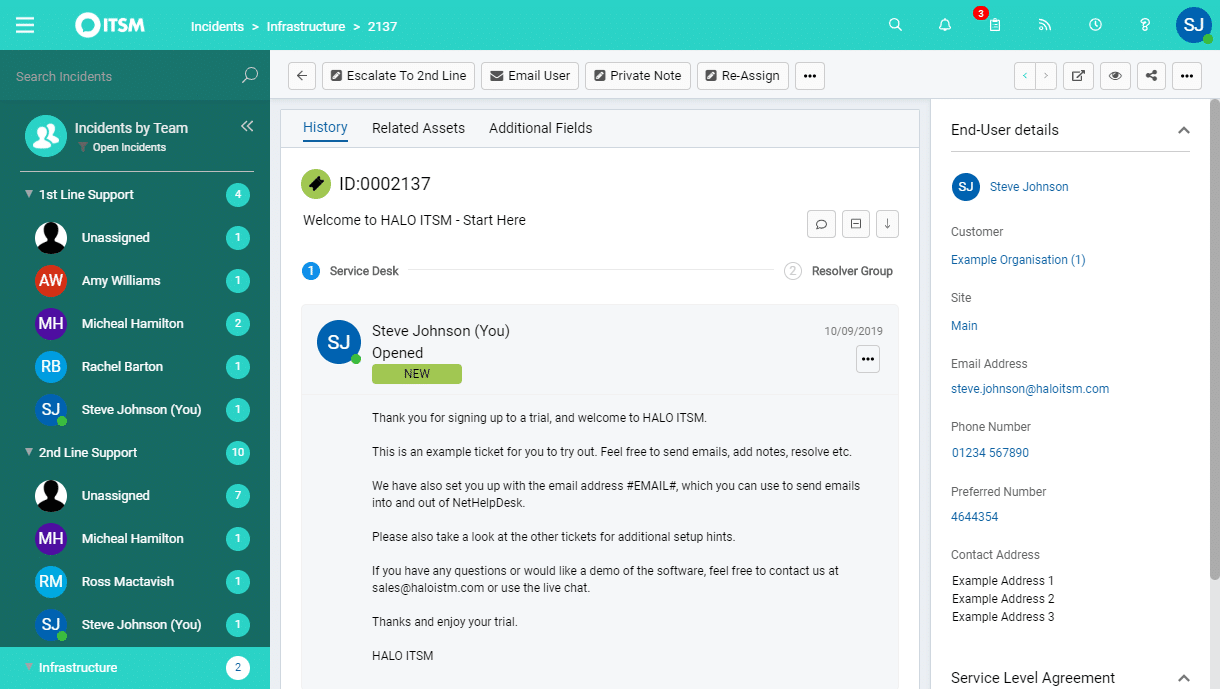
The HaloITSM is a holistic, all-inclusive request management tool. It focuses on transforming your workflow into an intuitive whole with a focus on minute-to-minute decisions. The tool makes an effort to help you standardize your business operations and help your teams perform at their peak capacity.
Main Features:
- Very flexible pricing
- Holistic request management solution
- Let managers set a variety of default parameters.
- Helps your team provide efficient, ITL-aligned service
- Simplifies the entire request resolution ecosystem
- Generous free trial
Why do we recommend it?
HaloITSM stands out with its approach to request management, allowing businesses to standardize operations, improve efficiency, and make minute-to-minute decisions. It offers flexible pricing, a generous free trial, and features that help managers set default parameters.
It tries to streamline the whole incident lifecycle, which ranges from creating tickets to resolving issues. It updates the statuses of each incident and lets you look at details like ticket ID, a summary of the issue, and priority level. This helps your employees correctly prioritize requests and use their time more efficiently. You can also link up brand new issues with existing requests and share solutions among your team members and users.
It has a lot of utility for managers, letting them set up default values for priority, service-level agreements, and who receives the requests, in addition to native knowledgebase creation features.
Who is it recommended for?
HaloITSM is recommended for businesses of various sizes that want a comprehensive and flexible request management solution. It’s suitable for organizations looking to streamline incident lifecycles, optimize workflow efficiency, and standardize their operations.
The flexibility in pricing and features makes it adaptable for both small and large enterprises. They offer a flexible payment scheme, starting at ~$78(59 GBP) for up to three agents and going down to ~$38(29 GBP) for 100 or more agents. The tool also offers a free 30-day trial.
4. Jira Service Desk
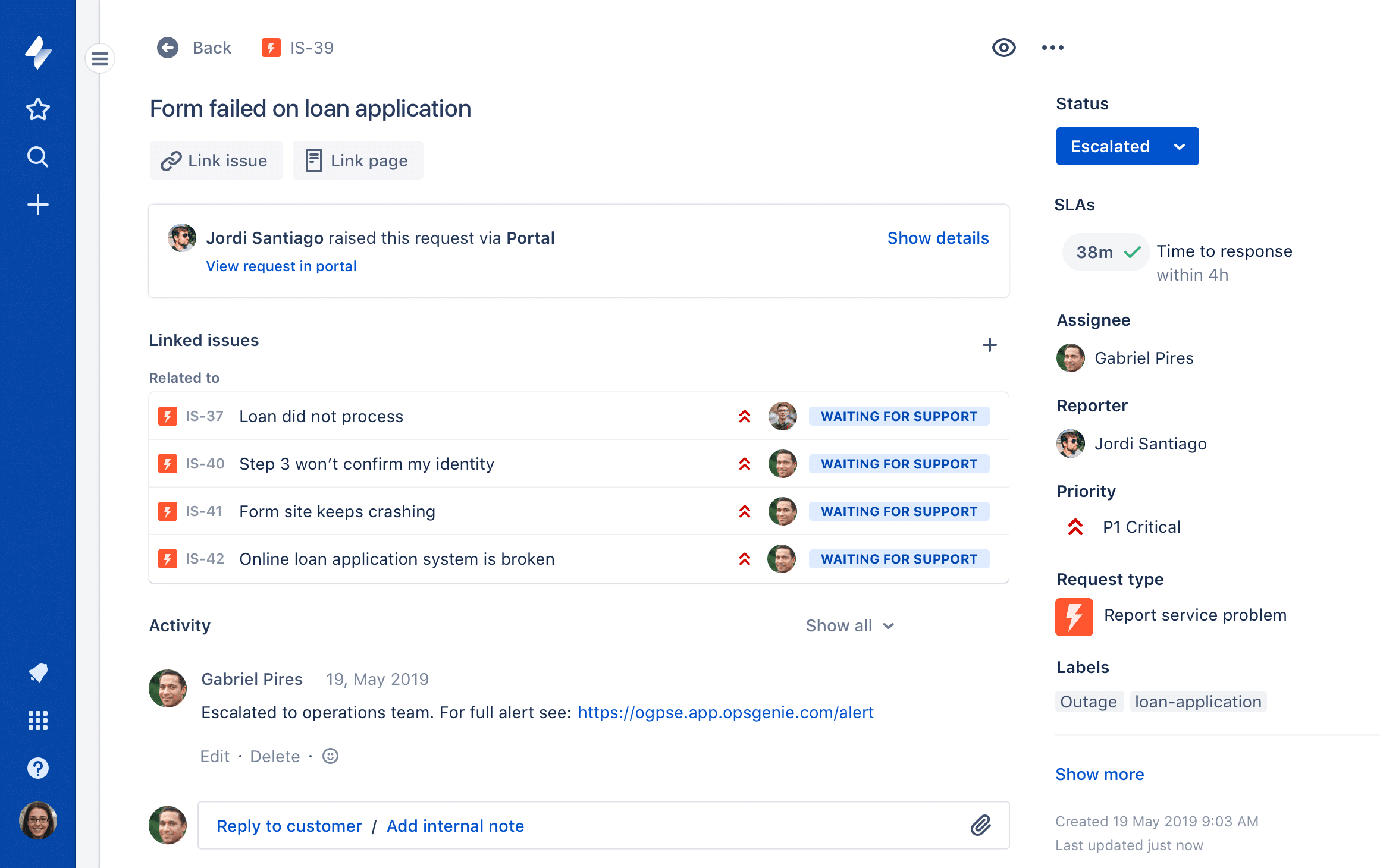
The Jira Service Desk is another excellent ITSM tool designed to simplify the service request management experience. Jira is the simplest tool on this list to set up, with barely any configuration efforts needed.
Main Features:
- Extremely simple to set up and use
- Has a machine learning-powered self-service portal
- PinkVERIFY certified
- Intuitive mobile application
- Reporting features to boost performance
- Extremely customizable
Why do we recommend it?
Jira Service Desk is recommended for its simplicity and ease of setup, making it an excellent choice for small and medium-sized businesses (SMBs). It offers a user-friendly interface, machine learning-powered self-service portal, and customizable features without overwhelming users with unnecessary complexity. Additionally, it integrates seamlessly with various Atlassian tools, making it a valuable choice for those already using Atlassian products.
With its clean interface, the Jira Service Desk is great for less technically inclined employees. It’s also heavily customizable, providing you with some quite advanced service request management features. However, you can easily set it up so that it meets your needs, integrating with a variety of third-party applications. If you’re using Atlassian tools like Statuspage or Opsgenie, or Confluence, you’ll find that the Jira Service Desk works with them perfectly.
There’s also a mobile app that makes collaboration easier and an alert system that lets you know if an issue occurs on the go.
Who is it recommended for?
Jira Service Desk is recommended for small and medium-sized businesses (SMBs) looking for a straightforward and user-friendly service request management tool. Its simplicity and ease of setup make it suitable for teams and organizations that don’t require overly complex features but still want effective service request management. You might find its features limiting in an enterprise setting unless you use other apps from the Atlassian Marketplace.
Pricing: Jira has two payment plans. The Small team plan costs $10/month for each agent and works for up to 3 agents, while the Growing team plan costs double that and works for up to 15 agents. There’s also a seven-day free trial available.
5. SolarWinds Web Help Desk
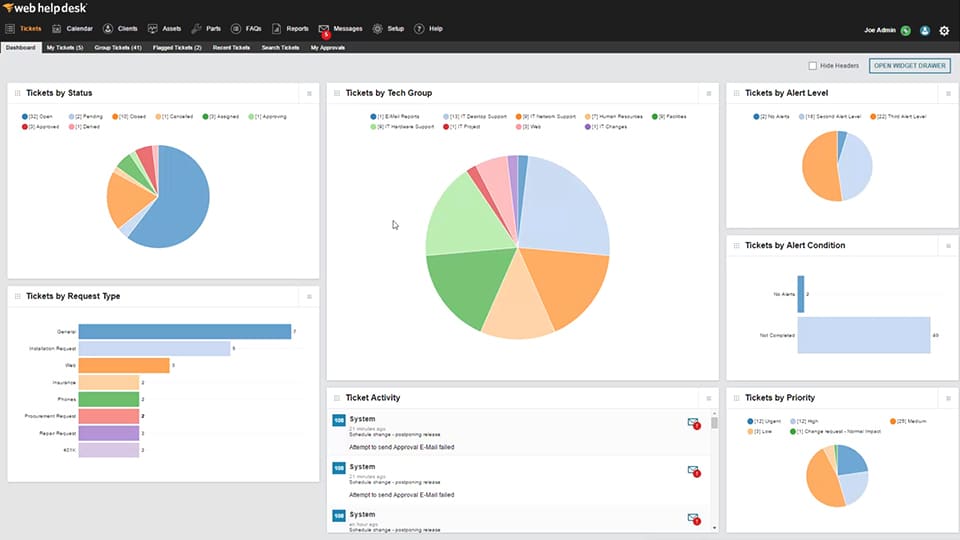
Made by the reputable SolarWinds company, the Web Help Desk is one of the most popular service request management tools on the market today. The tool is optimized to help IT service management teams diagnose incidents quickly and automatically route tickets. The tool is also easy to integrate with knowledge base articles and has a variety of other features at its disposal.
Main Features:
- Can automate request assignment and ticket updates
- Immediately integrates with LDAP and Active Directory
- Extremely customizable
- High scalability
- Rule-based approval and voting features
- Can track real-time helpdesk performance
- Modern-looking, responsive UI
Why do we recommend it?
We recommend SolarWinds Web Help Desk for its exceptional ability to automate request assignments, integrate with LDAP and Active Directory, and provide real-time tracking, ensuring efficient and customizable service request management for businesses. Its rule-based approval and voting features further enhance workflow optimization.
The Web Help Desk integrates with Active Directory, LDAP, and other parts of the SolarWinds suite effortlessly. This makes setting it up a seamless experience. As with most other software, the ability to get it up and running quickly and easily is paramount.
Web Help Desk is easily customizable, letting you set up dynamic request forms with unlimited fields. You can also commit to business-based action rules to automatically assign and update tickets. You can also track and automate your workflow using rule-based approval and voting. This helps you pick approvers and dynamically change advisory boards based on where the request comes from. Managers will also be able to track the real-time performance of helpdesks using its intuitive dashboard.
Who is it recommended for?
SolarWinds Web Help Desk is recommended for small to large businesses and enterprises seeking an efficient, customizable, and scalable solution for managing service requests, incidents, and helpdesk performance. It is particularly beneficial for IT service management teams aiming to streamline and automate their request management processes.
If it being on-premises software is an issue, you can use the SolarWinds Service Desk instead.
The SolarWinds Web Help Desk is available on a 14-day free trial.
6. SuperOps PSA
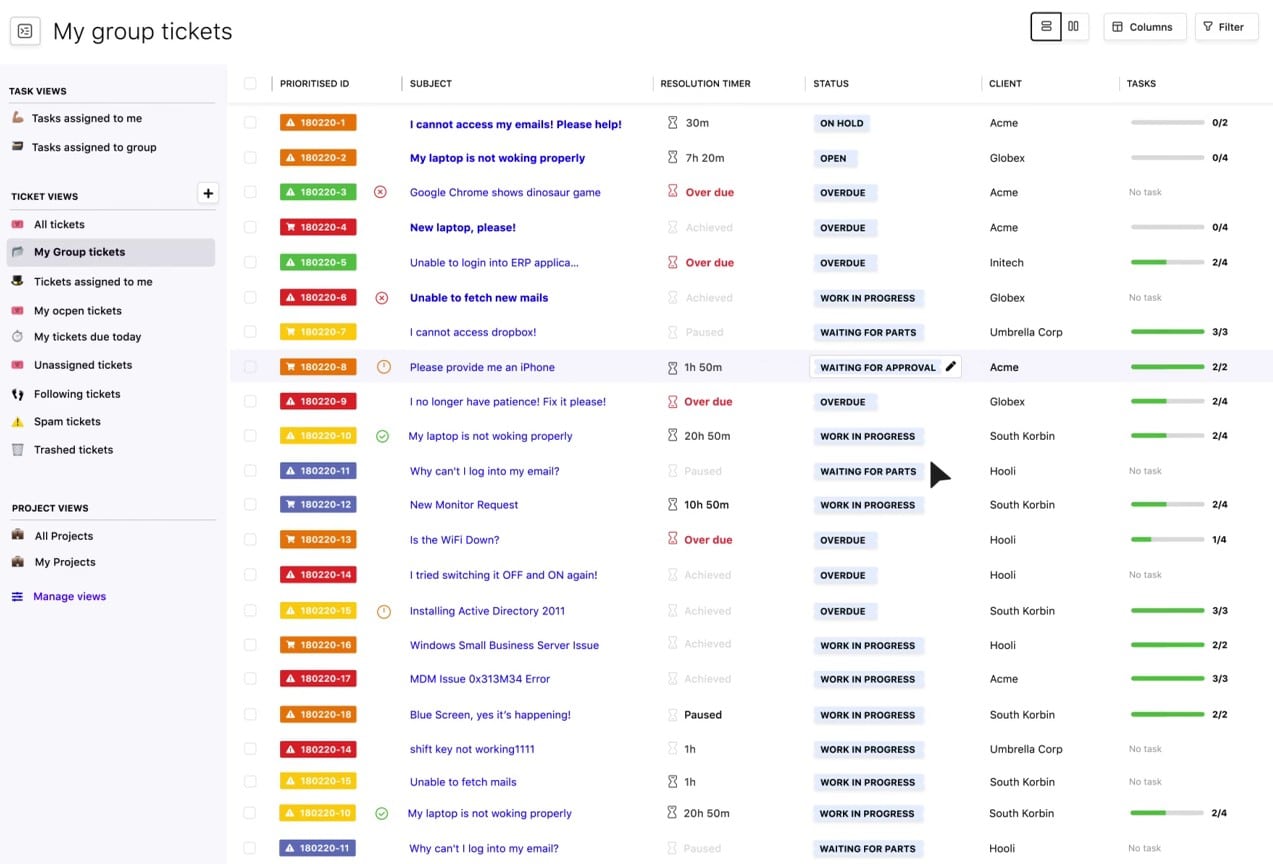
SuperOps PSA offers a package of management software systems for managed service providers. This includes a Service Desk framework that organizes the entire production of service request responses. This framework is implemented by a ticketing system.
Main Features:
- A self-service portal to facilitate service requests
- A user and technician communication channel\
- Automated ticket routing
- Task management and team management
- SLA compliance tracking
- Timesheet creation
- Automated billing
Why do we recommend it?
We recommend SuperOps PSA for managed service providers (MSPs) and businesses looking for comprehensive service request management.
It offers a user-friendly self-service portal, automated ticket routing, task and team management, SLA compliance tracking, timesheet creation, and automated billing.
A self-service portal enables users to raise a request. However, the SuperOps system can also process emails to generate a ticket. The team manager can set up automated ticket routing that enables a queue to be set up for a group of operatives so that the next available technician gets it. The technician console can manage several open tickets.
The request is shown in the technician console as a chat post. If the technician wants to communicate with the user, this is implemented as a chat reply. The SuperOps system repackages this message into an email. In this way, the technician never needs to know the user’s email address.
The PSA system records all of the time that each technician spent on the resolution of a problem. This can involve different charge rates and the Service Desk module is able to compile a final invoice line for the task. It will also automatically generate timesheets for each technician and keep track of SLA requirements.
The team manager console for the ticketing system provides oversight of all team members. The manager gets summaries of the activities of each technician and a countdown of each ticket. The team leader can also reroute tickets if a solution isn’t developing fast enough. It is possible to merge several tickets for the same problem or split tickets that include multiple issues.
Who is it recommended for?
SuperOps PSA is recommended for managed service providers (MSPs) and businesses that need a robust service request management solution with features like automated ticket routing, SLA compliance tracking, and timesheet creation. It is ideal for organizations aiming to streamline their service desk operations and enhance customer service.
Pricing: SuperOps offers four subscription plans, including a PSA-only plan and two options that include the PSA with remote monitoring and management tools. You can get a 14-day free trial of both packages.
7. Wrike
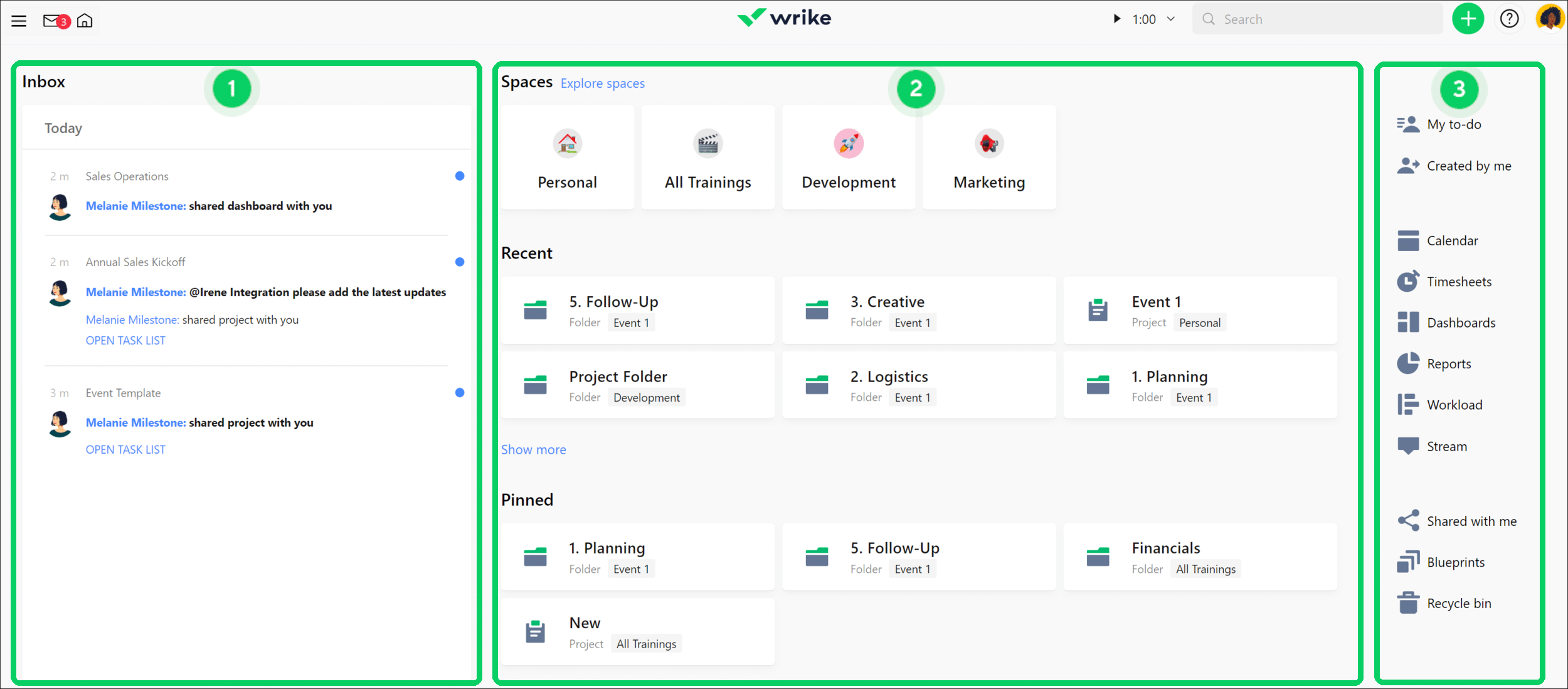
Wrike is a heavily customizable service request management tool optimized to help you manage multiple workflows at once. One of its biggest perks is that not only does the tool offer its Professional edition with a free trial, but you can get a taste of the tool with its free version as long as you don’t go over five users.
Main Features:
- Wrike supports over 400 different integrations
- Interactive Gantt chart features help you take a real-time look at your teams’ performance
- Customizable workflow templates
- Intuitive dashboard
Why do we recommend it?
We recommend Wrike for its high degree of customization and flexibility in managing multiple workflows.
With over 400 integrations and interactive Gantt chart features, Wrike allows users to tailor their request management processes to meet their specific needs.
The tool helps you maintain a constant rapport with teams and lets you take a detailed look at their performance. The tool provides a variety of IT service management templates; however, in case you feel like they aren’t cutting it for your applications, you can set up custom workflows to suit your needs.
The Dashboard lets you look at your team’s performance through multiple lenses to help you get a birds-eye view of the entire request management ecosystem.
Who is it recommended for?
Wrike is recommended for businesses of various sizes that require a highly customizable and flexible solution for managing multiple workflows and request management processes.
It is suitable for teams and organizations looking to tailor their project management and request handling to their specific needs and integrate with various other tools and services. With that being said, Wrike does lag a bit behind its competition in terms of the breadth of its features.
Pricing: It comes in four payment plans, a free plan for up to five users, a Professional plan which offers a free trial, a Business plan priced at $24.80/user/month, and the Enterprise plan for which you’d need to request a quote from the company.
8. HubSpot
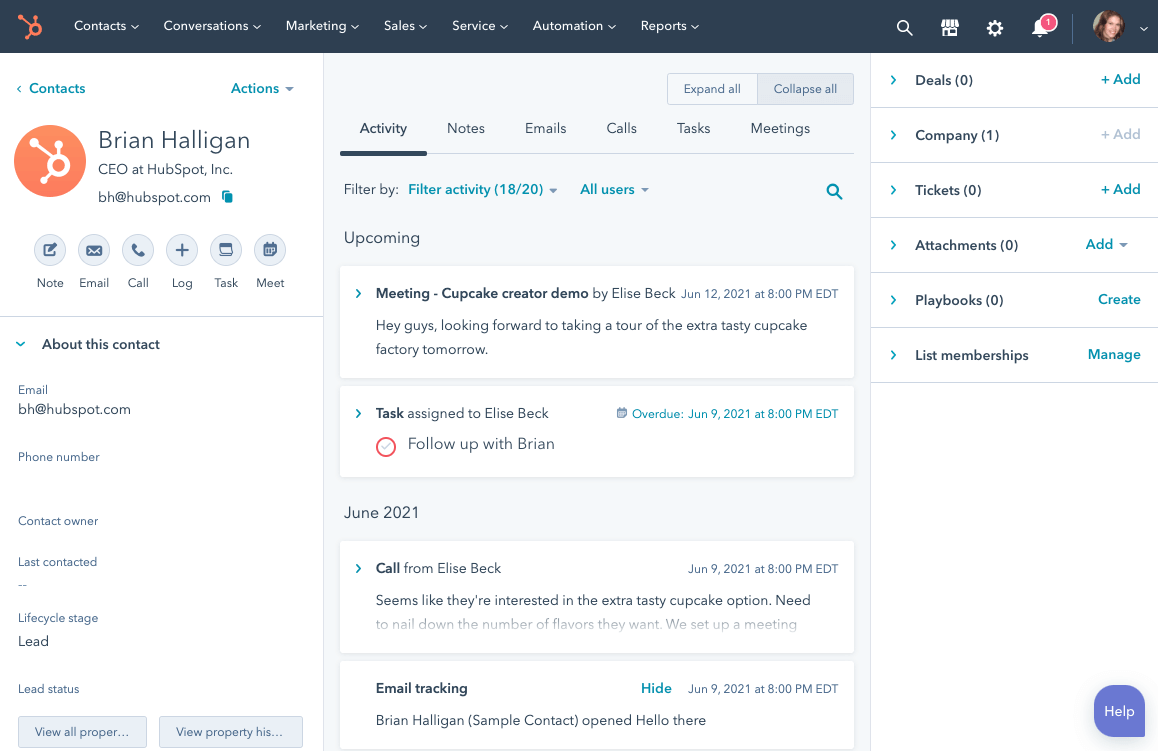
HubSpot is a versatile software made for conducting inbound marketing, request management, and assisting with sales. This customer-service-focused tool will provide you with a boost in request handling efficiency.
Main Features:
- The CRM is completely free
- Helpdesk-enabling features
- Knowledgebase creation
- Provides deeper insight into your request management process.
- Helps you automate some menial tasks
Why do we recommend it?
HubSpot is recommended for its comprehensive set of features, including knowledge base-building capabilities, helpdesk-enabling features, and deeper insights into the request management process.
It offers automation of repetitive tasks, multi-channel support, and a variety of communication features that streamline the request management process.
It has a variety of features, including knowledge base creation, live feedback, team email capabilities, and more.
Who is it recommended for?
HubSpot is recommended for businesses seeking a versatile software solution that can enhance inbound marketing, request management, and sales processes.
It’s suitable for organizations of various sizes, from small businesses to enterprises, looking to improve customer support, automate tasks, and manage their request management efficiently. Ideally, users should have some technical proficiency due to its complexity.
Pricing: You can get the HubSpot CRM for free, making it a great starting spot if you’re looking to try out the software. Its other editions, including the Service, Marketing, and Sales Hub, all start at $40/month. Its CMS starts at $240/month. You can get HubSpot’s premium versions on a 14-day free trial!
9. Freshservice
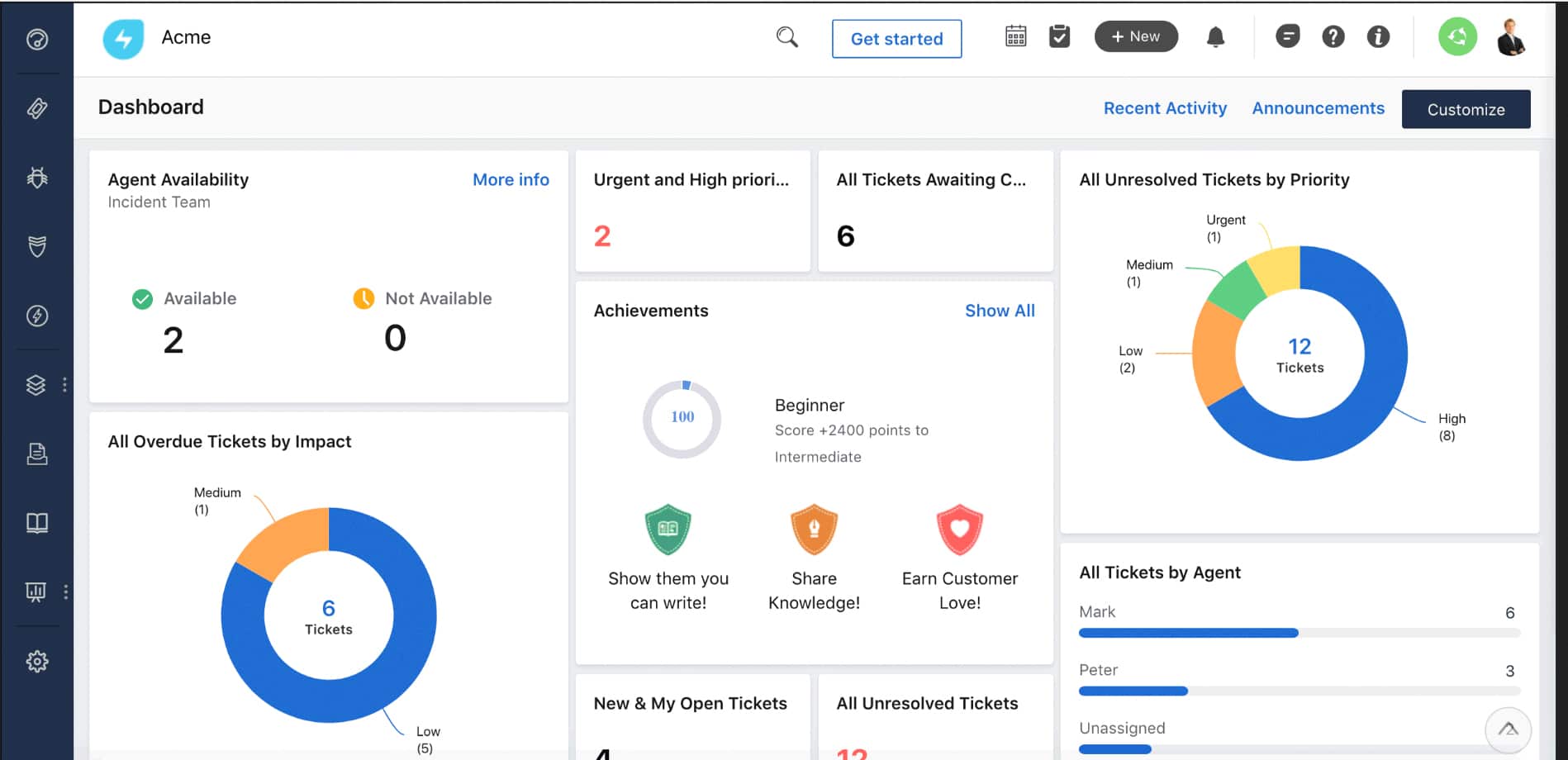
Freshservice is an IT service desk tool that shines with its ease of use and easy setup. This makes it great for less technical users and SMBs. It’s a very versatile tool, boasting a variety of incident management features, such as having more than one way to raise a ticket.
Main Features:
- A variety of incident management options
- Automated knowledgebase creation and management helps ease your employee’s workload
- Allows for SLA management by letting you set multiple SLA policies
- IP Whitelisting and log audits make this tool a great pick for enterprises as well
- Extremely simple to use and set up
Why do we recommend it?
Freshservice is recommended for its ease of use, quick setup, and versatile incident management capabilities. It offers multi-channel support, mobile access, an intuitive interface, and features like automated knowledgebase creation and self-service portals, making it an ideal solution for organizations looking to improve their request management and customer support processes.
It gives multi-channel support that helps with automating repetitive tasks, speeding up your entire request management process. It also lets you give support through email, phone, chat, or a variety of other outlets.
Another large perk of this software is that it has a mobile application, meaning you don’t have to be in the office to look at it. This, coupled with its excellent alert system, makes it a great tool for businesses that do a lot of their business off-premises.
The tool also improves communication between your teams, letting teammates talk to each other through a ticket. It also has a self-service portal, as well as automated knowledge base construction.
All in all, Freshservice, despite being a relatively new tool, shows a lot of promise. Once it receives a bit more polish, it might be able to contend with the top three entries on this list.
Who is it recommended for?
Freshservice is recommended for small to medium-sized businesses (SMBs) and enterprises seeking a user-friendly and versatile service desk tool. It’s suitable for organizations that want to streamline incident management, offer multi-channel support, and improve customer service processes.
Freshservice can be used by an SMB’s IT support team to efficiently handle and resolve user requests, whether they come through emails, phone calls, or chat, ensuring smooth operations and user satisfaction.
Pricing: Freshservice provides four different pricing models: Blossom- priced at $19/agent/month, Garden- priced at $49 per agent per month, Estate- priced at $79/agent/month, and Forest- priced at $99/agent/month. It also offers a fairly lengthy free trial, at 21 days total.
Conclusion
All of the tools on this list are high-quality request management software. Their placement mainly relies on how many peripheral or unique features they have, combined with how easy they are to use and how they look.
With that being said, as always, the ideal tool for you will always depend on your business. If you’re an enterprise looking for the best of the best, the SolarWinds Web Help Desk is there for you. If you’re a startup with a tight budget, HubSpot’s free version might be the tool for you. Because of this, you must put your businesses’ needs and expectations down, and then check which tool matches those the best.
We’ve still done our best to ensure that you can’t go wrong with our first couple of picks, so if you’re not quite sure what tool to go for, you won’t regret going for one of them.
What is your favorite request management software?
Is there a feature you wish appeared more often?
Let us know in the comments below!