

SIEM (Security Information and Event Management) functions by essentially analyzing resources across your IT infrastructure and then summing it up to unify it. After the data has been collected, it goes through a normalization step to make it processable during the next step. After it has been normalized, it analyzes it to discover any potential threats.
If any threats are discovered, you will be alerted respectively, allowing you to work on remediation steps to resolve the issue. The data will be categorized and presented to you in a comprehensive manner, do take note that the data gathered is very large as it spans your entire network, this is why being able to understand it in a comprehensive way is crucial to deal with data logs this massive.
Also, don’t confuse comprehensiveness with being simple, the data presented to you will still be quite detailed and extensive, allowing you to precisely figure out which bits and pieces need attention the most. These features make SIEM an excellent way to keep your data secure and achieve compliance with many regulations such as HIPAA, GDPR, PCI, et cetera.
So What Is SIEM Used for Exactly?
As we explained before, SIEM enhances your security in a multitude of ways. One of the more common ones is achieving compliance with regulations. For example, HIPAA requires your patients’ data to be protected both physically, and on the network. To achieve this, you need unique user IDs, data encryption, and decryption processes.
SIEM comes into play here by monitoring your compliance and making sure everything is staying up to code. If you set up adequate alerts for when you have a data and security breach, you can eliminate it quickly and efficiently to regain compliance. This is similar to other compliance methods.
You will need to set up the system to alert you accordingly when compliance is broken, allowing you to work on your system. Another thing to note is internal and external threats. External threats are the ones usually considered, as there are many malicious actors that would love to use ransomware to sell your data back to you, however, internal threats are far more common than you might think.
There are two ways your employees can hurt your business, incompetence, and genuine malice. Think of it this way, every single one of your employees has some kind of clearance and is privy to specific kinds of information. Some of these employees don’t have access to sensitive information, but the higher they are up the chain, the more information do they have to manage to help you run your business.
Then either as a mistake or an act of espionage, they can steal or edit the information which will end up damaging your business. When it comes to concerns such as these, having an intelligently placed monitoring system put in place, really helps offset the consequences of such problems. This way you can minimize the risks of anyone operating without bounds, and make sure your business always stays ahead.
Managing Your SIEM Tool
Taking everything we talked about into consideration, it is easy to recognize that SIEM is more of a last line of defense, rather than a proactive type of defense. For SIEM to be able to pick up an alert, it needs to have already happened, while exclusively proactive ways of security would be ideal, they are also impossible.
A system will always be flawed, and people will always be malicious and willing to exploit your infrastructure. In this regard, optimizing your response to such an event is paramount to mitigate as much damage as possible. This is where optimizing and managing your SIEM tool comes into place.
The best way to have a quick and efficient response is to understand how to set up your SIEM to have the most detailed and lightning-fast report possible, sent to the most qualified people to handle it. A system can be fast, but that is completely meaningless if it is inaccurate, or provides unrelated data which is just clutter, likewise, it is important that your IT specialists are alerted accordingly to their capabilities for a specific issue.
So how exactly do we do this? It is relatively simple, first, you need to figure out your primary risks. SIEM is very resource heavy, meaning that cutting wheat from the chaff is imperative when it comes to collecting data. You need to identify your key strategic points, and monitor them, this way you can ensure that your vital data is always monitored, even in periods of high stress on the infrastructure.
Once you have pinpointed your vital areas, how can you be sure of what exactly you need to monitor and get alerts for in the first place? We can use the regulatory compliance metrics for this. What does your network need to achieve for HIPAA compliance for example?
Categorize the specifics necessary to achieve compliance, and then customize the alerts for breaches within the said category. This way every time a HIPAA compliance breach occurs, you will be promptly alerted on how it happened in detail. This way of thinking can be extrapolated for other needs as well.
In other words, SIEM is as good as the contingency plan you come up with for a scenario where something might fail or get breached. In this regard, careful forethought and precise, elaborate construction will yield the best results.
Picking and Setting up Your SIEM
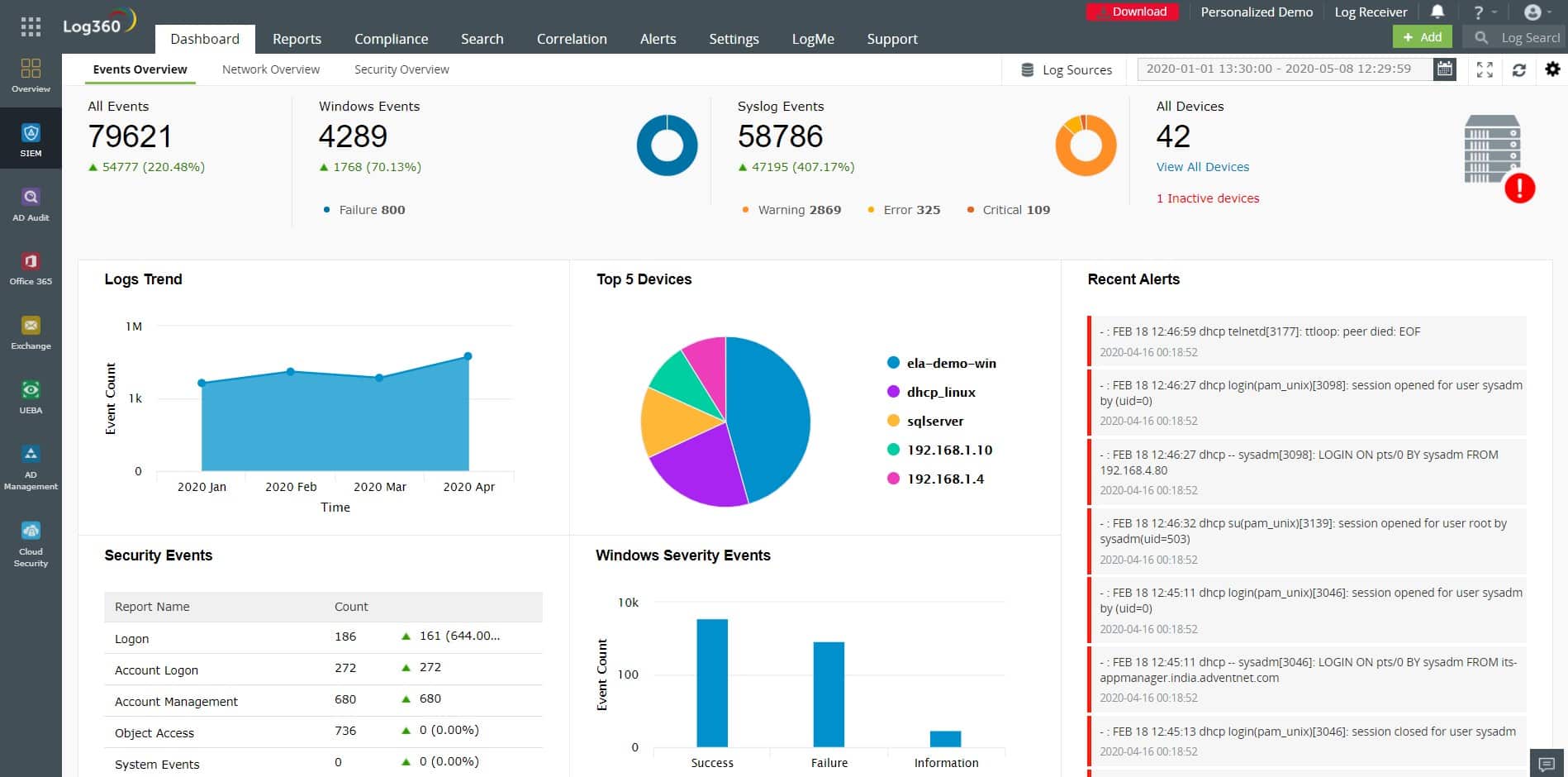
There is a wide variety of SIEM tools out on the market for you to take your pick from. One of the most comprehensive choices out there today is ManageEngine Log360. This tool provides a complete 360-degree view of your network. It keeps track of all the activities happening on your cloud and on-premises environments through a single console. It collects, analyzes, and correlates logs from more than 700 sources to detect sophisticated threats and decrease your risk exposure.
Its intuitive dashboards and real-time alerts also make it a good choice for organizations of all sizes. Start a 30-day free trial to view its benefits.
Another tool is SolarWinds Security Event Manager (SEM), it works out of the box, providing you with hundreds of different reports. These reports can be used to demonstrate compliance with a multitude of regulations, such as HIPAA, ISO, PCI DSS, SOX, FISMA, FERPA, NERC, and many more. This, however, isn’t where SEMs strengths lie.
The ways it analyzes and processes information are intelligent to optimize the precision of the data while minimizing the processing power and time expenditure to generate them. Furthermore, it is very simple and easy to use.
The UI is intuitive with out-of-the-box features that allow you to get started quickly and efficiently, while also providing plenty of room for customization and optimization to make sure that you get the coverage you need. Considering how much data SIEM tools tend to process, making sure it’s comprehensible is very important.
SEM does a great job at this by making sure that the hundreds of connectors it comes pre-built with, are easy to understand from a centralized location. This way your team can use the built-in filters, visualizations, and logs to easily find any potential threats. Apart from having real-time threat identification, it also offers integrated threat intelligence to identify potential malicious actors proactively.
SEM offers a 30-day free trial which comes with full functionality, as well as an interactive demo for you to explore features. It is also worth mentioning that the licensing price is based on log-emitting sources, rather than log volume. This way you can be sure that you won’t have to be selective about the logs which you want to monitor to keep your logs down.
Conclusion
SIEM tools aren’t very proactive in terms of security, but they fill a very valuable role. Without something that scans all of your data constantly, you wouldn’t really be aware of any breaches that occur until it is far too late. In this sense, having a tool that lets you respond as quickly as possible is imperative for a smooth running operation.
Taking these things into consideration, hopefully, you’ve gained further insight into how SIEM works and how to use it.