

With networking technologies getting better at a rapid pace, there’s a great need for tools that help businesses adjust to these swift improvements. As cloud computing, the Internet of Things and software-defined networking are increasingly shaping the corporate landscape, businesses are forced to interact with networks to a far greater degree than before.
Network Configuration Management Software and tools are the easiest way to deal with networking short of hiring teams of professionals.
Thankfully, the tools themselves are evolving just as quickly as network options are. With that being said, there’s a great deal of tools on the market today, and it can be difficult to choose the right one for your business.
This guide is dedicated to getting you up to speed with the essentials of network configuration, as well as showing you some easy ways to tell a good tool from a bad one. We’ll be reviewing paid and free tools alike.
Network Configuration Management
Network configuration is the defining of how a network works, how it flows, and what it’ll control when it’s first set up. This will involve the maintenance and arrangement of the components contained within the network.
From this we can conclude that network configuration management is simply the process that watches over how the network is set up and maintained, as well as the software and devices within it. Network configuration management also deals with discovering devices, maintaining inventory, and monitoring them to ensure that they are operating at their peak capacity.
The network configuration management database represents the center of this process. If anything goes awry, and you need to repair or change something within the network, the database is the first place you’ll want to check.
It contains all of the IP addresses and locations of every piece of hardware, as well as all of your data concerning your programs, their updates, and settings.
Factors To Consider
Automating your network management will exponentially increase the efficiency of your current systems by automating all of your repetitive tasks.
Furthermore, it’ll help you coordinate changes within the network and help it run at the best of its ability.
In this article we’ll be looking at the most important factors that go into minimizing errors and optimizing security.
An excellent network management tool will do the following:
- Setting up essentials for configuration
- Allow you to return your configuration to past settings
- Remember the history of your network changes
- Back up all of your configuration snapshots
- Distribute your updates all at once
- Make compliance audits
- Give an overview of your firmware patches
The Best Network Configuration Management Tools
In terms of automating your configuration management, there’s a variety of tools available to you. While some of these tools are paid, there are quite a few other tools that are both free and open-source.
Even among paid or free programs, it isn’t easy to make the call. Just because a tool needs to be paid for doesn’t mean that a free tool can’t provide the same functionality. In this article, we’ve assembled the top network configuration tools and put them all into one place.
Here you’ll find the cream of the crop out of both free and paid tools. We’ll look over a range of different budgets and help you pick a tool that fits your business needs. Keep in mind, however, that the free tools are mostly geared towards small businesses.
1. Auvik – FREE TRIAL

Auvik provides monitoring and management for networks from a cloud platform. The system installs a data collector on the local network and that unit scans the network in a number of ways, starting with a discovery process. The network management feature in the package is the Auvik network configuration service.
Key Features:
- Network discovery that generates an inventory and a network map
- Network device status monitoring with the Simple Network Management Protocol
- Traffic analysis with NetFlow, IPFIX, J-Flow, and sFlow
- Device configuration scans every 60 minutes
- Configuration backup
- Data viewer for device configurations
- Version history for stored configurations
- A difference comparison function to examine configuration versions
- Roll back to an earlier configuration
Auvik is able to monitor multiple sites with one account and there is a multi-tenantMSP edition available for managed service providers.
You can register for a quote and a 14-day free trial.
EDITOR'S CHOICE
Auvik is our top pick for a network configuration management tool because it is able to monitor multiple networks from its cloud location, providing a central IT support team with all of the facilities to monitor a network as well as secure device configurations. This system will preserve previous versions of a device’s settings, which allows a network administrator to examine a newer version and decide whether to erase recent changes. Rollback isn’t automatic, which gives technicians an opportunity to make a manual decision on whether to remove changes. The console includes a comparison function that highlights the difference between two versions. You also get network discovery, topology mapping, device status tracking, and traffic analysis with this platform.
Download: Access a Quote & FREE Trial
Official Site: https://www.auvik.com/features/#trial
OS: Cloud-based
2. Progress WhatsUp Gold – FREE TRIAL
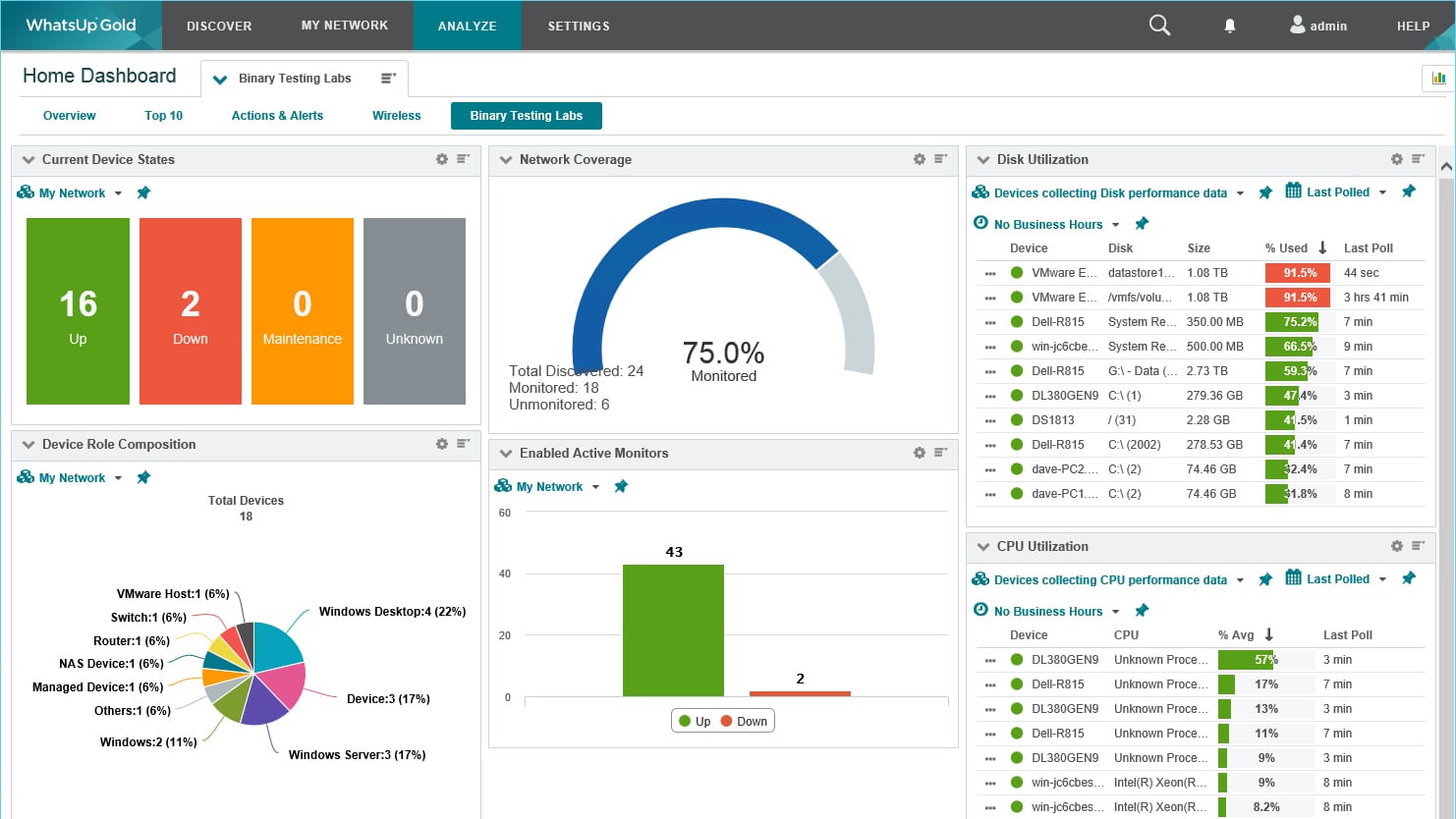
Progress WhatsUp Gold is a popular tool for managing network configurations. This tool automates the process of change management by setting up a device to send an SNMP trap when there’s a configuration change. On getting this trap, WhatsUp Gold sends an alert via email, Slack, or SMS to the registered contact details, so you can immediately respond to these changes. Moreover, WhatsUp Gold automates many routine tasks like backups.
Key Features:
- Automatically takes backups of configurations to prevent accidental or malicious changes.
- Checks device configurations against regulatory and policy requirements to identify deviations.
- Compares the versions side-by-side to better understand the discrepancies.
- Archives network configurations for further analysis.
- Sends instant alerts when changes occur.
Why do we recommend it?
WhatsUp Gold streamlines configuration and change management for devices. It uses simple SNMP traps to gather information and displays the updated configuration with the previous versions to quickly identify the discrepancies.
Also, it automates routine tasks like scheduling and taking backups, sending alerts, updating firmware, and more to reduce time and effort. It also checks with predefined compliance requirements to identify deviations and ensure that your configurations meet the requirements.
Who is it recommended for?
WhatsUp Gold can work well for organizations of all sizes, especially if there are multiple devices running on the networks. It improves the productivity of network engineers by allowing them to focus on high-value tasks, as automation can handle the routine tasks.
Overall, a comprehensive platform for managing all your configurations in a single place. Start a 30-day free trial.
3. ManageEngine Network Configuration Manager – FREE TRIAL
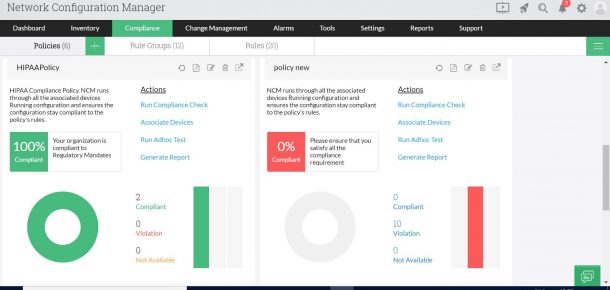
ManageEngine gives you a variety of tools used to monitor your IT services. These tools can be used together in order to bring you a cohesive and uniform management plus monitoring system. ManageEngine Network Configuration Manager can function with multi-vendor environments, and it can manage almost any configuration you can think of. One of its best features, however, is how insanely intuitive the user interface is.
Key Features
- The ManageEngine automates configuration backups of all devices on your network
- It will constantly sweep your devices in order to find any unauthorized changes that might’ve been made
- The tool will give you periodic reports about the variances between configs
- The ManageEngine gives you updatable backups for all your configs. This allows you to equip new devices with your standard settings
- You can apply configs to multiple devices at once
- The logging tool is excellent, recording all of the user’s changes to your settings
- Users get automatically banned off the network in case their accounts are hacked into
- There are different visualization methods that help you look at data in different ways
- You can poll all patches or updates
Why do we recommend it?
We recommend ManageEngine Network Configuration Manager based on its rich feature set, which includes real-time configuration management, automated backups, compliance reporting, and change tracking.
We often used it to schedule automatic backups of network device configurations, ensuring that we always had up-to-date copies in case of unforeseen issues or changes. This ensures that in case of a network failure or device misconfiguration, we could quickly restore the network to a working state, minimizing downtime and potential business disruptions.
Who is it recommended for?
It’s recommended for network administrators and IT professionals responsible for managing and maintaining complex network infrastructures. Whether you’re overseeing a small business network or a large enterprise setup, this tool can streamline configuration management and help ensure network reliability.
For instance, when you’re implementing a critical security policy change, this tool can help ensure consistent configuration updates on multiple devices simultaneously, reducing the risk of misconfigurations and improving network security and compliance.
If you’re just starting out and need a network configuration management tool, the ManageEngine is available free of charge for your first two devices. Access the 30-day free trial.
4. Site24x7 Network Configuration Management – FREE TRIAL
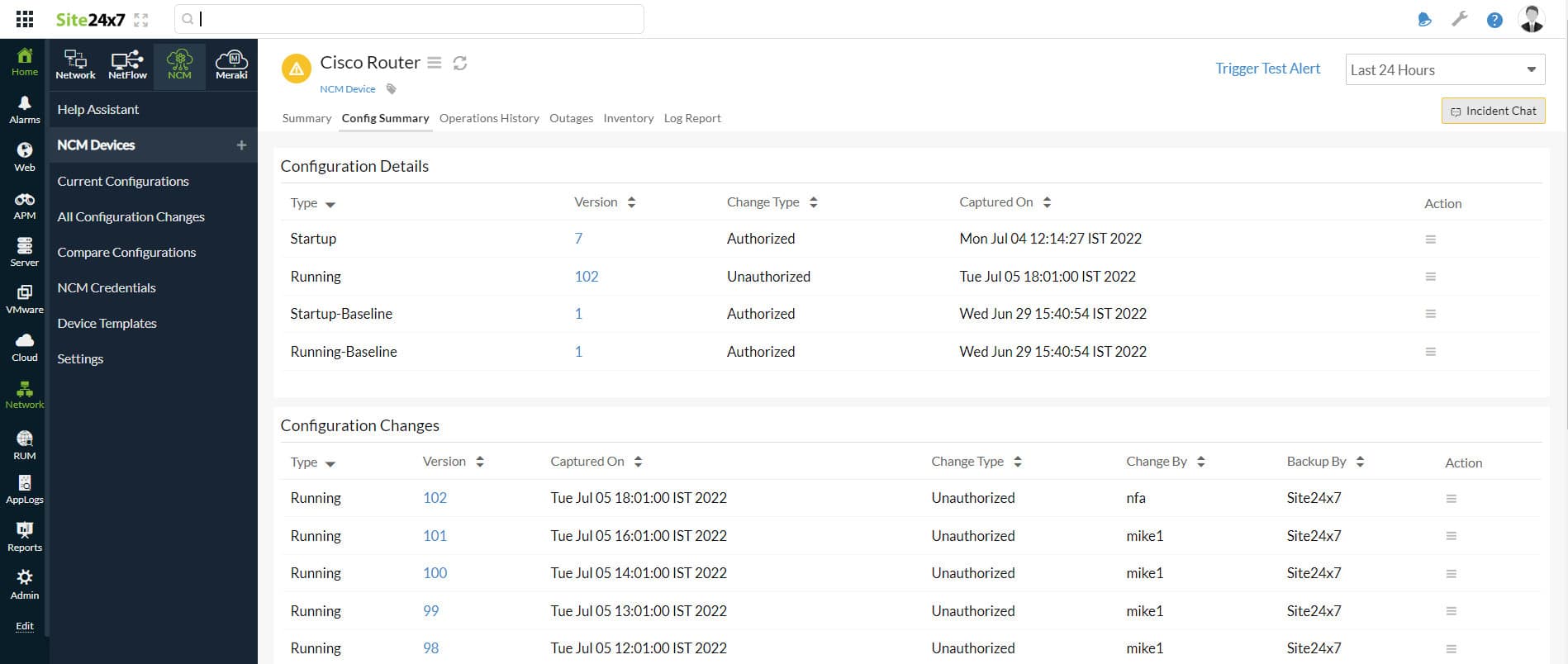
Site24x7 Network Configuration Management is one of the popular tools used by some of the top high-profile companies for smooth and secure network operations. It is a cloud-based solution that helps organizations find out inaccurate configurations in a network device in real-time and restore it to the approved version.
Key Features
- Detects firmware vulnerabilities
- Patch availability
- Intelligent Dashboard
- Automating and scheduling backups
- Configuration Restoration
Why do we recommend it?
Using the Site24x7 NCM tool, organizations can detect unauthorized changes and improper configurations faster and reduce disruptions. It even helps organizations restore the authorized changes back after any mishap with one click.
It even helps administrators track down unauthorized changes made to the settings and fix them. In addition to helping with network configuration and change management, the Site24x7 NCM solution guarantees compliance You can additionally view firmware vulnerabilities on that device as well as the full device landscape that is tracked by NCM.
Who is it recommended for?
Site24x7 is an all-in-one monitoring tool with a wide range of packages for networks, applications, and servers. Each edition has similar features and subscription plans that even small businesses can invest in. The only way each edition differs is based on its capacity, so if large businesses demand more capacity, it is best to pay extra cost.
Pros:
- Site24x7 provides in-depth insights and reports into the inventory, conflicts, and configuration changes
- Allows users to create automated backups for the configuration versions as soon as they detect any change
- Uses a single window to keep track of device changes, backups, and conflicts
- Supports PagerDuty, Slack, and other third-party tools to gain insightful alerts
Cons:
- NCM cost per extra device is not particularly listed
Site24x7 Network Configuration Manager is available on a 30-day free trial.
5. ManageEngine OpManager Nexus – FREE TRIAL

ManageEngine OpManager Nexus, formerly OpManager Plus, offers network configuration management services across the entire infrastructure for end-to-end visibility and context-aware automation. In particular, you can have better control and visibility into life-cycles across distributed network sites. With this tool, you can easily deploy, back up, roll back configurations, review changes, ensure compliance, identify firmware vulnerabilities, and automatically detect configuration changes.
Key Features
- Backs up configuration for any monitored network device. Also generates alerts for failed backups.
- Offers change notifications in real time via email, SNMP messages, Syslog messages, and desk tickets.
- Makes it easy to compare config versions with color-coded views.
- Uses a multi-layered logic-based engine for automated compliance auditing.
- Provides conditional logic and loops, so the configurations execute only when specific conditions are met.
Why do we recommend it?
OpManager Nexus is a good choice for managing network configurations. With this tool, you can quickly deploy, back up, and roll back configurations. It supports devices from 200+ vendors, making it ideal for most environments.
A few features that we love are network configuration analysis and user tracking, both of which can provide insights into the changes made to your configurations. Its remote firmware upgrade is also a big plus.
Additionally, it ensures compliance with leading standards like PCI, SOX, HIPAA, and more.

Who is it recommended for?
It is recommended for large enterprises and companies operating in regulated industries.
OpManager Nexus costs $1,233 for the professional edition and $19,995 for the enterprise edition. Both these prices are for a year. Start a 30-day free trial.
6. SolarWinds Network Configuration Manager

The SolarWinds Network Configuration Manager is best characterized by its versatility and analysis capabilities. This tool is often used in tandem with others like the Network Performance Monitor, providing intricate insights throughout a network. The degree of compatibility and the scope which this tool can cover makes it an excellent pick for both small and larger businesses. The tool is made to be a one-stop-shop of network management.
Key Features
- Automatic network configuration tasks, these will help you make chunks of your system work offline or during the night. You’ll also be able to change the settings in those situations.
- It helps you audit modules in order to show your security standard compliance
- It enables identifying and rolling back changes made without authorization.
- The tool gives you an indexed database of configs you can search through.
- You’ll get a constant stream of notifications based on the device’s lifecycle.
- You can control the tool through the dashboard, and it makes deciding which users have access to what much easie
- These are the main features of NCM, however, that isn’t to say that they don’t have much more than that to offer. The abundance of quality features and an excellent UI to boot is what gave NCM the number one spot on this list.
- The tool interacts with multiple brands as well as a variety of multi-vendor systems.

Why do we recommend it?
Having personally leveraged these features, we can vouch for the significant time and resource savings this tool can provide. It excels in automating configuration tasks, and features like configuration backups, change detection, compliance reporting, and network analysis have proven to be extremely accurate and beneficial.
Being compatible with other SolarWinds platforms is a great advantage over other tools, as this makes the NCM compatible with a variety of equipment that can help broaden your horizons.
Another benefit of this tool is how easy and fast it is to install. While it gets installed, it’ll completely scan your system in order to detect every device in your network, in addition to logging all of your configurations.
This can be quite handy if you face issues later on and want to restore the network to an earlier config. This tool also has great synergy with Cisco equipment. When you do an audit sweep, the NCM will check the Cisco National Vulnerability Database and point out any pitfalls you might’ve overlooked.
These security errors can be later fixed with an update, a patch, or by adjusting the device settings themselves. The other benefits of the Cisco integration are a greater insight into the Cisco Adaptive Security Appliances settings, in addition to management and audit utilities which help you access your control lists.
In addition to this, NCM can also serve to make large-scale configuration changes on a routine basis to devices of your choice. These changes aren’t affected by command syntax or the vendor.
Who is it recommended for?
It’s highly recommended for IT professionals and network administrators who oversee complex network infrastructures. It is an ideal solution for businesses of all sizes looking to automate and streamline configuration management. The tool’s standard configs will help you improve efficiency in terms of troubleshooting and audits.
SolarWinds Network Configuration Manager is invaluable for mid-sized financial institutions who use it to maintain consistent and secure configurations across their diverse range of network devices, ensuring compliance with industry regulations. It can help quickly identify and rectify configuration changes, reducing the risk of errors and network disruptions, which is crucial in the financial sector where data security and uptime are paramount.
When it comes to pricing, there’s a 30-day free trial, after which you will have to pay.
7. Device42 Configuration Management Database
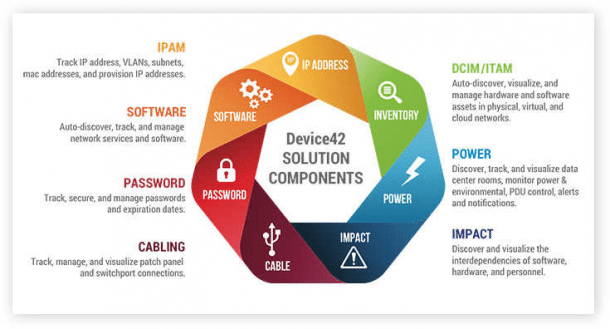
The Device42 network configuration manager is ideal for use within data centers. This tool has a variety of infrastructure management modules, in addition to supporting IP address management. It’ll also help manage your IT assets, as well as your data center infrastructure. Device42 can operate either on the cloud, or via an on-site installation. With this being said, keep in mind this tool isn’t as sophisticated as some of the other ones on this list.
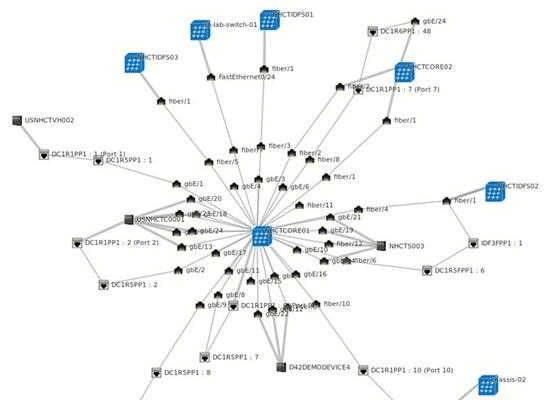
Key Features
- You can log inventory and equipment
- The tool can make backups of all your configs
- Device42 is great at continuously sweeping networks for unwanted content
- It can log all of your settings and firmware versions
- This tool is packed with auto-discovery features that ensure your configurations are up to date
- Decision-making visualizations this tool can produce are consistent and robust
Why do we recommend it?
We recommend Device42 Configuration Management Database because it provides a comprehensive and real-time view of an organization’s IT infrastructure. This visibility enabled us to make informed decisions, streamline operations, and optimize resource utilization. With Device42, managing our complex IT environment became more efficient and reliable, which led to us seeing improved overall performance and reduced operational costs.
Who is it recommended for?
This tool is well-suited for IT administrators, data center managers, and anyone responsible for maintaining an organized and optimized IT infrastructure.
Device42 Configuration Management Database proves its worth for medium-sized enterprises by offering a centralized platform to efficiently track and manage hardware and software assets. This simplifies inventory management, reduces redundancy, and enables better decision-making when administrators are planning for infrastructure upgrades and expansions.
There are three subscription plans for this tool. The cheapest out of these won’t allow you to manage configurations, so be careful when selecting yours.
8. ConfiBack
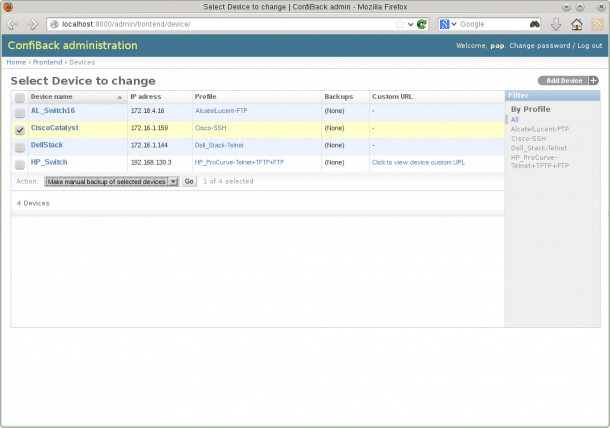
ConfiBack, which is an abbreviation of Configuration Backup. Despite being a completely free network configuration management tool, it doesn’t lag too far behind its paid competitors in the most important areas.
Key Features
- ConfiBack can schedule your routine backups
- The tool can save its results into a text file
- It’s open-source, making it easy to modify to suit your needs
Why do we recommend it?
ConfiBack earns our recommendation because it has once again backed its claims about providing an extremely user-friendly interface, allowing us to use its advanced features in a hassle-free manner, making our configuration backup and management simple.
Who is it recommended for?
ConfiBack is an ideal solution for IT professionals and organizations seeking a user-friendly and efficient tool for configuration backup and management, regardless of their size or industry. ConfiBack is particularly useful for companies who want to simplify and streamline the backup and management of critical network configurations, ensuring data integrity.
This free tool can be installed on all three of today’s most popular operating systems(Mac, Linux, and Windows). While it isn’t exactly ideal to be used for a business, it can still get the job done if your standards of security aren’t too high, or your requirements are low. Alternatively, you could program anything you need into ConfiBack by using its open-source nature.
9. TrueSight Automation for Networks
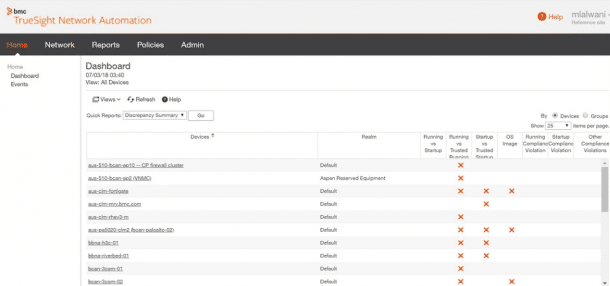
Made by BMC Software, TrueSight Automation for Networks(known as BladeLogic Network Automation before) is a hyper-functional network configuration management tool. It isn’t the most dynamic tool, however, if you know how to use it, its efficiency is almost unparalleled. In terms of pre-written policy, it is certified to be compliant with a variety of different system integrity requirements.
Key Features
- Automating your system scans, as well as logging all devices that get on your network, compliance checking, and synchronizing settings
- The tool will create config backups, and continuously scan it looking for errors
- There is an option for manual restoration as well as automatic
- The tool coordinates with the NIST National Vulnerability Database in order to ensure its programming covers all of the common weak spots.
Why do we recommend it?
TrueSight Automation for Networks stands out on our list due to its ability to automate complex network tasks with ease. After putting it to the test, we found that it greatly streamlines network management, saving valuable time and reducing the risk of human errors. If you’re looking to simplify and optimize your network operations, this tool is a game-changer.
Who is it recommended for?
IT professionals in small to large enterprises can benefit from this tool to improve network performance and reliability.
TrueSight Automation for Networks proved invaluable in streamlining the process of provisioning new network devices. By automating the configuration and deployment of switches and routers, we were able to significantly reduce the time required for onboarding new equipment, resulting in cost savings and faster network expansion.
Unfortunately, despite being compatible with Red Hat Enterprise Linux, Windows Server, and Ubuntu, this is a paid-only product, so make sure you know what you’re getting into before buying it, there is no free trial.
10. rConfig
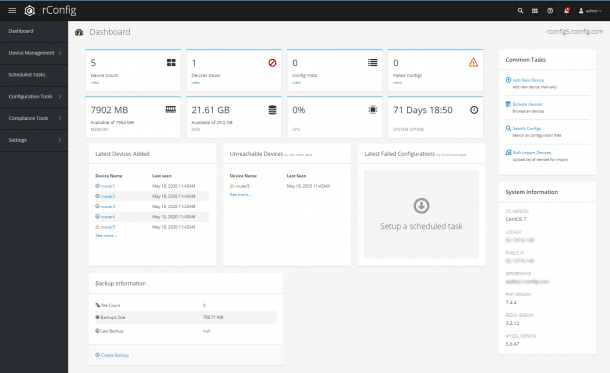
rConfig is one of the better free network configuration management tools out there. One of its main features is that it’s compatible with quite a few operating systems, most notably CentOS and Red Had Enterprise Linux
Key Features
- The rConfig tool can detect as well as copy all of your configs from your devices into their own files.
- It can schedule the configuration of your devices
- You can make adjustments and take actions off of any device within the network
- You can set policies using this tool, it also has an in-built compliance manager which will show you if all of the configs comply with the policies.
Why do we recommend it?
Our recommendation for rConfig stems from its open-source nature and robust feature set. As we’ve explored its capabilities, we can attest to its effectiveness in simplifying network configuration management.
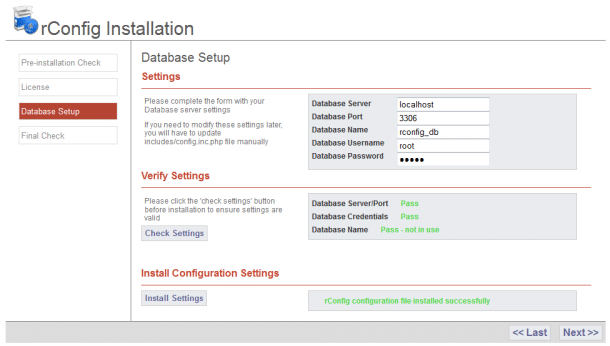
rConfig’s best benefit is that it’s entirely open source and open to the public. This means you can check and modify the code within it as you wish.
Who is it recommended for?
rConfig is an ideal solution for IT professionals and network administrators working in medium to large organizations. Its capabilities for network configuration management and real-time change detection make it a valuable tool for maintaining the security and reliability of complex network infrastructures.
One notable feature that greatly enhances our network management is rConfig’s real-time change detection. This functionality has enabled us to promptly identify and respond to any unauthorized or unexpected network configuration alterations, ensuring the security and integrity of our network infrastructure.
11. Net LineDancer
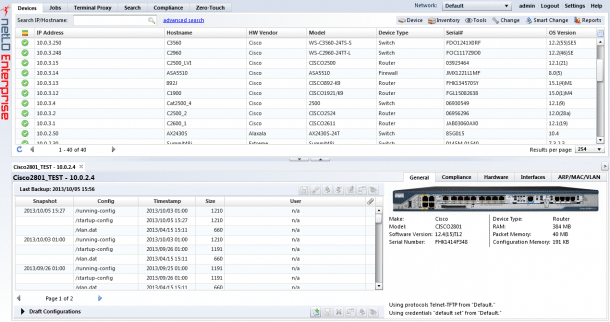
The Net LineDancer, also known as NetLD is a tool that, while not good for much past the basics, does the basics of configuration management really well.
Key Features
- The Net LineDancer automatically logs all of your devices in addition to taking config snapshots.
- It sweeps your configs in order to check for any unauthorized alterations
- You can compare configs whenever you’d like
- If you’ve got configs in store, you can reload them multiple devices at a time
Why do we recommend it?
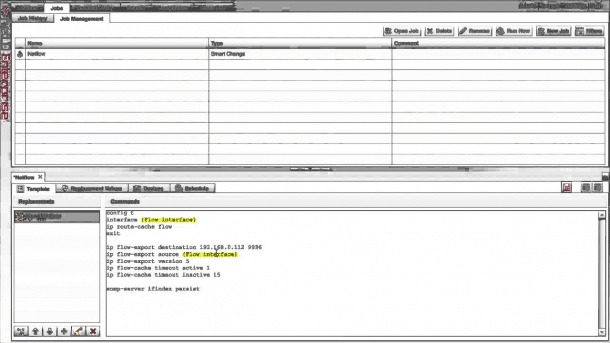
Net LineDancer earns our recommendation due to its comprehensive network configuration management capabilities. Having tested its features, we found that it truly excels in automating configuration tasks and provides simple insight into network changes.
Who is it recommended for?
Net LineDancer is highly recommended for network administrators, IT teams, and organizations seeking a robust solution to streamline network configuration management.
By continuously monitoring and automatically remediating configuration discrepancies, organizations can ensure that network devices adhere to established security policies and regulatory requirements. This is particularly valuable for industries with strict compliance standards, such as healthcare or finance, where data security and integrity are paramount.
Net LineDancer does have one crucial flaw, however, and it lies in its UI. Its dashboard and interface are quite cluttered, and there isn’t much you can do about it.
12. WeConfig
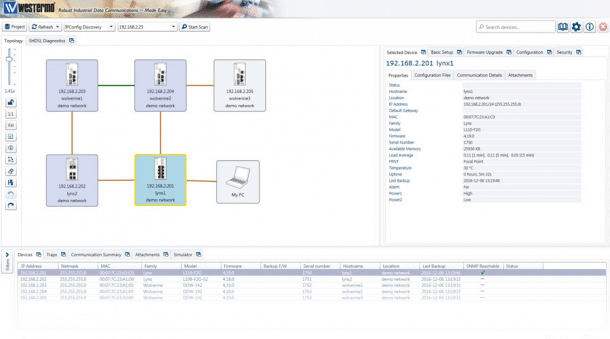
WeConfig is an excellent alternative to paid config managers made by Westermo. Its biggest downside is within its name- it’s designed only for Westermo-running devices. Fortunately, due to it running based on the SNMP system, it can be used with other manufacturers as well. Most importantly, the tool supports Windows.
Key Features
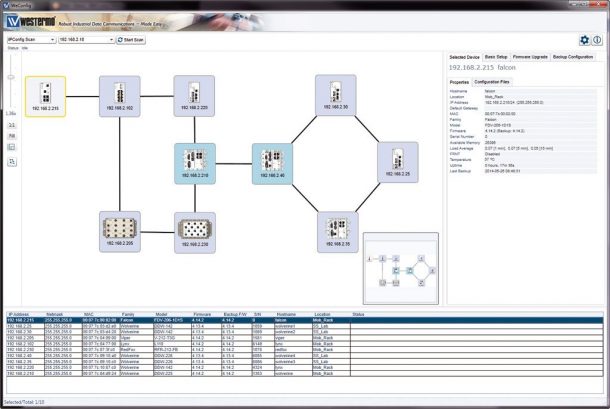
- WeConfig can compile all of your logs and network maps in order to store it in the WeConfig database
- The maps that the tool compiles can be organized however you want
- The map layout is lockable, which helps with keeping them in a fixed order and visualizing them
- If you want to take a look at graphs about your network equipment operation, the Analysis tab lets you do that
- Its configurations can be manually removed or altered through the config manager
Why do we recommend it?
We’ve tested out WeConfig’s intuitive interface and automation capabilities, making sure it lives up to its claims. We had a complex VLAN reconfiguration project that usually took us hours to complete manually. With WeConfig’s smart automation and batch processing capabilities, we were able to complete the same task in a fraction of the time.
Who is it recommended for?
WeConfig is recommended for IT professionals and organizations managing extensive network infrastructures.
Apart from enterprises, it can also be used in educational institutions with multiple campuses. With WeConfig, administrators can efficiently configure and manage network settings across different locations, ensuring a seamless and secure network experience for students and staff.
While WeConfig makes most basic tasks a breeze, it does lack some functionalities of its paid counterparts. For example, it doesn’t provide alerts, and it doesn’t come with the ability to provide user authentication.
13. RANCID
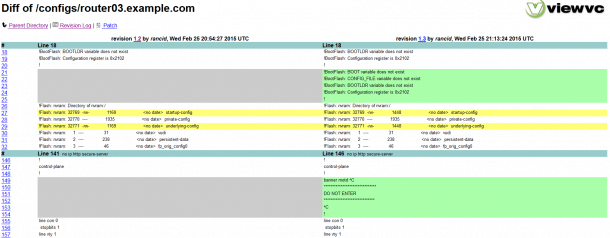
RANCID probably has the funniest developers out of all config management tools. Its name means “Really Awesome New Cisco Config Differ”. Now, if that doesn’t tell you enough about it, it is a free tool that has been in adjective development for many years. Now, while it doesn’t utilize online interfaces, and it doesn’t feature a GUI, there’s a variety of guides to help you learn your way around it.
Key Features
- All of your configs are archived, ready to be retrieved in the future
- Your data will be contained within a version control system
- The tool can keep track of version changes within the OS
- You can filter your configurations using traditional commands such as sed or grep
- RANCID lets you parallelize configs in large operations
Why do we recommend it?
We tried RANCID, and it made a real difference in our network management. One specific instance where it came to the rescue was when we had a critical situation where the configuration of a core router went haywire, causing a service disruption. RANCID’s change tracking feature allowed us to pinpoint the exact configuration changes made, saving us hours of manual investigation.
The tool is extremely versatile, including an audit, backup, and blame allocation tool all in one. This means that, essentially, regardless of your vendors, you will be able to keep up with config changes. Even though this tool is free, you shouldn’t take it lightly.
Who is it recommended for?
Businesses of all sizes, educational institutions, government agencies, and service providers can benefit from RANCID’s features.
For example, government agencies often deal with sensitive data and require robust network security. RANCID can help monitor configuration changes on firewalls and routers. If an unauthorized change is detected, it triggers alerts, ensuring the security of government networks.
14. CBackup
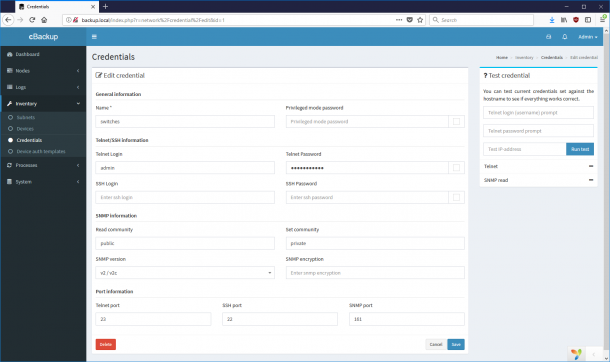
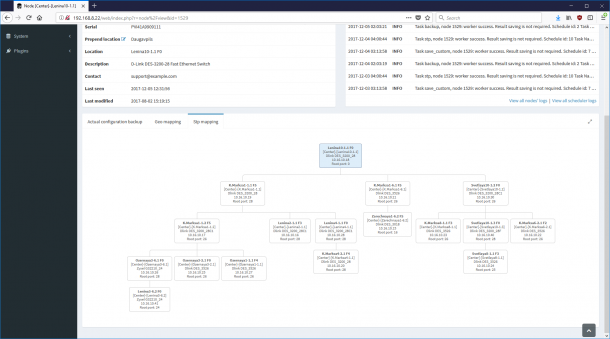
CBackup is the final tool we’ll be looking at. It’s both free and open-source, and is used in order to back up your network configs. It supports a variety of different platforms, and it gets routine updates from its vibrant community. If a device isn’t supported, there’s a good chance it will be in the next patch brought by its content delivery system. With that being said, no amount of good design will ever replace the capabilities of a high-budget tool in a business setting.
Key Features
- The tool allows you to track changes using Git. Git allows you to use either diff or plain-text config history
- You can make discovery and/or backup policies at will
- The tool provides hardware support you can customize
- If someone makes something great using the tool, it’s often shared with the community
Why do we recommend it?
We recommend CBackup due to its user-friendly interface and efficient backup solutions. Having tested its features, we can attest to its reliability in safeguarding critical data and providing seamless backup and recovery processes. Whether for personal use or business needs, CBackup simplifies data protection and management.
Who is it recommended for?
CBackup is recommended for individuals, businesses, and organizations of all sizes who seek reliable data backup and recovery solutions. Its versatility and ease of use make it suitable for a wide range of users, from personal users looking to safeguard their files to businesses and institutions with critical data protection needs.
How Do I Implement A Network Management Tool?
When it comes to securing your network, you’ll need to ensure you’re managing all of your devices’ settings properly. Using a network configuration management tool can help with updating your firmware and software whenever there’s a new patch.
This article provides a guide of the best network management tools, and it includes both free and paid options. The answer as to what the best one is isn’t linear, as it depends on the size of your operation, your OS, and your budget.
With that being said, do keep in mind that free tools are generally built for small networks and non-businesses. Now, if you’re in the market for a comprehensive, paid tool for all your network configuration needs, then you won’t go far wrong with Auvik, ManageEngine, or Site24x7.
Out of the free tools, ConfiBack takes the cake, mostly due to its massive list of different functions. Device42 would be our second pick, and you should especially consider it in case you are operating a data center with low-level requirements.